Evaluation(评估)
:::callout{theme="warning"} Object Monitors are superseded by Automate. Automate is a fully backward-compatible product that offers a single entry point for all business automation in the platform. :::
Object monitors are evaluated and Action effects are executed individually by subscriber. This ensures that data access permissions and Action validations that rely on user attributes are respected while allowing users to configure object monitors for their individual workflows.
Realtime evaluation
Some input and condition combinations support realtime evaluation. Object monitors that support it will be continuously evaluated. Notifications or Actions are usually executed within a few minutes of detected changes. If a large number of changes are synced from a pipeline build, the evaluation of monitors using those objects as inputs and its subsequent Actions or notifications may take a longer time to execute.
To support realtime evaluation, all of the following must be true:
- The input object type has been migrated to Object Storage V2 in the Ontology configuration.
- The input object type has less than 10 million object instances. If a condition is being evaluated in realtime and the object type grows beyond this limit due to new objects being added, the monitor will fail to evaluate.
- The input object set definition uses only exact-match filters on strings, ranges of numbers, or boolean properties.
- The input object set definition does not contain linked object properties or array properties.
- The rule uses an event condition for objects added or removed from input.
Scheduling monitors
:::callout{theme="neutral"} Realtime evaluation only applies to changes coming from a pipeline build. Changes made through Actions may take up to seven hours before they are detected by Object Monitors. To shorten this time, include a notification rule to any Action that must trigger an immediate notification. :::
While realtime evaluation does not currently support scheduling monitors, it is possible to configure a function-backed Action to run when the object monitor detects an event between certain hours, using TypeScript to detect the current time/day. This code snippet shows an example:
@Edits(ObjectType)
@OntologyEditFunction()
public someEditFunction(): void {
    const currentTime = Timestamp.now()
    const currentHour = currentTimestamp.getHours();
    if (currentHour >= 0 && currentHour < 12) {
      // Perform edits
    }
}
Non-realtime evaluation
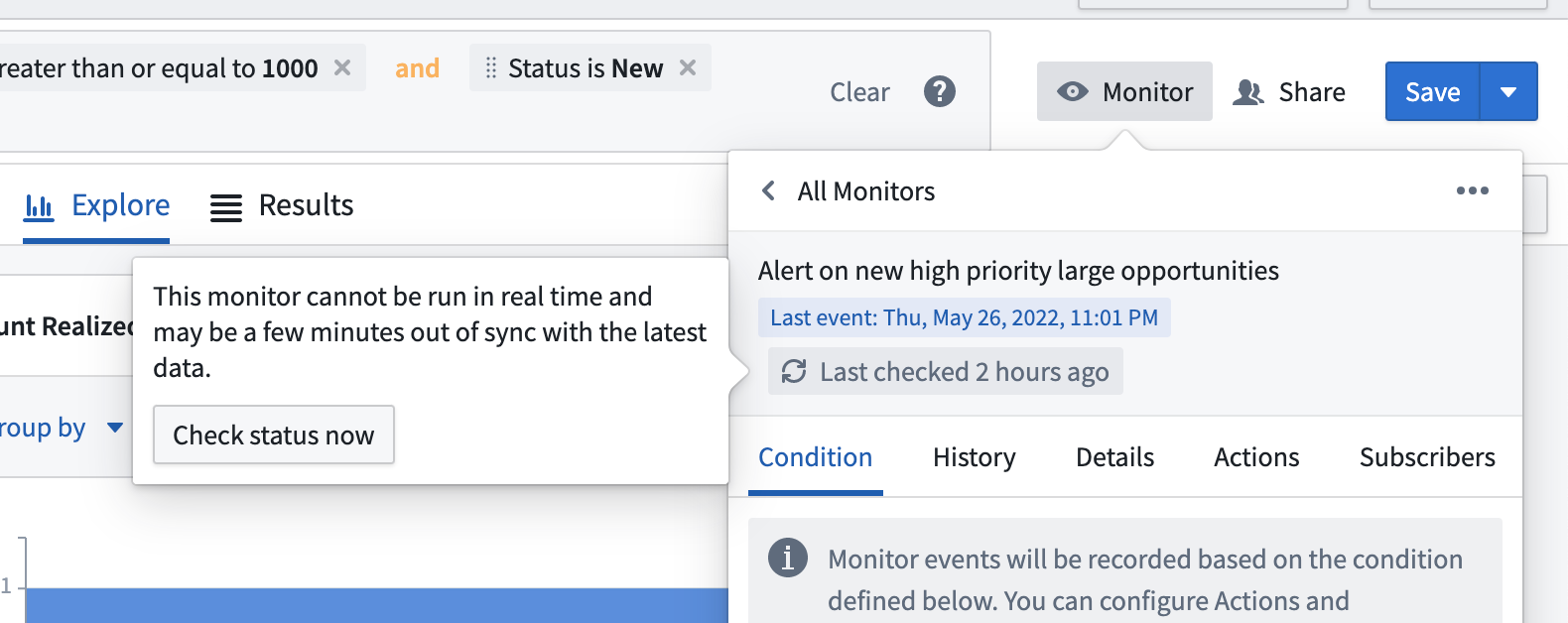
Object monitors that cannot be evaluated in realtime are evaluated using a polling mechanism. Monitors are guaranteed to evaluate within 24 hours of the previous evaluation. To distribute the load of evaluating for large numbers of monitors, the specific time when a polling-based evaluation occurs cannot be explicitly scheduled. The last-evaluated time for polling-based monitors is stored and displayed in the in the monitor overview panel of the Object Monitors application interface.
Manual evaluation
Non-realtime object monitors may also be evaluated manually from the Object Explorer interface. This option is primarily intended for testing when setting up non-realtime monitors.
中文翻译
评估
:::callout{theme="warning"} 对象监控器(Object Monitors)已被 Automate 取代。Automate 是一款完全向后兼容的产品,为平台中所有业务自动化提供单一入口。 :::
对象监控器的评估和操作效果(Action effects)会按订阅者(subscriber)单独执行。这确保了依赖用户属性的数据访问权限和操作验证(Action validations)得到遵守,同时允许用户为其个人工作流配置对象监控器。
实时评估(Realtime evaluation)
某些输入和条件组合支持实时评估。支持实时评估的对象监控器将持续进行评估。通知或操作(Actions)通常在检测到变更后的几分钟内执行。如果管道构建(pipeline build)同步了大量变更,使用这些对象作为输入的监控器评估及其后续操作或通知可能需要更长时间才能执行。
要支持实时评估,必须满足以下所有条件:
- 输入对象类型(input object type)已在本体配置(Ontology configuration)中迁移至 对象存储 V2。
- 输入对象类型的对象实例少于 1000 万个。如果条件正在实时评估,且由于新增对象导致对象类型超出此限制,监控器将评估失败。
- 输入对象集定义(input object set definition)仅使用字符串的精确匹配过滤器、数字范围或布尔属性。
- 输入对象集定义不包含链接对象属性(linked object properties)或数组属性(array properties)。
- 规则使用针对输入中新增或移除对象的 事件条件。
调度监控器(Scheduling monitors)
:::callout{theme="neutral"} 实时评估仅适用于来自管道构建的变更。通过操作(Actions)所做的变更可能需要最多七小时才能被对象监控器检测到。要缩短此时间,请为任何必须触发即时通知的操作添加 通知规则。 :::
虽然实时评估目前不支持调度监控器,但可以配置一个由函数支持的操作(function-backed Action),在对象监控器检测到特定时间范围内的事件时运行,并使用 TypeScript 检测当前时间/日期。以下代码片段展示了示例:
@Edits(ObjectType)
@OntologyEditFunction()
public someEditFunction(): void {
    const currentTime = Timestamp.now()
    const currentHour = currentTimestamp.getHours();
    if (currentHour >= 0 && currentHour < 12) {
      // 执行编辑操作
    }
}
非实时评估(Non-realtime evaluation)
无法实时评估的对象监控器将使用轮询机制(polling mechanism)进行评估。监控器保证在上次评估后的 24 小时内完成评估。为了分散大量监控器的评估负载,基于轮询的评估的具体时间无法显式调度。基于轮询的监控器的上次评估时间会存储并显示在对象监控器应用程序界面的监控器概览面板中。
手动评估(Manual evaluation)
非实时对象监控器也可以从对象资源管理器(Object Explorer)界面手动评估。此选项主要用于设置非实时监控器时的测试。