Monitor(监控器(Monitor))
:::callout{theme="warning"} Object Monitors are superseded by Automate. Automate is a fully backward-compatible product that offers a single entry point for all business automation in the platform. :::
A monitor is a resource that defines a condition on one or more inputs and any resulting Actions or notifications that should be triggered when the input condition is met.
Storage
Object monitors are saved in the Foundry Project hierarchy and are supported by standard resource operations such as save, share, move, delete, and role-based access.
Learn about the Foundry filesystem.
Object monitors are identified by a unique resource identifier in the format:
ri.object-sentinel.main.monitor.0cabb748-cf89-4404-be3c-c8f198cb2a0b
Retention
Historical activity for object monitors is retained for six months and permanently deleted after that time. If historical activity must be stored beyond this date, you can use Actions to store data in a long-lived object that is managed and controlled like any other user-created object in the Foundry Ontology.
When data is deleted, it is also removed from the monitor activity History tab in the Object Monitor application. You can find the History tab by first clicking on a monitor to expand the overview panel, then clicking History.
Expiration
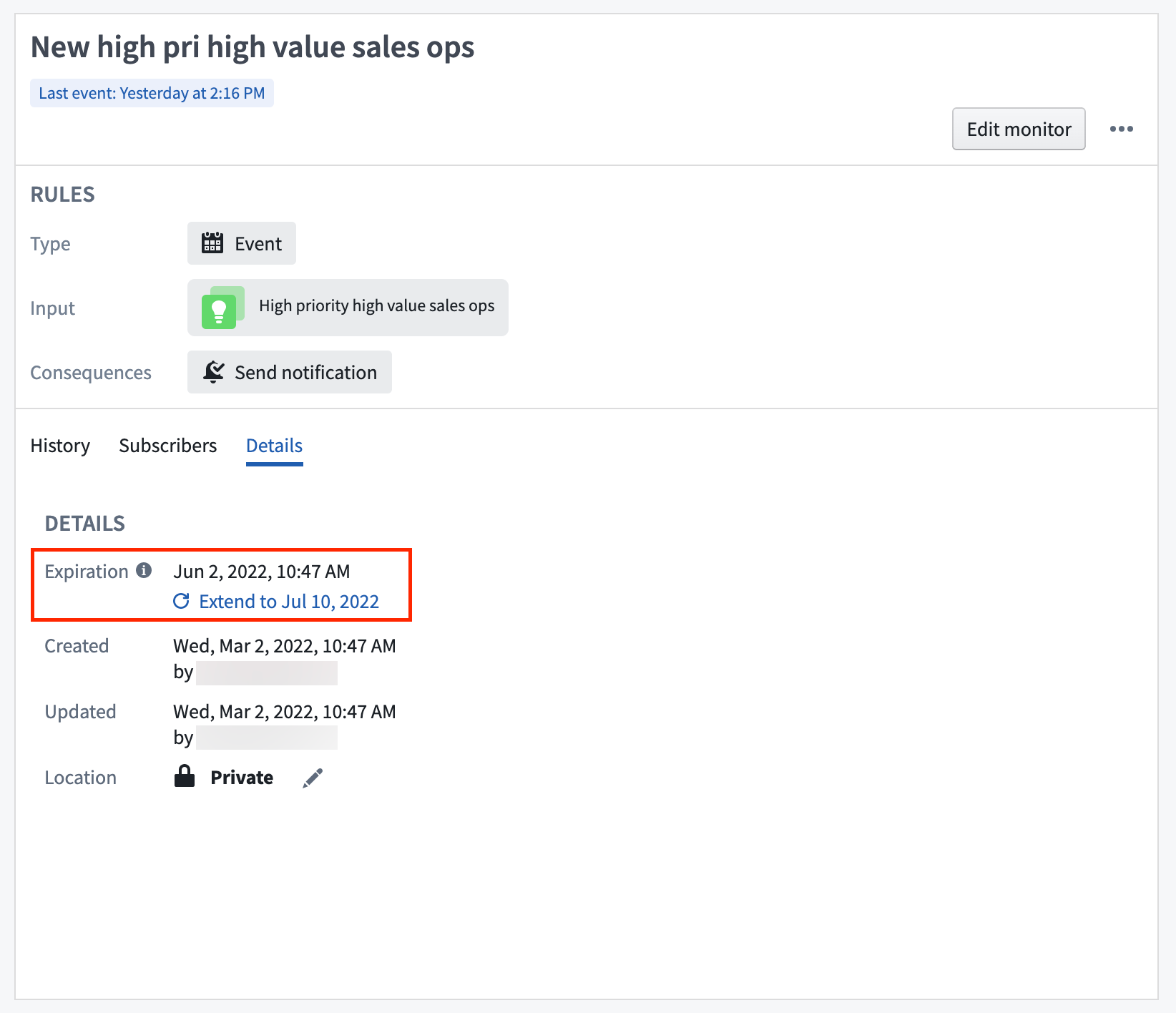
Object monitors always have an expiration date. The longest permitted expiration date is three months in the future and can be updated at any time by a user with an Editor role on the monitor.
The expiration date can be viewed and extended in the Object Monitors application interface. Click on a monitor to view the monitor overview panel to the right side of your screen. Then, click on the Details tab.
Learn how to create a new object monitor in Object Explorer or the Object Monitors application.
中文翻译
监控器(Monitor)
:::callout{theme="warning"} 对象监控器(Object Monitor)已被 自动化(Automate) 取代。自动化是一款完全向后兼容的产品,为平台中所有业务自动化提供单一入口。 :::
监控器是一种资源,用于定义一个或多个输入的条件,以及在满足输入条件时应触发的任何操作(Action)或通知。
存储
对象监控器保存在 Foundry 项目层级结构中,并支持标准资源操作,例如保存、共享、移动、删除以及基于角色的访问。
了解 Foundry 文件系统。
对象监控器通过唯一的资源标识符进行识别,格式如下:
ri.object-sentinel.main.monitor.0cabb748-cf89-4404-be3c-c8f198cb2a0b
保留
对象监控器的历史活动保留六个月,之后将被永久删除。如果历史活动需要在此日期之后继续存储,您可以使用操作将数据存储在长期存在的对象中,该对象的管理和控制方式与 Foundry 本体(Ontology) 中其他用户创建的对象相同。
当数据被删除时,它也会从对象监控器应用程序的监控器活动 历史记录(History) 选项卡中移除。您可以通过先点击监控器展开概览面板,然后点击 历史记录 来找到该选项卡。
过期
对象监控器始终设有过期日期。允许的最长过期日期为未来三个月,并且具有监控器 编辑者(Editor) 角色的用户可以随时更新该日期。
在对象监控器应用程序界面中,可以查看和延长过期日期。点击监控器以查看屏幕右侧的监控器概览面板,然后点击 详细信息(Details) 选项卡。
了解如何在 对象浏览器(Object Explorer) 或 对象监控器 应用程序中创建新的对象监控器。