Configure restricted-view-backed object types(配置受限视图支持的对象类型)
Restricted views (RVs) enable row-level access controls for ontology data. This allows for finer-grained access control than simply granting access to an entire dataset or all objects of a certain type.
Restricted views are similar to datasets but restrict access to specific rows in datasets. Restricted views are configured at the dataset level, and ontology objects inherit the granular permissions defined in the restricted view policy.
Use restricted views to back object types
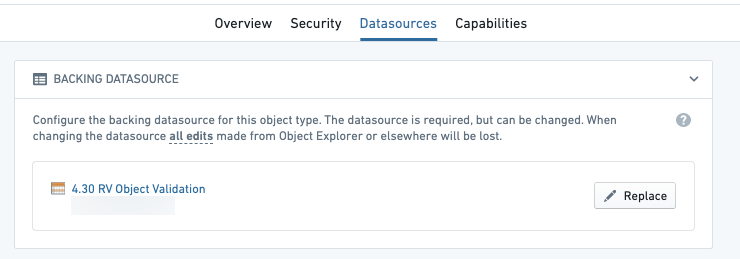
Backing an object type with a restricted view will control the specific objects a user can see. For example, if a user meets the requirements for a policy and can see a specific row in the restricted view, then they will be able to see the corresponding ontology object.
To view objects of an object type backed by a dataset, you must also be able to view the dataset.
- To view objects of an object type backed by a restricted view in Object Storage V1 (Phonograph), you must be able to view the object type itself; you do not necessarily need to see the restricted view. Rather, you only need to satisfy the restricted view's markings and its read policy for that row.
- In Object Storage V2, you must be able to see a restricted view to see objects of the object type backed by that restricted view.
When restricting specific objects from a user, only select restricted views in the Ontology Manager as an object type’s backing datasource.
Ontology edits
:::callout{theme="warning"} Access to an ontology object can be affected by user edits, since it is possible to edit a property that is referenced in the object's security. In such cases, a user might be able to see a row in the backing restricted view but not see the corresponding object in the ontology, or vice versa. :::
For example, consider a Ticket object type with the following data, where the policy on the restricted view requires you to be a member of the group in the Assignee column to see the row.
| Ticket ID | Title | Assignee |
|---|---|---|
| 101 | Ticket One | palantir-support |
If an action were applied to change the Assignee on this object to customer-support, then members of palantir-support who are not also members of customer-support will lose access to the object within the ontology. However, they will retain visibility of the row in the restricted view, which is unaffected by the action. Members of customer-support who are not also members of palantir-support would gain access to the ontology object, but still not be able to see the row in the restricted view.
Security configuration
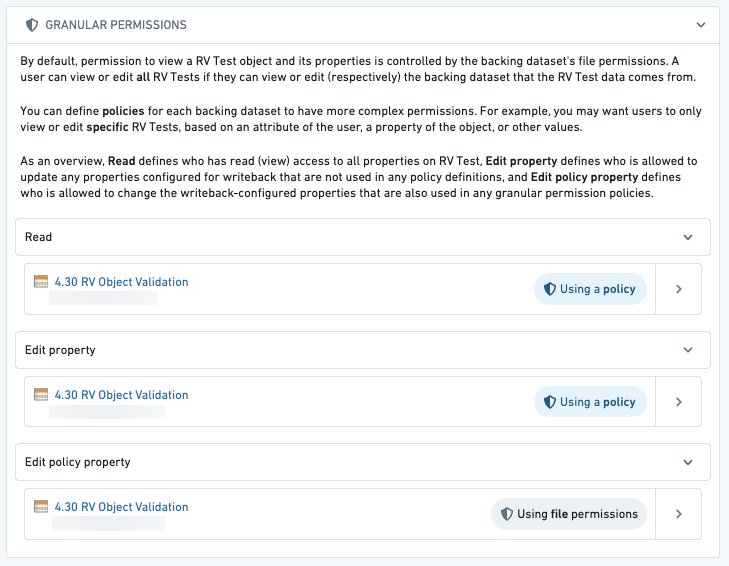
The Datasources tab in the Ontology Manager will show additional configuration options to edit Granular Policies. The Granular Policies section allows you to configure permissions for editing objects of this type.
:::callout{theme="warning"} Granular Policies for edits can only be configured for object types using Object Storage V1 which do not have the Only allow edits via actions option selected. For all other object types, edit permissions are controlled via action types editing the object types. Learn more about action permissions. :::
You can configure these policies to accommodate cases where you want users to view or edit only specific objects based on their attributes (like a property of the object). For example, you may only want users from Europe (found in the region column) to see and edit European objects, which may differ from the restricted view’s policy.
There are three policies that can define who can access the properties on an object:
- Read: This policy defines who can view all properties on the Restricted View. Using the example above, this might be a policy that compares the
regioncolumn with what is in the user’s attributes (Europe) to determine what objects the user can see. - Edit property: This policy defines who is allowed to update any of the properties configured for writeback that are not used in any granular permissions policy definitions. Using the example above, this policy would control who can edit the
nameproperty, but not who can edit theregionproperty, since theregionproperty is used in the policy. - Edit policy property: This policy defines who is allowed to update any of the properties configured for writeback that are also used in any granular permissions policy definitions. Using the example above, this policy would control who can edit the
regionproperty.
:::callout{theme="warning"} If view policies are changed after the object type was registered with Object Storage V1 (Phonograph), the registration must be updated through the Update button in the Phonograph section of the object type's Datasources tab in Ontology Manager. If the registration is not updated, the latest data of the restricted view may be made available based on previously registered policies. Automatic policy propagation is available by default in Object Storage V2. :::
中文翻译
配置受限视图支持的对象类型
受限视图(Restricted Views, RVs) 可为本体论(Ontology)数据提供行级访问控制。相比简单授予对整个数据集或某类全部对象的访问权限,这种方式能实现更精细的权限管控。
受限视图与数据集类似,但限制的是对数据集中特定行的访问。受限视图在数据集层级配置,本体论对象会继承受限视图策略中定义的细粒度权限。
使用受限视图支持对象类型
用受限视图支持对象类型后,将控制用户能看到的具体对象。例如,若用户满足某策略要求且能查看受限视图中的特定行,则其也能看到对应的本体论对象。
要查看由数据集支持的对象类型的对象,您还必须能查看该数据集。
- 在对象存储V1(Object Storage V1, Phonograph)中,要查看由受限视图支持的对象类型的对象,您必须能查看该对象类型本身,但不一定需要看到受限视图。实际上,您只需满足受限视图的标记(Markings)及其对该行的读取策略即可。
- 在对象存储V2(Object Storage V2)中,您必须能查看受限视图,才能看到由该受限视图支持的对象类型的对象。
当需要限制特定用户对某些对象的访问时,请仅在Ontology Manager中选择受限视图作为对象类型的支持数据源。
本体编辑
:::callout{theme="warning"} 用户编辑可能影响对本体对象的访问,因为可以编辑对象安全策略中引用的属性。在这种情况下,用户可能能看到受限视图中的某行,但看不到本体中对应的对象,反之亦然。 :::
例如,考虑一个包含以下数据的Ticket对象类型,其受限视图策略要求用户必须是Assignee列中指定组的成员才能查看该行。
| 工单ID(Ticket ID) | 标题(Title) | 受理人(Assignee) |
|---|---|---|
| 101 | 工单一(Ticket One) | palantir-support |
如果执行操作将此对象的受理人改为customer-support,那么palantir-support组中非customer-support组的成员将失去对本体内该对象的访问权限。但他们在受限视图中仍能看到该行,因为该视图不受操作影响。而customer-support组中非palantir-support组的成员将获得对本体内该对象的访问权限,但仍无法看到受限视图中的该行。
安全配置
Ontology Manager中的数据源(Datasources)选项卡会显示额外的配置选项,用于编辑细粒度策略(Granular Policies)。细粒度策略部分允许您配置编辑此类对象的权限。
:::callout{theme="warning"} 编辑操作的细粒度策略只能配置给使用对象存储V1且未选择仅允许通过操作进行编辑(Only allow edits via actions)选项的对象类型。对于其他所有对象类型,编辑权限通过编辑该对象类型的操作类型进行控制。了解更多关于操作权限的信息。 :::
您可以配置这些策略,以适应希望用户根据对象属性(如对象的某个属性)仅查看或编辑特定对象的场景。例如,您可能只希望来自欧洲(位于region列)的用户查看和编辑欧洲对象,这可以与受限视图的策略不同。
有三种策略可定义谁能访问对象的属性:
- 读取(Read): 此策略定义谁能查看受限视图上的所有属性。使用上述示例,这可能是一个将
region列与用户属性中的欧洲进行比较的策略,以确定用户能看到哪些对象。 - 编辑属性(Edit property): 此策略定义谁可以更新任何配置为回写(Writeback)且未在任何细粒度权限策略定义中使用的属性。使用上述示例,此策略将控制谁能编辑
name属性,但不能控制谁能编辑region属性,因为region属性已在策略中使用。 - 编辑策略属性(Edit policy property): 此策略定义谁可以更新任何配置为回写且也在任何细粒度权限策略定义中使用的属性。使用上述示例,此策略将控制谁能编辑
region属性。
:::callout{theme="warning"} 如果在对象类型注册到对象存储V1(Phonograph)后更改了视图策略,则必须通过Ontology Manager中对象类型数据源选项卡的Phonograph部分的更新(Update)按钮来更新注册。如果未更新注册,则可能基于先前注册的策略提供受限视图的最新数据。在对象存储V2中,默认启用自动策略传播。 :::