Object and property security policies(对象与属性安全策略)
Object security policies allow you to configure view permissions on an object instance by configuring security policies on the object type, independently of the permissions on the backing data source. These are used to achieve row-level security.
The visibility of specific properties can be guarded using additional property security policies. These are identical to object security policies, except they only apply to a selection of properties. These are used to achieve column-level security.
By default, object security policies are applied to all properties. When a property security policy includes a property, the user must pass both the object security policy and the property security policy to view the property value. The combination of object and property security policies is used to achieve cell-level security. If a user does not pass the object security policy, the object instance will not be viewable to that user. If they pass the object security policy but do not pass the property security policy, they will see a null value in place of the property value.
Configure object and property security policies
Access to an object instance and its properties is determined by the following conditions:
Vieweraccess to the object type.- Passing a granular policy, if configured.
- Passing any marking, organization, or classification checks.
When an object or property security policy is configured, users do not need Viewer permissions to the object type's backing data sources to view object instances.
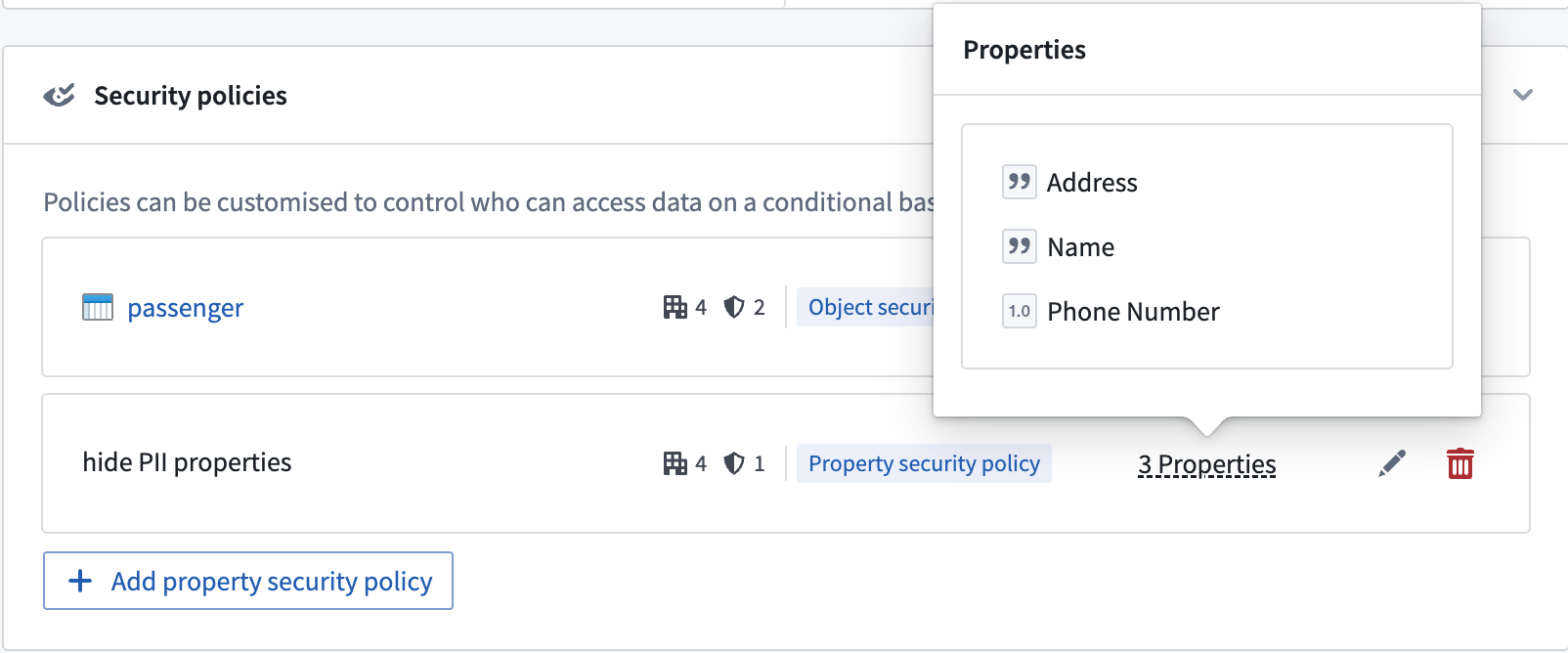
Consider an example where a Passenger object type has the properties User ID, Flight Number, Seat Assignment, Name, Address, and Phone Number. Some passengers are VIPs, whose information can only be seen by users who have access to a VIP marking. Additionally, some properties, such as Name, Address, and Phone Number, should be visible only to users who have the PII marking, and are authorized to view personally identifiable information. Since the backing dataset consists of sensitive data, it should be marked with PII and VIP. However, users without sensitive markings should still be able to access a passenger’s flight details.
The following steps can be taken to secure the Passenger object type using object security policies.
- Navigate to the Security tab of the object type.

- Select Create under the Security policies section to override data source policies with object security policies.
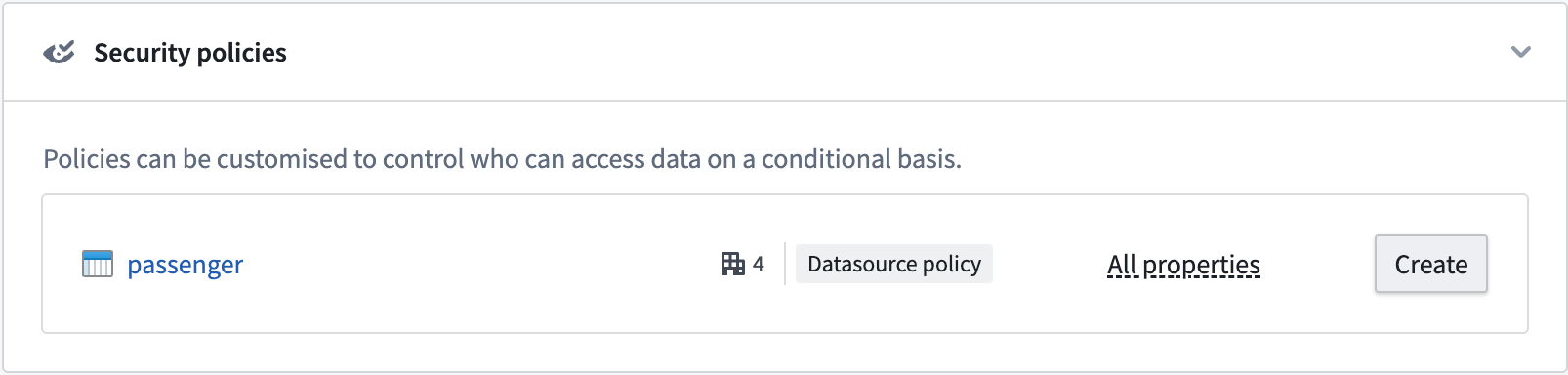
- Create the object security policy that edits view permissions for object instances. You have the option to add a granular policy and edit the organization and markings.
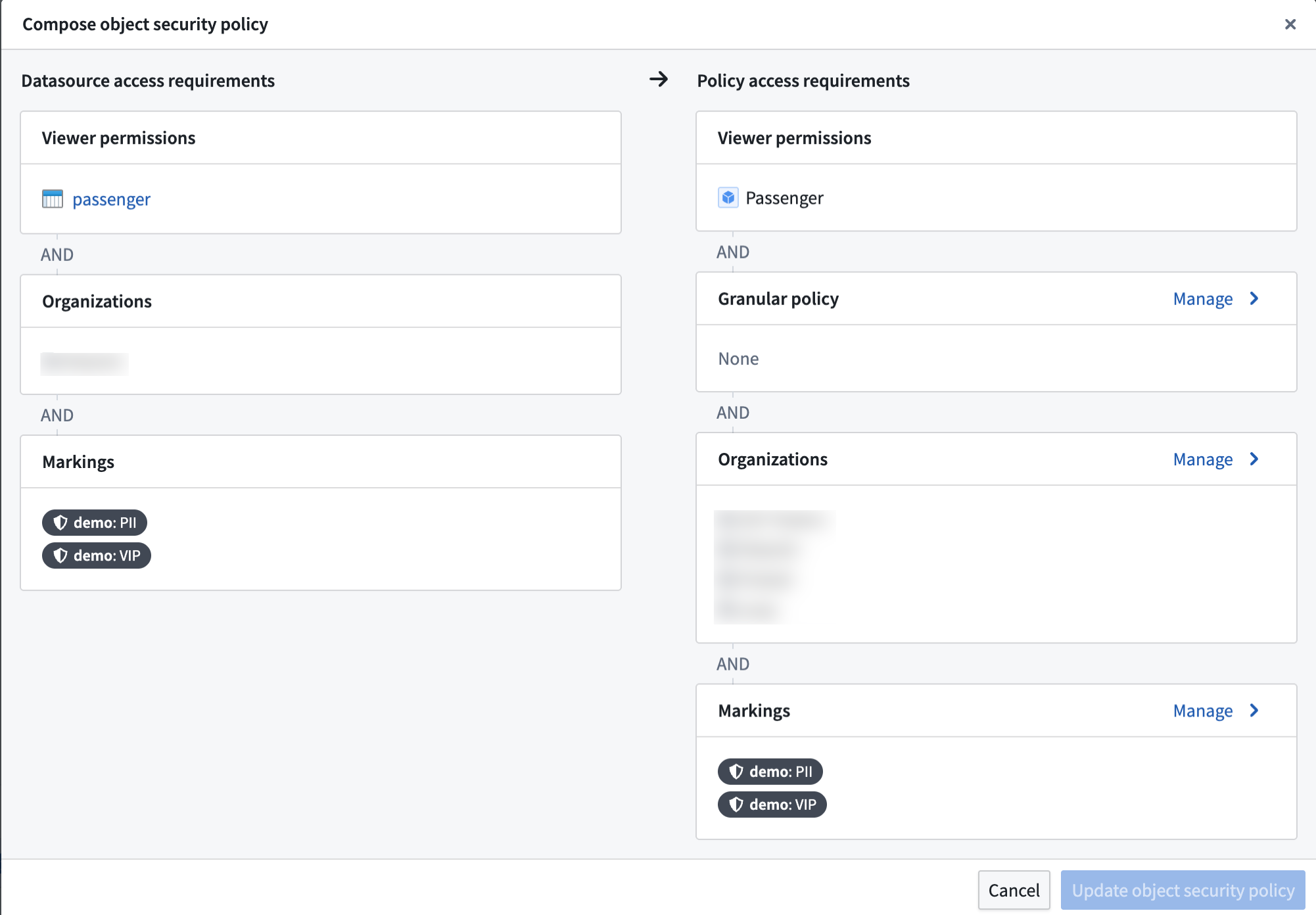
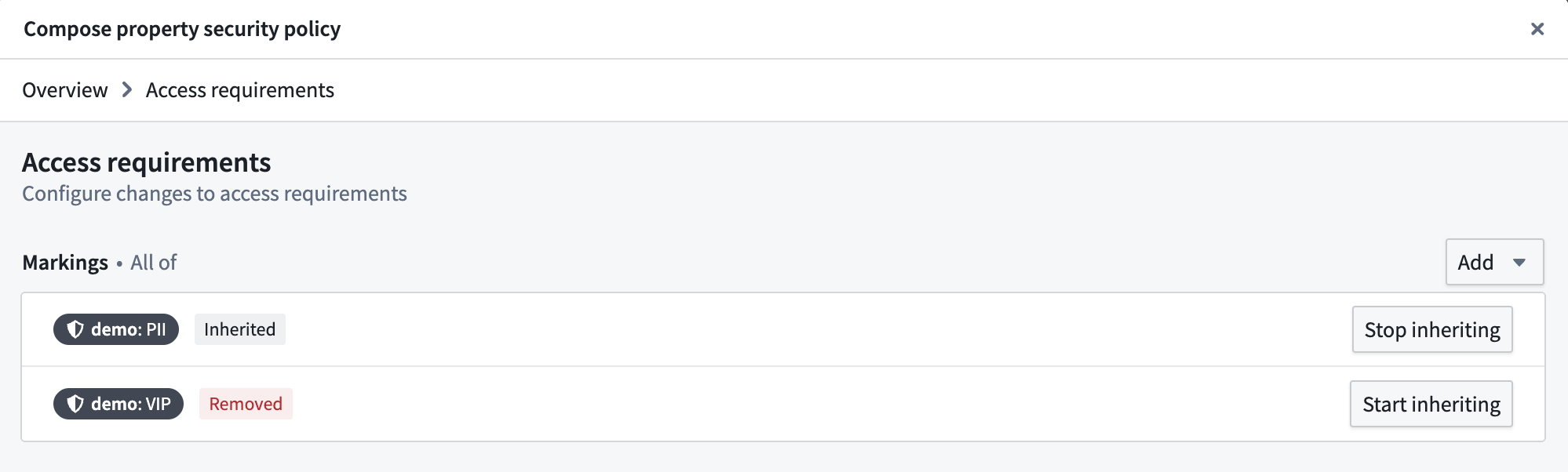
- In the Markings configuration, stop inheriting the
PIIandVIPmarkings so that users without those markings can see object instances.
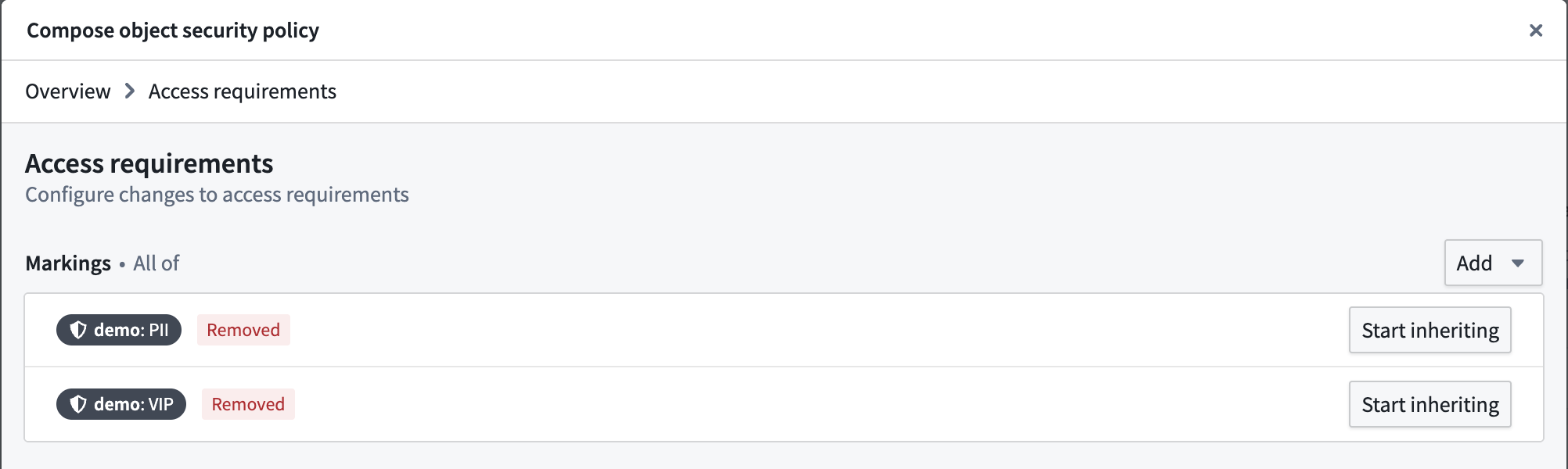
- Add a Granular policy to limit access to VIPs. The
VIPmarking is added as a mandatory control property. Every row has a set of markings in the mandatory control property that need to be satisfied by a user to access that object instance.
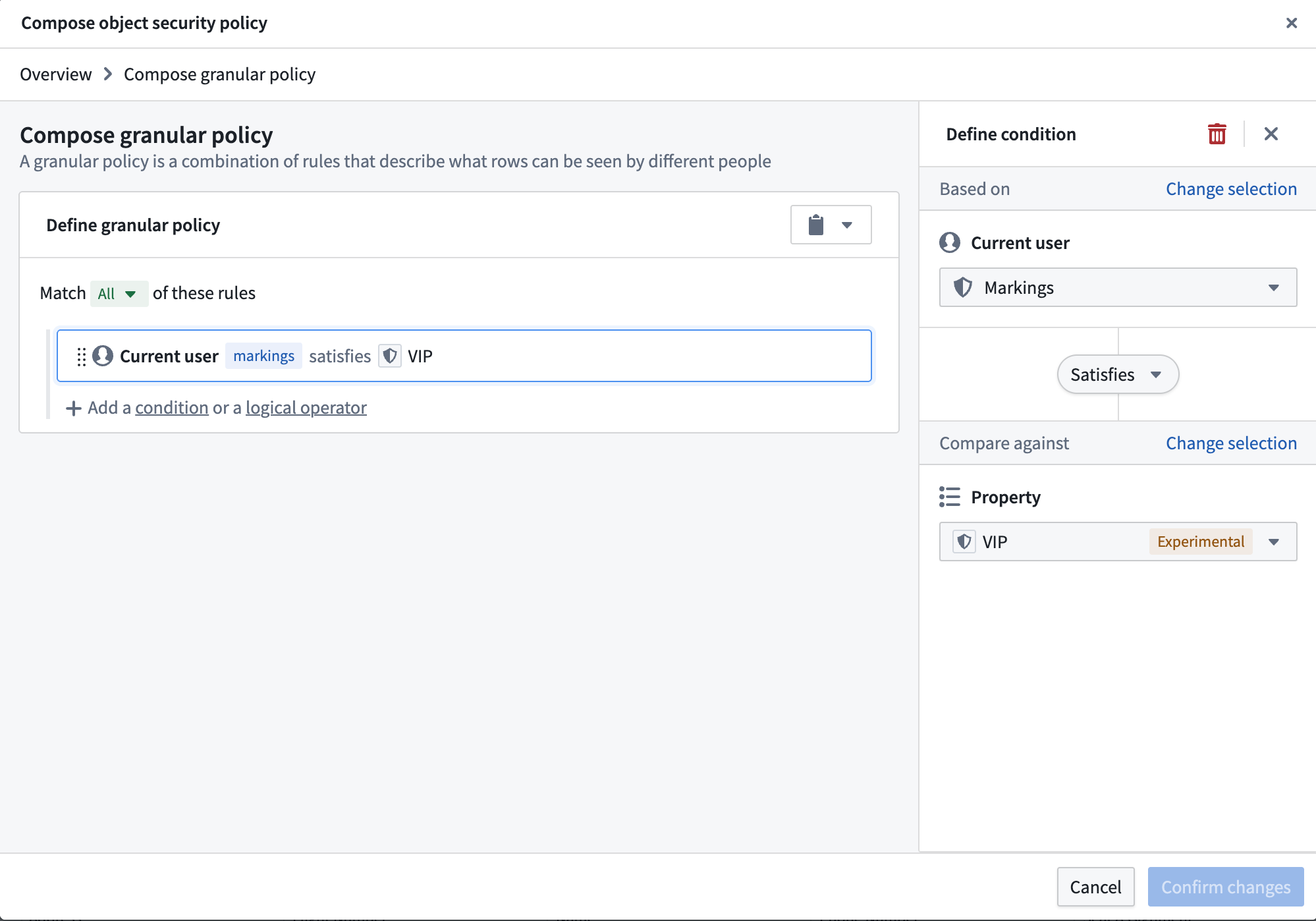
- This creates the object security policy. Now, we need to secure the
PIIproperties with thePIImarking. We can do this by adding a property security policy.
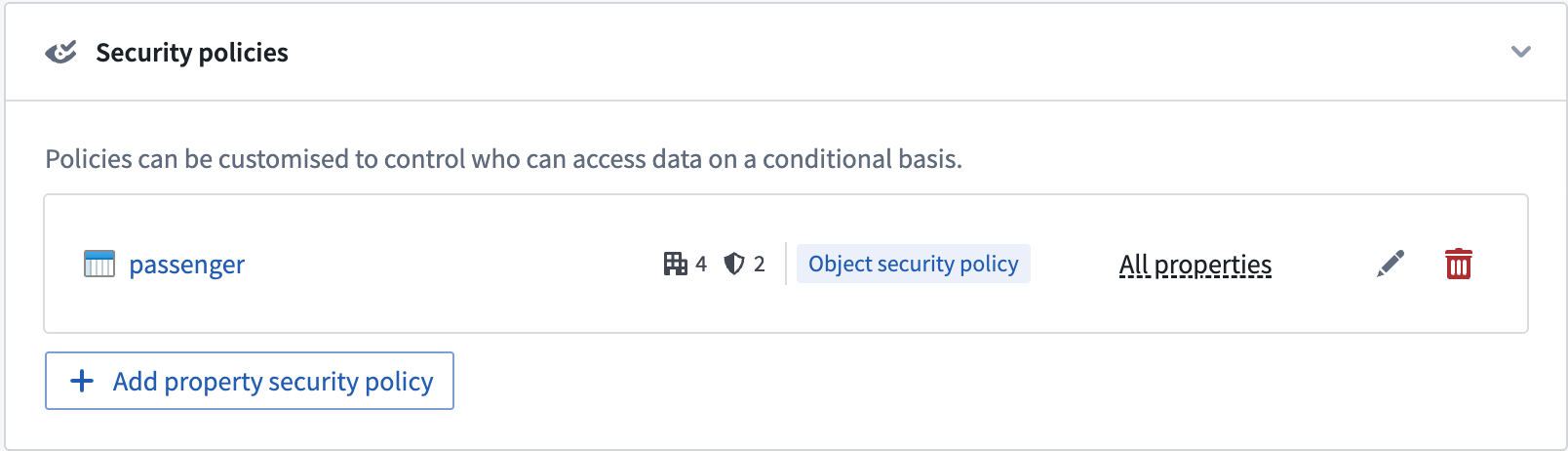
- Select the properties that need to be secured and give the policy a name. Then, add the
PIImarking in the Manage markings setting. The configuration settings for property security policies are identical to object security policies.

Select Manage markings for the property security policy and add thePIImarking.
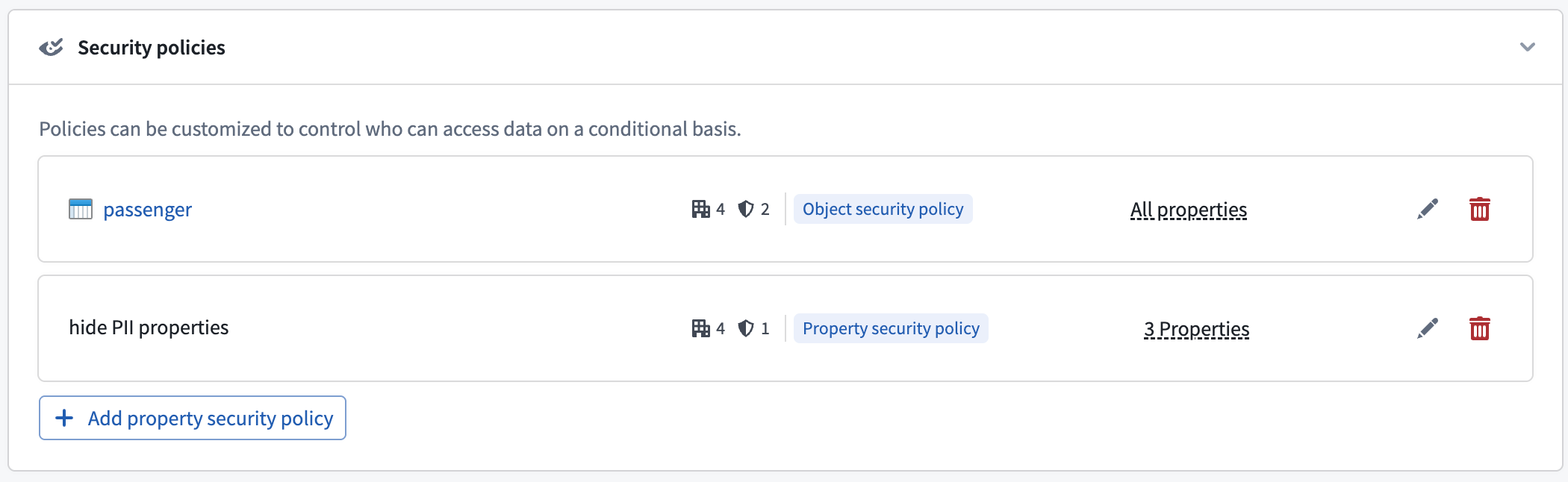
- This will create the property security policy. The properties included in the policy are now secured by the object security policy and the new property security policy. Properties not included in any property security policy will still be secured by the object security policy.
Permissions to edit security policies
To create or edit an object or property security policy, you must be an Owner of the object type. If your enrollment uses project-based permissions, this means you must hold the Owner role on the project that contains the object type.
Property security policy restrictions
The following restrictions apply when configuring one or more property security policies:
- An object security policy must already be configured.
- The primary key property cannot be a member of any property security policy.
- A non-primary key property can be a member of at most one property security policy.
Configure access to object types
Access to object types can be configured in the ontology metadata permissions. The user needs to be able to view the object type definition and instances.
Configure a granular policy
Learn more about configuring granular policies for row-level security.
Configure mandatory controls
By default, an object security policy will inherit all mandatory controls from its data sources. These include markings, organizations, and classifications.
The object security policy can then be further customized to add new mandatory controls and remove inherited mandatory controls that are no longer necessary.
Materializations with object security policies
Object security policies also determine the permissions for viewing materialized data in the object type.
Currently, object types with object security policies can only be materialized to Foundry datasets. The most restrictive permissions are applied to materialized data. This includes the following:
- All markings from the backing data sources.
- Additional markings applied on object or property security policies.
- Markings from all mandatory controls properties used in the granular policies of all object and property security policies.
:::callout{theme="warning"} Transactions on materialized datasets are secured by the security policies generated at the time of the materialized dataset build. When users add or remove a marking in their object or property security policies, the marking will only be reflected in the transactions committed at the time that the marking is present. Transactions are committed when the materialization is scheduled to build, which is configured by the user. After adding a marking to an object or property security policy, make sure to do the following:
- Build the materialization dataset if the markings need to propagate to the materialization dataset immediately.
- Mark the materialization or backing dataset with the marking to secure all historical transactions on the materialization dataset. :::
Test object security policies
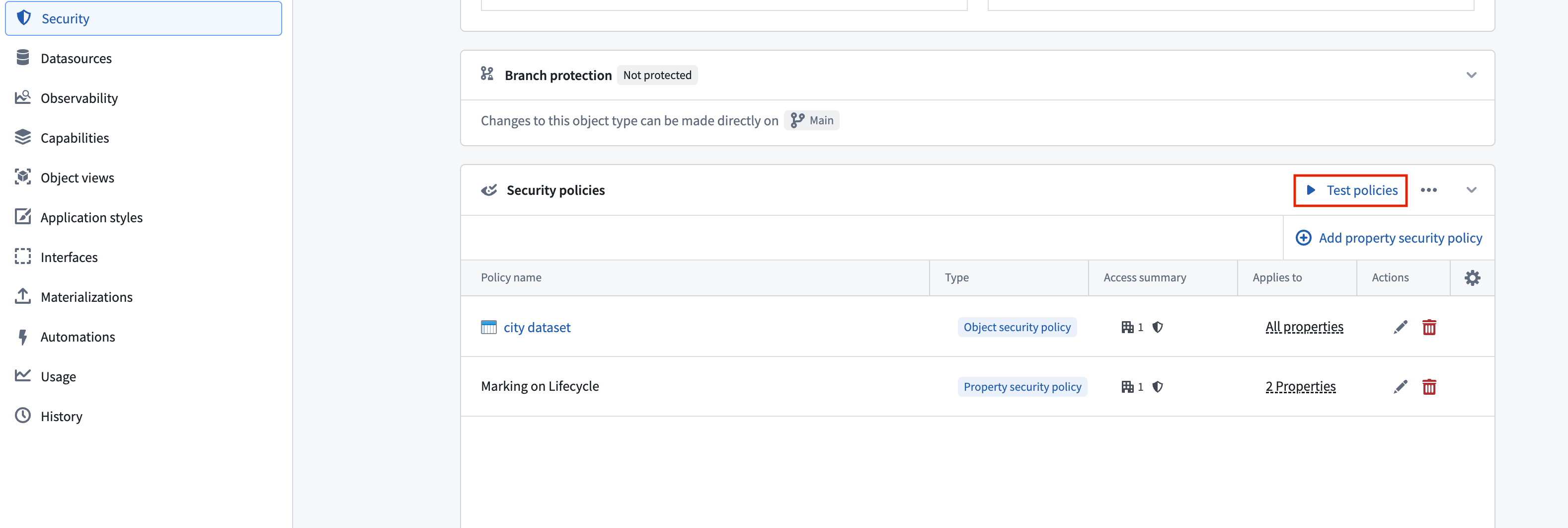
When configuring object security policies, you can test a specific user's ability to view the properties of an indexed object type based on your unsaved object security policy. You can also edit the values of properties referenced in granular policies to test hypothetical object instances and determine if your policy is correctly configured. Select Test policies from the Security policies section to launch the Test security policies modal.
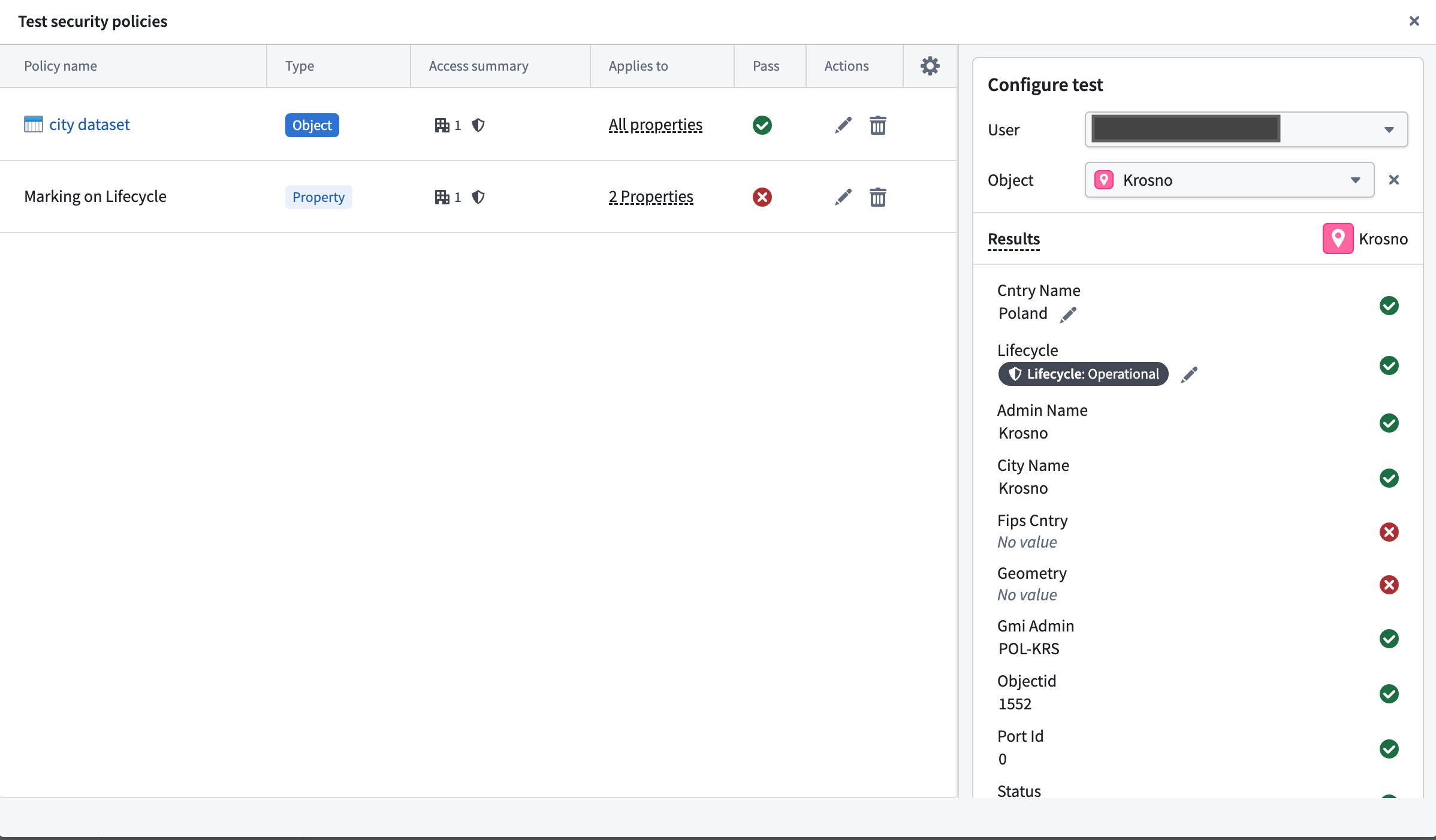
In the Test security policies modal, use the Configure test panel to select a User whose visibility access you wish to test on a given Object. The Results section indicates which properties on the object the user can view based on the current security policy configuration.
Current object security policy testing limitations
- You cannot test derived property visibility, as this also relies on the user's visibility on the derived property's source object.
- If you are neither a member nor administrator of an organization that is referenced in the security policy, then guest memberships and secondary organizations will not be taken into account during testing. Foundry indicates this by displaying a warning callout that enumerates the organizations you do not have permissions on.
Migrate from restricted views to object security policies
Object security policies are recommended over restricted views for most use cases built on the Ontology. They provide unified cell-level security, near-instantaneous policy updates, and support for streaming and branching. Learn more about the benefits of object and property security policies.
If you previously set up object types backed by restricted views and want to migrate to object security policies, you can use the migration tool described below. Learn more about object and property policies versus data source policies.
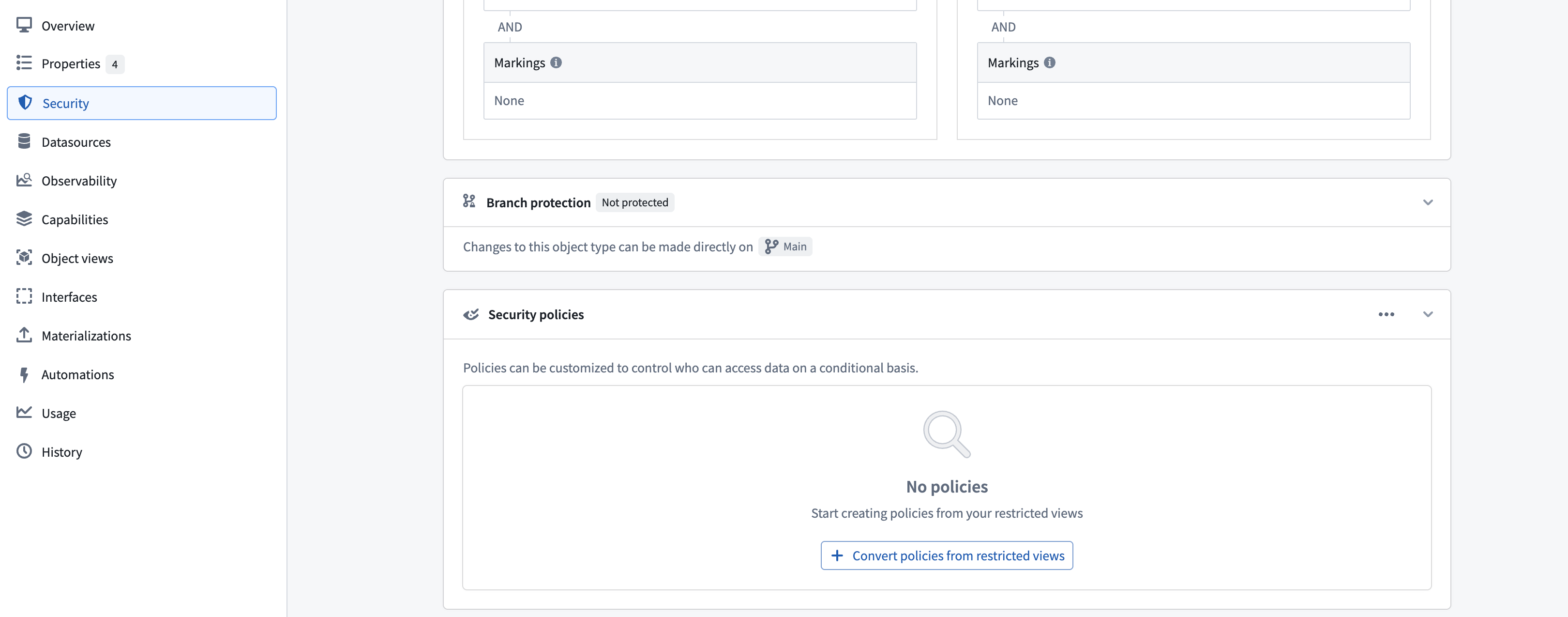
You can migrate an object type's data source from a restricted view to the backing dataset of the restricted view, secured by object security policies, using the migration tool in the Security tab. The tool configures security policies to match the policies defined on the restricted view.
Limitations
:::callout{theme="warning"} The migration tool does not support all restricted view configurations. The following configurations are not supported:
- Object types with multiple data sources (MDOs).
- Object types with multiple materializations or a single restricted view materialization.
- Restricted views with granular policies that use unsupported comparison operators, including greater than, greater than or equal, less than, and less than or equal.
- Restricted views with granular policies that reference numeric constant values, such as integer, long, or double.
- Restricted views with granular policies that reference authorized group IDs, organization marking IDs, or static marking IDs as user properties. Consider using a mandatory control property to achieve equivalent security. :::
Preserve discretionary security
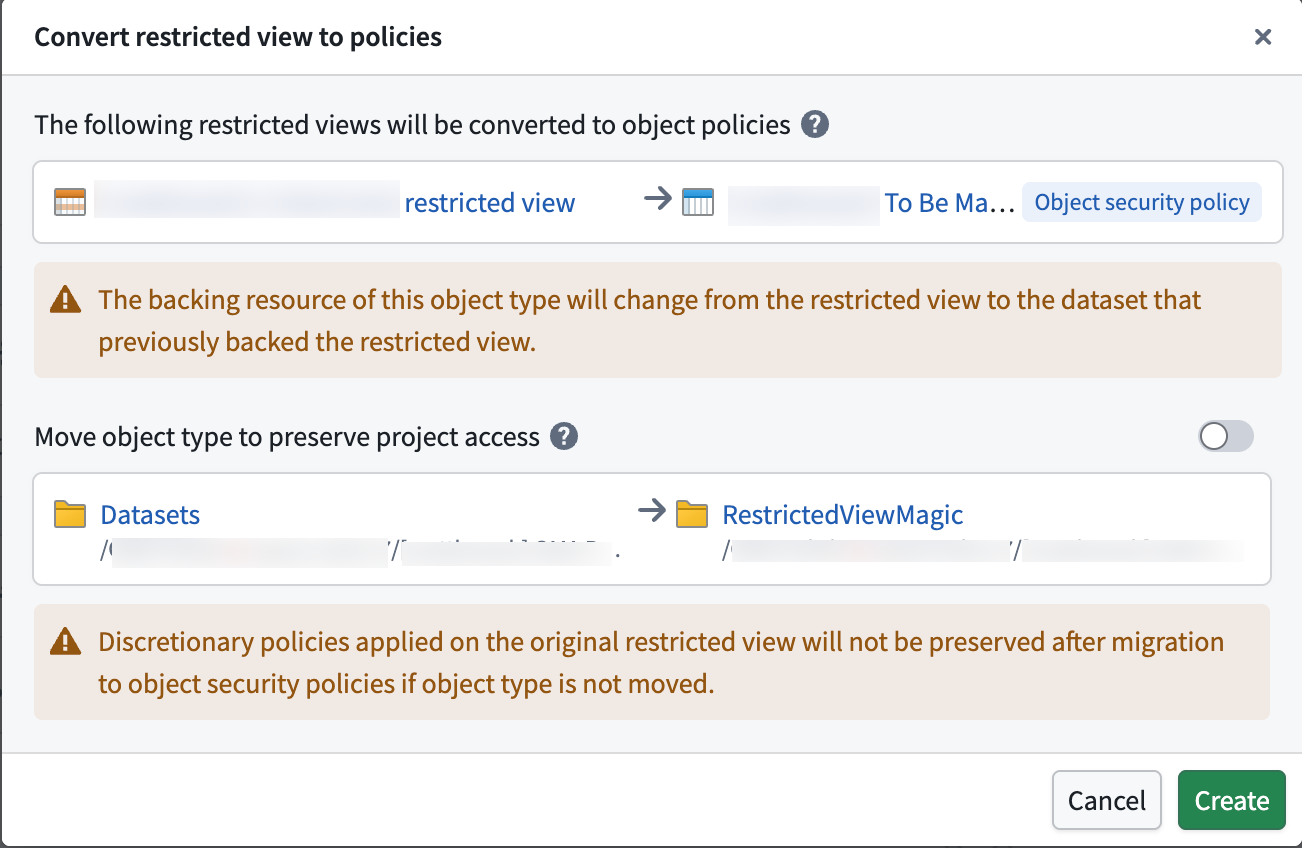
To preserve project viewing constraints on the data (security configurations inherited from the project the restricted view is in), you can move the object type into the same project as the restricted view using the migration tool.
中文翻译
对象与属性安全策略
对象安全策略允许您通过配置对象类型上的安全策略,独立于底层数据源的权限,来设置对象实例的查看权限。这些策略用于实现行级安全。
特定属性的可见性可以通过额外的属性安全策略进行保护。这些策略与对象安全策略相同,但仅适用于选定的属性。它们用于实现列级安全。
默认情况下,对象安全策略适用于所有属性。当属性安全策略包含某个属性时,用户必须同时通过对象安全策略和属性安全策略才能查看该属性值。对象安全策略与属性安全策略的组合用于实现单元格级安全。如果用户未通过对象安全策略,则该用户将无法查看该对象实例。如果用户通过了对象安全策略但未通过属性安全策略,他们将看到该属性值显示为null。
配置对象与属性安全策略
对对象实例及其属性的访问权限由以下条件决定:
当配置了对象或属性安全策略时,用户无需拥有对象类型底层数据源的Viewer权限即可查看对象实例。
考虑一个示例:Passenger对象类型包含属性User ID、Flight Number、Seat Assignment、Name、Address和Phone Number。部分乘客是VIP,其信息仅能由拥有VIP标记访问权限的用户查看。此外,某些属性(如Name、Address和Phone Number)应仅对拥有PII标记且被授权查看个人身份信息的用户可见。由于底层数据集包含敏感数据,应标记为PII和VIP。然而,没有敏感标记的用户仍应能访问乘客的航班详情。
以下步骤可用于通过对象安全策略保护Passenger对象类型。
- 导航至对象类型的安全选项卡。
- 在安全策略部分选择创建,以使用对象安全策略覆盖数据源策略。
- 创建用于编辑对象实例查看权限的对象安全策略。您可以选择添加细粒度策略,并编辑组织与标记。
- 在标记配置中,停止继承
PII和VIP标记,以便没有这些标记的用户也能查看对象实例。
- 添加细粒度策略以限制对VIP的访问。将
VIP标记添加为强制控制属性。每一行在强制控制属性中都有一组标记,用户需要满足这些标记才能访问该对象实例。
- 这将创建对象安全策略。现在,我们需要使用
PII标记保护PII属性。我们可以通过添加属性安全策略来实现。
- 选择需要保护的属性并为策略命名。然后,在管理标记设置中添加
PII标记。属性安全策略的配置设置与对象安全策略相同。
为属性安全策略选择管理标记并添加PII标记。
- 这将创建属性安全策略。策略中包含的属性现在受对象安全策略和新的属性安全策略共同保护。未包含在任何属性安全策略中的属性仍受对象安全策略保护。
编辑安全策略的权限
要创建或编辑对象或属性安全策略,您必须是该对象类型的所有者。如果您的注册环境使用基于项目的权限,这意味着您必须对包含该对象类型的项目持有Owner角色。
属性安全策略限制
配置一个或多个属性安全策略时,适用以下限制:
- 必须已配置对象安全策略。
- 主键属性不能成为任何属性安全策略的成员。
- 非主键属性最多只能成为一个属性安全策略的成员。
配置对象类型的访问权限
对象类型的访问权限可以在本体元数据权限中配置。用户需要能够查看对象类型定义和实例。
配置细粒度策略
配置强制控制
默认情况下,对象安全策略会从其数据源继承所有强制控制。这些包括标记、组织和分类。
然后可以进一步自定义对象安全策略,以添加新的强制控制并移除不再需要的继承强制控制。
具有对象安全策略的物化
对象安全策略还决定了查看对象类型中物化数据的权限。
目前,具有对象安全策略的对象类型只能物化为Foundry数据集。最严格的权限将应用于物化数据。这包括以下内容:
- 来自底层数据源的所有标记。
- 应用于对象或属性安全策略的额外标记。
- 来自所有对象和属性安全策略的细粒度策略中使用的所有强制控制属性的标记。
:::callout{theme="warning"} 物化数据集上的事务由物化数据集构建时生成的安全策略保护。当用户在对象或属性安全策略中添加或移除标记时,该标记仅会在标记存在时提交的事务中反映出来。事务在物化计划构建时提交,由用户配置。 在向对象或属性安全策略添加标记后,请确保执行以下操作:
- 如果标记需要立即传播到物化数据集,请构建物化数据集。
- 使用该标记标记物化数据集或底层数据集,以保护物化数据集上的所有历史事务。 :::
测试对象安全策略
配置对象安全策略时,您可以基于未保存的对象安全策略,测试特定用户查看已索引对象类型属性的能力。您还可以编辑细粒度策略中引用的属性值,以测试假设的对象实例,并确定策略是否正确配置。从安全策略部分选择测试策略以启动测试安全策略模态框。
在测试安全策略模态框中,使用配置测试面板选择一个用户,以测试其在给定对象上的可见性访问权限。结果部分指示基于当前安全策略配置,该用户可以查看对象上的哪些属性。
当前对象安全策略测试限制
- 您无法测试派生属性的可见性,因为这还依赖于用户对派生属性源对象的可见性。
- 如果您既不是安全策略中引用的组织的成员也不是管理员,则测试期间将不考虑来宾成员身份和次要组织。Foundry会通过显示警告提示来指示这一点,该提示枚举了您没有权限的组织。
从受限视图迁移到对象安全策略
对于基于本体的多数用例,推荐使用对象安全策略而非受限视图。它们提供统一的单元格级安全、近乎即时的策略更新,并支持流式和分支。 了解对象和属性安全策略的更多优势。
如果您之前设置了由受限视图支持的对象类型,并希望迁移到对象安全策略,可以使用下面描述的迁移工具。了解对象和属性策略与数据源策略的更多区别。
您可以使用安全选项卡中的迁移工具,将对象类型的数据源从受限视图迁移到受限视图的底层数据集,并通过对象安全策略进行保护。该工具会配置安全策略以匹配受限视图上定义的策略。
限制
:::callout{theme="warning"} 迁移工具不支持所有受限视图配置。以下配置不受支持:
- 具有多个数据源(MDO)的对象类型。
- 具有多个物化或单个受限视图物化的对象类型。
- 使用不受支持的比较运算符(包括大于、大于等于、小于和小于等于)的细粒度策略的受限视图。
- 细粒度策略引用数值常量值(如整数、长整型或双精度浮点数)的受限视图。
- 细粒度策略将授权组ID、组织标记ID或静态标记ID作为用户属性引用的受限视图。考虑使用强制控制属性来实现等效安全。 :::
保留自由裁量安全
为了保留对数据的项目查看约束(从受限视图所在项目继承的安全配置),您可以使用迁移工具将对象类型移动到与受限视图相同的项目中。