Ontology permissions(本体权限)
The permissions to view, edit, and manage ontology resources are managed through Compass, the Palantir platform's filesystem. Ontology resources are saved into a project, and the selected project determines who can view, edit, and manage them.
This capability is enabled for new ontologies. For existing ontologies, an ontology owner must enable the capability manually, and existing ontology resources require migration. This capability is not yet available for Default Ontologies. If you are unsure of your ontology type, contact Palantir Support.
This project-based permissions approach replaces the previous permission models: ontology roles and datasource-derived permissions. It comes with multiple benefits:
- Unified permission model: Ontology resources use the same permission system as other resource types, so you only need to learn and manage permissions in one place.
- Bulk management: Set permissions at the project or folder level to control access across multiple resources at once, eliminating the need to set permissions on individual items.
- Permissions explainability: The Security tab displays the required permissions to view and edit an object type, and the required permissions to see instances or run actions.
- Additional privacy controls: Hide sensitive ontology resources by applying a marking or by placing them in a project where the user lacks a role grant.
- Compass curation primitives: Use portfolios and tags to organize ontology resources, and role grants or markings to hide irrelevant resources from users.
Migrating to projects does not change who has access to the backing datasource. To see objects, users continue to need permissions on both the object type and the datasource.
Example of project-based permission
Consider an object type called Building saved as a file in project A. Your ability to view, edit, or manage Building depends on your role in project A. If you are an Editor in project A, you can edit the Building object type. To view specific Building objects (like Empire State Building), you need the Viewer role on the object type and either access to the backing datasource or access granted through object and property security policies, depending on how the object type's security is configured.
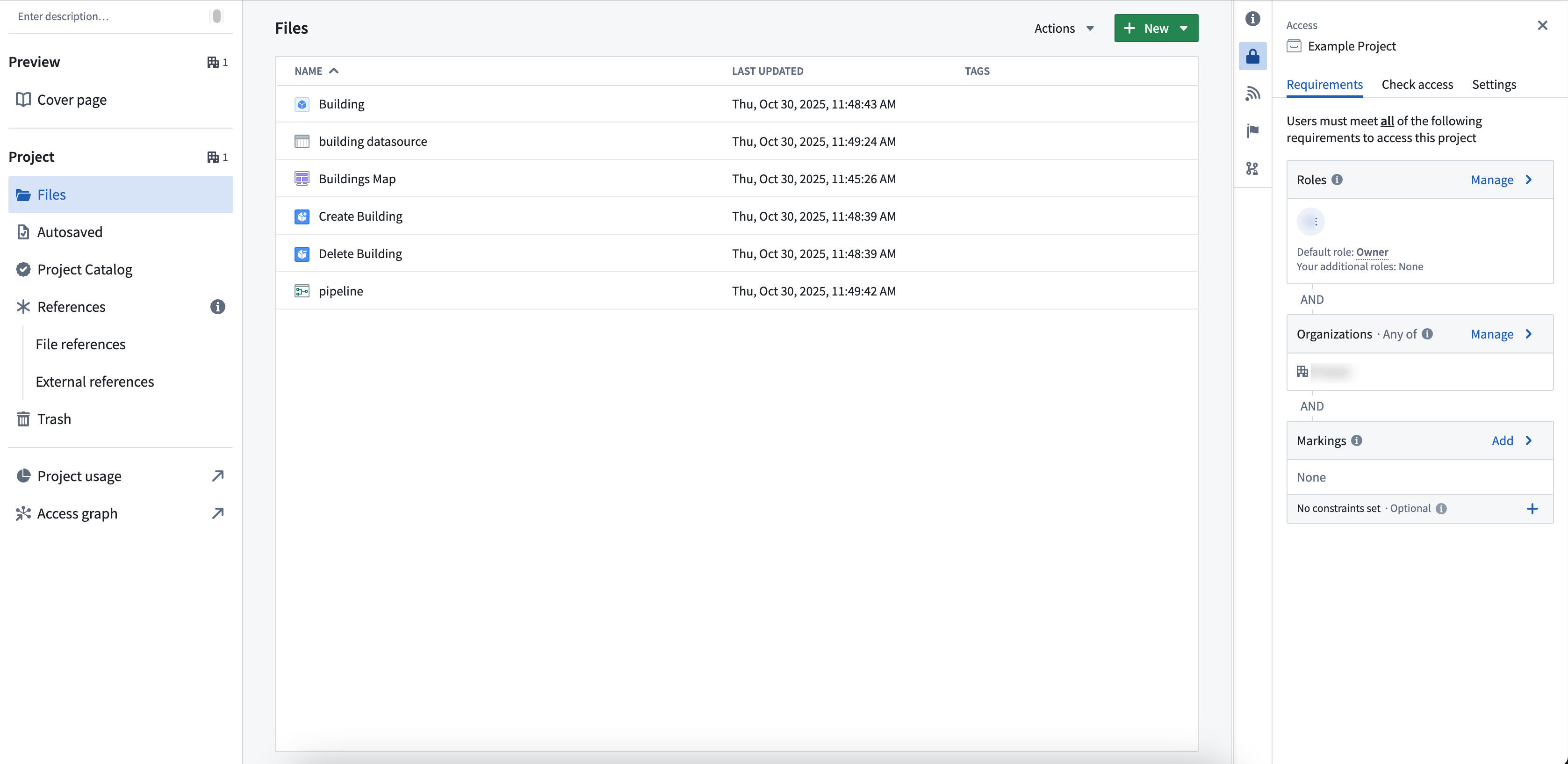
If you only have viewing rights for the object type, you can only see information such as schema and contact information, not the actual data. If you need help understanding the permissions required, review the Compass project side panel.
Viewing object types and objects
Object types are permissioned differently from objects. To see an object type, you must have View permissions on the object type, but do not need View permissions for the backing datasource.
To see objects, you must hold View permissions on the object type and access to the data. Access to the underlying data is determined by the object type's security configuration:
- Object and property security policies: Object visibility is governed by policies configured directly on the object type, independent of the backing datasource permissions.
- Data source policies: Object visibility is governed by the permissions on the backing data source. You must hold View permissions on the backing data source to see the objects.
For more information on configuring object security, review the documentation on managing object security. For more information on the distinction between object types (schema) and objects (data), review the documentation on object permissions.
When objects are in projects, the backing datasource must be imported into the project for the object to index. If the backing datasource is not already in the project, you are prompted to import it during object creation.
Edit permissions for links and actions
You will need the appropriate edit permissions depending on the resource you would like to edit:
- For links: You must hold edit permissions on both the link type and the linked object types.
- For actions: You must hold edit permissions on the action type and on all ontology resource types edited by the action.
Packaging and installing with different permission models
A Marketplace product installs using the same permission model it was packaged with. The Require new ontology resources be saved in a project toggle in Ontology configuration only affects creation of new ontology resources — it does not change how Marketplace installs a product on the target environment (where the product is installed) relative to the source environment (where it was packaged).
- Packaged with Ontology roles: installs using Ontology roles.
- Packaged with project permissioning: installs using project permissioning.
- Source migrated to project permissioning after publishing: the target's ontology resources are migrated to project permissioning on the next upgrade.
Classification-based access controls (CBAC)
When ontology resources are saved in projects governed by classification-based access controls (CBAC), the following rules apply:
- You must specify a file classification when creating the resource.
- The file classification must be equal to or lower than the project maximum classification.
- Object type materializations fail if no classification is specified.
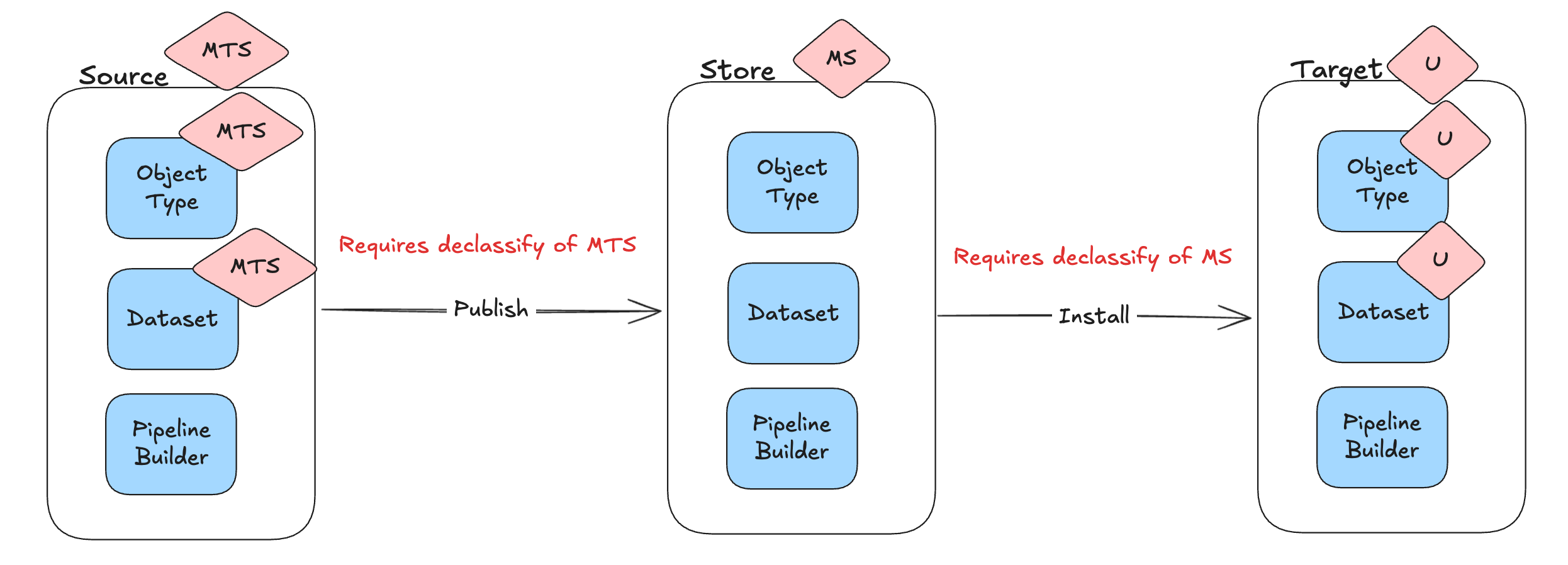
Marketplace and file classifications
File classifications are not ontology-specific — they apply to all files. The rules below are called out here because they affect how project permissioning interacts with classification-based access controls. Marketplace does not carry file classifications inside the product itself.
- At publish time: Marketplace does not track file classifications. If the classification of the Marketplace store is lower than any of the classifications that will be dropped, it checks that the user has declassify permissions on those markings.
- At install time: each installed file takes the classification of the target project. If the target project's classification is lower than the classification of the Marketplace store, the installing user must hold declassify permissions on those markings.
- On upgrade: file classifications are not changed. The classifications set at install time can be edited manually, and those manual edits persist through later upgrades.
Previous permission models
Previously, permissioning ontology resources varied based on your ontology authorization model. The table below summarizes how resources are currently managed for each model. Refer to the documentation to learn more about these legacy permission systems.
| Legacy Ontology permission models | Description |
|---|---|
| Ontology roles | - Ontology resources are permissioned in Ontology Manager using ontology specific roles (Ontology viewer, Ontology editor, and Ontology owner). They are not a resource of a project. |
| Datasource-derived | - Ontology resources derive their permissions from the backing datasource of the object. For example, you have editor on the object type if and only if you are editor on the backing datasource. |
中文翻译
本体权限
查看、编辑和管理本体资源的权限通过 Palantir 平台的文件系统 Compass 进行管理。本体资源保存在项目中,所选项目决定了谁可以查看、编辑和管理这些资源。
此功能对新创建的本体默认启用。对于现有本体,本体所有者需要手动启用该功能,并且现有本体资源需要进行迁移。此功能尚不适用于默认本体(Default Ontologies)。如果您不确定自己的本体类型,请联系 Palantir 支持团队。
这种基于项目的权限管理方式取代了之前的权限模型:本体角色和基于数据源的权限。它带来了多项优势:
- 统一的权限模型: 本体资源使用与其他资源类型相同的权限系统,因此您只需在一个地方学习和管理权限。
- 批量管理: 在项目或文件夹级别设置权限,可一次性控制多个资源的访问权限,无需对单个项目逐一设置。
- 权限可解释性: 安全(Security)选项卡会显示查看和编辑对象类型所需的权限,以及查看实例或运行操作所需的权限。
- 额外的隐私控制: 通过应用标记(marking)或将敏感本体资源放置在用户没有角色授权的项目中,可以隐藏这些资源。
- Compass 整理原语: 使用投资组合(portfolio)和标签(tag)来组织本体资源,使用角色授权或标记来向用户隐藏不相关的资源。
迁移到项目不会改变用户对底层数据源的访问权限。要查看对象,用户需要同时拥有对象类型和数据源的权限。
基于项目权限的示例
假设有一个名为 Building 的对象类型,作为文件保存在项目 A 中。您查看、编辑或管理 Building 的能力取决于您在项目 A 中的角色。如果您是项目 A 的 Editor(编辑者),则可以编辑 Building 对象类型。要查看具体的 Building 对象(如 Empire State Building),您需要拥有该对象类型的 Viewer(查看者)角色,并且根据对象类型的安全配置方式,要么拥有底层数据源的访问权限,要么通过对象和属性安全策略获得访问权限。
如果您只拥有对象类型的查看权限,则只能看到模式(schema)和联系信息等元数据,而无法看到实际数据。如果您需要帮助理解所需的权限,请查看 Compass 项目侧面板。
查看对象类型和对象
对象类型和对象的权限设置方式不同。要查看对象类型,您必须拥有对象类型的查看权限,但不需要拥有底层数据源的查看权限。
要查看对象,您必须拥有对象类型的查看权限以及对数据的访问权限。对底层数据的访问权限由对象类型的安全配置决定:
有关配置对象安全的更多信息,请查看管理对象安全的文档。有关对象类型(模式)和对象(数据)之间区别的更多信息,请查看对象权限文档。
当对象位于项目中时,必须将底层数据源导入项目,对象才能被索引。如果底层数据源尚未在项目中,系统会在创建对象时提示您导入。
链接和操作的编辑权限
根据您要编辑的资源,您需要相应的编辑权限:
- 对于链接: 您必须同时拥有链接类型和链接对象类型的编辑权限。
- 对于操作: 您必须拥有操作类型以及该操作所编辑的所有本体资源类型的编辑权限。
使用不同权限模型进行打包和安装
Marketplace 产品使用其打包时的权限模型进行安装。本体配置(Ontology configuration)中的要求新本体资源保存在项目中(Require new ontology resources be saved in a project)开关仅影响新本体资源的创建——它不会改变 Marketplace 在目标环境(安装产品的环境)相对于源环境(打包产品的环境)安装产品的方式。
- 使用本体角色打包: 使用本体角色进行安装。
- 使用项目权限打包: 使用项目权限进行安装。
- 发布后源环境迁移到项目权限: 目标环境的本体资源将在下次升级时迁移到项目权限。
基于分类的访问控制(CBAC)
当本体资源保存在受基于分类的访问控制(CBAC)管理的项目中时,适用以下规则:
- 创建资源时必须指定文件分类(file classification)。
- 文件分类必须等于或低于项目最高分类。
- 如果未指定分类,对象类型的具体化(materialization)将失败。
Marketplace 和文件分类
文件分类并非本体特有——它们适用于所有文件。以下规则在此特别说明,是因为它们会影响项目权限与基于分类的访问控制的交互方式。Marketplace 不会在产品内部携带文件分类。
- 发布时: Marketplace 不跟踪文件分类。如果 Marketplace 商店的分类低于将要投放的任何分类,它会检查用户是否拥有对这些标记的解密(declassify)权限。
- 安装时: 每个安装的文件都采用目标项目的分类。如果目标项目的分类低于 Marketplace 商店的分类,则安装用户必须拥有对这些标记的解密权限。
- 升级时: 文件分类不会更改。安装时设置的分类可以手动编辑,这些手动编辑会在后续升级中保留。
之前的权限模型
以前,本体资源的权限设置因本体的授权模型而异。下表总结了每种模型下当前如何管理资源。请参阅文档以了解有关这些旧版权限系统的更多信息。
| 旧版本体权限模型 | 描述 |
|---|---|
| 本体角色(Ontology roles) | - 本体资源在 Ontology Manager 中使用本体特定角色(本体 viewer、本体 editor 和本体 owner)进行权限设置。它们不是项目的资源。 |
| 数据源派生(Datasource-derived) | - 本体资源从对象的底层数据源派生其权限。例如,当且仅当您是底层数据源的编辑者时,您才是对象类型的编辑者。 |