Add Object Views to a Marketplace product(将对象视图(Object View)添加到 Marketplace 产品中)
Use Foundry DevOps to include your Object Views in Marketplace products for other users to install and reuse. Learn how to create your first product.
Supported features
Marketplace products only support Object View tabs that use the Workshop tab builder. The legacy Object View builder is not supported. If you would like to package an Object View tab that leverages the legacy builder, you should first rebuild the tab with the Workshop tab builder.
Add Object Views to products
To add an Object View to a product, first create a product. Add outputs and then select the Add ontology entities option.
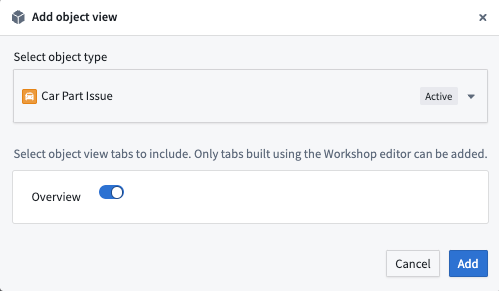
Once you have selected an Object View, you can select which tabs you would like to include in your product.
中文翻译
将对象视图(Object View)添加到 Marketplace 产品中
使用 Foundry DevOps 将您的对象视图(Object View)包含在 Marketplace 产品中,供其他用户安装和复用。了解如何创建您的第一个产品。
支持的功能
Marketplace 产品仅支持使用 Workshop 标签页构建器创建的对象视图标签页(Object View tab)。旧版对象视图(Object View)构建器不受支持。如果您希望打包使用旧版构建器创建的对象视图标签页(Object View tab),应首先使用 Workshop 标签页构建器重建该标签页。
将对象视图(Object View)添加到产品中
要将对象视图(Object View)添加到产品中,请先创建一个产品。然后添加输出,并选择添加本体实体(Add ontology entities)选项。
选择对象视图(Object View)后,您可以进一步选择要包含在产品中的标签页。