Object Views(对象视图(Object Views))
Object Views are reusable representations of object data. They provide a central hub for all information related to an object and include key information about the object, including property data, object links, and related applications.
Standard and configured Object Views
There are two types of object views:
- Standard Object Views: Standardized, out-of-the-box representations that automatically reflect an object type's configuration. Standard Object Views are available for all object types and provide a consistent way to view object data without any configuration. Learn more about standard Object Views.
- Configured Object Views: Fully customizable representations built using Workshop that you can configure to provide contextualized experiences for specific workflows. When a configured Object View is created, it becomes the default view, though users can always switch back to the standard Object View.
Standard Object Views exist alongside configured Object Views as a first-class viewing option. While standard Object Views display by default when no configured Object View is created, they remain accessible even after a configured Object View is built. Users can toggle between standard and configured Object Views at any time based on their needs.
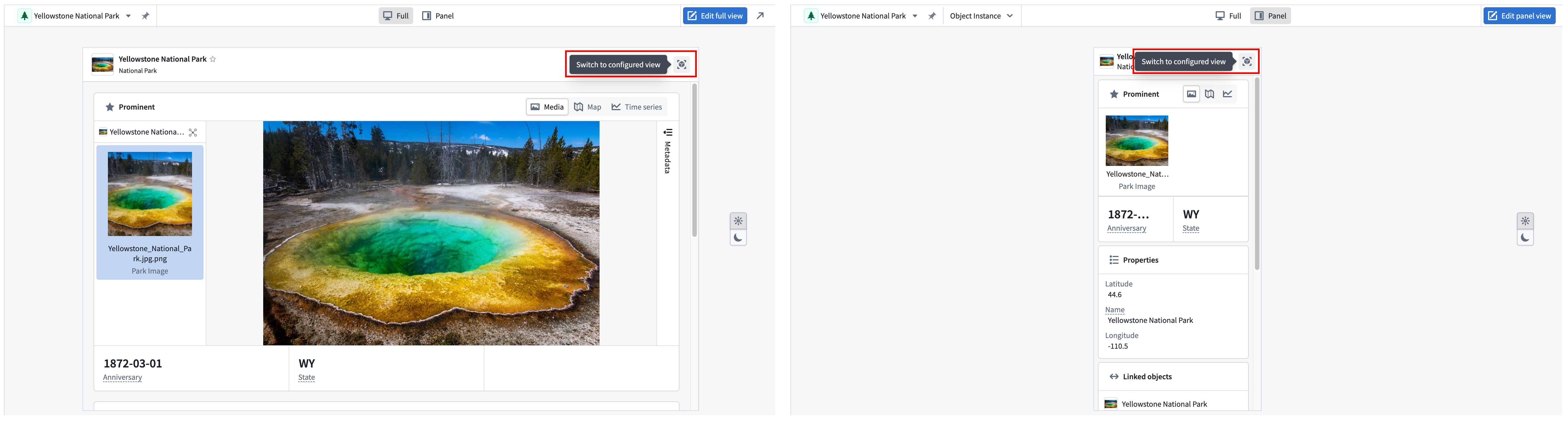
Object View form factors
Both standard and configured Object Views are available in two form factors to accommodate different levels of detail. These different form factors offer flexibility in how object data appears across different workflows.
- Full Object Views: A comprehensive overview of an object, representing an in-depth display of all related information.
- Panel Object Views: Intended for integration with other applications and should focus on displaying the most critical data for a specific workflow.
Example: Configured Patient Object View
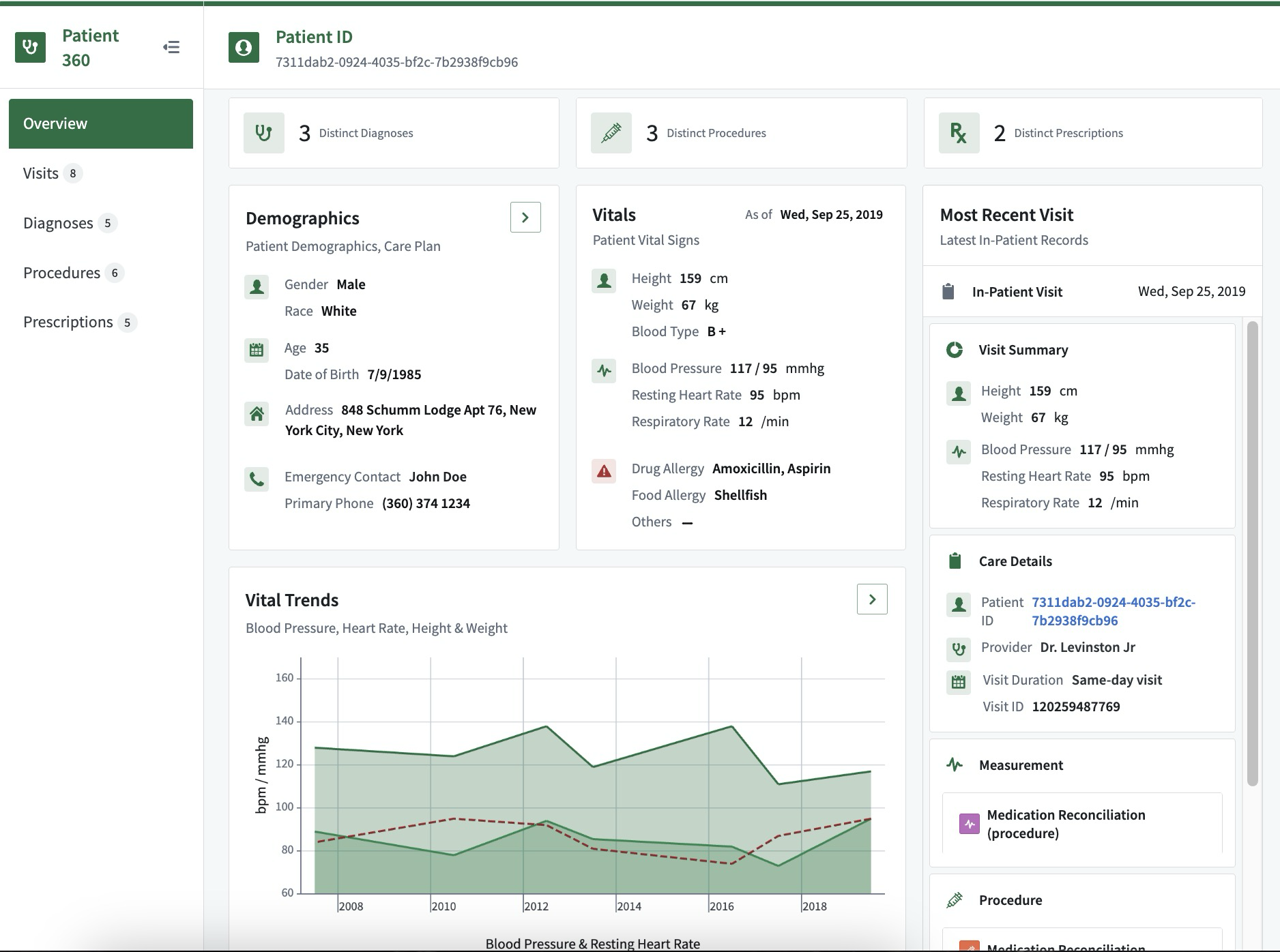
A configured full Object View for a Patient object might include:
- Core demographics, vitals, and care details: A comprehensive snapshot of the patient's basic information, health status, and ongoing care plans.
- Linked procedures, prescriptions, and diagnoses: A consolidated list of medical interventions, medications prescribed, and confirmed diagnoses, providing a holistic view of the patient's medical history.
- Analytical trends from historical in-patient records: Insights derived from past hospital stays, highlighting patterns and trends in the patient's health over time.
This configured full Object View could serve as an exhaustive resource for all relevant information about a patient, facilitating better-informed healthcare decisions and personalized care planning.
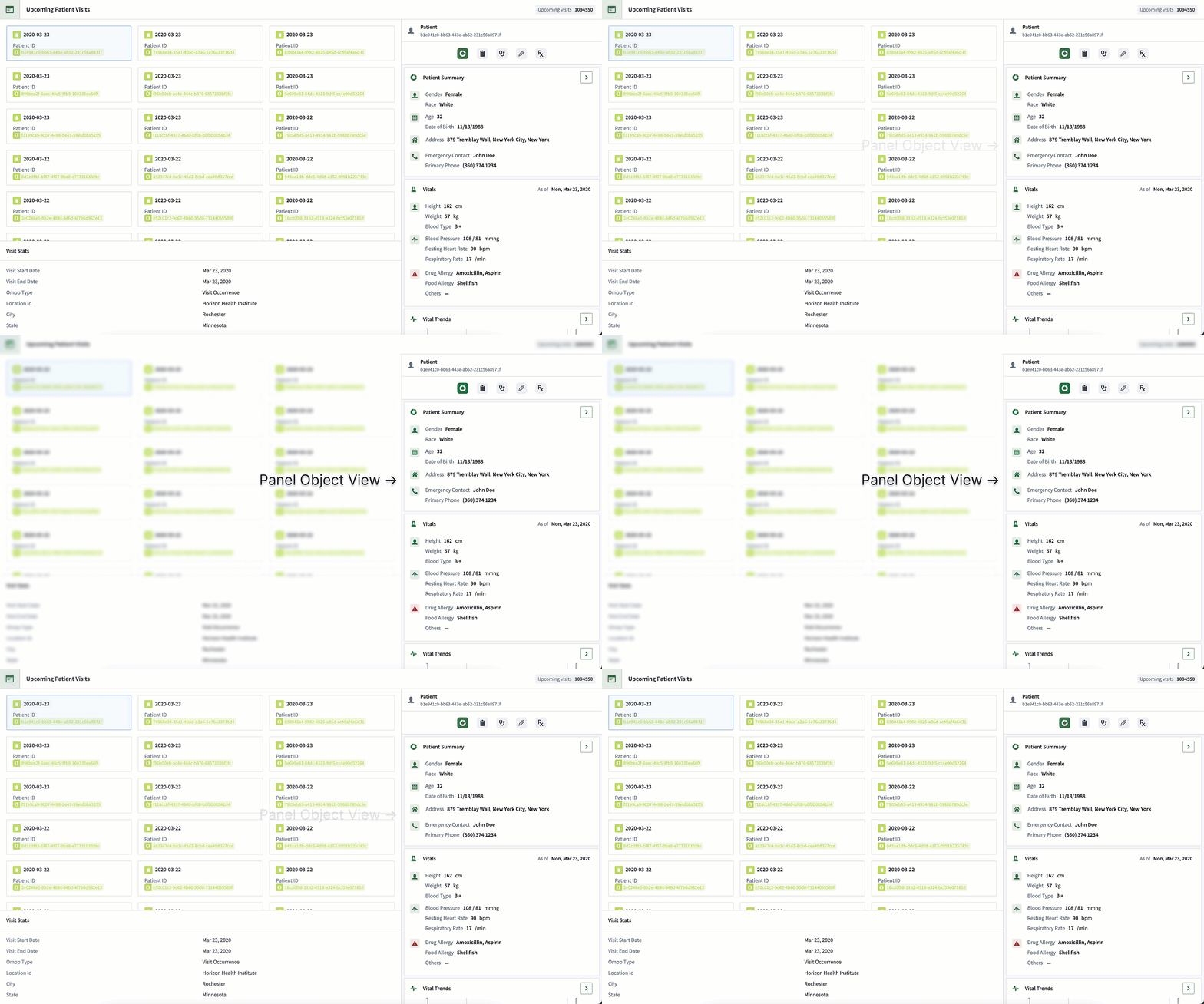
The configured panel Object View for the same Patient object may only show the demographic and vital information, so when it appears in other applications it provides users with easy access to the most critical data for their workflow.
Learn more about object types and the concepts behind Ontology-based data modeling.
中文翻译
对象视图(Object Views)
对象视图是对象数据的可复用呈现形式。它们为与对象相关的所有信息提供中央枢纽,包含对象的关键信息,包括属性数据、对象链接及相关应用。
标准对象视图与配置对象视图
对象视图分为两种类型:
- 标准对象视图(Standard Object Views): 开箱即用的标准化呈现形式,自动反映对象类型的配置。所有对象类型均可使用标准对象视图,无需任何配置即可提供一致的数据查看方式。了解标准对象视图的更多信息。
- 配置对象视图(Configured Object Views): 使用 Workshop 构建的完全可定制呈现形式,您可针对特定工作流配置上下文相关的体验。创建配置对象视图后,它将成为默认视图,但用户始终可以切换回标准对象视图。
标准对象视图与配置对象视图并存,作为一级查看选项。当未创建配置对象视图时,默认显示标准对象视图;即使构建了配置对象视图,标准视图仍可访问。用户可根据需求随时在标准视图与配置视图之间切换。
对象视图形式
标准对象视图和配置对象视图均提供两种形式,以适应不同详细程度的需求。这些不同形式为对象数据在不同工作流中的呈现方式提供了灵活性。
- 全尺寸对象视图(Full Object Views): 对象的全面概览,深度展示所有相关信息。
- 面板对象视图(Panel Object Views): 专为与其他应用集成而设计,应聚焦于显示特定工作流中最关键的数据。
示例:配置的患者对象视图
针对 Patient 对象的配置全尺寸对象视图可能包含:
- 核心人口统计、生命体征及护理详情: 患者基本信息、健康状况及当前护理计划的综合快照。
- 关联的手术、处方及诊断: 医疗干预措施、处方药物及确诊结果的整合列表,提供患者病史的整体视图。
- 历史住院记录的分析趋势: 从过往住院数据中提取的洞察,突出患者健康状况随时间变化的模式与趋势。
此配置的全尺寸对象视图可作为患者所有相关信息的详尽资源,助力更明智的医疗决策与个性化护理规划。
同一 Patient 对象的配置面板对象视图可能仅显示人口统计与生命体征信息,因此当它出现在其他应用中时,用户可轻松获取工作流所需的最关键数据。