Action metrics(操作指标(Action metrics))
Action metrics display the near real-time usage of an action type over the last 30 days. You can access these metrics from the action type's overview page in Ontology Manager, or in Workflow Lineage by selecting the action node for a given execution. The following metrics are available:
- Success/failure metrics: Monitor the current status of your actions with success and failure counts. This enables rapid identification of issues and supports proactive troubleshooting, allowing you to address failures as soon as they occur.
- P95 duration metric: Track the 95th percentile (P95) execution duration for each action type. This metric highlights the upper range of execution times, helping you detect performance bottlenecks and optimize workflows for consistent and efficient operation.
You are also able to access run history, which provides a complete view of a given action's executions over the past seven days. Learn more about AIP observability capabilities.
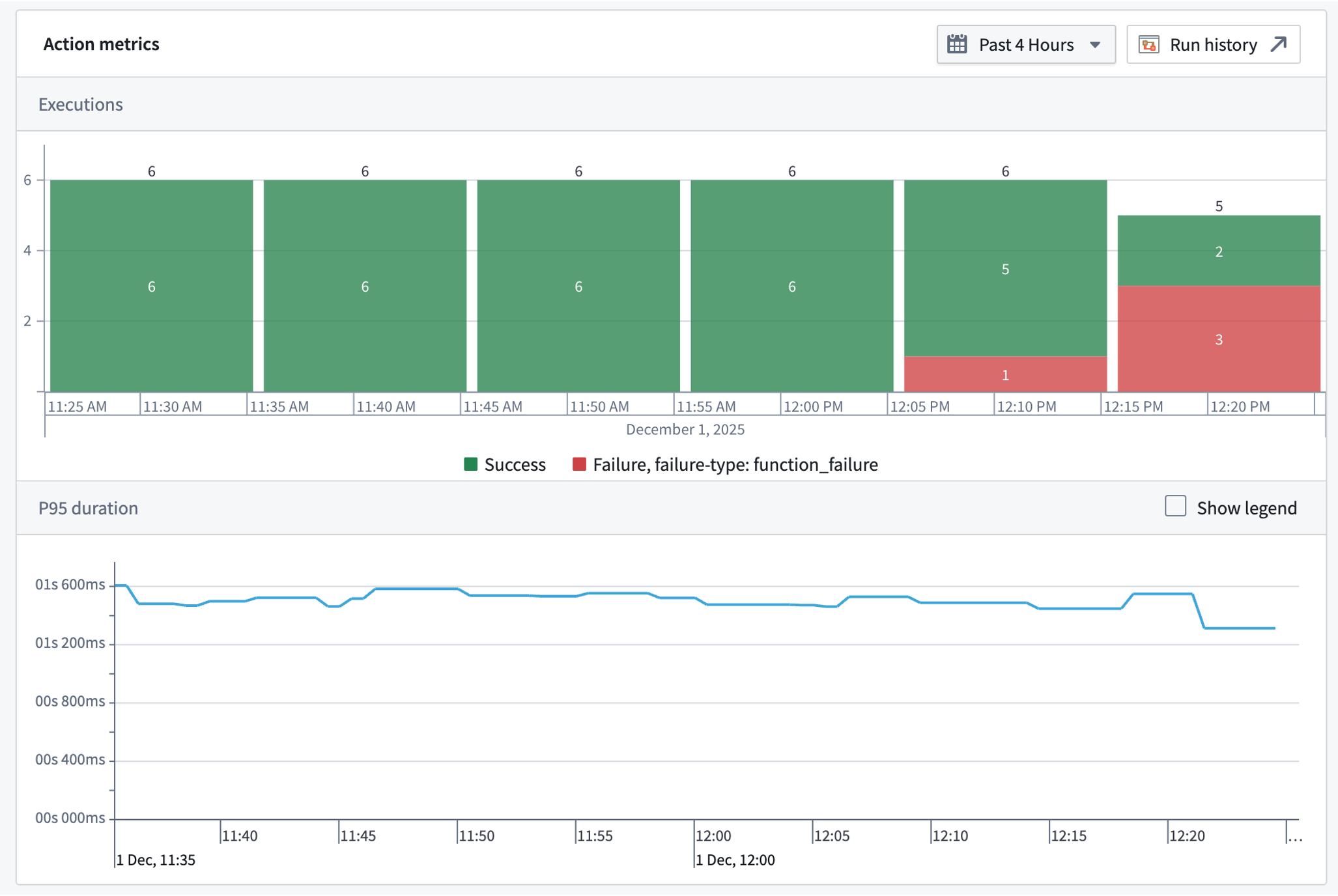
All metrics are updated in near real-time using the latest data from the Foundry Telemetry Service (FTS). This ensures you have access to the most current information for monitoring, debugging, and maintaining the health of your actions.
Action failure types
Action metrics do not require action logs to be displayed. Unlike action logs, action metrics track failures.
Action metrics have a variety of categories of failures that may be displayed. These categories are:
- Invalid parameter failure: The action was submitted with a parameter or parameters that are not valid within the context of the action.
- Scale limit failure: The action affected more than the permitted limit of object types (by default, usually 10,000).
- Authentication failure: The user did not pass the security submission criteria for the action.
- Side effect failure: The action failed due to a webhook or an incorrectly configured side effect.
- Function failure: The action failed because the underlying function failed. This failure mode is only possible for function-backed actions.
- User-facing function failure: The function backing the action threw an error intended to be displayed to the user. This failure mode is only possible for function-backed actions.
- Conflict failure: The action failed due to a conflict, such as a concurrent modification.
- Unclassified failure: The action failure did not fall into any of the above categories.
Permissions
To view action metrics, you must be a viewer on the action.
中文翻译
操作指标(Action metrics)
操作指标显示过去30天内某类操作类型的近实时使用情况。您可以通过Ontology Manager中操作类型的概览页面,或在Workflow Lineage中选择特定执行的操作节点来访问这些指标。可用的指标包括:
- 成功/失败指标(Success/failure metrics): 通过成功和失败次数监控操作的当前状态。这有助于快速识别问题并支持主动排查,使您能够在故障发生时立即处理。
- P95持续时间指标(P95 duration metric): 追踪每种操作类型的第95百分位(P95)执行持续时间。该指标突出执行时间的上限范围,帮助您检测性能瓶颈并优化工作流,确保操作一致高效运行。
您还可以访问运行历史(run history),该功能提供过去七天内特定操作执行的完整视图。了解更多关于AIP可观测性功能的信息。
所有指标均使用来自Foundry Telemetry Service (FTS)的最新数据近实时更新。这确保您能够获取最新信息,用于监控、调试和维护操作的健康状态。
操作失败类型(Action failure types)
操作指标无需操作日志即可显示。与操作日志不同,操作指标会追踪失败情况。
操作指标可能显示多种失败类别。这些类别包括:
- 无效参数失败(Invalid parameter failure): 操作提交时包含一个或多个在操作上下文中无效的参数。
- 规模限制失败(Scale limit failure): 操作影响的对象类型数量超过允许的限制(默认通常为10,000个)。
- 身份验证失败(Authentication failure): 用户未通过操作的安全提交标准。
- 副作用失败(Side effect failure): 操作因webhook或配置错误的副作用而失败。
- 函数失败(Function failure): 操作因底层函数失败而失败。此失败模式仅适用于函数支持的操作。
- 面向用户的函数失败(User-facing function failure): 支持操作的函数抛出了旨在向用户显示的错误。此失败模式仅适用于函数支持的操作。
- 冲突失败(Conflict failure): 操作因冲突(如并发修改)而失败。
- 未分类失败(Unclassified failure): 操作失败不属于上述任何类别。
权限(Permissions)
要查看操作指标,您必须是该操作的viewer(查看者)。