Revert or undo actions(撤销或还原操作)
Action reverts in Ontology Manager allow an action to be reverted (that is, undone) immediately after the action has been applied. You can revert an action by selecting Undo in the success message after any successful action application.
New actions are revertible by default.
:::callout{theme="neutral"} Action reverts are only available for Object Storage V2; meaning that only actions that modify or create an object type in OSv2 can be reverted. If your object types are not currently stored in Object Storage V2, you can migrate by following this guide. :::
Configure a revertible action
Currently, actions can only be reverted by the user who applied the action.
In the Form tab of an action, toggle on the Allow revert after action submission button. Once this toggle is correctly configured and saved to the Ontology, your action can be reverted.
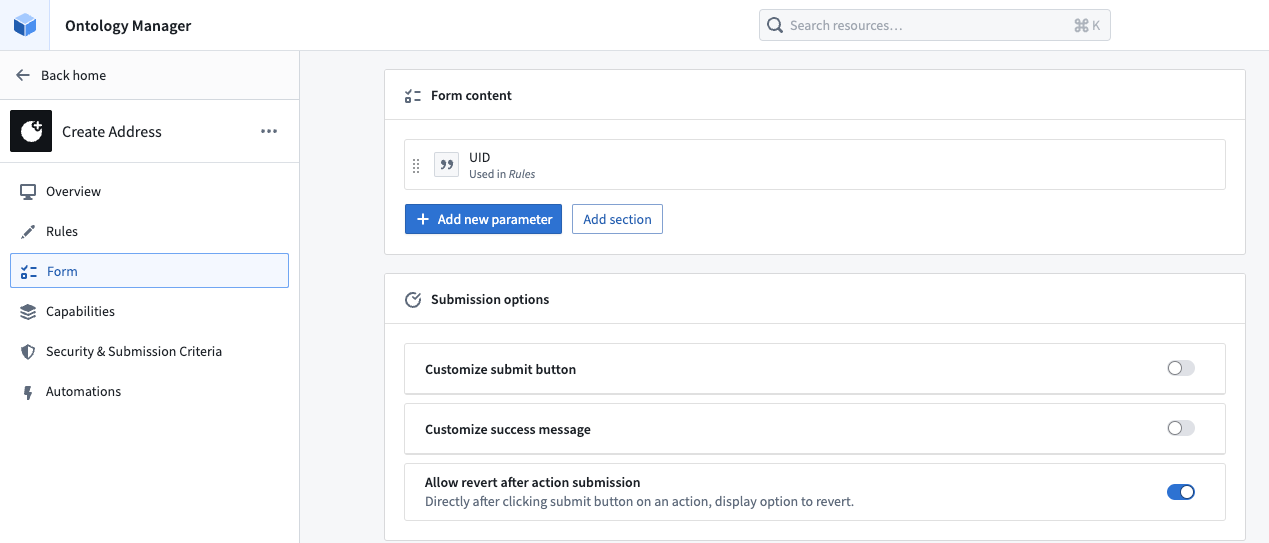
The Allow revert after action submission toggle in the Form tab will be enabled by default for actions created after May 2024 that only modify OSv2 object types. If an action existed before May 2024 and modifies an object type in OSv2, action reverts will not be toggled on by default but can be manually enabled.
You will not be able to revert an action if it only modifies OSv1 object types.
Revert an action
:::callout{theme="warn" title="Revert action"} The toast below is your only opportunity to revert the action. This is especially important to note when performing delete actions. :::
Once reverted successfully, users will see a similar toast to the original action success as shown below.
Edits applied:

Edits reverted:

Caveats
An action revert may fail in some cases:
- An action on an object cannot be reverted once any subsequent edit has been made to the object, even if the edit is on a different property. In other words, an action on an object can only be reverted if the action is the most recent edit to an object.
- An action cannot be reverted if action reverts has been toggled off after action submission, even if action reverts have been toggled on again.
An action revert only reverts the edits to the object instance, but it will not revert side effects, such as notifications or webhooks, nor will it call them in the same way that the applied action would have.
Undoing a delete action without the revert action toast
If a delete action is performed and you wish to undo the deletion, but the revert action toast is no longer available, the only remediation options available are to:
- Migrate to a new object type and copy over the desired edits using functions; or
- Drop all edits on the object type.
中文翻译
撤销或还原操作
在本体管理器中,操作还原(Action revert)允许在操作应用后立即将其撤销(即还原)。您可以在任何操作成功执行后,通过成功消息中的撤销按钮来还原该操作。
默认情况下,新建操作均可还原。
:::callout{theme="neutral"} 操作还原仅适用于对象存储V2(Object Storage V2);这意味着只有修改或创建OSv2中对象类型的操作才能被还原。如果您的对象类型当前未存储在对象存储V2中,可按照此指南进行迁移。 :::
配置可还原操作
目前,操作只能由执行该操作的用户进行还原。
在操作的表单选项卡中,开启允许在提交操作后还原按钮。一旦正确配置并保存到本体中,您的操作即可被还原。
对于2024年5月之后创建且仅修改OSv2对象类型的操作,表单选项卡中的允许在提交操作后还原按钮将默认启用。 如果操作创建于2024年5月之前且修改的是OSv2中的对象类型,操作还原默认不会开启,但可以手动启用。
如果操作仅修改OSv1对象类型,则无法还原该操作。
还原操作
:::callout{theme="warn" title="还原操作"} 下方的提示框是您还原操作的唯一机会。执行删除操作时尤其需要注意这一点。 :::
成功还原后,用户将看到与原始操作成功类似的提示框,如下所示。
编辑已应用:
编辑已还原:
注意事项
在某些情况下,操作还原可能会失败:
- 如果对象在操作之后被进行了任何后续编辑(即使编辑的是不同属性),则无法还原该操作。换言之,只有当操作是该对象的最近一次编辑时,才能被还原。
- 如果在提交操作后关闭了操作还原功能(即使之后再次开启),则无法还原该操作。
操作还原仅还原对对象实例的编辑,但不会还原副作用(如通知或Webhook),也不会像已应用操作那样调用这些副作用。
在没有还原操作提示框的情况下撤销删除操作
如果执行了删除操作且希望撤销删除,但还原操作提示框已不可用,则唯一的补救方案包括:
- 迁移到新的对象类型,并使用函数复制所需的编辑内容;或
- 删除该对象类型上的所有编辑内容。