Actions on interfaces(接口上的操作(Actions on interfaces))
You can create generic actions that apply to all objects of a chosen interface. There are two main ways you can use interfaces from within actions:
- Interface action rules: To create, modify, delete, and link objects of the configured interface.
- Interface reference parameters: To reference objects of the configured interface. This parameter is required by the "Modify" and "Delete" interface action rules, but can also be used by any other action rules.
Interfaces can also define interface action type constraints, which describe expected action capabilities that implementing object types can satisfy with concrete action types.
Action type constraints define an interface-level action contract; action rules define the edits performed when an action type is submitted.
Interface action type constraints are currently an Ontology Manager modeling and mapping feature, not an end-user application or Ontology SDK invocation surface.
:::callout{theme="warning"} Interface action submission criteria apply uniformly to all object types that implement the interface. Before you create an interface action, carefully review which users will have permission to create, modify, or delete objects across all object types that implement the interface. Learn more about establishing control over interface actions. :::
Using action on interface rules
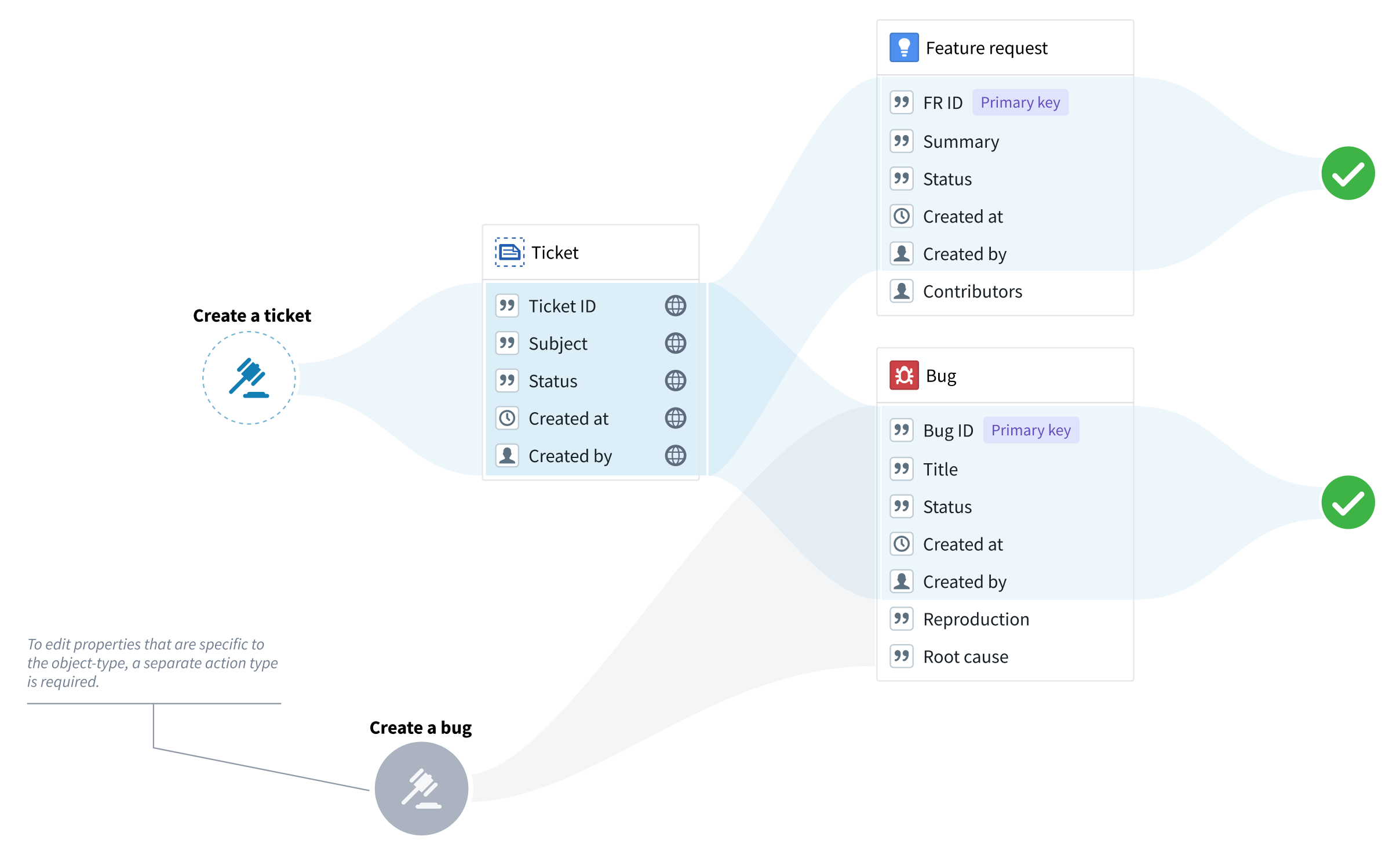
You can use interface action rules whenever the edits can apply to all the object types that implement the interface. In other words, you can use interface action rules only to modify the interface shared properties or to delete objects. For example, if “Feature request” and “Bug” are object types of the “Ticket” interface, you can use a “Create a ticket” action type to create bugs and feature requests, but you cannot create any property types that are specific to bugs or feature requests.
Creating a new interface action type
To set up a new interface action type, choose Action type from the New menu in Ontology Manager.
- Under Interfaces, pick the desired interface and rule type.
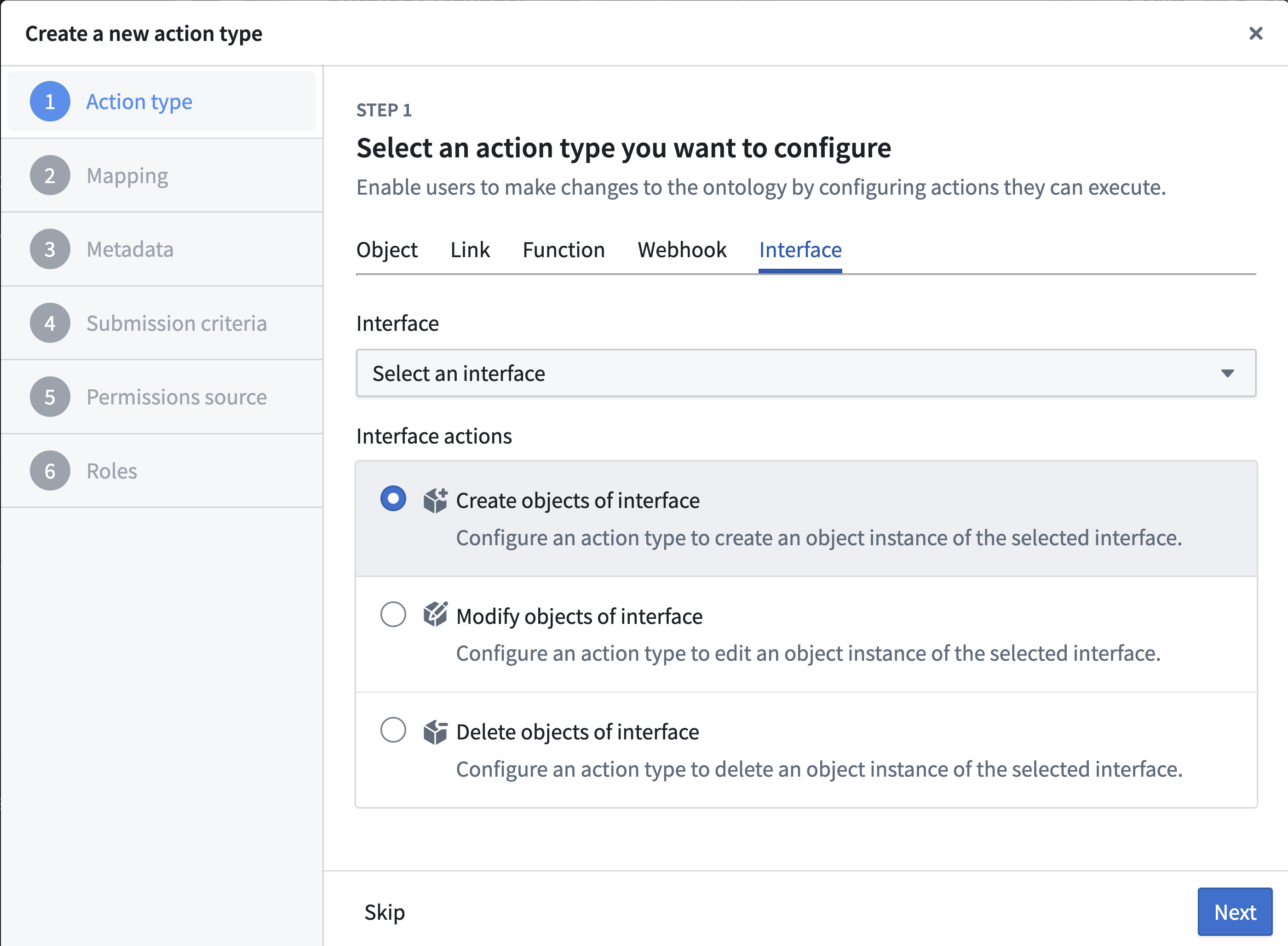
- Add the shared properties that you want to include in the action (if applicable).
- Add metadata to describe your action type. Remember that this metadata should apply to all the object types that implement the interface.
- Under Submission criteria, choose the users that can execute the action (you can apply more complex criteria later on). Remember that these permissions will apply to all object types that implement the interface, as long as the user has permissions to edit them.
- Select Create to finalize the action type.
“Create” actions on interfaces
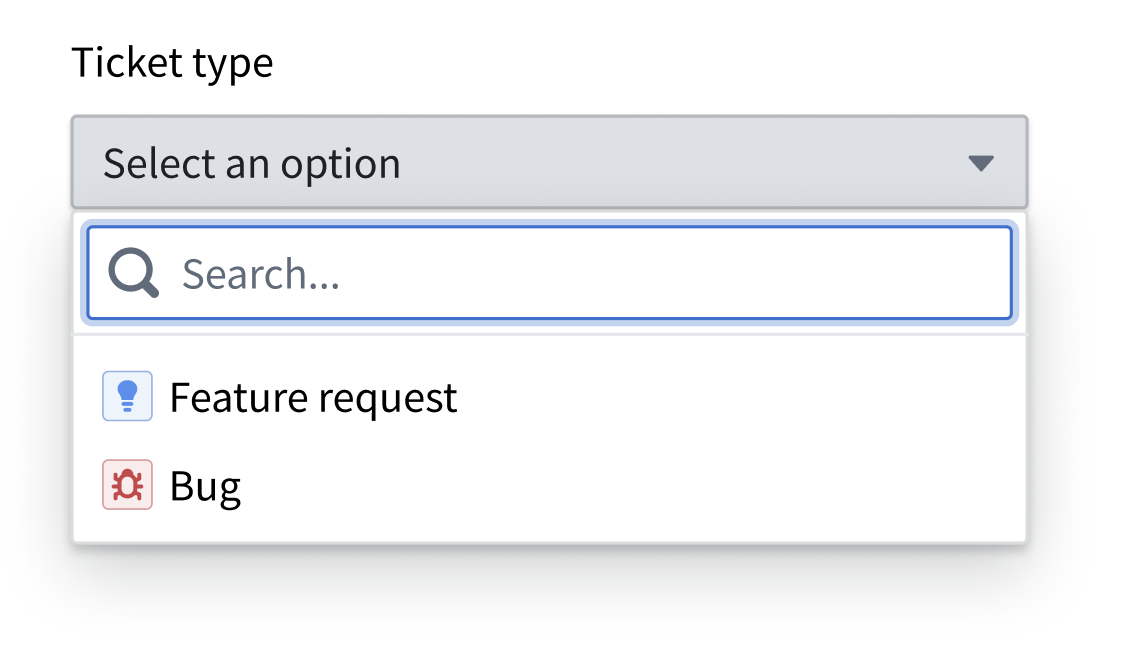
Because the action type is only associated with an interface, an “Object type” parameter will be automatically generated to indicate the object type that should be created. If using a form or a table, the user will be prompted to pick an object type from a list.
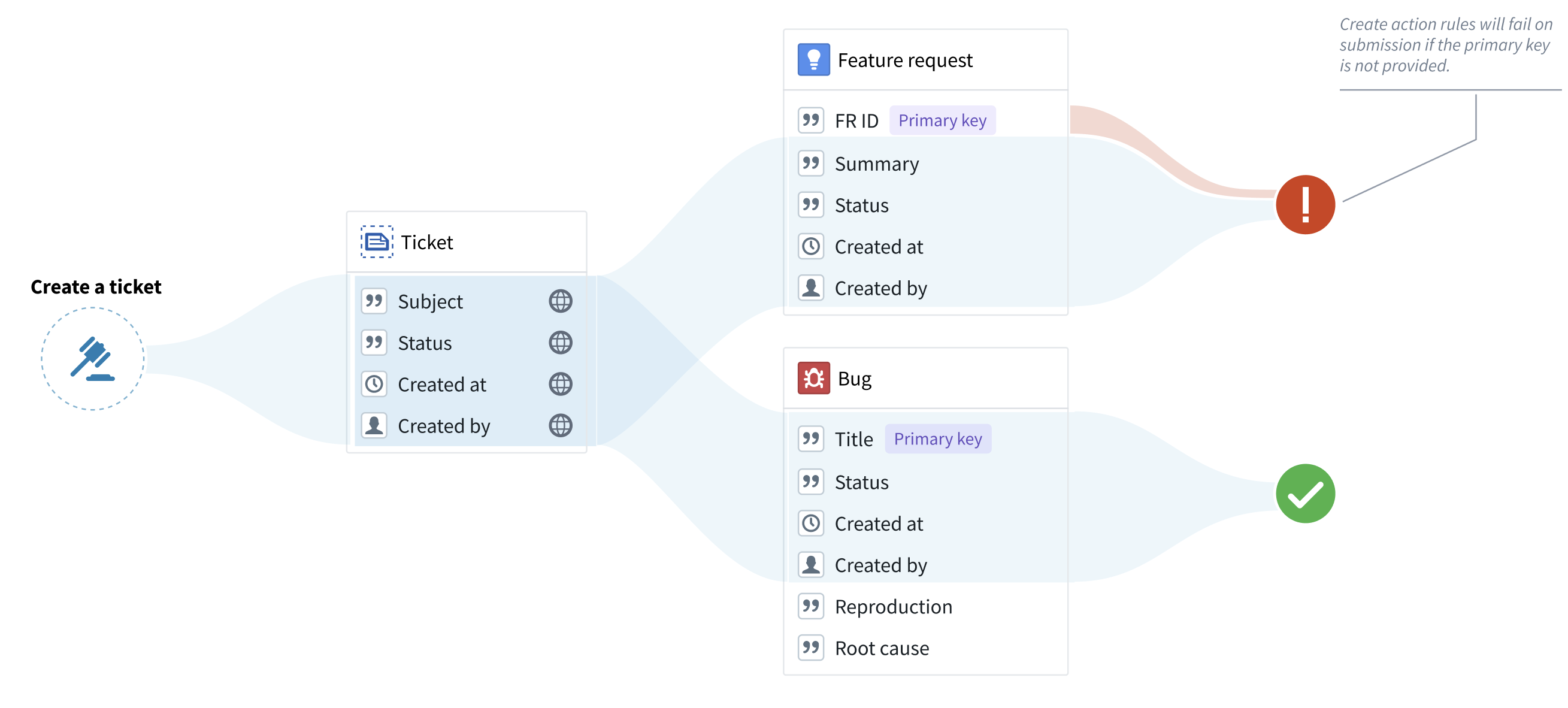
Note that objects cannot be created without a primary key. Therefore, any object type without a primary key assigned in the rule will fail during submission. To avoid failures of this type, make sure that both the interface and the Create rule include an interface property that can be used as the primary key in the object types that implement the interface.
“Modify” actions on interfaces
"Modify" rules on an interface can modify any object of the configured interface. An “interface reference” parameter will be generated, constrained to the selected interface. The "interface reference" parameter is similar to the “object reference” parameter, with the exception that the "interface reference" parameter shows objects of any type that implements the interface. If using a form or a table, the user could then pick an object from a list.
Note that primary key values cannot be modified by any action type. Therefore, an action will fail on submission if the action tries to modify a primary key property for a selected object type. Always ensure that the action rule does not modify properties that are likely to be used as a primary key by some of the object types that implement the interface.
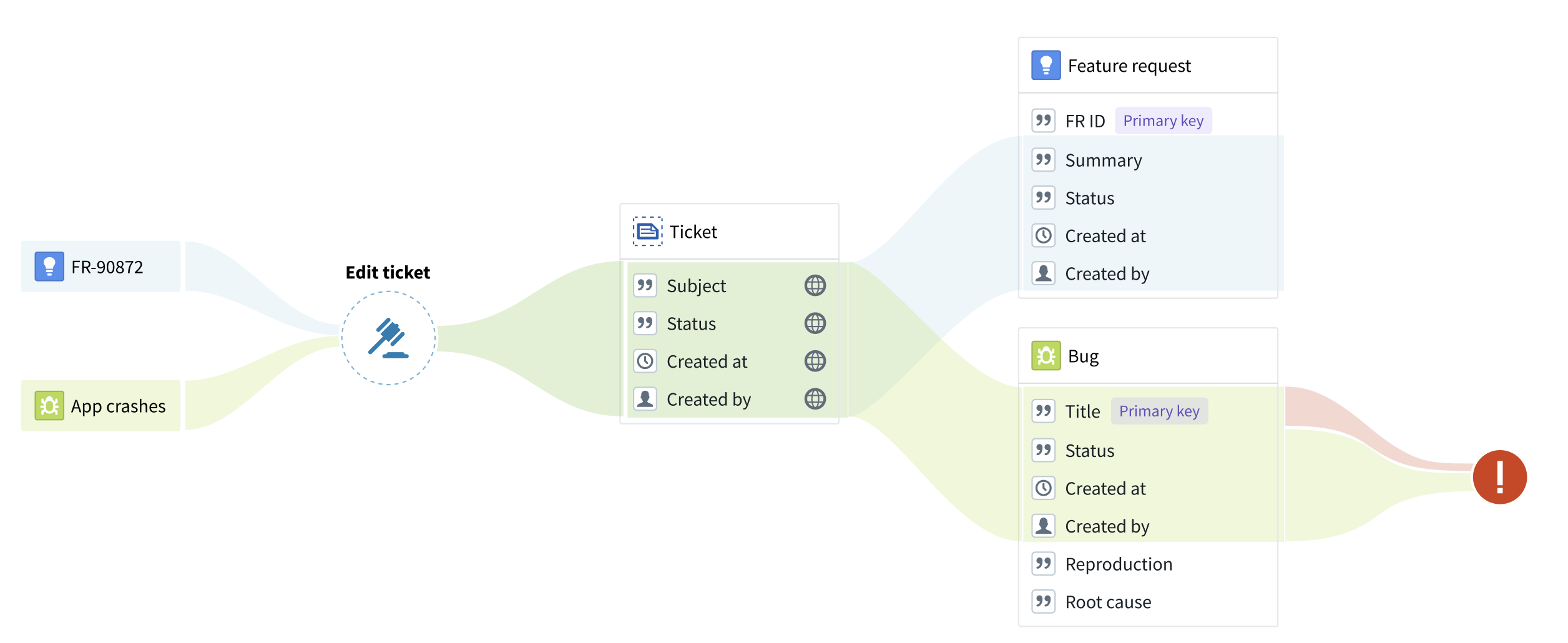
In the example below, the “Title” property is incorrectly used as the primary key for the “Bug” object type. The “Edit ticket” action will fail on submission because the action attempts to change the primary key of the bug.
"Delete" actions on interfaces
"Delete" action rules can have an "interface reference" parameter assigned to them, instead of an object reference parameter. This interface reference, constrained to a specific interface, will indicate the object to be deleted. If using a form or a table, the user could then pick an object from a list.
"Create link" actions on interfaces
"Create interface link" rules allow you to create links using an interface link constraint defined on an interface. To configure a "Create interface link" rule:
- Select the interface you want to create links on.
- Select the interface link constraint defined on the interface. If the link constraint is between two interfaces, both the source and destination parameters will be automatically generated as interface reference parameters. If the link constraint is between an interface and an object type, the source will be an interface reference parameter and the destination will be an object reference parameter.
Optionally, you can also configure the source and destination objects manually if you do not want to use the parameters autogenerated by actions. These can be:
- An interface reference or object reference parameter referencing an existing object.
- An object created by a "Create object" or "Create object(s) of interface" rule within the same action type.
:::callout{theme="warning"} If there are multiple concrete link implementations on the object type for the link constraint, the action will fail. Additionally, creating a one-to-many link modifies the foreign key on the many side of the relationship. Ensure there are no conflicts if your action type also modifies the foreign key using a "Create object" or "Modify object(s)" rule. :::
"Delete link" actions on interfaces
"Delete interface link" rules allow you to delete links using an interface link constraint defined on an interface. To configure a "Delete interface link" rule:
- Select the interface you want to delete links on.
- Select the interface link constraint defined on the interface. If the link constraint is between two interfaces, both the source and destination parameters will be automatically generated as interface reference parameters. If the link constraint is between an interface and an object type, the source will be an interface reference parameter and the destination will be an object reference parameter.
Optionally, you can also manually configure the source and destination objects instead of using the autogenerated parameters. These must be parameters referencing existing objects — either interface reference or object reference parameters.
:::callout{theme="warning"} If there are multiple concrete link implementations on the object type for the link constraint, the action will attempt to delete all the concrete link implementations. :::
Executing actions on interfaces
Actions created with interface action rules can be applied to objects whose object type implements the interface, just like any object-specific action type. For a given object, all object-type-specific and interface-based actions that can be applied to that object will appear in the action dropdown.
Permissions
Interface action rules follow the same permissions as object action types.
See the documentation on action type permissions for more details.
Level of support
As support for interface action rules and reference parameters expands, availability will vary across the Palantir platform.
Supported applications and services
- Ontology Manager: Creation of interface action types and configuration of interface parameters in submission criteria and overrides.
- Object Explorer and Object Views: Rendering of actions defined on interfaces.
Limitations of interface action rules
- Submission criteria apply uniformly across all object types that implement the interface, so you cannot configure different permissions per object type within a single interface action. To restrict access, disable interface actions for specific object types in Ontology Manager by selecting its Interfaces tab and establishing control over actions inherited from an interface in the Interface action control section. The ability to apply more granular permission controls to interface actions is under active development.
- Action logs are not yet supported.
- Actions on interfaces cannot be used with functions.
中文翻译
接口上的操作(Actions on interfaces)
您可以创建适用于所选接口(interface)所有对象的通用操作。在操作中,您可以通过以下两种主要方式使用接口:
- 接口操作规则(Interface action rules): 用于创建、修改、删除和链接已配置接口的对象。
- 接口引用参数(Interface reference parameters): 用于引用已配置接口的对象。此参数是"修改"和"删除"接口操作规则所必需的,但也可用于其他任何操作规则。
接口还可以定义接口操作类型约束,这些约束描述了预期的操作能力,实现对象类型可以通过具体的操作类型来满足这些能力。
操作类型约束定义了接口级别的操作契约;操作规则则定义了提交操作类型时执行的编辑操作。
接口操作类型约束目前是 Ontology Manager 的建模和映射功能,并非面向最终用户的应用或 Ontology SDK 调用接口。
:::callout{theme="warning"} 接口操作提交条件统一适用于实现该接口的所有对象类型。在创建接口操作之前,请仔细审查哪些用户将有权在实现该接口的所有对象类型中创建、修改或删除对象。了解更多关于建立对接口操作的控制。 :::
使用接口操作规则
当编辑操作可以应用于实现接口的所有对象类型时,您可以使用接口操作规则。换句话说,您只能使用接口操作规则来修改接口共享属性或删除对象。例如,如果"功能请求"和"缺陷"是"工单"接口的对象类型,您可以使用"创建工单"操作类型来创建缺陷和功能请求,但不能创建任何特定于缺陷或功能请求的属性类型。
创建新的接口操作类型
要设置新的接口操作类型,请在 Ontology Manager 的新建菜单中选择操作类型。
- 在接口下,选择所需的接口和规则类型。
- 添加您希望在操作中包含的共享属性(如适用)。
- 添加元数据来描述您的操作类型。请记住,此元数据应适用于实现该接口的所有对象类型。
- 在提交条件下,选择可以执行操作的用户(您可以在之后应用更复杂的条件)。请记住,只要用户拥有编辑权限,这些权限将适用于实现该接口的所有对象类型。
- 选择创建以完成操作类型。
接口上的"创建"操作
由于操作类型仅与接口关联,系统会自动生成一个"对象类型"参数,用于指示应创建的对象类型。如果使用表单或表格,系统将提示用户从列表中选择一个对象类型。
请注意,没有主键(primary key)的对象无法创建。因此,任何在规则中未分配主键的对象类型在提交时都会失败。为避免此类失败,请确保接口和创建规则都包含一个接口属性,该属性可用作实现该接口的对象类型的主键。
接口上的"修改"操作
接口上的"修改"规则可以修改已配置接口的任何对象。系统会生成一个"接口引用"参数,该参数被约束到所选接口。"接口引用"参数与"对象引用"参数类似,区别在于"接口引用"参数显示实现该接口的任何类型的对象。如果使用表单或表格,用户可以从列表中选择一个对象。
请注意,主键值不能被任何操作类型修改。因此,如果操作尝试修改所选对象类型的主键属性,提交时将会失败。请始终确保操作规则不会修改可能被某些实现该接口的对象类型用作主键的属性。
在下面的示例中,"标题"属性被错误地用作"缺陷"对象类型的主键。"编辑工单"操作在提交时会失败,因为该操作试图更改缺陷的主键。
接口上的"删除"操作
"删除"操作规则可以分配一个"接口引用"参数,而不是对象引用参数。这个被约束到特定接口的接口引用将指示要删除的对象。如果使用表单或表格,用户可以从列表中选择一个对象。
接口上的"创建链接"操作
"创建接口链接"规则允许您使用在接口上定义的接口链接约束来创建链接。要配置"创建接口链接"规则:
- 选择您要创建链接的接口。
- 选择在接口上定义的接口链接约束。如果链接约束位于两个接口之间,源参数和目标参数将自动生成为接口引用参数。如果链接约束位于接口和对象类型之间,源参数将是接口引用参数,目标参数将是对象引用参数。
如果您不想使用操作自动生成的参数,也可以手动配置源对象和目标对象。这些可以是:
- 引用现有对象的接口引用参数或对象引用参数。
- 在同一操作类型中由"创建对象"或"创建接口对象"规则创建的对象。
:::callout{theme="warning"} 如果对象类型上存在多个针对该链接约束的具体链接实现,操作将会失败。此外,创建一对多链接会修改关系多方的外键。如果您的操作类型还使用"创建对象"或"修改对象"规则修改了该外键,请确保没有冲突。 :::
接口上的"删除链接"操作
"删除接口链接"规则允许您使用在接口上定义的接口链接约束来删除链接。要配置"删除接口链接"规则:
- 选择您要删除链接的接口。
- 选择在接口上定义的接口链接约束。如果链接约束位于两个接口之间,源参数和目标参数将自动生成为接口引用参数。如果链接约束位于接口和对象类型之间,源参数将是接口引用参数,目标参数将是对象引用参数。
如果您不想使用自动生成的参数,也可以手动配置源对象和目标对象。这些必须是引用现有对象的参数——可以是接口引用参数或对象引用参数。
:::callout{theme="warning"} 如果对象类型上存在多个针对该链接约束的具体链接实现,操作将尝试删除所有具体链接实现。 :::
执行接口上的操作
使用接口操作规则创建的操作可以应用于其对象类型实现了该接口的对象,就像任何特定于对象的操作类型一样。对于给定的对象,所有可应用于该对象的特定于对象类型的操作和基于接口的操作都将显示在操作下拉菜单中。
权限
接口操作规则遵循与对象操作类型相同的权限。
有关更多详细信息,请参阅操作类型权限文档。
支持级别
随着对接口操作规则和引用参数的支持不断扩展,Palantir 平台上的可用性将有所不同。
支持的应用程序和服务
- Ontology Manager: 创建接口操作类型以及在提交条件和覆盖中配置接口参数。
- Object Explorer 和 Object Views: 渲染在接口上定义的操作。
接口操作规则的局限性
- 提交条件统一适用于实现该接口的所有对象类型,因此您无法在单个接口操作中为每个对象类型配置不同的权限。要限制访问,请在 Ontology Manager 中通过选择对象类型的接口选项卡,并在接口操作控制部分建立对从接口继承的操作的控制,来禁用特定对象类型的接口操作。更细粒度的接口操作权限控制功能正在积极开发中。
- 操作日志尚不支持。
- 接口上的操作不能与函数(functions)一起使用。