Submission criteria(提交标准)
Submission criteria (formerly known as validations) are the conditions that determine whether an action can be submitted. Submission criteria support encoding business logic into data editing permissions, ensuring Ontology data quality and editing governance.
Submission criteria are created by combining conditions based on the context (like a user or a parameter) and static information to create a logical statement. Submission criteria can incorporate object, relation, and even user information into a logical statement to determine whether an action can be submitted.
:::callout{title="Example"}
For example, an airline might want to change the airplanes listed for a specific flight. The configured action allows users to change the Aircraft object linked to a Flight object. However, the airline only wants selected users (like a flight controller) to be able to use this action, in order to ensure that only aircraft which are still in operation are used. Using submission criteria, builders can ensure that an action which changes the airplane on a flight can only be submitted when the criteria are met by combining the user's membership to a group with the airplane's status at the moment that the action is submitted.
:::
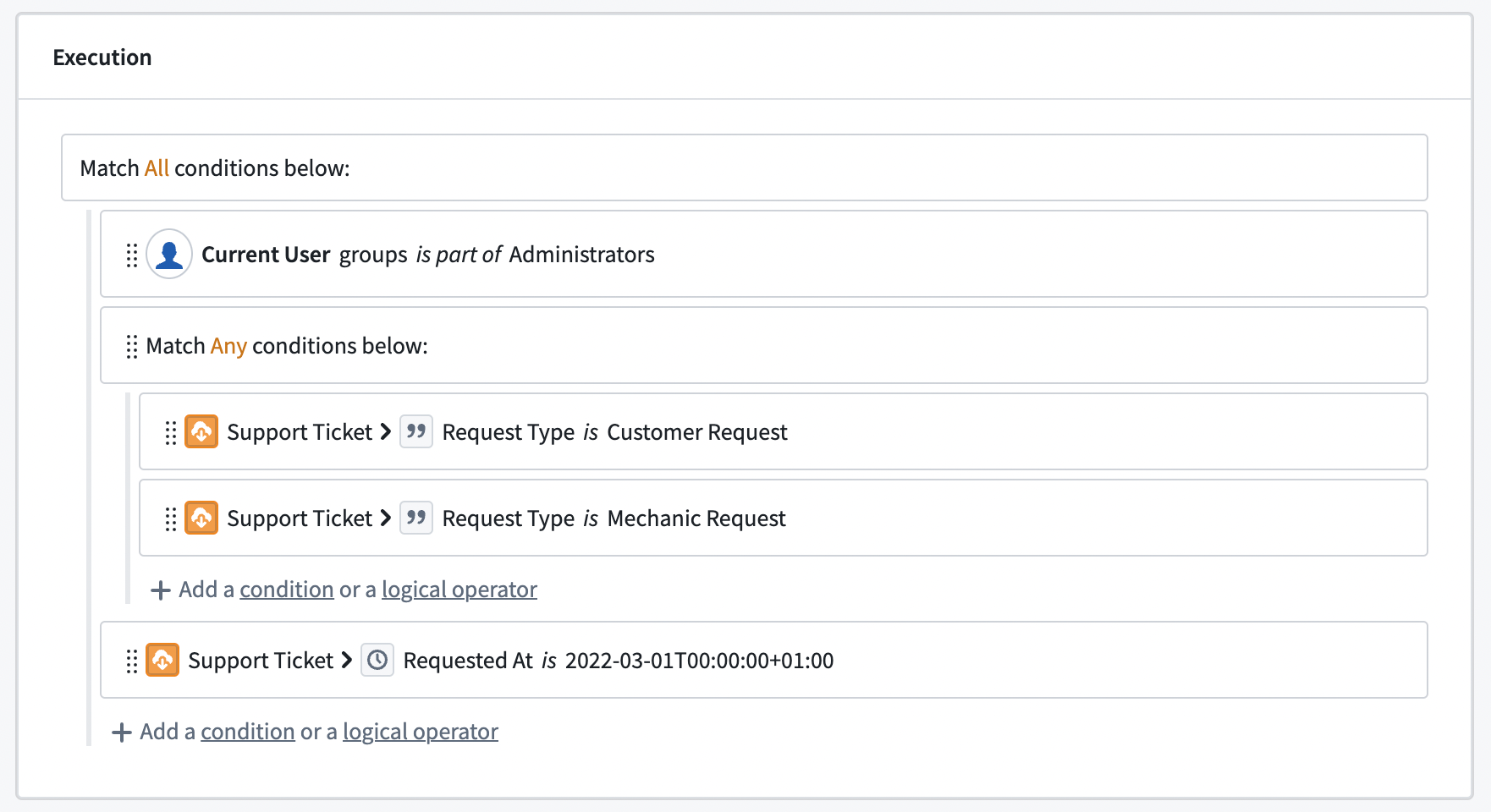
Submission criteria consist of conditions and operators. Conditions are single statements governing the values of parameters or user properties. Operators are used to combine and nest different conditions.
Using the different types of operators, we can create more sophisticated statements, mirroring their business processes and requirements. Actions can only be submitted if all the submission criteria are met. This is independent from the permissions that govern whether a user can edit the action type itself. While an object type can have several action types adding, modifying, and removing objects, each action type has independent submission criteria.
Conditions
A condition is a single comparison check between two values. Each condition either passes or fails based on its parameter or user inputs. A condition can be configured using one of two condition templates: “based on current user” or “based on parameter”. These templates provide a framework for the rest of the condition. Every condition is a simple comparison between two values using an operator in the middle.

:::callout{title="Example"}
Continuing with our example, the flight controller requirement can be set using the Current User template, as it requires the context of the person submitting the action. To know whether an aircraft is still in operation, the Aircraft object needs to be used via the Parameter template.
:::
Current user
The Current User template defines permissions based on the user submitting the action. The Current User input can be used to check a user's ID, group memberships via group IDs, or any other multipass attribute available (such as the user's Organization). Foundry evaluates user IDs as strings, which can be compared against either a statically defined list of user IDs or any string parameter that stores a user ID.
The group IDs option allows you to create conditions using the groups for which the action's user is a member (whether direct or inherited membership). The groups can be compared against a static selection of groups or the group ID provided by other parameters.
Multipass attributes are treated as string lists and can only be compared against other strings or string lists. A user will have a list of proposed multipass attributes that the user has access to. Using the Other user attribute field, conditions can be configured against attributes the user does not have access to. If a user does not have access to an attribute, they will fail the condition.
:::callout{title="Example"} To know whether a user in our example is a flight controller, we need to check if the user is a member of the flight controller group. :::
Parameter
Submission criteria can also use parameters defined in the parameter section. Parameters are passed into an action type from other apps or users themselves. Using conditions on parameters allows builders to embed business logic into the action type and prevent users from submitting actions on data that do not conform with business requirements.
:::callout{title="Example"}
In our example, the operating status is given via the Aircraft object and can change with every aircraft. The condition needs to be built on top of the Aircraft object type parameter.
:::
Submission criteria do not support attachment and object set parameters. These parameter types are removed from the selection panel.
Select a value
After selecting the condition template, choose what value to compare. Some parameters (like lists or object parameters) require a more granular selection of what value should be used in the comparison. We can also choose to compare the length of a list instead of its content.

:::callout{title="Example"}
In the aircraft example, the operating status of an aircraft is stored in the property on the Aircraft object.
:::
Operators
Operators define the comparison between the two values. To simplify the configuration workflow, operators are pre-filtered to only show a selection of operators valid for the parameter. When a parameter is changed, all conditions using this parameter need to be reconfigured.

There are multiple operators available depending on the selected parameters. For single value parameters, the following operators are available:
| Operator | Example | Data Example | Description |
|---|---|---|---|
| is | name is John Doe | "John Doe" is "John Doe" = TRUE | The left value exactly matches the right value. |
| is not | Current User is not John Doe | “John Doe" is not "Maria Smith" = TRUE | The left value and right value do not match. |
| matches | name matches ^[A | E | I |
| is less than | Aircraft > Engine Count is less than 2 | 4 is less than 2 = TRUE | The left value is smaller than the right value. |
| is greater than or equals | Aircraft > Engine Count is greater than or equals 2 | 4 is greater than or equals 2 = TRUE | The left value is greater than the right value. |
For parameters with multiple values, the following operators are available. Object reference lists are turned into a list of values (either the object value or the value of the defined property): |Operator |Example |Data Example |Description | |--- |--- |--- |--- | |includes |Aircrafts > Pilot Name includes "John Doe" |[ "John Doe", "Maria Smith" ] includes "John Doe" = TRUE |At least one of the left values exactly matches the right value. | |includes any |List of names includes any Aircrafts > Pilot Name |["King Louis", "John Doe"] is included in [ "John Doe", "Maria Smith" ] = TRUE |At least one of the left values exactly matches at least one of the right values. | |is included in |name is included in [ "John Doe", "Maria Smith" ] | "John Doe" is included in [ "John Doe", "Maria Smith" ] = TRUE |The left value exactly matches at least one of the right values. | |each is |Aircrafts > Pilot Name each is "John Doe" |[ "John Doe", "Maria Smith" ] each is "John Doe" = FALSE |All left values exactly match the right value. | |each is not |Aircrafts > Pilot Name each is not "John Doe" |[ "John Doe", "Maria Smith" ] each is not "King Louis" = TRUE |All left values do not exactly match the right value. |
:::callout{title="Example"}
Since a user in our example is a member of many groups but the comparison is to a single group, we need to select the includes operator to check for an overlap. However, the operating status needs to exactly match an expected status, so the is operator must be set.
:::
Value
The value represents the other side of the comparison. The value can either be based on an existing parameter, a static value, or no value. No value checks whether the first value is empty (or null). Like the operator, the available options depend on the first value type.

:::callout{title="Example"}
We can now finalize the two conditions needed in the aircraft example. For flight controllers, the correct group needs to be selected as a static parameter. This is because the group should not change, but should stay the same every time an Action is submitted, regardless of the context. Hence the specific value is used and the desired group is selected via the dropdown. An aircraft is considered operational when the operating status property is Yes, which can be set using the specific value option again.
:::
Logical operators
A logical operator can be used to combine different conditions. Logical operators can also be nested to create even more complex logic and can require either all, any, or no conditions underneath it to be met to pass.
Failure message
Failure messages support defining what error should be displayed whenever the Action cannot be submitted. Every condition and logical operator on the root level has its own failure message. If conditions of lower levels are not met, the failure message of the corresponding root level (parent) is displayed. The failure message will be displayed to the end user across Foundry (Object Explorer, Workshop, or Quiver) whenever a condition is not met. The failure message informs the user about why they are blocked from submitting an Action.
中文翻译
提交标准
提交标准(Submission criteria,以前称为验证)是决定操作能否提交的条件。提交标准支持将业务逻辑编码到数据编辑权限中,确保本体数据质量和编辑治理。
提交标准通过基于上下文(如用户或参数)和静态信息的条件组合来创建逻辑语句。提交标准可以将对象、关系甚至用户信息整合到逻辑语句中,以判断操作是否可以提交。
:::callout{title="示例"}
例如,一家航空公司可能想要更改特定航班上列出的飞机。配置的操作允许用户更改链接到Flight对象的Aircraft对象。然而,航空公司只希望选定的用户(如航班调度员)能够使用此操作,以确保只使用仍在运营中的飞机。通过使用提交标准,构建者可以确保更改航班飞机的操作只有在满足条件时才能提交,具体方式是将用户的组成员身份与提交操作时飞机的状态相结合。
:::
提交标准由条件和运算符组成。条件是管理参数值或用户属性的单一语句。运算符用于组合和嵌套不同的条件。
通过使用不同类型的运算符,我们可以创建更复杂的语句,以反映其业务流程和需求。只有满足所有提交标准时,操作才能提交。这与管理用户是否可以编辑操作类型本身的权限无关。虽然一个对象类型可以有多个添加、修改和删除对象的操作类型,但每个操作类型都有独立的提交标准。
条件
条件是两个值之间的单一比较检查。每个条件根据其参数或用户输入要么通过要么失败。条件可以使用两种条件模板之一进行配置:"基于当前用户"或"基于参数"。这些模板为条件的其余部分提供了框架。每个条件都是使用中间运算符对两个值进行的简单比较。
:::callout{title="示例"}
继续我们的示例,航班调度员的要求可以使用Current User模板设置,因为它需要提交操作的用户上下文。要了解飞机是否仍在运营,需要通过Parameter模板使用Aircraft对象。
:::
当前用户
Current User模板根据提交操作的用户定义权限。Current User输入可用于检查用户的ID、通过组ID检查组成员身份,或任何可用的多通行证属性(如用户所属组织)。Foundry将用户ID作为字符串处理,可以将其与静态定义的用户ID列表或任何存储用户ID的字符串参数进行比较。
组ID选项允许您使用操作用户所属的组(无论是直接成员还是继承成员)来创建条件。这些组可以与静态选择的组或其他参数提供的组ID进行比较。
多通行证属性被视为字符串列表,只能与其他字符串或字符串列表进行比较。用户将拥有一个其有权访问的多通行证属性列表。使用Other user attribute字段,可以针对用户无权访问的属性配置条件。如果用户无权访问某个属性,他们将无法通过该条件。
:::callout{title="示例"} 要了解我们示例中的用户是否为航班调度员,我们需要检查该用户是否是航班调度员组的成员。 :::
参数
提交标准也可以使用参数部分中定义的参数。参数从其他应用或用户本身传递到操作类型中。通过对参数使用条件,构建者可以将业务逻辑嵌入到操作类型中,并防止用户提交不符合业务要求的数据操作。
:::callout{title="示例"}
在我们的示例中,运营状态通过Aircraft对象给出,并且可能随每架飞机而变化。该条件需要基于Aircraft对象类型参数构建。
:::
提交标准不支持附件和对象集参数。这些参数类型将从选择面板中移除。
选择值
选择条件模板后,选择要比较的值。某些参数(如列表或对象参数)需要更精细地选择比较中应使用的值。我们也可以选择比较列表的长度而不是其内容。
:::callout{title="示例"}
在飞机示例中,飞机的运营状态存储在Aircraft对象的属性中。
:::
运算符
运算符定义两个值之间的比较。为简化配置工作流程,运算符会预先过滤,仅显示对该参数有效的运算符选择。当参数更改时,使用该参数的所有条件都需要重新配置。
根据所选参数,有多个运算符可用。对于单值参数,以下运算符可用:
| 运算符 | 示例 | 数据示例 | 描述 |
|---|---|---|---|
| is | name is John Doe | "John Doe" is "John Doe" = TRUE | 左侧值与右侧值完全匹配。 |
| is not | Current User is not John Doe | "John Doe" is not "Maria Smith" = TRUE | 左侧值与右侧值不匹配。 |
| matches | name matches ^[A|E|I|O|U]* | "John Doe" matches | 左侧值与正则表达式匹配。 |
| is less than | Aircraft > Engine Count is less than 2 | 4 is less than 2 = TRUE | 左侧值小于右侧值。 |
| is greater than or equals | Aircraft > Engine Count is greater than or equals 2 | 4 is greater than or equals 2 = TRUE | 左侧值大于或等于右侧值。 |
对于多值参数,以下运算符可用。对象引用列表会转换为值列表(对象值或定义属性的值): |运算符|示例|数据示例|描述| |---|---|---|---| |includes|Aircrafts > Pilot Name includes "John Doe"|[ "John Doe", "Maria Smith" ] includes "John Doe" = TRUE|至少一个左侧值与右侧值完全匹配。| |includes any|List of names includes any Aircrafts > Pilot Name|["King Louis", "John Doe"] is included in [ "John Doe", "Maria Smith" ] = TRUE|至少一个左侧值与至少一个右侧值完全匹配。| |is included in|name is included in [ "John Doe", "Maria Smith" ]|"John Doe" is included in [ "John Doe", "Maria Smith" ] = TRUE|左侧值与至少一个右侧值完全匹配。| |each is|Aircrafts > Pilot Name each is "John Doe"|[ "John Doe", "Maria Smith" ] each is "John Doe" = FALSE|所有左侧值都与右侧值完全匹配。| |each is not|Aircrafts > Pilot Name each is not "John Doe"|[ "John Doe", "Maria Smith" ] each is not "King Louis" = TRUE|所有左侧值都不与右侧值完全匹配。|
:::callout{title="示例"}
由于我们示例中的用户是多个组的成员,但比较是针对单个组,我们需要选择includes运算符来检查重叠。然而,运营状态需要与预期状态完全匹配,因此必须设置is运算符。
:::
值
值代表比较的另一侧。值可以基于现有参数、静态值或无值。无值检查第一个值是否为空(或null)。与运算符一样,可用选项取决于第一个值的类型。
:::callout{title="示例"}
我们现在可以完成飞机示例中所需的两个条件。对于航班调度员,需要选择正确的组作为静态参数。这是因为该组不应更改,而应在每次提交操作时保持不变,无论上下文如何。因此使用specific value,并通过下拉菜单选择所需的组。当运营状态属性为Yes时,飞机被视为可运营,这可以再次使用特定值选项进行设置。
:::
逻辑运算符
逻辑运算符可用于组合不同的条件。逻辑运算符也可以嵌套以创建更复杂的逻辑,并且可以要求其下的所有、任意或无条件满足才能通过。
失败消息
失败消息支持定义当操作无法提交时应显示的错误信息。根级别的每个条件和逻辑运算符都有自己的失败消息。如果较低级别的条件未满足,则会显示相应根级别(父级)的失败消息。当条件未满足时,该失败消息将在整个Foundry(对象资源管理器、Workshop或Quiver)中显示给最终用户。失败消息告知用户为何无法提交操作。