Approvals(审批 (Approvals))
A user may not have permission to make a particular change in Foundry and needs to make a request for that change. This request gets routed to administrators for approval. The request is invoked when the necessary approvals are obtained, meaning that the requested changes are applied.
This workflow of requesting, approving, and invoking a change in Foundry is managed by the Approvals application. This application can be accessed directly in Foundry, or in Control Panel for certain administrative workflows. Approvals consolidates compliance, governance, and peer-review workflows, making them easy to manage in Foundry. Some example workflows that use approvals are Project access requests and Review ontology proposals.
Core concepts
Requests are made up of one or many tasks. All requests are listed in the Approvals inbox.
Approvals inbox
The Approvals inbox allows users to search for relevant requests for efficient processing. Here, users can filter requests by attributes like type, creator or status.
Filters are located in the left sidebar. To view requests awaiting your review, select the Your inbox filter. To view requests created by you, select the Created by you filter.
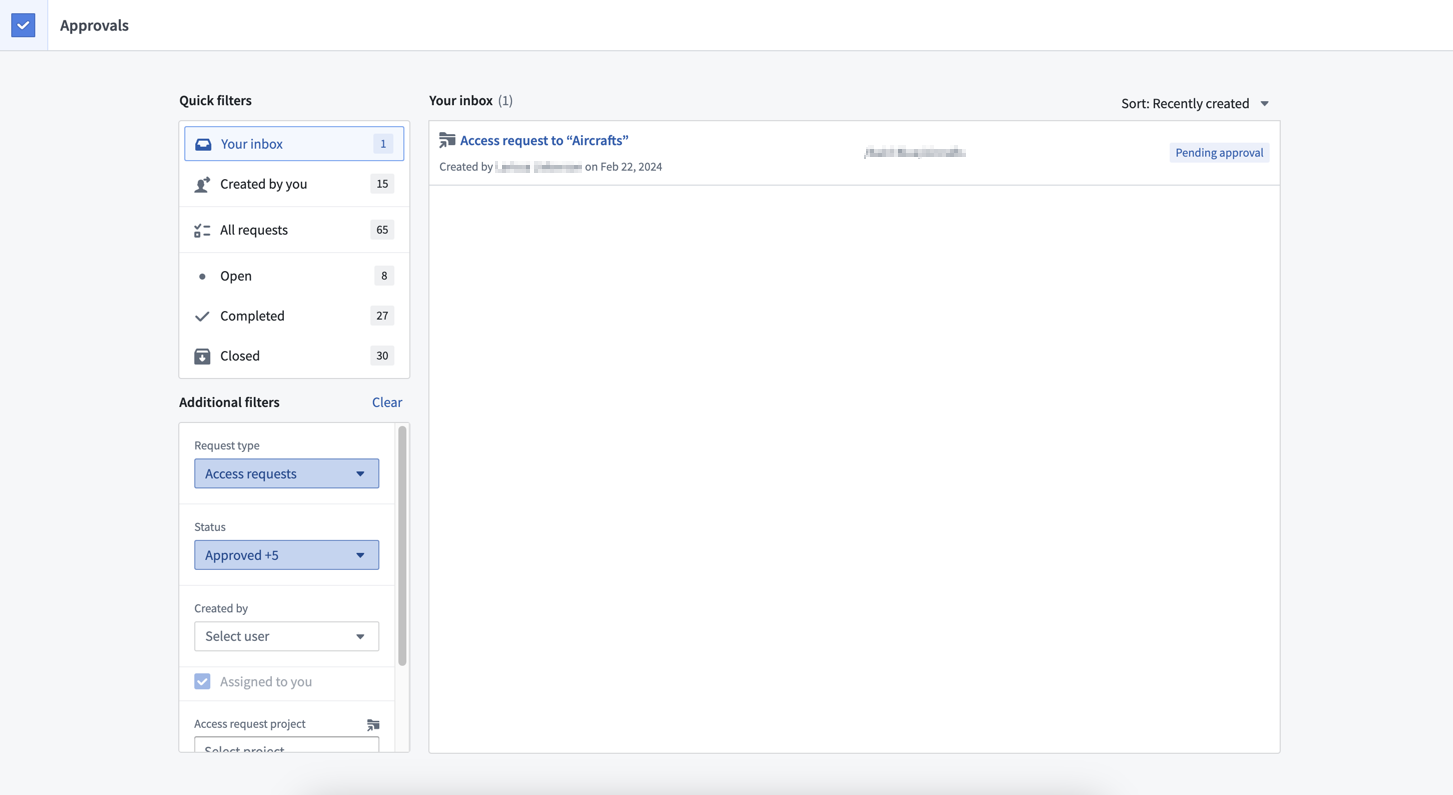
Requests are persisted even if they have been completed, so you can reference them as an audit log of past decisions.
Requests
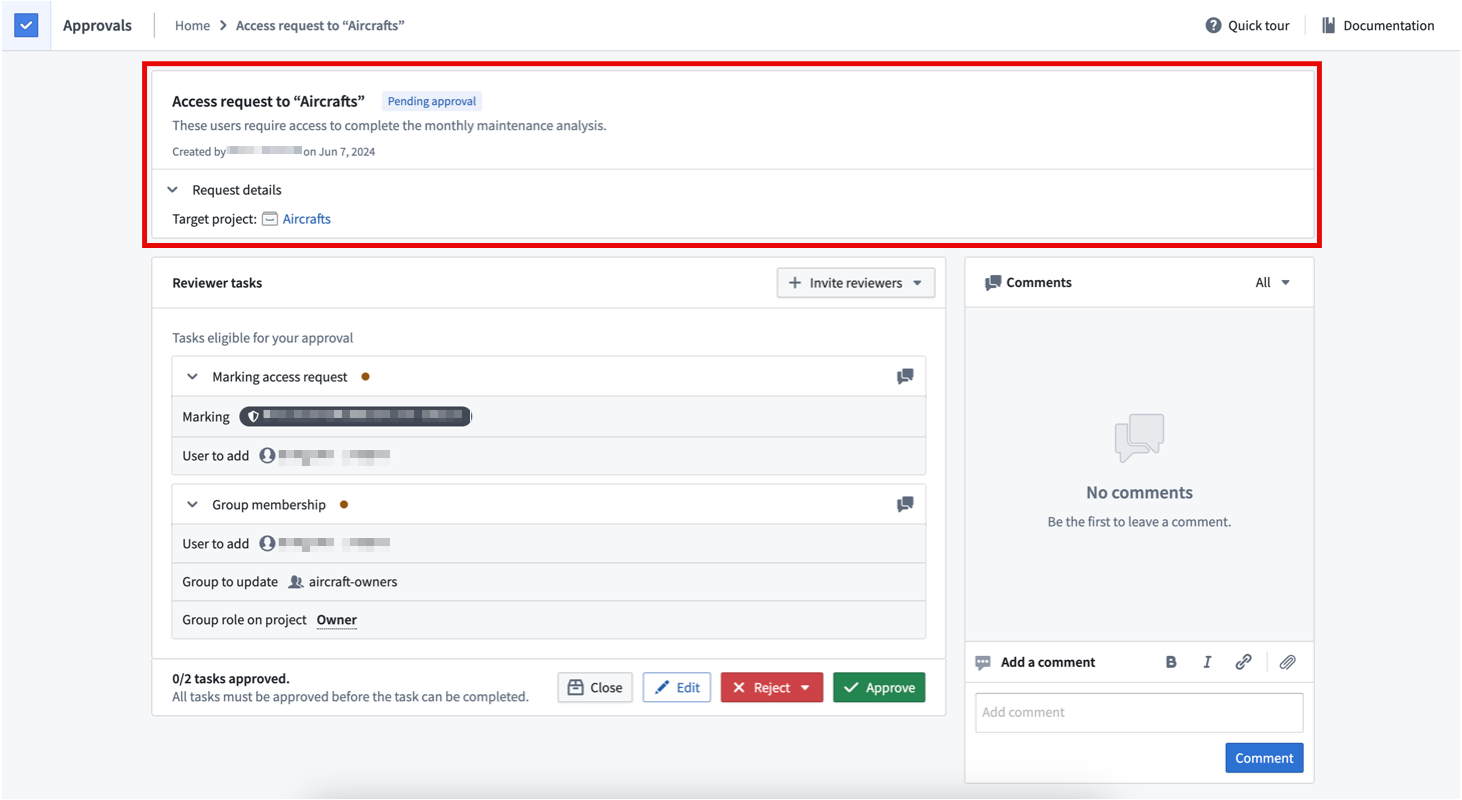
A request includes a set of tasks that must all be approved for the tasks to be invoked, which applies the requested changes. In the Approvals application, the inbox is a list of requests.
Requests can be in any of the following states:
- Pending approval: An open request with tasks that require approval for the request to be invoked.
- Closed: A request that has been closed without being invoked. A closed request cannot be reopened. Eligible users can close a request if it is no longer relevant.
- Rejected and Closed: A request that has been rejected by a reviewer and closed without being invoked. The request cannot be reopened.
- Changes requested: A request that a reviewer has requested changes to. The request stays open and eligible users can edit it or provide further justification to comply with the necessary changes.
- Action required: A request with approval for all tasks that cannot be invoked without some user action. For example, if a request is approved, but required checkpoints are incomplete, the request cannot be invoked until the checkpoints are submitted.
- Completed: A request that has been invoked because all of its tasks have been approved.
Request actions
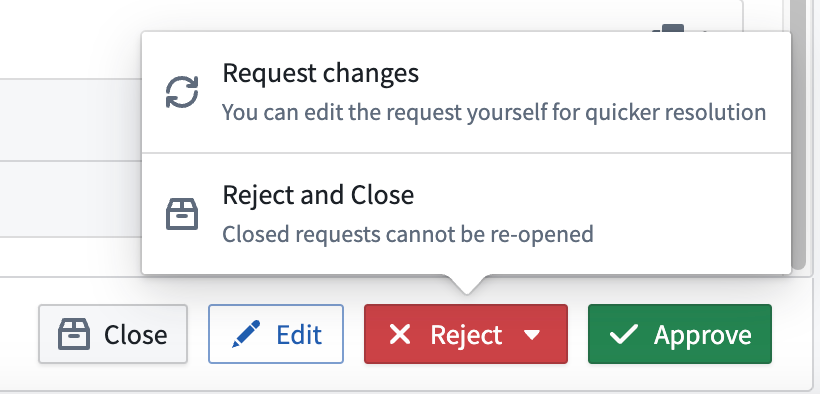
Requests can be edited or closed by the requesting user or by any eligible reviewers. Only eligible reviewers can approve, reject or reject and close a request.
If a request has multiple tasks with different eligible reviewers, actions by a reviewer are only applied to the tasks they are eligible to review. Actions can only be taken on a request level and are applied to tasks accordingly.
Tasks
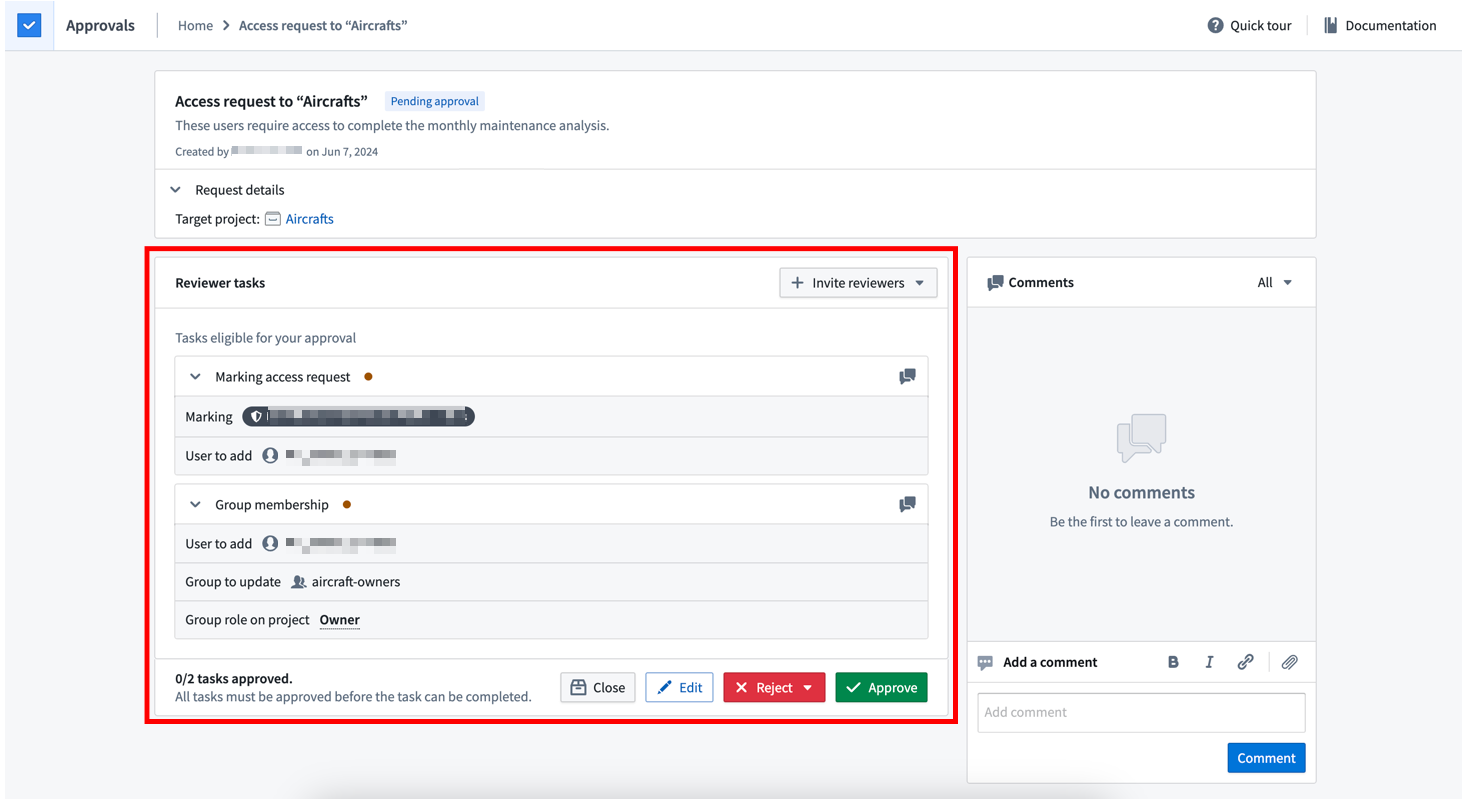
A task is an individual change in Foundry. All tasks associated with a request must be approved for the request to be invoked and requested changes to be applied. Some examples of tasks include:
- Group membership: Add a user as a member of a group. Administrators with
Manage permissionsand/orManage membershippermissions on the group can approve this task. - Project access request: Directly grant a user a role on a Project. Users who have the Owner role on the Project can approve this task.
- Marking access request: Add a user as a member of a Marking. Administrators who have
Manage permissionson this Marking can approve this task. - Add reference request: Add a reference to a Project. Users who have the Editor or Owner role on the Project can approve this task.
- Ontology proposal: Make changes to the Ontology. This task will redirect to the Ontology Manager for further details of the proposed change. Administrators who have the Owner role on the Ontology can approve this task.
Tasks move through a lifecycle of different states:
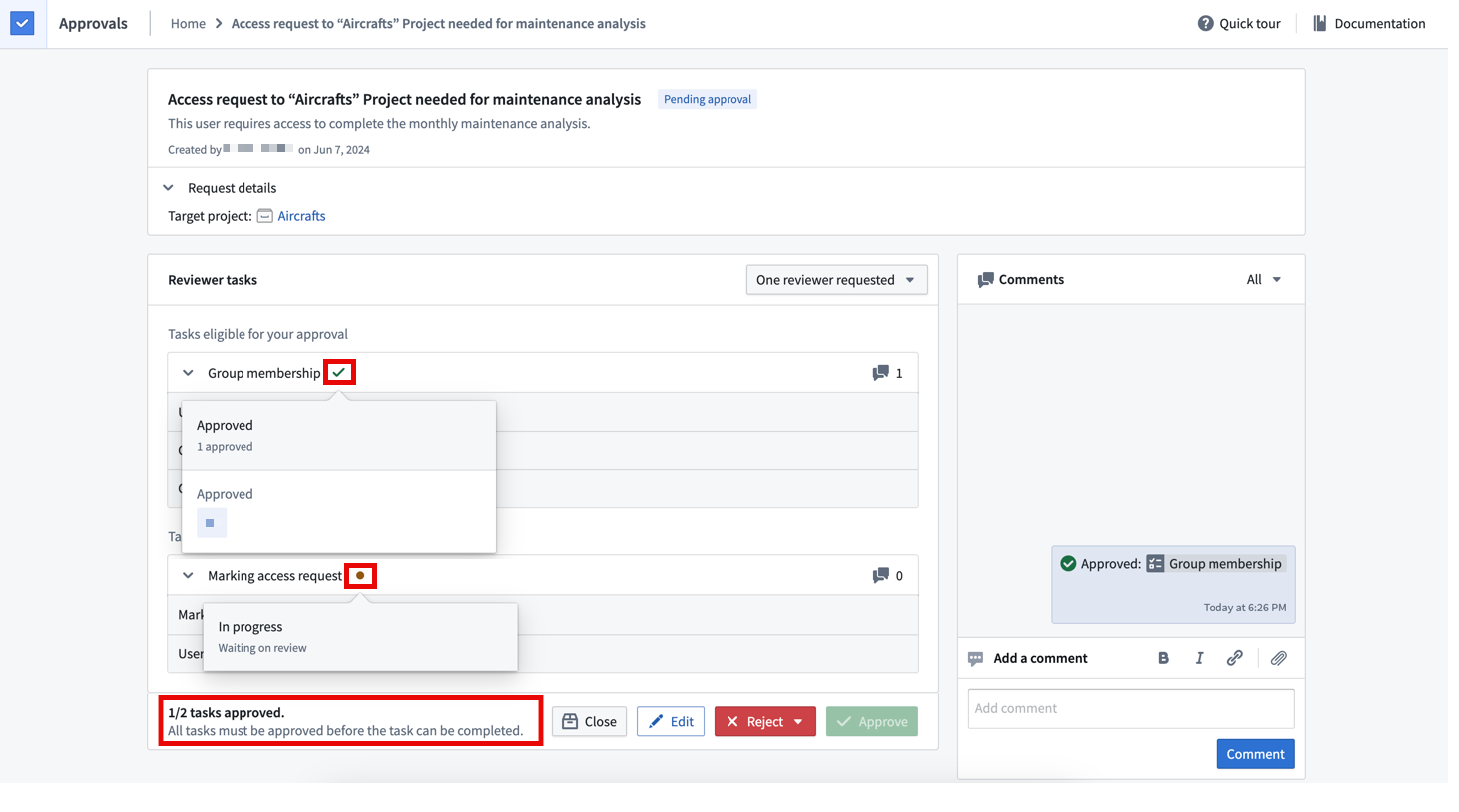
- Review: The requirements for the task have not been met, and the task is waiting for eligible reviewer(s). This is the default state for tasks in a newly created request.
- Approved: All requirements for the task have been met, and required approval has been received.
- Rejected: The task was rejected by an eligible reviewer. This happens when a reviewer takes the
Reject and closeor theChanges requestedaction. If the request has not been closed, an eligible reviewer can return to this task and override the initial rejection with an approval.
Within the same request, tasks may have different eligible reviewers, so different tasks in the same request can be in different states, as shown below. All tasks need to be approved for the request to be invoked.
Required checkpoints
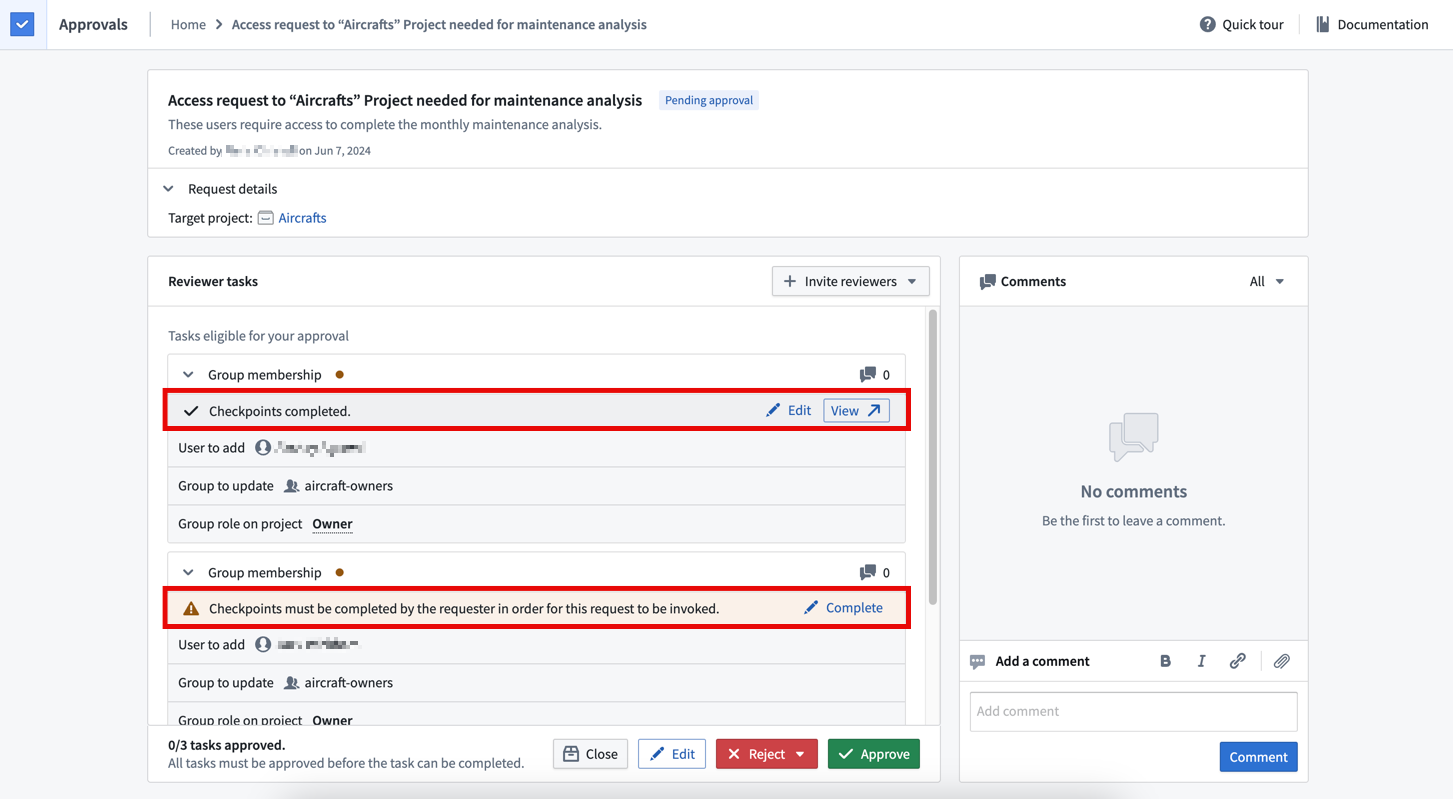
If checkpoints have been configured for certain actions (for example, adding a user to a group), then justifications will also be required for associated requests.
The corresponding tasks will display whether checkpoints have been completed or not. The requesting user is usually required to complete checkpoints when the request is made. If that does not happen, eligible reviewers can complete checkpoints on behalf of the requesting user.
Notifications
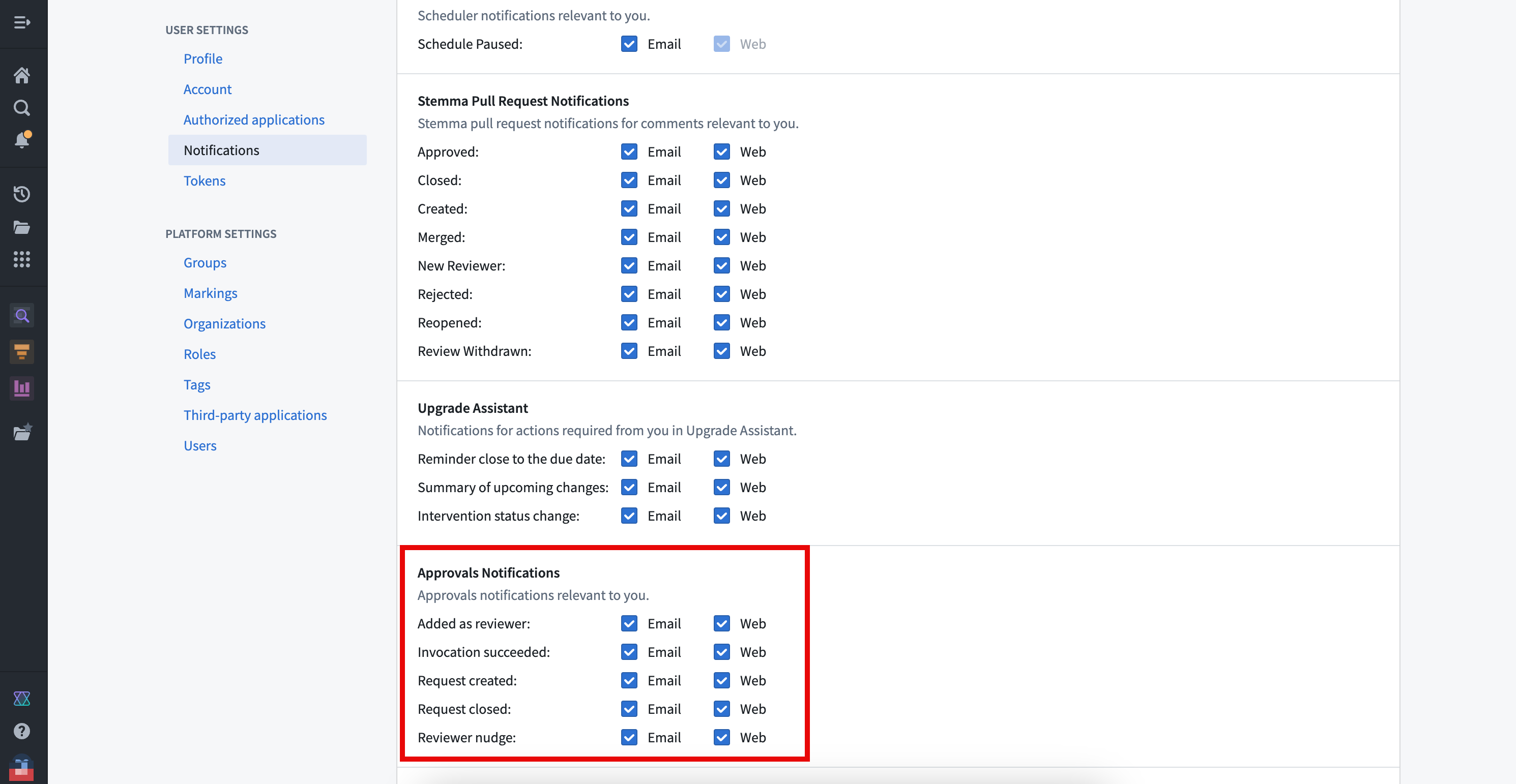
Requesters and reviewers are notified by email or in Foundry at different points in the request lifecycle. Configure platform notification settings in Account > Settings > Notifications. The following Approvals notifications are available for configuration:
- Added as reviewer: You were added as a reviewer on a request. Notifications occur when a request is first created. If you are added as a reviewer on a request because of your membership in a group, you will only be notified if there are fewer than 50 users with membership to that group. This is done to avoid sending notifications to large groups. Notifications also occur when a user manually adds you as a reviewer.
- Invocation succeeded: A request you reviewed was successfully invoked.
- Request closed: A request that you created or that you were a reviewer on was closed.
- Request created: You created a request.
- Reviewer nudge: You were nudged for a request that still needs your review.
中文翻译
审批 (Approvals)
用户可能没有权限在 Foundry 中进行特定更改,因此需要提交更改请求。该请求会被路由至管理员处进行审批。当获得必要的审批后,请求即被调用,这意味着所请求的更改将被应用。
这种在 Foundry 中请求、审批和调用更改的工作流程由 审批 (Approvals) 应用程序管理。该应用程序可直接在 Foundry 中访问,也可在控制面板 (Control Panel) 中用于某些管理工作流程。审批功能整合了合规、治理和同行评审工作流程,使其在 Foundry 中易于管理。一些使用审批功能的示例工作流程包括项目访问请求 (Project access requests) 和审查本体提案 (Review ontology proposals)。
核心概念
请求 (Requests) 由一个或多个任务 (Tasks) 组成。所有请求都列在审批收件箱 (Approvals inbox) 中。
审批收件箱 (Approvals inbox)
审批收件箱允许用户搜索相关请求以便高效处理。在此处,用户可以按类型、创建者或状态等属性筛选请求。
筛选器位于左侧边栏。要查看待您审阅的请求,请选择 您的收件箱 (Your inbox) 筛选器。要查看您创建的请求,请选择 由您创建 (Created by you) 筛选器。
即使请求已完成,它们也会被保留,因此您可以将其作为过去决策的审计日志进行参考。
请求 (Requests)
一个请求包含一组任务,这些任务必须全部获得批准才能被调用,从而应用所请求的更改。在审批应用程序中,收件箱是一个请求列表。
请求可以处于以下任一状态:
- 待审批 (Pending approval): 一个开放的请求,其任务需要获得批准才能被调用。
- 已关闭 (Closed): 一个已关闭但未被调用的请求。已关闭的请求无法重新打开。如果请求不再相关,有权限的用户可以关闭它。
- 已拒绝并关闭 (Rejected and Closed): 一个已被审阅者拒绝且已关闭但未被调用的请求。该请求无法重新打开。
- 已请求更改 (Changes requested): 审阅者已请求对请求进行更改。该请求保持开放状态,有权限的用户可以编辑它或提供进一步的理由以符合必要的更改。
- 需要操作 (Action required): 一个所有任务均已获得批准,但需要用户执行某些操作才能被调用的请求。例如,如果请求已获批准,但必需的检查点 (checkpoints) 未完成,则在提交检查点之前,该请求无法被调用。
- 已完成 (Completed): 一个因其所有任务均已获得批准而被调用的请求。
请求操作 (Request actions)
请求可以由请求用户或任何有资格的审阅者编辑或关闭。只有有资格的审阅者才能对请求执行 批准 (approve)、拒绝 (reject) 或 拒绝并关闭 (reject and close) 操作。
如果一个请求包含多个任务,且这些任务有不同的有资格审阅者,则审阅者的操作仅适用于他们有资格审阅的任务。操作只能在请求级别执行,并相应地应用于任务。
任务 (Tasks)
任务是 Foundry 中的单个更改。与请求关联的所有任务都必须获得批准,请求才能被调用,所请求的更改才能被应用。任务的一些示例包括:
- 组成员资格 (Group membership): 将用户添加为组 (group) 的成员。对该组拥有
管理权限 (Manage permissions)和/或管理成员资格 (Manage membership)权限的管理员可以批准此任务。 - 项目访问请求 (Project access request): 直接授予用户在项目 (Project) 上的角色 (role)。对项目拥有所有者 (Owner) 角色的用户可以批准此任务。
- 标记访问请求 (Marking access request): 将用户添加为标记 (Marking) 的成员。对此标记拥有
管理权限 (Manage permissions)权限的管理员可以批准此任务。 - 添加引用请求 (Add reference request): 向项目 (Project) 添加引用 (reference)。对项目拥有编辑者 (Editor) 或所有者 (Owner) 角色的用户可以批准此任务。
- 本体提案 (Ontology proposal): 对本体 (Ontology) 进行更改。此任务将重定向到本体管理器 (Ontology Manager) 以获取有关提议更改的更多详细信息。对本体拥有所有者 (Owner) 角色的管理员可以批准此任务。
任务会经历不同状态的生命周期:
- 审阅 (Review): 任务的要求尚未满足,正在等待有资格的审阅者。这是新创建请求中任务的默认状态。
- 已批准 (Approved): 任务的所有要求均已满足,并且已收到所需的批准。
- 已拒绝 (Rejected): 任务被有资格的审阅者拒绝。当审阅者执行
拒绝并关闭 (Reject and close)或已请求更改 (Changes requested)操作时会发生这种情况。如果请求尚未关闭,有资格的审阅者可以返回此任务,并用批准覆盖最初的拒绝。
在同一个请求中,不同的任务可能有不同的有资格审阅者,因此同一请求中的不同任务可能处于不同状态,如下所示。所有任务都需要获得批准,请求才能被调用。
必需的检查点 (Required checkpoints)
如果已为某些操作(例如,将用户添加到组)配置了检查点 (checkpoints),则相关请求也将需要提供理由。
相应的任务将显示检查点是否已完成。请求用户通常需要在提交请求时完成检查点。如果未完成,有资格的审阅者可以代表请求用户完成检查点。
通知 (Notifications)
在请求生命周期的不同阶段,请求者和审阅者会通过电子邮件或在 Foundry 中收到通知。在 账户 (Account) > 设置 (Settings) > 通知 (Notifications) 中配置平台通知设置。以下审批通知可供配置:
- 被添加为审阅者 (Added as reviewer): 您被添加为某个请求的审阅者。在首次创建请求时会发生通知。如果您因属于某个组 (group) 的成员而被添加为请求的审阅者,则仅当该组成员少于 50 人时,您才会收到通知。这样做是为了避免向大型群组发送通知。当用户手动将您添加为审阅者时,也会发生通知。
- 调用成功 (Invocation succeeded): 您审阅过的请求已成功调用。
- 请求已关闭 (Request closed): 您创建的或您作为审阅者的请求已关闭。
- 请求已创建 (Request created): 您创建了一个请求。
- 审阅者提醒 (Reviewer nudge): 您因一个仍需您审阅的请求而被提醒。