Auto-refresh in Workshop(Workshop 中的自动刷新(Auto-refresh))
Workshop auto-refresh allows builders to easily create applications that automatically update as data changes in Foundry. Providing reliable, up-to-date information to users is critical for supporting operational workflows, and Workshop makes this possible in a just few clicks.
With auto-refresh, you can register object sets within a module to be watched for updates from anywhere in Foundry. When an update occurs, all data in the current module will automatically refresh without user interaction. Examples of update sources include ontology data updates due to Actions taken by other users, edits from an upstream data integration, or new records from a streaming data source. In these cases, auto-refresh will update the data in the current module.
Auto-refresh is valuable in cases where data freshness is a priority, including but not limited to live dashboards and collaborative workflows.
To surface data recency directly in your module's UI, use the Data Freshness widget. It displays a last updated timestamp for configured object types and their datasources based on the most recent index time, rendering relative times for updates within 24 hours (for example, "2 hours ago") and absolute times for updates older than 24 hours (for example, "Thu, Jul 17, 2025, 1:52 PM").
You can enable Auto-refresh within a specific Workshop module. Navigate to the Auto-refresh configuration options toward the bottom of the Settings panel in the Workshop editor.
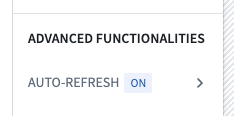
:::callout{theme="neutral"} Auto-refresh may trigger an increased data load volume and associated costs. Builders may choose not to enable the feature for workflows where live data is less necessary. :::
Settings
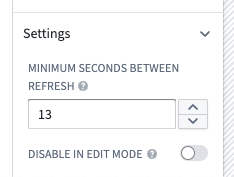
To update auto-refresh settings, select Auto-refresh in the Settings panel. Then expand the Settings section on the bottom of the panel.
Minimum seconds between refresh
This setting allows a module builder to configure the minimum amount of time between data refreshes. This setting will not impact initial refresh latency, but rather ensure that a module is not constantly reloading. The current minimum, or most frequent, refresh rate is 10 seconds, which ensures stability of services due to the increased load from auto-refreshing.
Disable in edit mode
This setting allows module builders to turn off Auto-refresh behavior while in edit mode. A builder may wish to use this if auto-refreshing data in edit mode distracts from the building experience or is not needed. Auto-refresh will remain configured and active in view mode with this setting enabled.
Control auto-refresh updates with events
You can let users pause or resume the application of auto-refresh updates during a session by configuring Workshop events, such as through a Button Group widget:
- Enable auto-refresh updates: Allows updates from auto-refresh to take effect.
- Disable auto-refresh updates: Prevents updates from auto-refresh from taking effect.
Learn more about Events: Module state.
Limitations
Object Storage V2 (OSv2)
Auto-refresh is limited to OSv2-backed object types. This limitation includes object sets with linked objects of OSv1-backed object types used in the object set definition.
Learn more about migrating from OSv1 to OSv2.
Workflows involving user input
Workflows involving user input are not prohibited in modules that use auto-refresh. However, you may run into the issue where variable or widget state is reset after refreshing. To work around this, you should avoid using automatic recompute behavior in variables that experience this issue. For cases where this is not enough, you can use the iFrame widget to embed a separate module that acts as a sandboxed environment that will not auto-refresh. You can set a URL query parameter embedded=true to hide the Foundry sidebar. Another method is to have a separate Workshop module that opens in a new browser or Carbon tab to complete parts of the workflow that involve user input.
Auto-refresh of linked object types
Auto-refresh does not automatically watch for updates of linked object types. This means linked object properties and linked object aggregations of a watched object set will not auto-refresh unless the linked object type is also explicitly watched.
:::callout{theme="neutral"} To trigger auto-refresh for linked object properties or function-backed columns, use the linked object type variable in a simple widget like an Object Set Title widget and place it in a section with zero height or width. This allows the refresh to be triggered without displaying the widget to users. :::
Filters
Some object set filter types are not currently supported by Auto-refresh, such as terms, phrase, multiMatch, prefixOnLastToken, and objectSetLink. Support for these filter types may be added in the future. As a workaround, you can watch an unfiltered object set of the same type. This may cause refreshing to happen more often than is necessary but should otherwise ensure that the object type is kept up to date within a module.
Visibility in module
Currently, object sets that have Auto-refresh enabled need to be used within a visible widget in a module to trigger an auto-refresh. This prevents automatic refreshes being triggered when the object set being watched for updates is not on screen. For example, if a registered object set is only used within a hidden drawer, auto-refresh will only occur while that drawer is open.
If an auto-refresh notification occurs while a variable is hidden, it will be delayed until the variable becomes visible again, at which point a reload will immediately be triggered.
This behavior also applies if the browser tab is minimized, or is not the currently active tab.
No inheritance of auto-refresh configuration from embedded modules
Embedding a Workshop module does not carry over the auto-refresh configuration of the embedded module. Auto-refresh must be explicitly configured for every module that you intend to use auto-refresh with. This also means that auto-refresh will not work specifically within the context of the embedded module.
To embed a module that will auto-refresh inside a parent module that does not auto-refresh, you can use the iFrame widget to embed a separate module that acts as a sandboxed environment that will auto-refresh. You can set a URL query parameter embedded=true to hide the Foundry sidebar.
Troubleshooting
If any errors occur that appear to be referencing auto-refresh issues, consider the following:
- Ensure that all object types and link types are backed by Object Storage V2. In particular, watch for two object types backed by OSv2 that have a link type backed by OSv1, as this can cause errors with auto-refresh.
- Ensure invalid object sets cannot be set at runtime, such as adding invalid filter types to an object set. It is possible for an object set to initially be compatible with auto-refresh, but it may end up in a state where it is unable to be watched for updates due to user interaction with the application.
- Improving the stability of your network connection will directly improve the stability of the Auto-refresh feature. If the network is disconnecting and reconnecting, you may see errors notifying users when Auto-refresh is disabled.
- In cases where you are not seeing expected refreshes, you may be watching too specific of an object set. Try watching a broader object set, like the base object set for a given type, or a wider filter. You can then define a variable with more specific filters downstream of this broader watched object set.
- Check the browser console for more detailed error messages. Below, you can review details for some common errors that may occur while using auto-refresh:
InvalidObjectSetForPlanning: A watched object set contains a reference to an entity (either an object type or link type) indexed in Object Storage V1.
中文翻译
Workshop 中的自动刷新(Auto-refresh)
Workshop 的自动刷新功能允许构建者轻松创建能够随 Foundry 中数据变化而自动更新的应用程序。为用户提供可靠的最新信息对于支持操作工作流至关重要,而 Workshop 只需点击几下即可实现这一功能。
通过自动刷新,您可以注册模块中的对象集(Object Set),以便监控来自 Foundry 任何位置的更新。当发生更新时,当前模块中的所有数据将自动刷新,无需用户交互。更新源的示例包括:其他用户执行操作(Action)导致的本体论(Ontology)数据更新、上游数据集成(Data Integration)的编辑,或来自流式数据源(Streaming Data Source)的新记录。在这些情况下,自动刷新将更新当前模块中的数据。
在数据新鲜度至关重要的场景中,自动刷新非常有价值,包括但不限于实时仪表盘(Live Dashboard)和协作工作流(Collaborative Workflow)。
要直接在模块的用户界面中显示数据的新近程度,请使用数据新鲜度小部件(Data Freshness widget)。它会根据最近的索引时间显示已配置对象类型及其数据源的最后更新时间戳,对于24小时内的更新显示相对时间(例如"2小时前"),对于超过24小时的更新显示绝对时间(例如"2025年7月17日星期四下午1:52")。
您可以在特定 Workshop 模块中启用自动刷新。在 Workshop 编辑器的设置(Settings)面板底部,导航到自动刷新配置选项。
:::callout{theme="neutral"} 自动刷新可能会增加数据加载量和相关成本。对于实时数据需求较低的工作流,构建者可以选择不启用此功能。 :::
设置(Settings)
要更新自动刷新设置,请在设置(Settings)面板中选择自动刷新(Auto-refresh)。然后展开面板底部的设置(Settings)部分。
刷新最小间隔(Minimum seconds between refresh)
此设置允许模块构建者配置数据刷新之间的最小时间间隔。此设置不会影响初始刷新延迟,而是确保模块不会持续重新加载。当前最小(即最频繁)的刷新率为10秒,这可以确保服务稳定性,因为自动刷新会增加负载。
编辑模式下禁用(Disable in edit mode)
此设置允许模块构建者在编辑模式下关闭自动刷新行为。如果编辑模式下的自动刷新数据干扰了构建体验或不需要,构建者可能希望使用此设置。启用此设置后,自动刷新将在查看模式下保持配置并处于活动状态。
通过事件(Event)控制自动刷新更新
您可以通过配置 Workshop 事件(例如通过按钮组小部件(Button Group widget))让用户在会话期间暂停或恢复自动刷新更新的应用:
- 启用自动刷新更新(Enable auto-refresh updates): 允许自动刷新更新生效。
- 禁用自动刷新更新(Disable auto-refresh updates): 阻止自动刷新更新生效。
了解更多关于事件:模块状态(Events: Module state)的信息。
限制(Limitations)
对象存储 V2 (Object Storage V2, OSv2)
自动刷新仅限于基于 OSv2 的对象类型。此限制包括在对象集定义中使用基于 OSv1 的对象类型的链接对象(Linked Object)的对象集。
了解更多关于从 OSv1 迁移到 OSv2的信息。
涉及用户输入的工作流
使用自动刷新的模块并不禁止涉及用户输入的工作流。但是,您可能会遇到变量或小部件状态在刷新后重置的问题。为解决此问题,您应避免在遇到此问题的变量中使用自动重新计算行为。如果这还不够,您可以使用iFrame 小部件(iFrame widget)嵌入一个单独的模块,该模块作为不会自动刷新的沙盒环境。您可以设置 URL 查询参数 embedded=true 来隐藏 Foundry 侧边栏。另一种方法是使用单独的 Workshop 模块,在新的浏览器或 Carbon 标签页中打开,以完成涉及用户输入的工作流部分。
链接对象类型的自动刷新
自动刷新不会自动监控链接对象类型的更新。这意味着,除非也明确监控链接对象类型,否则被监控对象集的链接对象属性和链接对象聚合(Linked Object Aggregation)将不会自动刷新。
:::callout{theme="neutral"} 要触发链接对象属性或函数支持列(Function-backed Column)的自动刷新,请在简单小部件(如对象集标题小部件(Object Set Title widget))中使用链接对象类型变量,并将其放置在高度或宽度为零的部分中。这样可以在不向用户显示小部件的情况下触发刷新。 :::
过滤器(Filter)
某些对象集过滤器类型目前不受自动刷新支持,例如 terms、phrase、multiMatch、prefixOnLastToken 和 objectSetLink。未来可能会添加对这些过滤器类型的支持。作为变通方法,您可以监控同一类型的未过滤对象集。这可能会导致刷新频率高于必要水平,但通常可以确保对象类型在模块内保持最新。
模块中的可见性
目前,启用了自动刷新的对象集需要在模块的可见小部件中使用,才能触发自动刷新。这可以防止当被监控更新的对象集不在屏幕上时触发自动刷新。例如,如果注册的对象集仅在隐藏抽屉中使用,则自动刷新只会在该抽屉打开时发生。
如果在变量隐藏时发生自动刷新通知,该通知将被延迟,直到变量再次可见,此时将立即触发重新加载。
如果浏览器标签页被最小化或不是当前活动标签页,此行为同样适用。
嵌入模块不继承自动刷新配置
嵌入 Workshop 模块不会继承被嵌入模块的自动刷新配置。对于您打算使用自动刷新的每个模块,都必须显式配置自动刷新。这也意味着自动刷新在嵌入模块的上下文中将无法正常工作。
要在不自动刷新的父模块中嵌入一个会自动刷新的模块,您可以使用iFrame 小部件(iFrame widget)嵌入一个单独的模块,该模块作为会自动刷新的沙盒环境。您可以设置 URL 查询参数 embedded=true 来隐藏 Foundry 侧边栏。
故障排除(Troubleshooting)
如果出现任何似乎与自动刷新问题相关的错误,请考虑以下事项:
- 确保所有对象类型和链接类型(Link Type)都基于对象存储 V2。特别要注意,两个基于 OSv2 的对象类型如果具有基于 OSv1 的链接类型,可能会导致自动刷新错误。
- 确保在运行时不会设置无效的对象集,例如向对象集添加无效的过滤器类型。对象集最初可能与自动刷新兼容,但由于用户与应用程序的交互,最终可能进入无法被监控更新的状态。
- 提高网络连接的稳定性将直接改善自动刷新功能的稳定性。如果网络频繁断开和重新连接,您可能会看到通知用户自动刷新已禁用的错误。
- 如果您没有看到预期的刷新,可能是因为监控的对象集过于具体。尝试监控更广泛的对象集,例如给定类型的基础对象集(Base Object Set)或更宽泛的过滤器。然后,您可以在该更广泛监控对象集的下游定义具有更具体过滤器的变量。
- 检查浏览器控制台以获取更详细的错误消息。以下是一些使用自动刷新时可能出现的常见错误的详细信息:
InvalidObjectSetForPlanning:被监控的对象集包含对存储在对象存储 V1 中的实体(对象类型或链接类型)的引用。