Example applications(示例应用)
Workshop home page
Create ready-to-use applications using your own data directly from the Workshop home page. Currently, there is support for building an inbox, map, and metrics application.

To begin, choose the template you would like to use. Then, simply select an object type and relevant properties to be used in the template. The images below illustrate this process for the creation of a map application.


Once you have chosen a save location for the module and selected Create module, you will have a ready-to-use template with the data you inputted.

Workshop Design Hub
The Workshop Design Hub is a Marketplace product that is a compilation of example applications and templates designed to assist you in creating superior applications using Foundry Workshop, a low-code application building tool.
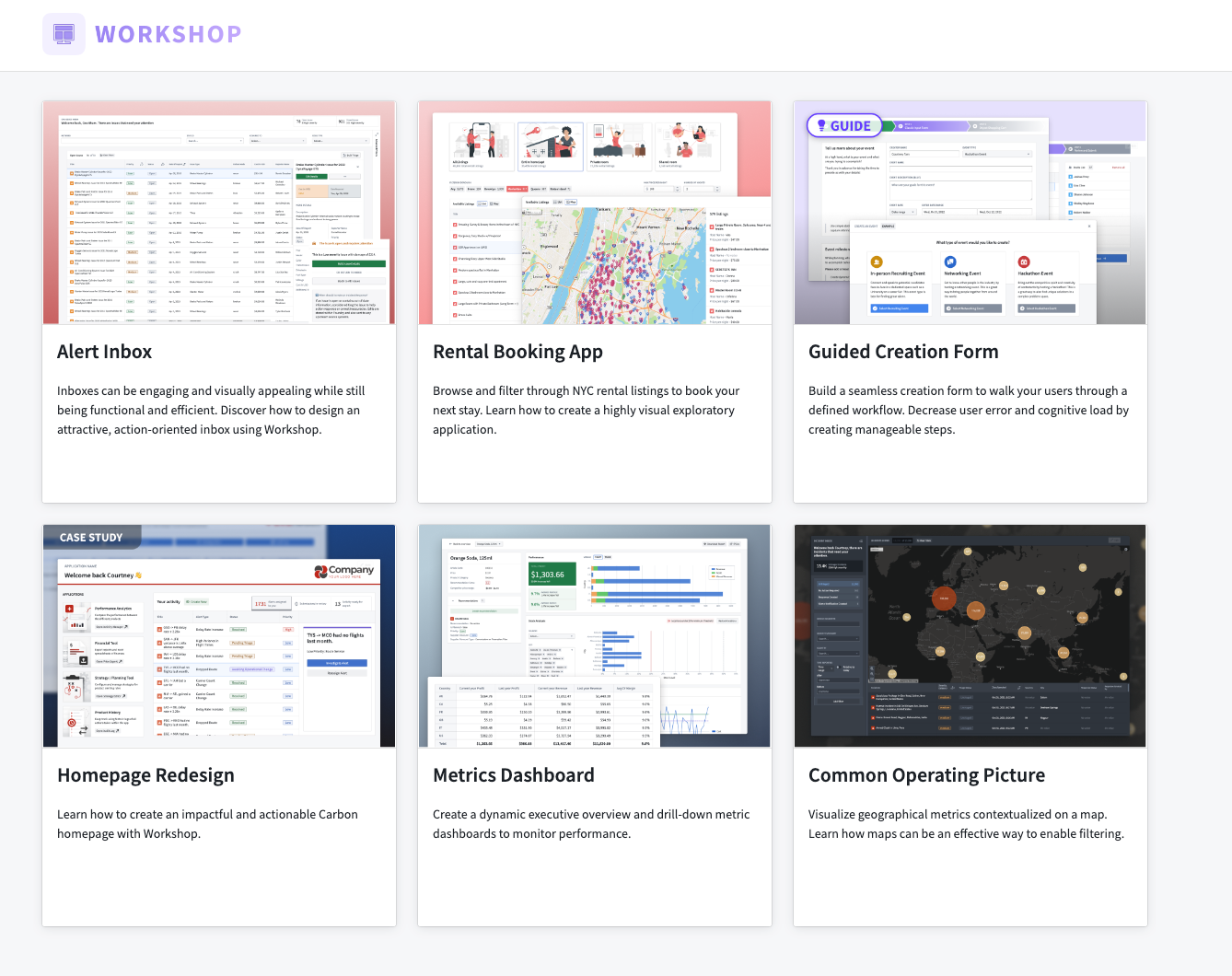
The Design Hub consists of six high-quality Workshop application examples for you to use as inspiration for your own workflows.
Design Hub modules are intended as design examples and inspiration rather than ready-made app templates. These example modules come with notional data and provide functional end-to-end apps which can be reverse-engineered and analyzed by app builders. We hope that the concepts and patterns in Design Hub modules can be applied to new apps that you build or existing apps that you manage.
Supported Workshop applications
The following Workshop applications are available in the Design Hub, with each one's unique features and functionalities listed below:
- Alert Inbox: Design an attractive, action-oriented inbox using Workshop. Learn how to create engaging and visually appealing inboxes that are functional and efficient.
- Guided Creation Form: Build a seamless creation form to walk your users through a defined workflow. Decrease user error and cognitive load by creating manageable steps and understanding the essentials of a guided form.
- Metrics Dashboard: Create dynamic executive overview and drill-down metric dashboards to monitor performance. Discover how to design visually informative dashboards and effectively track important metrics.
- Common Operating Picture: Visualize geographical metrics contextualized on a map. Learn how maps can be an effective way to enable filtering and explore the benefits of displaying data geographically.
- Rental Booking App: Browse and filter through NYC rental listings to book your next stay. Learn how to create a highly visual exploratory application and enhance user experience with intuitive filtering options.
- Illustrations App: A small collection of illustrations in Workshop, showcasing the potential of incorporating visual elements into your app designs.
Access sample modules
To access a Workshop Design Hub sample module, navigate to the Workshop Design Hub project. Then, duplicate the desired Workshop module to a location of your choosing.
To access the Workshop Design Hub from your Foundry enrollment, contact your Palantir representative.
Usage recommendations
By default, the assets in the Workshop Design Hub (Ontology objects, apps, datasets) are set to read-only and we strongly recommend duplicating any Workshop module to another project before modifying it for a specific use case. In the case where your administrator has configured the assets to be read-write, it is still essential to treat Ontology elements (such as object types or action types) and Workshop applications within the Design Hub as read-only as periodic Design Hub updates overwrite local changes made to these aforementioned elements.
Inboxes
A common application type built in Workshop is an inbox. Often, the core components of an inbox are:
- A clear set of alerts to review or tasks to complete, and the ability to easily filter and prioritize among them.
- A detailed view of each individual alert or task that allows for in-depth review.
- Configured action types that enable decision-making on each alert or task.
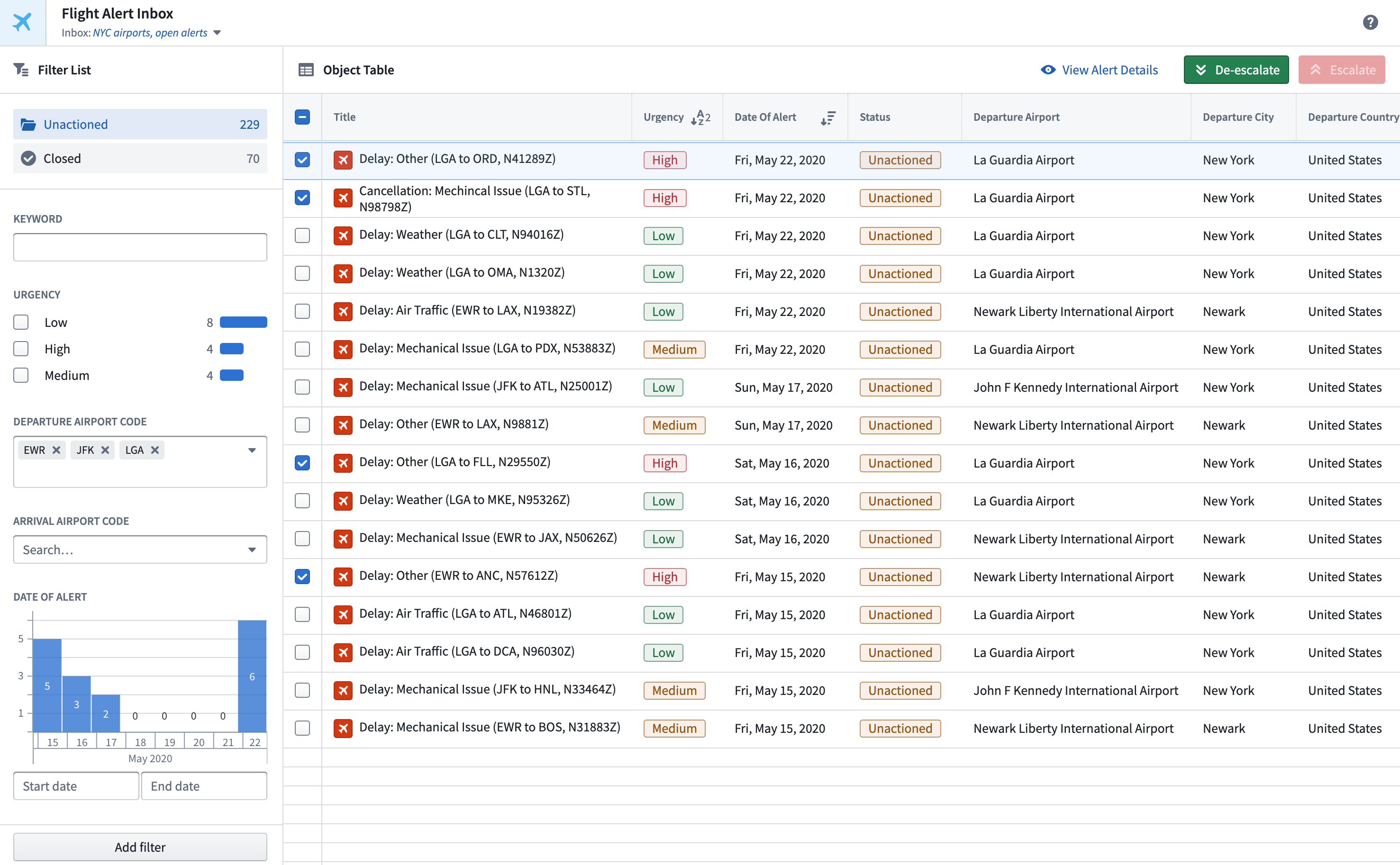
The example below shows an example Workshop inbox displaying information about Flight Alerts that require triage, review, and action. Core widgets used include the Prominent Terms Filter, Filter List, Object Table, and Button Group. Additionally, state saving is enabled to allow users to preserve the inbox settings most relevant to them and also share these saved views with other users.
Common operating pictures
Senior leaders often need a way to understand how the critical parts of their organization are functioning in real-time. Common operating pictures built in Workshop can convey the geospatial context, detailed charts, and top-line metrics necessary to make high-level decisions on the fly.
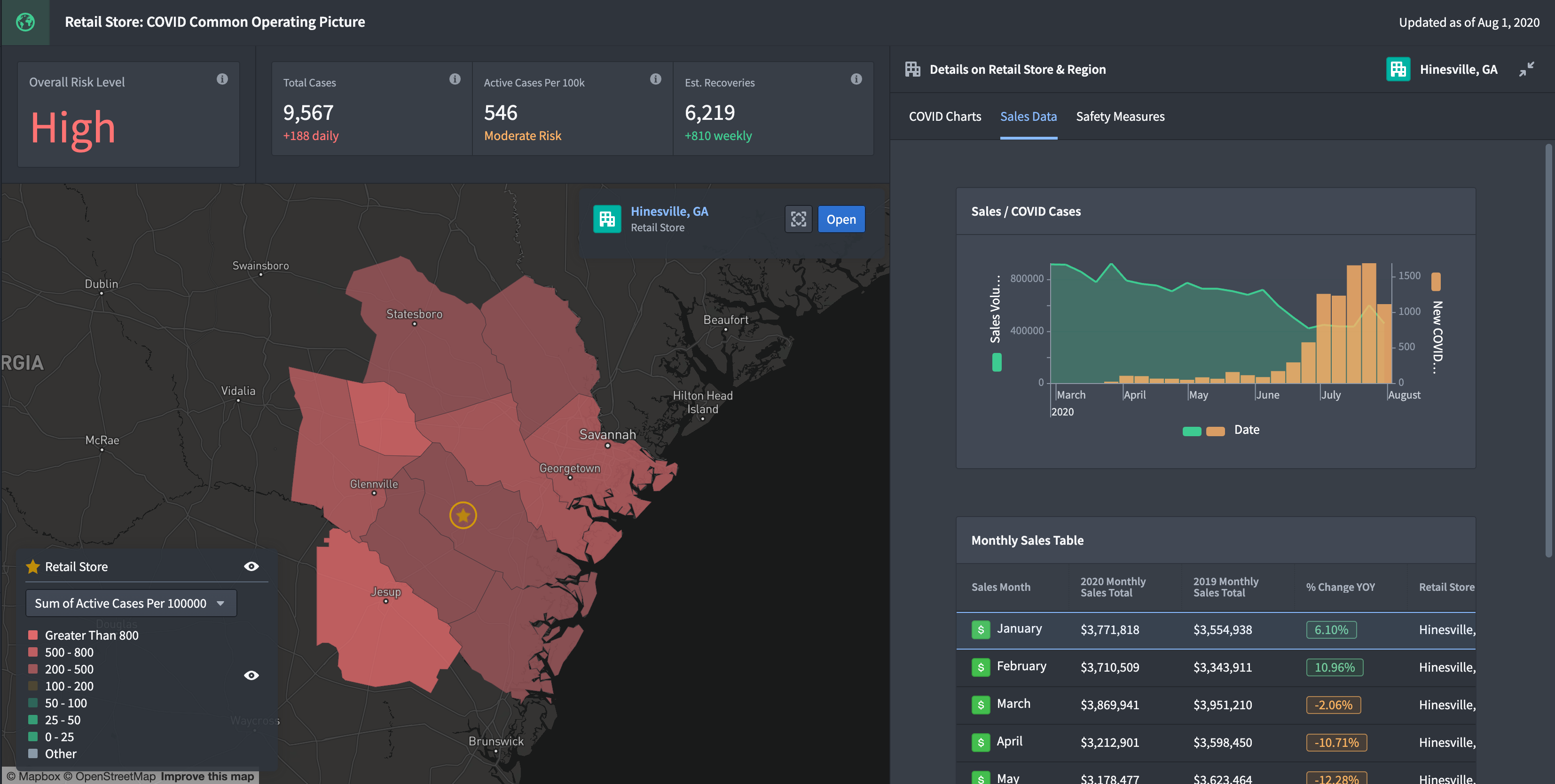
The example below shows an example Workshop common operating picture overlaying COVID case information atop retail store sales and operations data. The aim is to help a store manager understand store performance and more effectively adjust their plans as local case counts change. Core widgets used include the Metric Card, Map, Chart: XY, and Object Table.
中文翻译
示例应用
Workshop 主页
通过 Workshop 主页,您可以直接使用自己的数据创建即用型应用。目前支持构建收件箱、地图和指标应用。
首先,选择您要使用的模板。然后,只需选择要在模板中使用的对象类型(Object Type)和相关属性。下图展示了创建地图应用的这一过程。
选择好模块的保存位置并点击创建模块(Create module)后,您将获得一个包含所输入数据的即用型模板。
Workshop Design Hub
Workshop Design Hub 是一个Marketplace产品,汇集了示例应用和模板,旨在帮助您使用 Foundry Workshop(一种低代码应用构建工具)创建卓越的应用。
Design Hub 包含六个高质量的 Workshop 应用示例,可供您在自己的工作流中借鉴灵感。
Design Hub 模块旨在作为设计示例和灵感来源,而非现成的应用模板。这些示例模块附带模拟数据,提供功能完整的端到端应用,应用构建者可以对其进行逆向工程和分析。我们希望 Design Hub 模块中的概念和模式能够应用于您构建的新应用或您管理的现有应用。
支持的 Workshop 应用
Design Hub 中提供以下 Workshop 应用,每个应用的功能和特性如下所列:
- 警报收件箱(Alert Inbox): 使用 Workshop 设计一个美观且以行动为导向的收件箱。学习如何创建既实用又高效的引人入胜的收件箱。
- 引导式创建表单(Guided Creation Form): 构建一个无缝的创建表单,引导用户完成定义好的工作流。通过创建可管理的步骤并理解引导式表单的要点,减少用户错误和认知负荷。
- 指标仪表板(Metrics Dashboard): 创建动态的高管概览和下钻式指标仪表板,以监控绩效。探索如何设计信息丰富的可视化仪表板并有效跟踪重要指标。
- 通用态势图(Common Operating Picture): 在地图上可视化具有地理背景的指标。了解地图如何成为实现过滤的有效方式,并探索以地理方式展示数据的优势。
- 租赁预订应用(Rental Booking App): 浏览和筛选纽约市的租赁房源,预订您的下一次住宿。学习如何创建高度可视化的探索性应用,并通过直观的筛选选项提升用户体验。
- 插图应用(Illustrations App): Workshop 中的一小部分插图集合,展示了将视觉元素融入应用设计的潜力。
访问示例模块
要访问 Workshop Design Hub 示例模块,请导航至 Workshop Design Hub 项目。然后,将所需的 Workshop 模块复制到您选择的位置。
要从您的 Foundry 注册中访问 Workshop Design Hub,请联系您的 Palantir 代表。
使用建议
默认情况下,Workshop Design Hub 中的资产(本体论对象(Ontology objects)、应用、数据集)设置为只读,我们强烈建议在针对特定用例修改任何 Workshop 模块之前,先将其复制到另一个项目。如果您的管理员已将资产配置为可读写,仍然必须将 Design Hub 中的本体论元素(如对象类型或操作类型)和 Workshop 应用视为只读,因为定期的 Design Hub 更新会覆盖对这些元素所做的本地更改。
收件箱
Workshop 中构建的一种常见应用类型是收件箱。通常,收件箱的核心组件包括:
- 一组清晰的待审警报或待完成任务,以及轻松筛选和确定优先级的能力。
- 每个警报或任务的详细视图,便于深入审查。
- 配置的操作类型(Action Types),支持对每个警报或任务做出决策。
下面的示例展示了一个 Workshop 收件箱,其中显示需要分类、审查和处理的航班警报信息。使用的核心小部件包括突出术语筛选器(Prominent Terms Filter)、筛选列表(Filter List)、对象表格(Object Table)和按钮组(Button Group)。此外,还启用了状态保存(State Saving),允许用户保留最相关的收件箱设置,并与其他用户共享这些保存的视图。
通用态势图
高级领导者通常需要一种方式来实时了解其组织关键部分的运行状况。在 Workshop 中构建的通用态势图(Common Operating Pictures)可以传达地理空间背景、详细图表和关键指标,从而支持快速做出高层决策。
下面的示例展示了一个 Workshop 通用态势图,将 COVID 病例信息叠加在零售店销售和运营数据之上。其目的是帮助门店经理了解门店绩效,并在当地病例数变化时更有效地调整计划。使用的核心小部件包括指标卡片(Metric Card)、地图(Map)、XY 图表(Chart: XY)和对象表格(Object Table)。