Formatting(格式化)
Workshop offers many formatting options across widgets that help users style their displays. In this section, we walk through two of these options: value formatting and conditional formatting.
Value formatting
Value formatting applies special formatting when rendering values in user-facing applications, making raw values more display-friendly. In Workshop, value formatting can be used to render values when setting up time series property columns in the Object Table widget and time series property displays in the Metric Card widget. This formatting is local to the Workshop module, and not global to the ontology. Learn more about setting up value formatting.
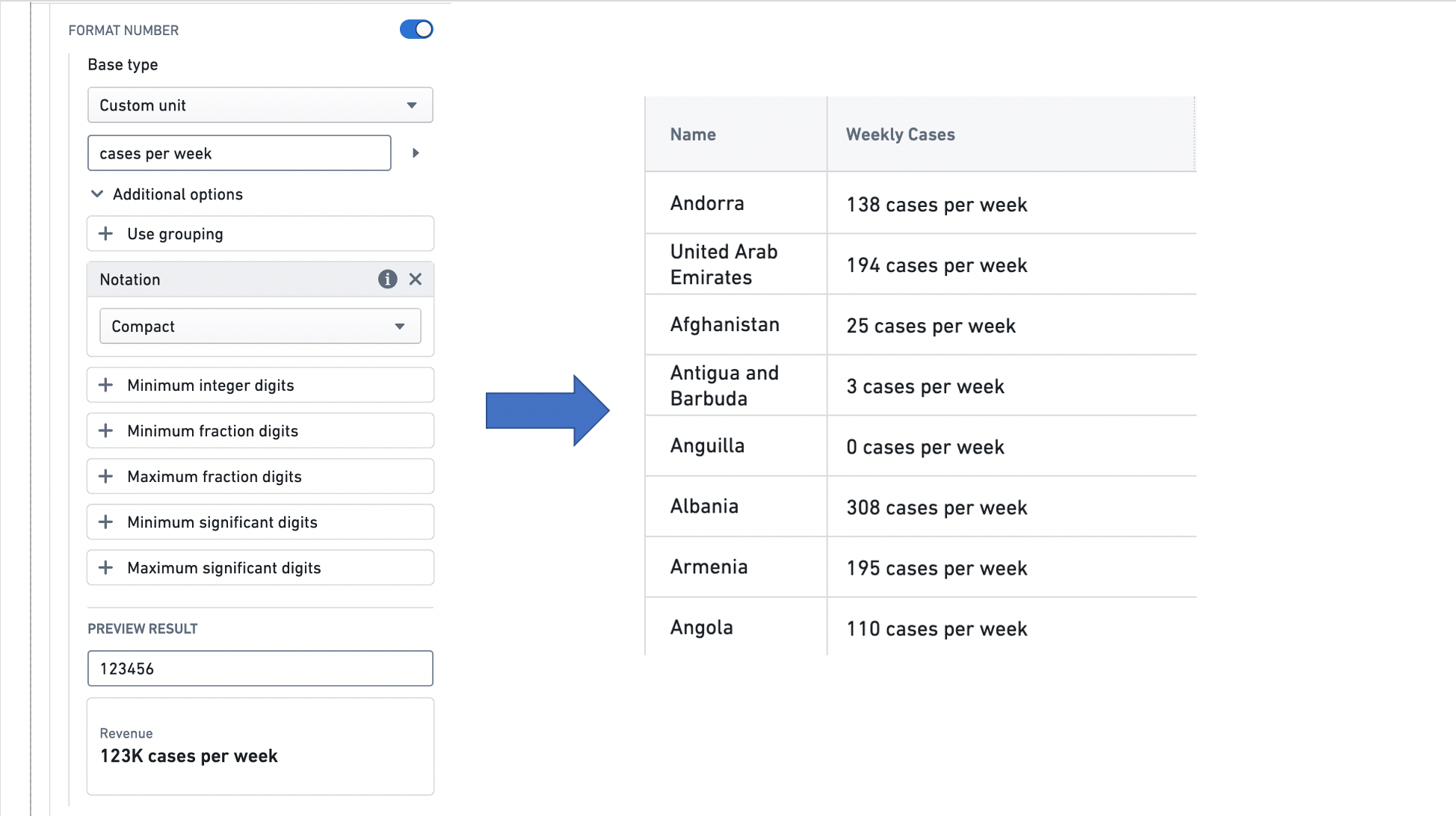
The example below shows how value formatting is used to style the value displayed in an Object table column named Weekly Cases, that features the weekly number of COVID-19 cases observed in each country.
Conditional formatting
Conditional formatting applies rules to determine how numbers and sparklines are styled. In Workshop, conditional formatting can be used to style time series property columns in the Object Table widget and time series property displays in the Metric Card widget. This formatting is local to the Workshop module, and not global to the ontology. Learn more about setting up conditional formatting.
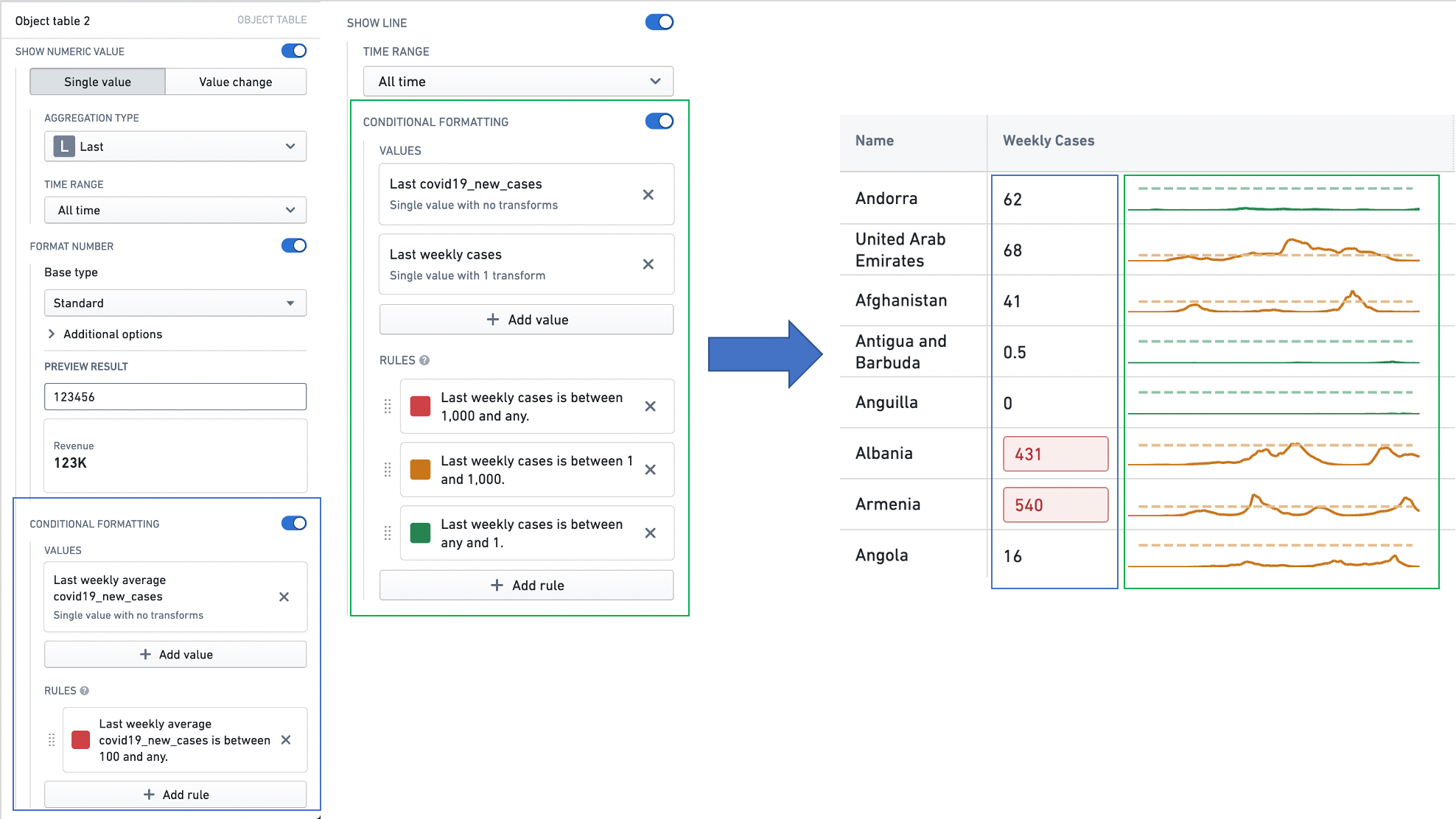
The example below shows how conditional formatting is used to style the summarized value and the sparkline displayed in an Object table column named Weekly Cases, that features the weekly number of COVID-19 cases observed in each country.
中文翻译
格式化
Workshop 提供了多种跨组件的格式化选项,帮助用户美化其显示效果。在本节中,我们将介绍其中两种选项:数值格式化(Value Formatting)和条件格式化(Conditional Formatting)。
数值格式化(Value Formatting)
数值格式化(Value Formatting) 在面向用户的应用程序中渲染数值时应用特殊格式,使原始数值更易于显示。在 Workshop 中,数值格式化可用于在对象表格(Object Table)组件中设置时间序列属性列,以及在指标卡片(Metric Card)组件中设置时间序列属性显示。此格式化仅适用于 Workshop 模块,并非全局应用于本体论(Ontology)。了解更多关于设置数值格式化的信息。
以下示例展示了如何使用数值格式化来样式化名为 Weekly Cases 的对象表格列中显示的数值,该列展示了每个国家每周观察到的 COVID-19 病例数。
条件格式化(Conditional Formatting)
条件格式化(Conditional Formatting) 应用规则来确定数字和迷你趋势图(Sparklines)的样式。在 Workshop 中,条件格式化可用于样式化对象表格(Object Table)组件中的时间序列属性列,以及指标卡片(Metric Card)组件中的时间序列属性显示。此格式化仅适用于 Workshop 模块,并非全局应用于本体论(Ontology)。了解更多关于设置条件格式化的信息。
以下示例展示了如何使用条件格式化来样式化名为 Weekly Cases 的对象表格列中显示的汇总值和迷你趋势图,该列展示了每个国家每周观察到的 COVID-19 病例数。