Mobile application launcher(移动应用启动器)
The Mobile application launcher is a simple landing page that enables users to search for, browse, and open Workshop applications that have been designed for use on a mobile device.

There is no configuration required to set up the mobile app launcher; when you create a mobile Workshop application, the application will appear in the app launcher. In addition to helping users find and use mobile applications, the mobile app launcher provides a few additional features:
- The mobile app launcher is optimized to reduce the dependencies loaded when it is opened. This makes the app launcher load more quickly, reducing bandwidth usage on mobile devices.
- Navigating into an application, or between pages within an application, updates the browser history so that Back and Forward interactions work as expected on a phone. This enables users to swipe from the left or right to navigate on iOS, or use the hardware back button on Android devices to navigate back.
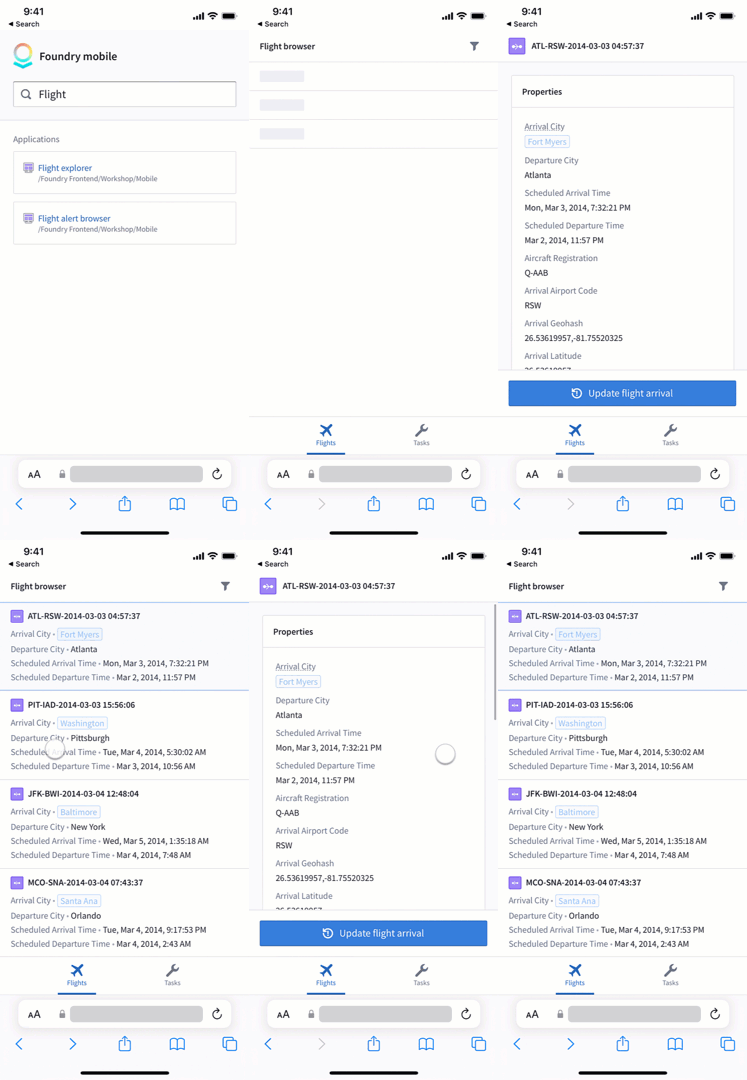
Once you have created one or more mobile applications, tell your users to navigate to the mobile app launcher to get started finding and using your applications. The mobile app launcher is available in your environment at https://<your-foundry-url>/workspace/m.
You can open the mobile app launcher on your desktop device, but the launcher will appear in full width across your desktop screen. To simulate how apps will appear on a mobile device, we recommend using the device mode preview in your browser of choice:
中文翻译
移动应用启动器
移动应用启动器是一个简洁的登录页面,使用户能够搜索、浏览并打开专为移动设备设计的Workshop应用。
移动应用启动器无需任何配置即可使用;当你创建移动Workshop应用时,该应用会自动出现在启动器中。除了帮助用户查找和使用移动应用外,移动应用启动器还提供以下额外功能:
- 移动应用启动器经过优化,可减少打开时加载的依赖项。这使得启动器加载速度更快,从而减少移动设备上的带宽消耗。
- 进入应用或在应用内页面间导航时,浏览器历史记录会同步更新,确保手机上的"后退"和"前进"操作符合预期。这使得iOS用户可以通过左右滑动进行导航,Android设备用户则可以使用硬件返回键返回上一页。
创建好一个或多个移动应用后,请告知用户导航至移动应用启动器,即可开始查找和使用你的应用。移动应用启动器可通过以下地址访问:https://<your-foundry-url>/workspace/m。
你可以在桌面设备上打开移动应用启动器,但启动器会以全宽模式显示在桌面屏幕上。要模拟应用在移动设备上的显示效果,建议使用浏览器中的设备模式预览功能: