Module interface(模块接口(Module interface))
The module interface is the set of variables that are able to be mapped to variables from a parent module when embedded, and initialized from the URL. You can think of the module interface as the API for a Workshop module.
:::callout{theme="neutral"} Module interface variables are different from ontology interfaces, which define shared properties and links across object types. Module interface variables define the inputs and outputs of a Workshop module for embedding and URL initialization. :::
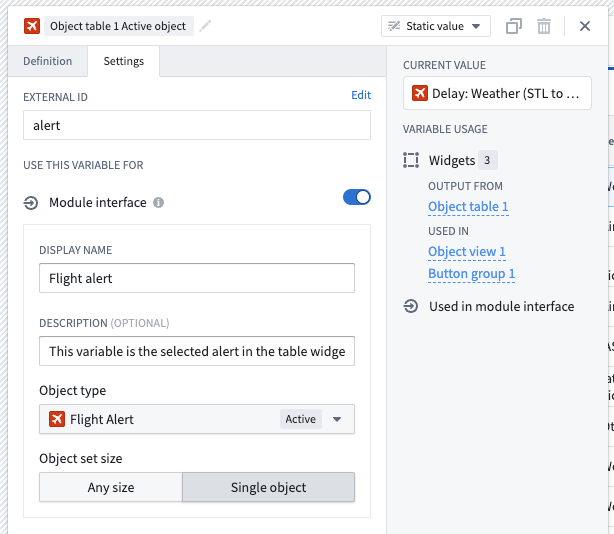
To add a variable to the module interface, navigate to the Settings panel for a variable, add an external ID, and make sure the toggle for module interface is enabled. Optionally, you can give a module interface variable a display name and description, which will be shown when the module is embedded or used in an Open Workshop module event.
Embedded module interface
When embedding a module, the module interface variables for that module will be available to map parent module variables to child module interface variables. You can read more about this in interface configuration within the embedded modules documentation.
Use module interface variables to communicate between a parent and child module or between sibling embedded modules. These shared interface variables can back shared state, such as a selected object, a selected tab, or whether an overlay is shown. Embedded modules may modify the value of interface variables through events, allowing other places that reference these variables to respond to the updated value. Learn more in Communicating across embedded modules.
:::callout{theme="neutral"} When an interface variable is mapped between a parent and an embedded child module, Workshop uses the parent module's variable definition and ignores the embedded module's own interface variable definition. See the embedded modules interface configuration for details. :::
Open Workshop module event
The Open Workshop module event can be used to avoid manually creating a URL, as described below. The selected module's interface will appear, allowing variable values to be passed from the current module to the chosen module's interface variables. When the event is called, the URL uses the current value to open the selected module.
In edit mode, when you open a module from a module reference (for example, opening an embedded child module in its own editor), the module opens with the current values of any module interface variables that were passed from the source module. This allows you to debug the opened module using the same state that was present where it was referenced.
Create a URL with module interface variables
Outside of the Open Workshop module event, a URL can manually be dynamically generated to allow sharing custom links to an application state using URL query parameter values for module interface variables. To do so, follow the steps below:
- Log in to your Workshop app.
- Copy the URL from your browser. Make sure to be in view mode and not edit mode. This URL is fixed, so you can share it with other users who hold the correct permissions.
- Now, return to edit mode.
- Select the Variables menu located in the left sidebar.
- Create a New variable > String > Static.
- Go to the variable Settings tab, and add an external ID.
- Append
?to the URL from step 2, followed by the external ID,=, and the value you would like to set. For instance,?interfaceVariable=123. You can add other module interface variables by adding an ampersand&followed by an additional external ID, equals=the value.
:::callout{theme="neutral"} Module interface variables are initialized from URL parameters when the module is first loaded. Changing the URL after the module has loaded does not dynamically update variable values. To update variable values at runtime, use Workshop events such as the Set variable value event or the On module load event. :::
The link is now ready to be used and will define the module interface variable as the value set in the URL. This link may be generated dynamically by using variable transformations, with values coming from action forms, functions, or other variable transformations.
For testing purposes, you can change the /latest/ to /dev/ in the URL, and the link will now redirect to the last saved version of the Workshop application instead of the last published version.
Carbon navigation
Read about using module interface variables with Carbon navigation here. Note there are several limitations on types of variables that Carbon supports, and that external IDs must be prefixed with variable. when configuring parameters for a Carbon module tab.
中文翻译
模块接口(Module interface)
模块接口是一组变量的集合,当模块嵌入时,这些变量可映射到父模块的变量,也支持通过URL初始化。你可以将模块接口看作Workshop模块的API。
:::callout{theme="neutral"} 模块接口变量与本体接口(Ontology interface)不同,后者定义了跨对象类型的共享属性和关联。模块接口变量定义的是Workshop模块用于嵌入和URL初始化的输入输出。 :::
要将变量添加到模块接口中,请进入该变量的设置(Settings)面板,添加外部ID,并确保模块接口的开关已启用。你还可以选择性地为模块接口变量设置显示名和描述,当模块被嵌入或者在打开Workshop模块事件(Open Workshop module event)中被使用时,这些信息会展示出来。
嵌入模块接口(Embedded module interface)
嵌入模块时,该模块的模块接口变量可用于将父模块变量映射到子模块的接口变量。你可以阅读嵌入模块文档中的接口配置(interface configuration)章节了解更多相关内容。
你可以使用模块接口变量在父模块与子模块之间,或是同级的嵌入模块之间通信。这些共享的接口变量可以支撑共享状态,比如选中的对象、选中的标签页、或是是否显示某个浮层。嵌入模块可以通过事件修改接口变量的值,让所有引用这些变量的其他位置都能响应更新后的值。你可以阅读嵌入模块间通信章节了解更多信息。
:::callout{theme="neutral"} 当父模块和嵌入的子模块之间映射了接口变量时,Workshop会采用父模块的变量定义,忽略嵌入模块自身的接口变量定义。详情请查看嵌入模块接口配置。 :::
打开Workshop模块事件(Open Workshop module event)
打开Workshop模块事件可用于避免手动创建URL,具体说明如下。选中模块的接口会展示出来,支持将当前模块的变量值传递到目标模块的接口变量中。该事件被触发时,会使用当前值生成URL打开选中的模块。
在编辑模式下,当你通过模块引用打开一个模块时(比如在独立编辑器中打开一个嵌入的子模块),打开的模块会携带从源模块传递过来的所有模块接口变量的当前值。这让你可以使用引用位置的相同状态来调试打开的模块。
用模块接口变量创建URL
除了使用打开Workshop模块事件之外,你也可以手动动态生成URL,通过将模块接口变量的值作为URL查询参数,来分享指向特定应用状态的自定义链接。请按以下步骤操作:
- 登录你的Workshop应用。
- 从浏览器复制URL。请确保你处于查看模式而非编辑模式。该URL是固定的,你可以将其分享给拥有对应权限的其他用户。
- 接下来回到编辑模式。
- 选择左侧边栏中的变量(Variables)菜单。
- 创建新变量 > 字符串(String) > 静态(Static)。
- 进入变量的设置标签页,添加一个外部ID。
- 在第2步得到的URL末尾添加
?,后接外部ID、=,再加上你想要设置的变量值。例如?interfaceVariable=123。你还可以添加其他模块接口变量,只要用&连接,后接新的外部ID、=和对应值即可。
:::callout{theme="neutral"} 模块接口变量仅会在模块首次加载时从URL参数初始化。模块加载完成后修改URL不会动态更新变量值。要在运行时更新变量值,请使用Workshop事件,比如设置变量值(Set variable value)事件或模块加载时(On module load)事件。 :::
现在链接就可以使用了,它会将模块接口变量的值设置为URL中定义的值。你可以使用变量转换(variable transformations)动态生成该链接,变量值可以来自操作表单、函数或其他变量转换的输出。
出于测试目的,你可以将URL中的/latest/替换为/dev/,这样链接就会跳转到Workshop应用的最后一次保存版本,而非最后一次发布的版本。