Object set filter variables(对象集筛选变量(Object Set Filter Variable))
An object set filter variable is used to track the filter state of an object set, often output by widgets such as the Filter List, XY Chart, Vega Chart or Pivot Table widgets. Object set filters can then be applied to object set variables, or used to filter object sets in widget configurations.
Create an object set filter variable
An object set filter variable can be created as an empty variable and then used in widget configurations to capture widget selections.
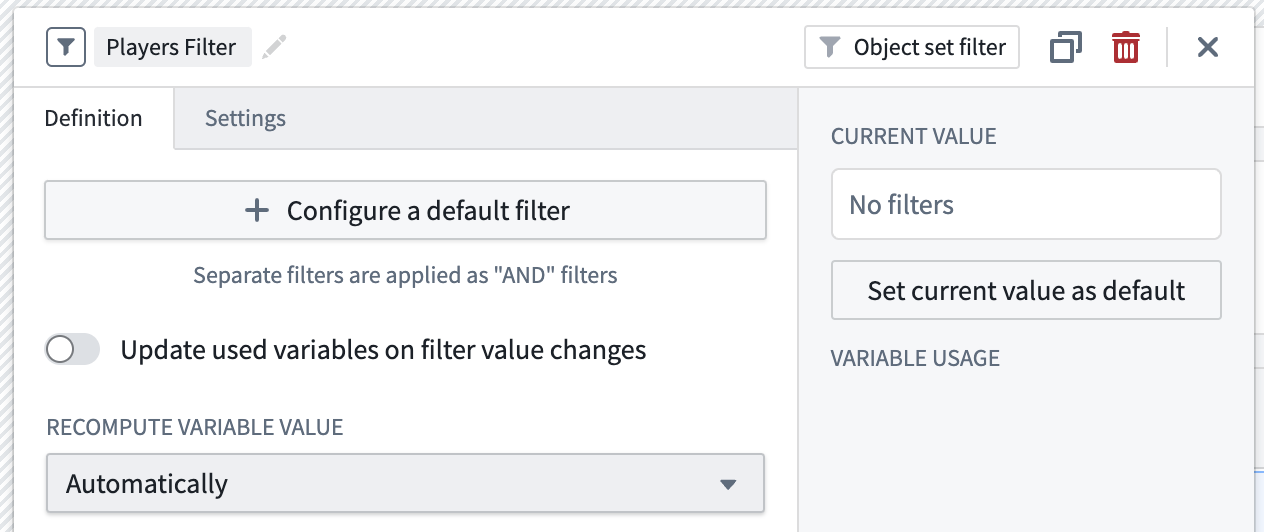
A default state for the filter can also be specified by selecting object types, property types, and values for those property types. The values can be specified inline, or as variables.
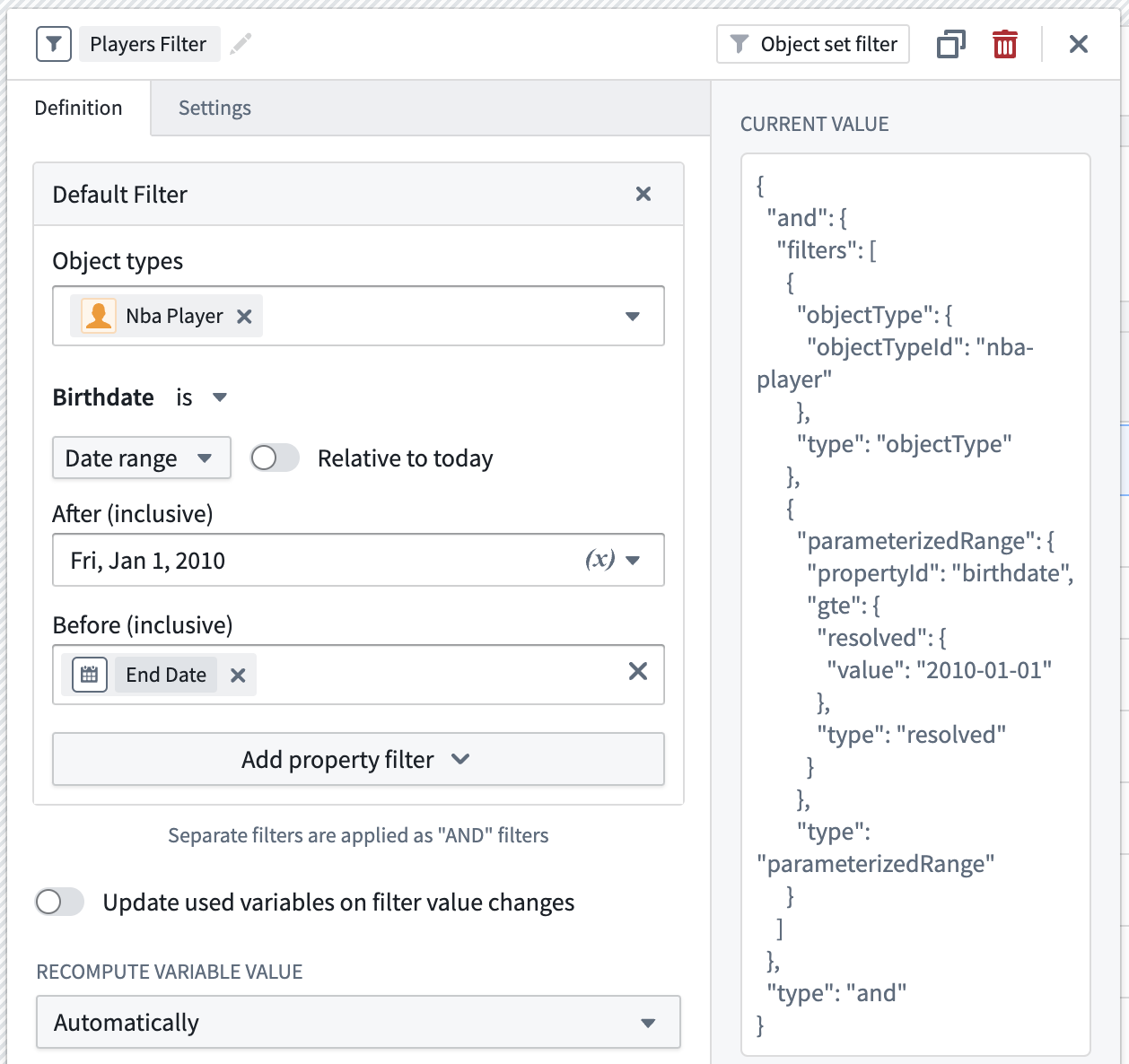
If you select multiple object types, it is recommended that you filter on properties that are shared by all object types. Failure to do so may result in unexpected behavior, especially if deploying the module from Marketplace.
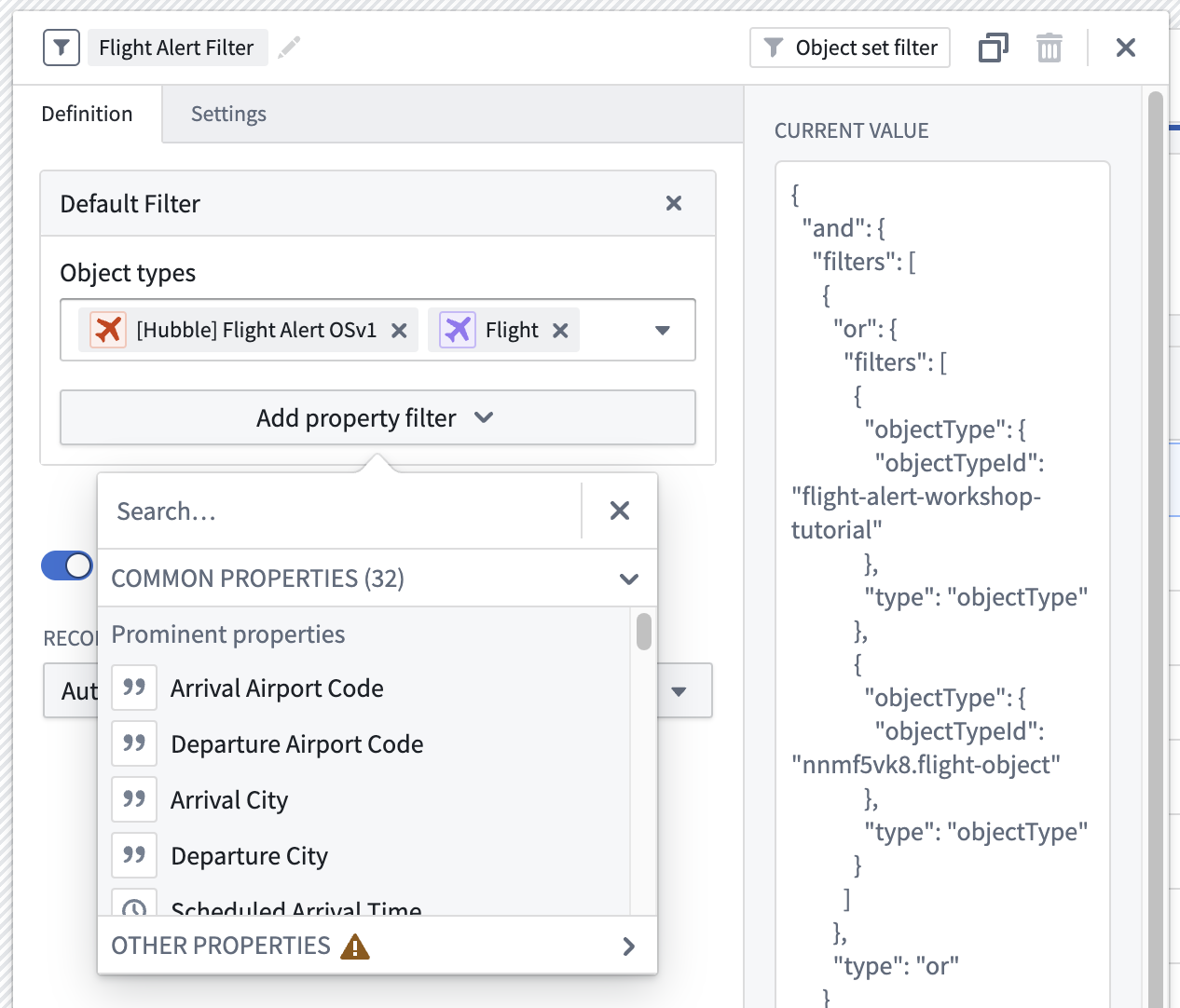
You can also remove the specified object types once your properties are specified if you want to make your filter object type agnostic. Note that you cannot add additional property filters, or select variables for property values, unless at least a single object type is specified.
Supported starting filters
The initial state of object sets can also be defined through object set filter variables. Currently, you can filter through or filter out from initial filters in the following ways:
IS: This will return objects that have a property value that matches exactly with the filter query.NULL: This will return objects that have a property value that is null.CONTAIN: This will return objects that have a property that contains the filter query. For example, if a property value isid000123and the filter query isid0001, this will be considered a match. This matching behavior is currently limited to prefixes; matching arbitrary portions of strings is not currently supported. For instance, if the property value isid000123and the filter query isd0001, this will not be considered a match.
Filter value extraction
For some workflows, it may be helpful to extract specific filtered values from an object set filter to use them elsewhere in your module. Here are some sample use cases where this may be valuable:
- You want to extract and translate a user's filtered values from an initial object type to a secondary object type with a different data model. For example, if a user is initially filtering on the
Email Dateproperty on anEmailobject, and you want to translate that filter to also work on theCall Dateproperty of aPhone Callobject. - A user filters to a given alert type in the Filter List widget, and you want to extract their chosen alert type into a string variable to then use it to pre-fill a
Create New AlertAction. - A user has filtered down to certain properties in the Exploration Search Bar widget, and you want to extract and save their filter state using module interface variables as dynamic URL parameters so that the module can be re-loaded with those same selections.
To accomplish this, you can specify a default filter variable state using variables for property values, and turn on Update used variables on filter value changes.
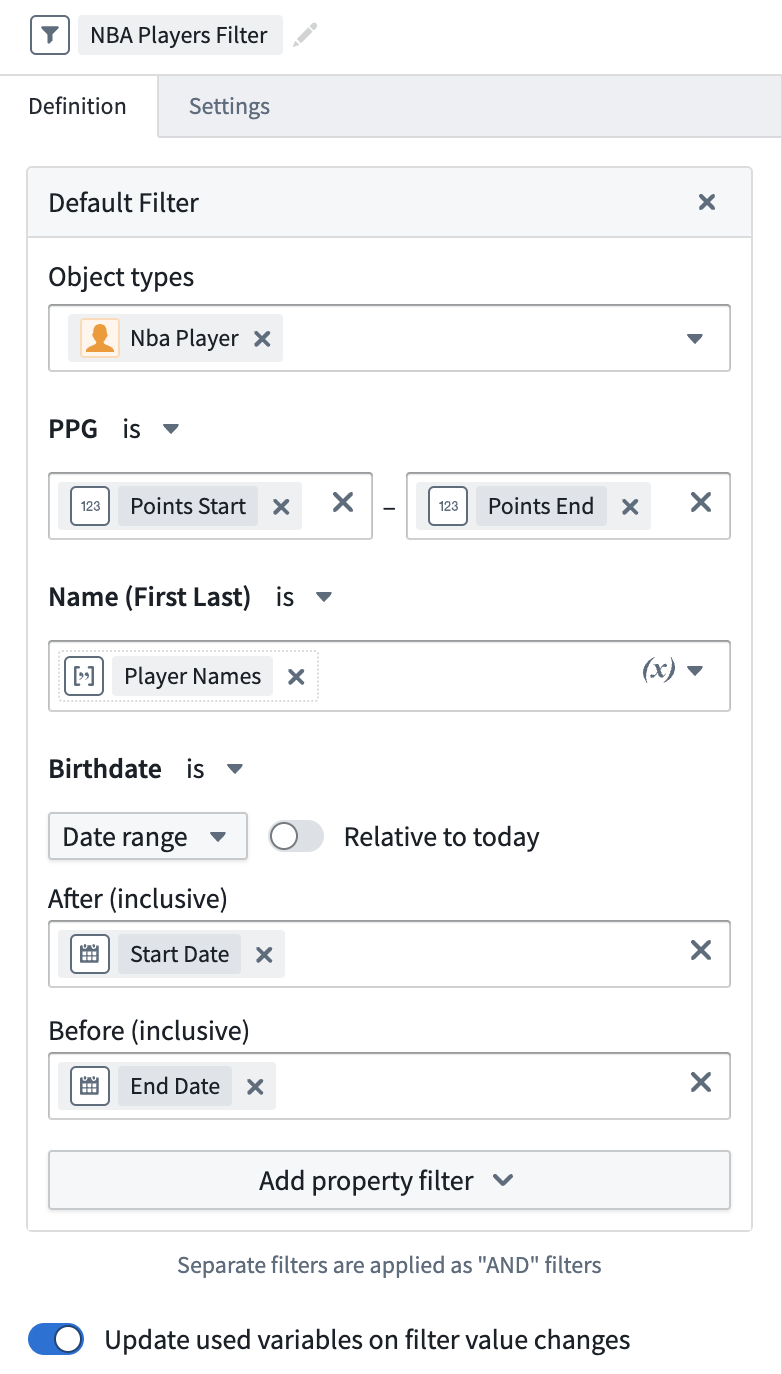
When the filter value is updated to a filter that matches the shape of the default filter, the value for each variable in the configured default will be updated to the extracted value from the filter.
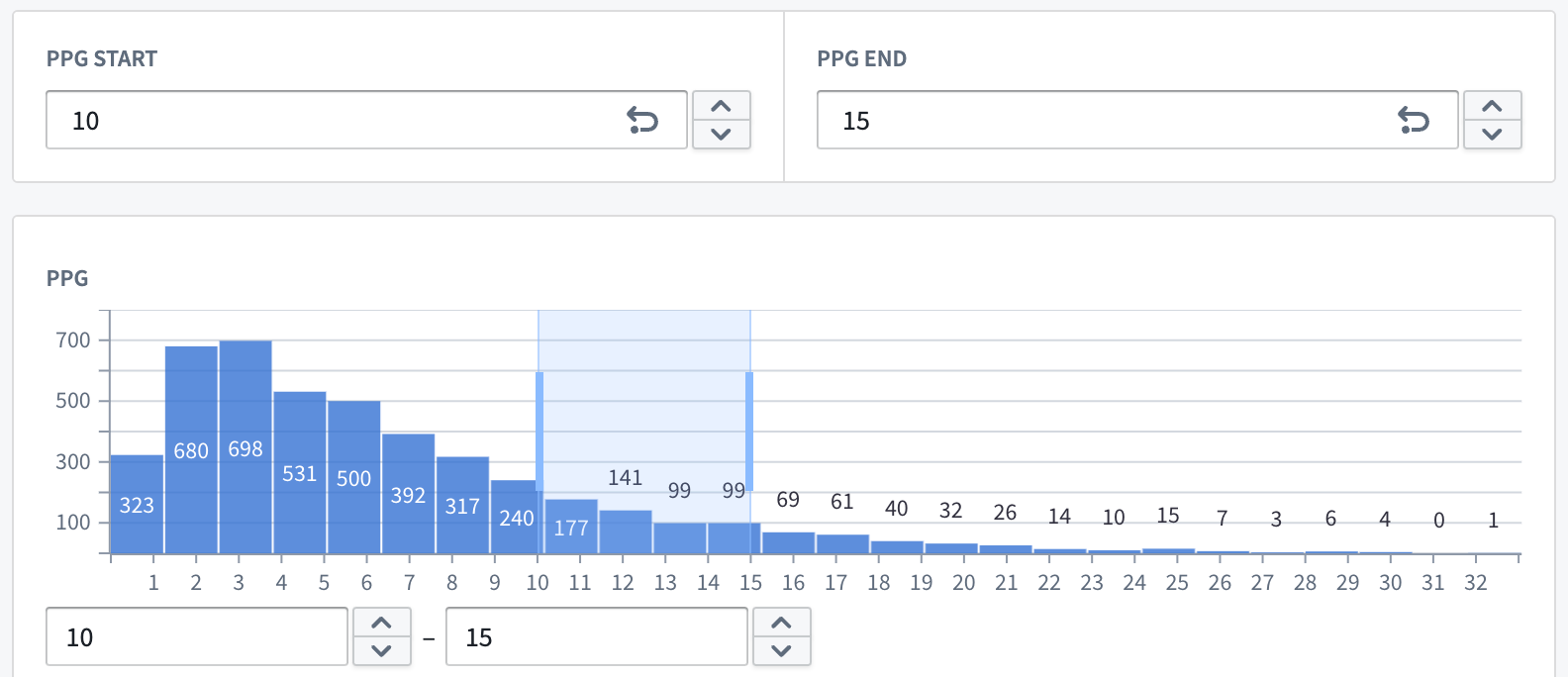
Using the filter above, when a range of points-per-game is selected in the filter list, the numeric inputs that are backed by these extraction variables will be updated.
Only the following value types can be extracted:
- Numeric ranges
- Date/Time ranges
- String terms
- An array variable should be configured to extract multiple values. If a non-array variable is configured, only the first filtered value will be extracted.
Limitations
The filter value must match the shape of the default filter in order for extraction to occur. Review some known cases where this may happen:
- Deeply nested or disjoint range filters, like those that can be output by the pivot table or certain chart selections, do not support extraction or may behave in unexpected ways.
- The current filter value must match the inclusive less than or equal to (LTE), or greater than or equal to (GTE) behavior offered by the object set filter variable definition.
- Negated filter values must also be negated in the filter variable's default configuration.
- The XY Chart widget with a numerical axis does not currently support extraction.
中文翻译
对象集筛选变量(Object Set Filter Variable)
对象集筛选变量(Object Set Filter Variable) 用于追踪对象集的筛选状态,通常由筛选列表(Filter List)、XY图表(XY Chart)、Vega图表(Vega Chart)或数据透视表(Pivot Table)等小部件输出。对象集筛选器随后可应用于对象集变量,或用于在小部件配置中筛选对象集。
创建对象集筛选变量(Create an Object Set Filter Variable)
对象集筛选变量可以创建为空变量,然后在小部件配置中用于捕获小部件的选择。
也可以通过选择对象类型、属性类型以及这些属性类型的值来指定筛选器的默认状态。这些值可以内联指定,也可以作为变量指定。
如果选择了多个对象类型,建议筛选所有对象类型共有的属性。否则可能导致意外行为,尤其是在从Marketplace部署模块时。
如果您希望使筛选器与对象类型无关,也可以在指定属性后移除已选的对象类型。请注意,除非至少指定了一个对象类型,否则无法添加额外的属性筛选器或为属性值选择变量。
支持的起始筛选器(Supported Starting Filters)
对象集的初始状态也可以通过对象集筛选变量来定义。目前,您可以通过以下方式从初始筛选器中进行筛选或排除:
IS:返回属性值与筛选查询完全匹配的对象。NULL:返回属性值为空的对象。CONTAIN:返回属性包含筛选查询的对象。例如,如果属性值为id000123且筛选查询为id0001,则视为匹配。此匹配行为目前仅限于前缀匹配;尚不支持匹配字符串的任意部分。例如,如果属性值为id000123且筛选查询为d0001,则不视为匹配。
筛选值提取(Filter Value Extraction)
在某些工作流中,从对象集筛选器中提取特定的筛选值并在模块的其他位置使用可能会很有帮助。以下是一些可能有用的示例场景:
- 您希望提取用户对初始对象类型的筛选值,并将其转换为具有不同数据模型的次要对象类型。例如,如果用户最初在
Email对象上筛选Email Date属性,而您希望将该筛选器也应用于Phone Call对象的Call Date属性。 - 用户在筛选列表小部件中筛选到某个警报类型,您希望将所选警报类型提取到字符串变量中,然后用于预填充"创建新警报(Create New Alert)"操作。
- 用户在探索搜索栏小部件中筛选到某些属性,您希望使用模块接口变量(Module Interface Variables)作为动态URL参数来提取并保存其筛选状态,以便模块可以重新加载并保留相同的选择。
要实现此目的,您可以使用变量为属性值指定默认筛选变量状态,并开启在筛选值更改时更新使用的变量(Update used variables on filter value changes)。
当筛选值更新为与默认筛选器形状匹配的筛选器时,已配置默认值中的每个变量值将更新为从筛选器中提取的值。
使用上述筛选器,当在筛选列表中选择每场比赛得分范围时,由这些提取变量支持的数值输入将随之更新。
仅支持提取以下值类型:
- 数值范围(Numeric ranges)
- 日期/时间范围(Date/Time ranges)
- 字符串项(String terms)
- 应配置数组变量以提取多个值。如果配置了非数组变量,则仅提取第一个筛选值。
限制(Limitations)
筛选值必须与默认筛选器的形状匹配才能进行提取。以下是一些已知的可能出现此情况的情形:
- 深度嵌套或不连续的范围筛选器,例如数据透视表或某些图表选择可能输出的筛选器,不支持提取或可能产生意外行为。
- 当前筛选值必须匹配对象集筛选变量定义提供的包含性小于等于(LTE)或大于等于(GTE)行为。
- 取反的筛选值也必须在筛选变量的默认配置中取反。
- 带有数值轴的XY图表小部件(XY Chart widget)目前不支持提取。