Routing(路由(Routing))
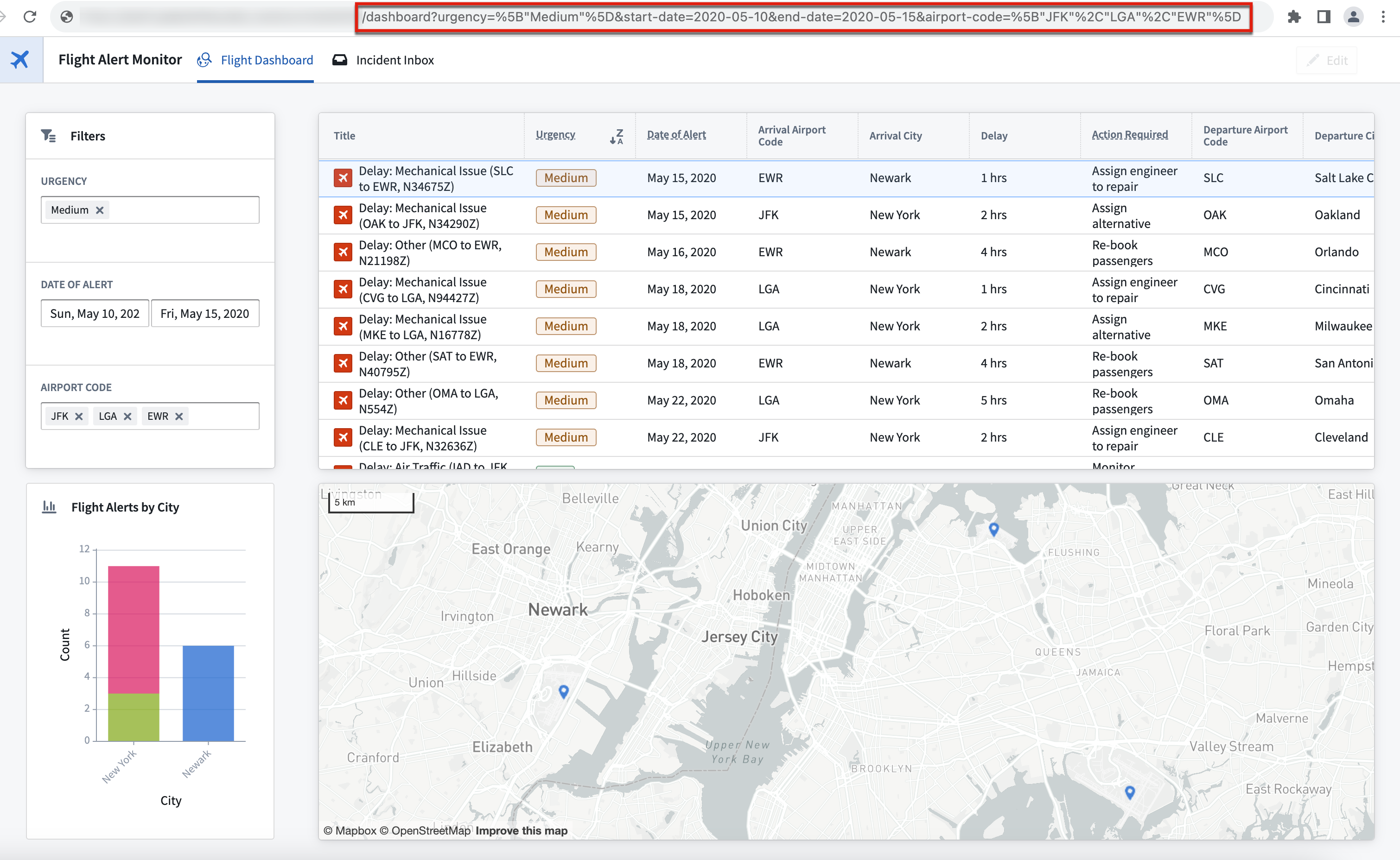
Workshop routing enables specific states or views of a module to be written to the URL, allowing users to easily share these views with others through link sharing.
Enable routing
To enable routing for your Workshop module, navigate to the Pages section of the Settings panel on the left and toggle on the Enable routing option.

The Pages section displays an overview of the pages used with routing and provides an additional panel that showcases the variables in use, as shown below.

Routing for pages
With routing enabled, the ID of the current page will be written to the URL. For pages without a defined page ID, no page ID will be written to the URL; users will be returned to the module's default page on page load.

Routing for variables
You can also use routing to save and share variable values that are configured for use with the module interface. With routing enabled, the current values of variables configured with a routing URL update behavior are written directly as URL query parameters.
To include a module interface variable in the URL, use one of the following configuration options.
- In URL when used by visible widget or layout: The URL will only contain the variable's value if the following is true:
- The value is not the variable's default value
- The variable is used in a widget or layout that appears in the current view.
- Always in URL: The URL will always contain the variable's value if the value is not the variable's default value.
- Never in URL: The URL will never contain the variable's value if the routing toggle is disabled.
If a query parameter key matches the external ID of a module interface variable, the value of the query parameter will be used as the variable's initial value, regardless of URL inclusion behavior configured.

Limitations
Unsupported variables types in the URL
The following variables types are unable to be used in the URL:
- Object set filter variables
- Object set variables are limited to single objects, specified by their RID
However, you can define the above variables types indirectly using other routing variables. For instance, you can create a string variable used with routing and define the default value of an object set filter variable using this string variable.
No inheritance of routing configuration from embedded modules
Embedding a Workshop module does not carry over the routing configuration of the embedded module. To use variable values from an embedded module with routing, add the desired variables to the child module's module interface and pass in routing variables from the parent module in the embedded module configuration.
中文翻译
路由(Routing)
Workshop路由功能可将模块(Module)的特定状态或视图写入URL,用户可通过链接分享轻松将这些视图共享给他人。
启用路由
若要为你的Workshop模块启用路由,请前往左侧设置(Settings)面板的页面(Pages)分区,开启启用路由(Enable routing)开关。
页面(Pages)分区会展示路由关联的所有页面概览,同时提供额外面板展示当前正在使用的变量,如下图所示。
页面路由
启用路由后,当前页面的ID会被写入URL。如果页面没有定义页面ID,URL中不会写入页面ID,用户加载模块时会返回模块的默认页面。
变量路由
你也可以使用路由保存并共享模块界面配置使用的变量值。启用路由后,配置了路由URL更新行为的变量的当前值会直接作为URL的查询参数(Query parameter)写入。
若要将模块界面变量加入URL,请选择以下配置选项之一。
- 当被可见组件(Widget)或布局使用时加入URL: 仅当满足以下所有条件时,URL才会包含该变量的值:
- 变量值不是该变量的默认值
- 该变量被当前视图中显示的组件或布局使用
- 始终加入URL: 只要变量值不是该变量的默认值,URL就会始终包含该变量的值
- 永不加入URL: 路由开关关闭时,URL永远不会包含该变量的值
如果某个查询参数的键与模块界面变量的外部ID(External ID)匹配,那么无论变量配置的URL包含规则是什么,该查询参数的值都会被用作变量的初始值。
限制
URL中不支持的变量类型
以下变量类型无法在URL中使用:
- 对象集(Object set)筛选变量
- 对象集(Object set)变量仅支持单个对象,需通过其资源标识符(RID)指定
不过,你可以通过其他路由变量间接定义上述变量类型。例如,你可以创建一个用于路由的字符串变量,再通过该字符串变量定义对象集筛选变量的default value。