Widget display optimization(微件显示优化)
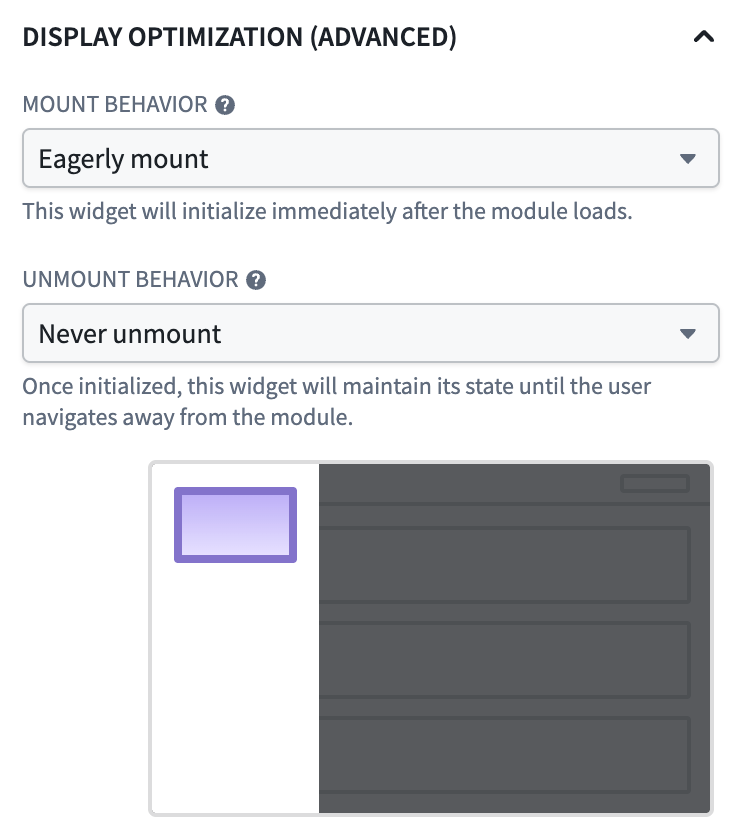
Widget display optimization is a Workshop setting that controls when individual widgets mount and unmount as users navigate within a module. By default, widgets mount when they become visible and unmount when they leave the screen. This frees up browser resources when widgets are not in view but means that widgets must reload their data and rebuild their state every time a user navigates back to them.
:::callout{theme="warning"} Display optimization is an advanced feature. Eagerly mounting widgets or keeping them mounted when not currently in view consumes browser memory and can degrade module performance if applied broadly. Configure non-default display behavior only on the specific widgets where it is needed. :::
When to adjust display behavior
Adjusting widget display behavior is most useful for:
- Custom widgets that hold local state: Custom widgets unmount by default when scrolled off-screen, which discards any state held inside the widget's iframe. Setting these widgets to remain mounted preserves that state across navigation.
- Widgets with expensive initial loads: If a widget runs a computationally expensive function, queries a large amount of data, or initializes a complex visualization, keeping it mounted avoids the user waiting for that work to repeat each time they revisit the view.
- Widgets that users return to frequently: Scroll position and loaded data are preserved across module navigation in most cases (but not all) when a widget is configured to remain mounted.
- Widgets that should be ready before the user navigates to them: Eagerly mounting a widget mounts it on initial module load so the widget is fully loaded the first time a user navigates to its layout. This is useful for widgets on a destination page that users almost always reach, where the wait on first navigation would otherwise be disruptive. The tradeoff is a longer initial module load time.
- Widgets that are heavy when off-screen: Configuring a widget to unmount when scrolled off-screen, in addition to the default unmount when its layout is no longer rendered, can reduce memory and rendering pressure for modules with large or expensive widgets in long scrollable layouts.
It is not recommended to change display behavior on widgets that are rarely revisited or hold no meaningful state. Note that display optimization settings are not supported in loop layouts.
Configuration options
Display optimization is controlled by two independent settings: a widget's mount behavior and its unmount behavior. The default values for each setting are tuned for most use cases, and the recommended approach is to leave them in place unless one of the scenarios above applies.
Mount behavior
- Default: The widget mounts when its containing layout (the page, section, or tab that holds it) first renders.
- Delay until on-screen: The widget delays mounting until it is scrolled into view. This is the historical behavior for some widget types and is useful when a layout contains many widgets that the user may never reach.
- Eagerly mount: The widget mounts as soon as the module loads, even if it is not yet visible. The widget remains mounted for the rest of the session.
Unmount behavior
- Default: The widget unmounts when its containing layout is no longer rendered; for example, when the user switches to another tab or page.
- Unmount when off-screen: The widget unmounts whenever it is scrolled out of view, in addition to the default condition. This is the most aggressive unmount setting and is useful for widgets that are expensive to keep in memory.
- Never unmount: Once mounted, the widget remains mounted for the rest of the session. Subsequent navigation back to the widget is immediate and any widget state is preserved.
Configure widget display behavior
To set display behavior for a specific widget:
- In edit mode, select the widget in the canvas.
- Open the widget configuration panel's Display tab and locate the Display optimization options.
- Choose the desired mount and unmount behavior from the available modes.
The configuration panel contains a short description and animation of each mode and disables options that do not apply to the selected widget or layout type.
Performance considerations
The default display behavior is tuned for modules with many widgets across many pages or sections, where unmounting off-screen widgets keeps memory usage and rendering work bounded. When you opt a widget into staying mounted:
- The widget's DOM, React state, and any in-memory data remain in the browser for the entire session.
- Widgets configured to eagerly mount and never unmount add their initialization work to the module's initial load time, which can noticeably increase for the module if applied broadly.
- Modules that keep large numbers of widgets mounted are more susceptible to slowdowns, memory pressure, and browser tab crashes on lower-spec devices.
Use the Performance Profiler to measure the impact of widget display optimization changes on your module's load and reload times.
中文翻译
微件显示优化
微件显示优化是一项 Workshop 设置,用于控制用户在模块(Module)内导航时各个微件(Widget)的挂载(Mount)和卸载(Unmount)时机。默认情况下,微件在可见时挂载,在离开屏幕时卸载。这可以在微件不可见时释放浏览器资源,但也意味着每次用户导航回这些微件时,它们都必须重新加载数据并重建状态。
:::callout{theme="warning"} 显示优化是一项高级功能。提前挂载微件或在微件不可见时保持其挂载状态会消耗浏览器内存,如果广泛应用可能会降低模块性能。请仅在确实需要的特定微件上配置非默认的显示行为。 :::
何时调整显示行为
调整微件显示行为在以下场景中最为有用:
- 保存本地状态的自定义微件: 自定义微件在滚动出屏幕时默认会卸载,这会丢弃微件 iframe 内保存的任何状态。将这些微件设置为保持挂载,可以在导航过程中保留该状态。
- 初始加载开销较大的微件: 如果微件运行计算密集型函数、查询大量数据或初始化复杂的可视化效果,保持其挂载状态可以避免用户在每次重新访问该视图时等待这些操作重复执行。
- 用户频繁返回的微件: 在大多数情况下(并非全部),当微件配置为保持挂载时,滚动位置和已加载的数据会在模块导航过程中得以保留。
- 需要在用户导航前准备就绪的微件: 提前挂载微件会在模块初始加载时将其挂载,从而确保用户首次导航到其所在布局时微件已完全加载。这适用于目标页面上的微件,因为用户几乎总是会访问这些页面,否则首次导航时的等待会造成干扰。代价是模块的初始加载时间会变长。
- 在屏幕外占用资源较多的微件: 除了默认的布局不再渲染时卸载外,配置微件在滚动出屏幕时也进行卸载,可以减少在包含大型或高开销微件的长滚动布局中模块的内存和渲染压力。
不建议更改很少被重新访问或不保存有意义状态的微件的显示行为。请注意,循环布局(Loop layouts) 不支持显示优化设置。
配置选项
显示优化由两个独立的设置控制:微件的挂载行为和卸载行为。每个设置的默认值已针对大多数用例进行了调优,建议保持默认设置,除非适用上述场景之一。
挂载行为
- 默认: 微件在其所在布局(包含它的页面、分区或选项卡)首次渲染时挂载。
- 延迟至屏幕可见: 微件会延迟挂载,直到滚动进入可视区域。这是某些微件类型的历史行为,适用于布局中包含许多用户可能永远不会访问到的微件的情况。
- 提前挂载: 微件在模块加载后立即挂载,即使它尚不可见。该微件将在会话的其余时间保持挂载状态。
卸载行为
- 默认: 微件在其所在布局不再渲染时卸载;例如,当用户切换到另一个选项卡或页面时。
- 屏幕不可见时卸载: 除了默认条件外,微件在滚动出可视区域时也会卸载。这是最激进的卸载设置,适用于在内存中保持运行开销较大的微件。
- 从不卸载: 微件一旦挂载,将在会话的其余时间保持挂载状态。后续导航回该微件时将是即时的,并且会保留所有微件状态。
配置微件显示行为
要为特定微件设置显示行为:
- 在编辑模式下,在画布中选择该微件。
- 打开微件配置面板的显示选项卡,找到显示优化选项。
- 从可用模式中选择所需的挂载和卸载行为。
配置面板包含每种模式的简短说明和动画,并会禁用不适用于所选微件或布局类型的选项。
性能注意事项
默认显示行为针对跨多个页面或分区包含大量微件的模块进行了调优,在这些模块中,卸载屏幕外的微件可以将内存使用和渲染工作量控制在合理范围内。当您选择让微件保持挂载时:
- 微件的 DOM、React 状态以及任何内存中的数据将在整个会话期间保留在浏览器中。
- 配置为提前挂载且从不卸载的微件会将其初始化工作增加到模块的初始加载时间中,如果广泛应用,可能会显著增加模块的加载时间。
- 保持大量微件挂载的模块在低配置设备上更容易出现运行缓慢、内存压力过大以及浏览器标签页崩溃的问题。
使用性能分析器(Performance Profiler)来衡量微件显示优化更改对模块加载和重新加载时间的影响。