Widget: Current Location Manager(微件(Widget):当前位置管理器)
The Current Location Manager widget prompts users to share their location and publishes the detected location as a string variable that you can use in your application. Additionally, the widget can display a human-readable preview of the detected location to the end user, determined using the Mapbox reverse geocoding API.
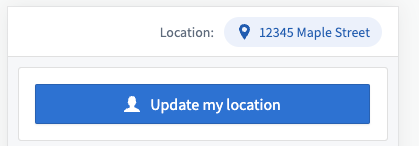
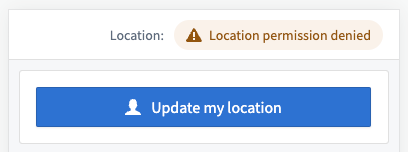
If the user denies access to their current location, a warning is shown and no current location variable value is set:
Note that the Current Location Manager widget will only prompt the user to share their location and update the user's detected location while the page containing it is open. If your user navigates to a different page within your application, location detection and updates will be paused. We recommend placing the widget in a toolbar or other prominent location so that it is consistently visible when needed. Opening a drawer on top of a page containing the Current Location Manager will not prevent it from updating; only navigating to a different page will cause updates to be paused.
Configuration options
Below are the core configuration options for the Current Location Manager:
- Label: The text label shown to the left of the location preview. Can be empty to remove the label.
- Location output variable: The string variable that stores the user's current location in
lat,longformat. - Hide location display: If enabled, both the label and location preview will be hidden, but the user will still be prompted to share their location. Additionally, no request will be made to attempt to reverse geocode the user's location. This is suitable in cases when there is no need to show the user a preview of the detected location.
中文翻译
微件(Widget):当前位置管理器
当前位置管理器微件(Widget)会提示用户共享其位置,并将检测到的位置发布为字符串变量(String Variable),供您在应用程序中使用。此外,该微件还可利用 Mapbox reverse geocoding API 为最终用户显示检测位置的人类可读预览。
如果用户拒绝访问其当前位置,系统将显示警告,且不会设置当前位置变量值:
请注意,当前位置管理器微件仅在包含它的页面处于打开状态时,才会提示用户共享位置并更新检测到的用户位置。如果用户在应用程序中导航到其他页面,位置检测和更新将暂停。我们建议将该微件放置在工具栏(Toolbar)或其他显眼位置,以确保在需要时始终可见。在包含当前位置管理器的页面上方打开抽屉(Drawer)不会阻止其更新;只有导航到其他页面才会导致更新暂停。
配置选项
以下是当前位置管理器的核心配置选项:
- 标签(Label): 显示在位置预览左侧的文本标签。可留空以移除该标签。
- 位置输出变量: 存储用户当前位置的字符串变量,格式为
lat,long。 - 隐藏位置显示: 启用后,标签和位置预览都将被隐藏,但仍会提示用户共享其位置。此外,系统不会发起尝试对用户位置进行反向地理编码(Reverse Geocoding)的请求。这适用于无需向用户显示检测位置预览的情况。