Exploration Filter Pills(探索筛选标签(Exploration Filter Pills))
Use the Exploration Filter Pills widget to visualize and apply filters to an object set.
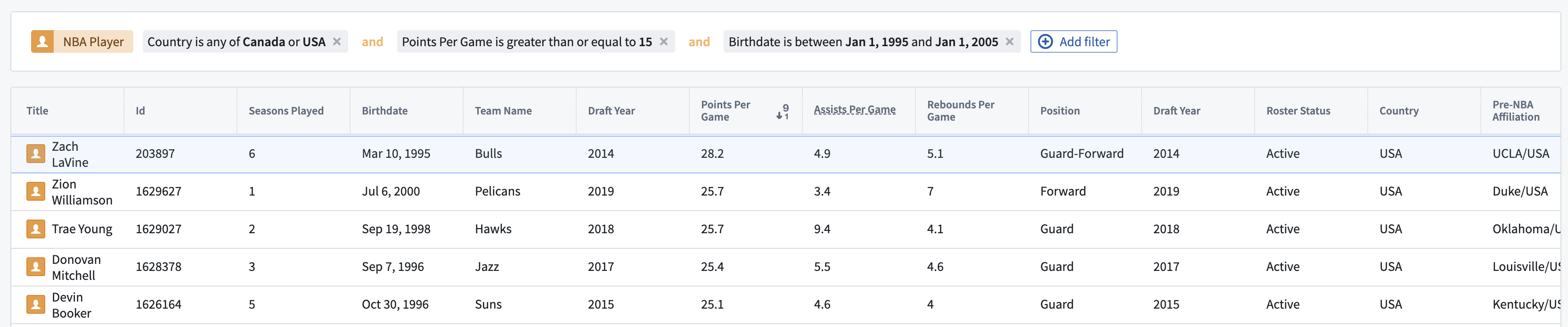
Configuration options
- Mode
- Read only: Display a non-editable view of any filters applied to a specified object set containing a single object type.
- Remove only: Display an editable view of any filters applied to a specified object set containing a single object type, allowing users to remove any applied filters. An object set filter variable containing the applied filters may optionally be specified as output.
- Update existing filters only: Display an editable view of any filters applied to a specified object set containing a single object type, allowing users to remove or edit any applied filters. An object set filter variable containing the applied filters may optionally be specified as output.
- Add, update, remove: Display an editable view of any filters applied to a specified object set containing a single object type, allowing users to remove or edit any applied filters as well as add new property filters to be applied on the object set. An object set filter variable containing the applied filters may optionally be specified as output.
- Prevent users from changing operators (or, and): Toggle to enable/disable users from changing operator values used between applied filters.
- Display object type pill: Toggle to enable/disable a pill describing the object type of the current object set.
中文翻译
探索筛选标签(Exploration Filter Pills)
使用探索筛选标签(Exploration Filter Pills) 组件来可视化对象集并对其应用筛选条件。
配置选项
- 模式(Mode)
- 只读(Read only): 显示应用于指定单一对象类型对象集的筛选条件的不可编辑视图。
- 仅移除(Remove only): 显示应用于指定单一对象类型对象集的筛选条件的可编辑视图,允许用户移除已应用的筛选条件。可选择将包含已应用筛选条件的对象集筛选变量作为输出。
- 仅更新现有筛选(Update existing filters only): 显示应用于指定单一对象类型对象集的筛选条件的可编辑视图,允许用户移除或编辑已应用的筛选条件。可选择将包含已应用筛选条件的对象集筛选变量作为输出。
- 添加、更新、移除(Add, update, remove): 显示应用于指定单一对象类型对象集的筛选条件的可编辑视图,允许用户移除或编辑已应用的筛选条件,并添加新的属性筛选条件以应用于该对象集。可选择将包含已应用筛选条件的对象集筛选变量作为输出。
- 阻止用户更改运算符(或、与)(Prevent users from changing operators (or, and)): 切换以启用/禁用用户更改已应用筛选条件之间使用的运算符值。
- 显示对象类型标签(Display object type pill): 切换以启用/禁用描述当前对象集对象类型的标签。