Image Annotation(图像标注(Image Annotation))
The Image Annotation widget is used to annotate images by drawing rectangles around areas of interest.
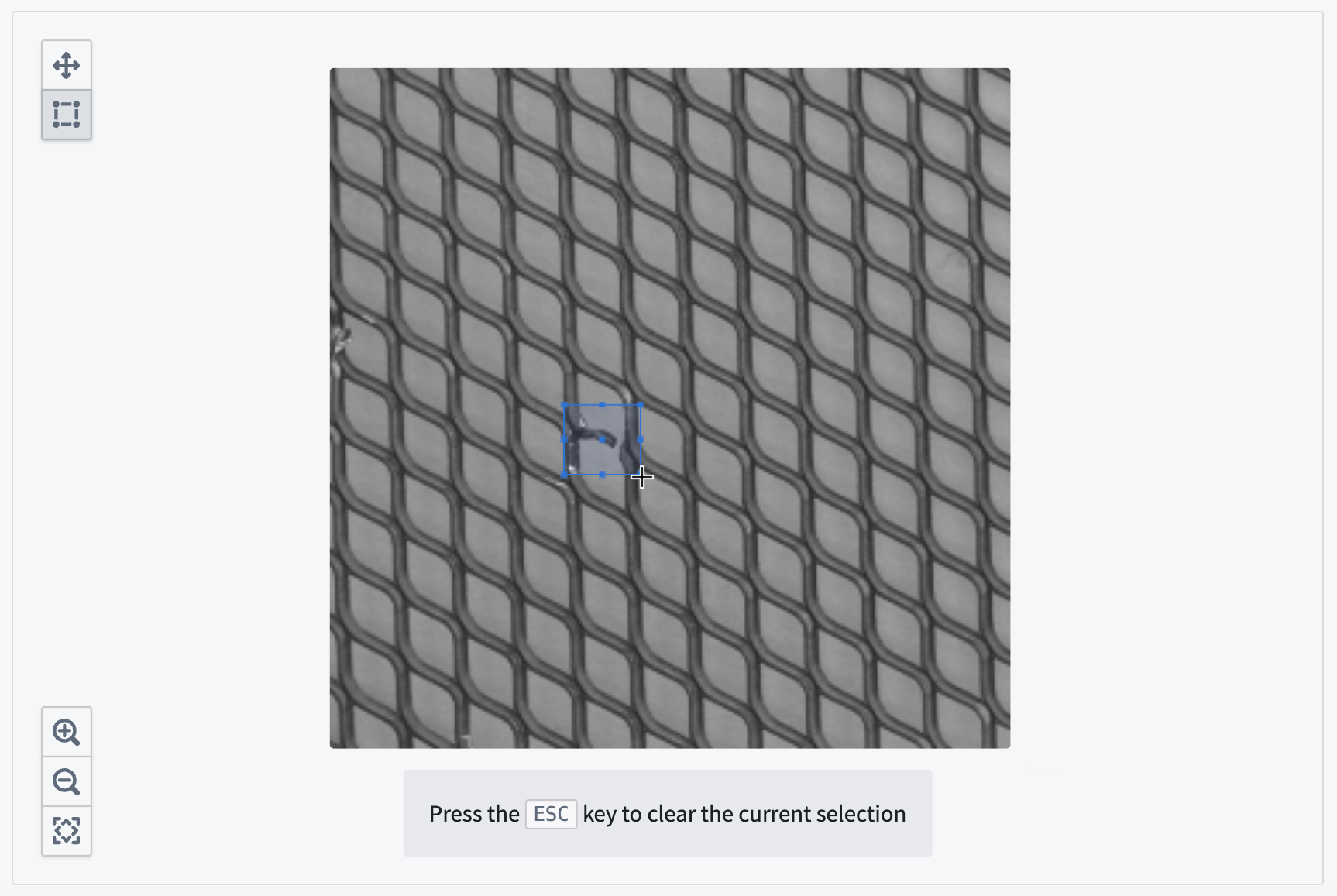
The screenshot below shows an example of a configured Image annotation widget in the process of creating an annotation:
Configuration options
Here is a screenshot of the initial state of a newly-added Image Annotation widget alongside its initial configuration panel:
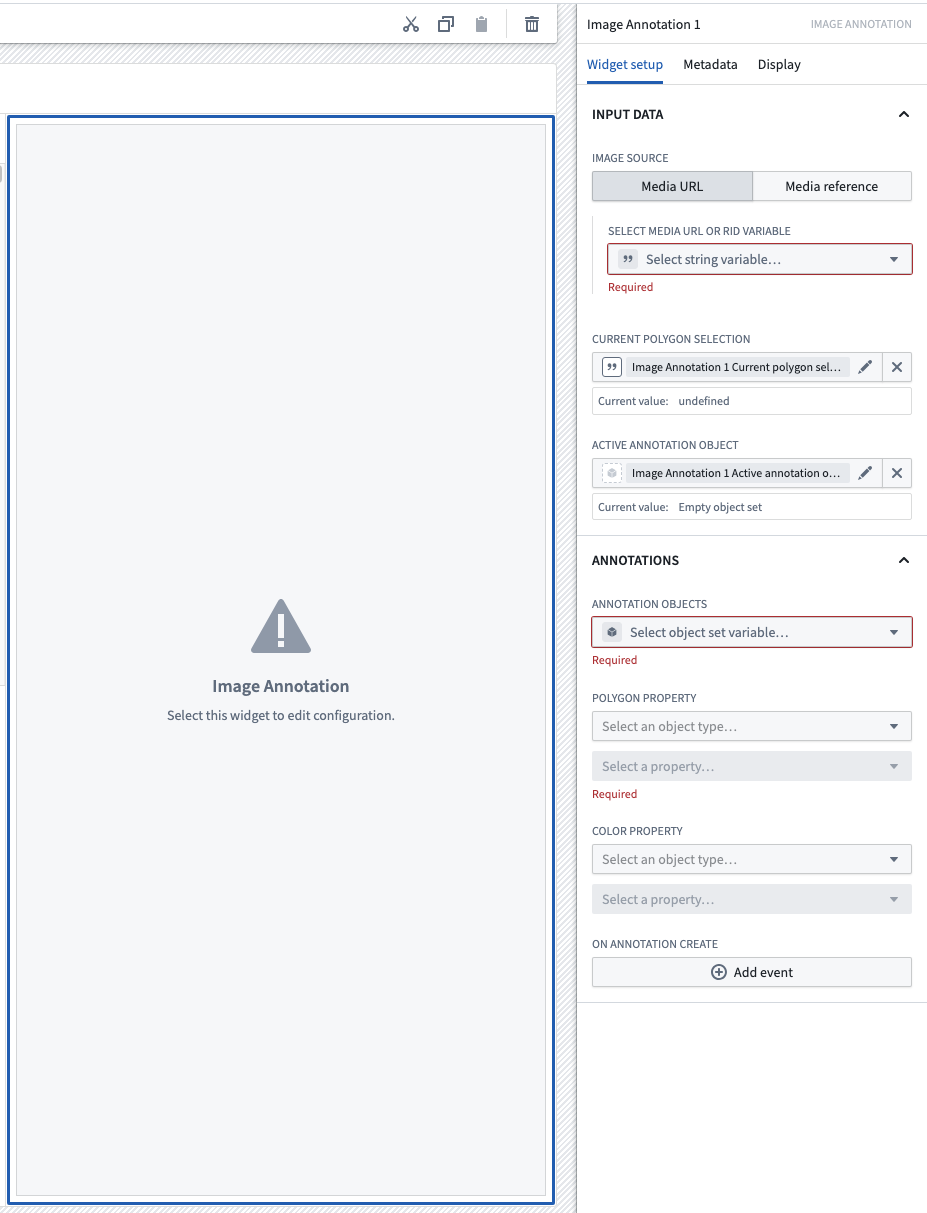
- Input data
- Image source: The image can be displayed from either a media URL or media reference. Currently this widget accepts the following image file types:
- Media URL: Select a string variable with a valid media URL to render a preview of the media. If referencing a media URL from a dataset, the URL should be in either of the following format:
.png,.jpg,.jpeg,.bmp, or.webp, https://{my-foundry-url}/foundry-data-proxy/api/web/dataproxy/datasets/{dataset rid}/transactions/{transaction rid}/{filename}https://{my-foundry-url}/foundry-data-proxy/api/web/dataproxy/datasets/{dataset rid}/views/{branch name}/{filename}.- Otherwise, if referencing an external media URL, configure access in your enrollment's Content Security Policy settings.
- Media reference: Define an object set with a single object and select the media reference typed property to render a preview of the media for that object.
- Media URL: Select a string variable with a valid media URL to render a preview of the media. If referencing a media URL from a dataset, the URL should be in either of the following format:
- Current bounding box selection: A string variable that tracks the active bounding box selection coordinate stored as "x1, y1, x2, y2", where (x1, y1) are the pixel coordinates for the upper-left corner of the box, and (x2, y2) are the pixel coordinates for the lower-right corner of the box.
- Active annotation object: The object representing the currently selected annotation.
- Annotations
- Annotation objects: The object set representing the annotations to be superimposed on the image. Currently, up to 1000 annotations per image is supported.
- Bounding box property: The annotation object set's string property that represents the point vector.
- Color property: The annotation object set's string property that represents the color to be drawn as a hex code. This field is optional.
- On annotation create: Enable module builders to configure Workshop events to trigger when an annotation is created by a user.
中文翻译
图像标注(Image Annotation)
图像标注(Image Annotation) 组件用于通过绘制矩形框来标注图像中的感兴趣区域。
下方截图展示了一个已配置的图像标注(Image Annotation) 组件在创建标注过程中的示例:
配置选项
以下是新添加的图像标注(Image Annotation)组件初始状态及其初始配置面板的截图:
- 输入数据(Input data)
- 图像来源(Image source): 图像可通过媒体URL或媒体引用(media reference)显示。目前该组件支持以下图像文件类型:
- 媒体URL(Media URL): 选择包含有效媒体URL的字符串变量,以渲染媒体预览。如果引用数据集中的媒体URL,该URL应采用以下格式之一:
.png、.jpg、.jpeg、.bmp或.webp, https://{my-foundry-url}/foundry-data-proxy/api/web/dataproxy/datasets/{dataset rid}/transactions/{transaction rid}/{filename}https://{my-foundry-url}/foundry-data-proxy/api/web/dataproxy/datasets/{dataset rid}/views/{branch name}/{filename}。- 否则,如果引用外部媒体URL,请在注册的内容安全策略(Content Security Policy)设置中配置访问权限。
- 媒体引用(Media reference): 定义一个包含单个对象的对象集,并选择媒体引用(media reference)类型属性,以渲染该对象的媒体预览。
- 媒体URL(Media URL): 选择包含有效媒体URL的字符串变量,以渲染媒体预览。如果引用数据集中的媒体URL,该URL应采用以下格式之一:
- 当前边界框选择(Current bounding box selection): 一个字符串变量,用于跟踪当前选中的边界框坐标,存储格式为"x1, y1, x2, y2",其中(x1, y1)为框左上角的像素坐标,(x2, y2)为框右下角的像素坐标。
- 当前标注对象(Active annotation object): 表示当前选中标注的对象。
- 标注(Annotations)
- 标注对象(Annotation objects): 表示要叠加在图像上的标注的对象集。目前每张图像最多支持1000个标注。
- 边界框属性(Bounding box property): 标注对象集中的字符串属性,用于表示点向量。
- 颜色属性(Color property): 标注对象集中的字符串属性,用于表示绘制颜色的十六进制代码。此字段为可选。
- 创建标注时(On annotation create): 允许模块构建者配置Workshop事件,以便在用户创建标注时触发。