Inline Action(内联操作(Inline Action))
The Inline Action widget enables users to interact with the Ontology to create, modify, or delete one or multiple objects or links. The widget supports both form and table interfaces, which can be configured in either Workshop or the Ontology Manager application. Both interfaces support extensive configuration options, including default values, constraints, and live validation with custom error messages to simplify troubleshooting. To configure the widget, users must have an existing action type in the Ontology with defined parameters, logic, and security. A single Inline Action widget can display multiple Actions simultaneously. Here are the key scenarios where you should use Inline Actions:
- To enable users to perform business operations or workflows directly from your app.
- To collect structured information from users.
- To standardize and control how actions are performed on objects, ensuring data integrity and auditability.
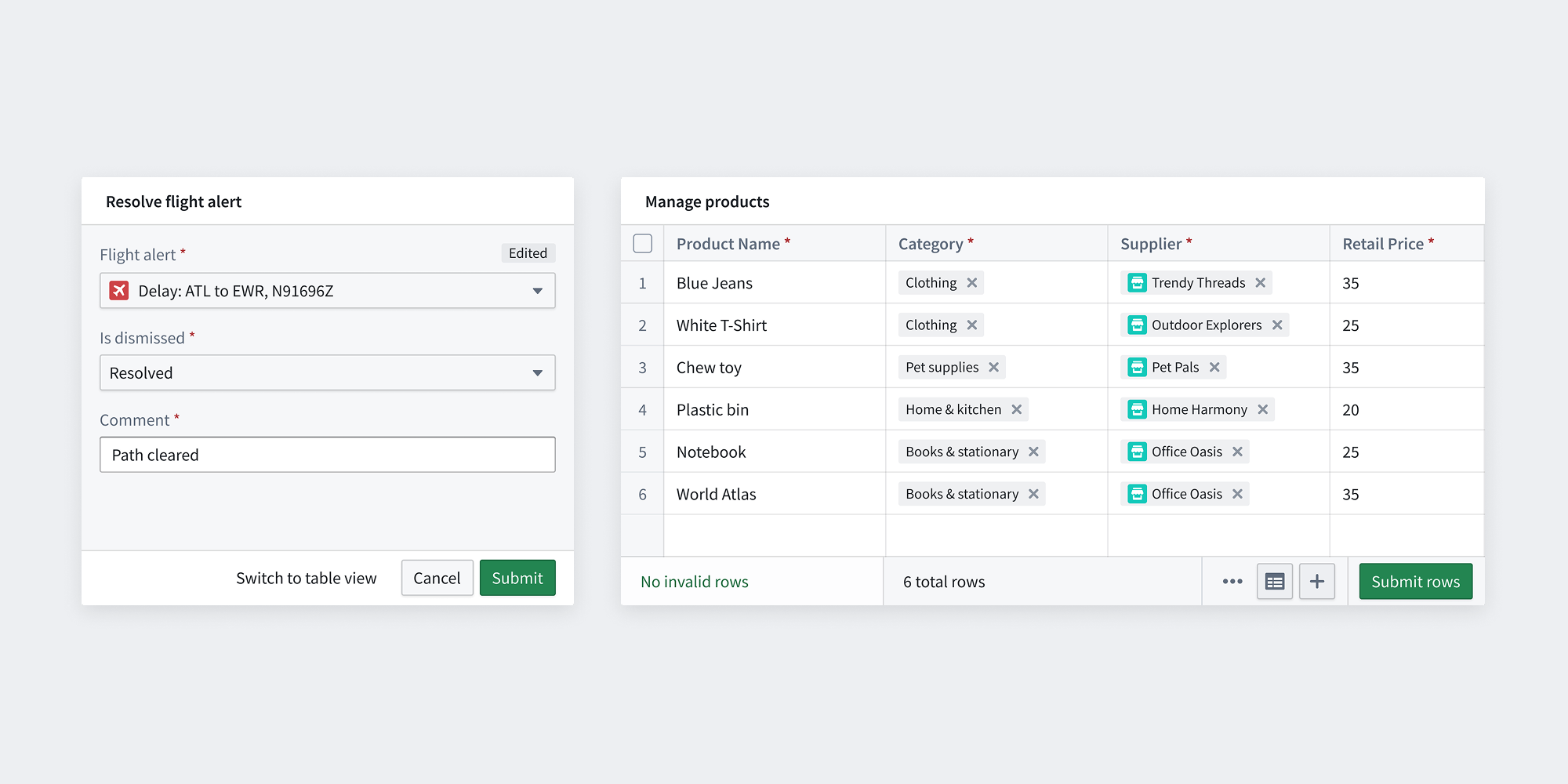
Action form
Action forms trigger one Action at a time and are recommended for small-scale datasets where guided form interaction is desired. It is commonly used for performing an Action on a small number of objects, or running a Function that can compute a more complex set of edits from a small number of parameters. Common examples include inputting personal information, marking several tasks as completed, or running an LLM to extract information from uploaded media and save the results to the ontology.
Action table (Action grid)
Action tables (previously known as Action grids) are recommended for large-scale datasets or when data is sourced from CSV files. They support live editing within your Workshop application. Common examples include managing warehouse inventory and performing bulk updates. The table layout offers several benefits, including keyboard navigation and CSV file upload capabilities.
:::callout There may be some Actions that are not yet usable in the Table because some feature of the Action is only supported in the Form layout. Over time, these feature gaps will be removed. :::
Configuration
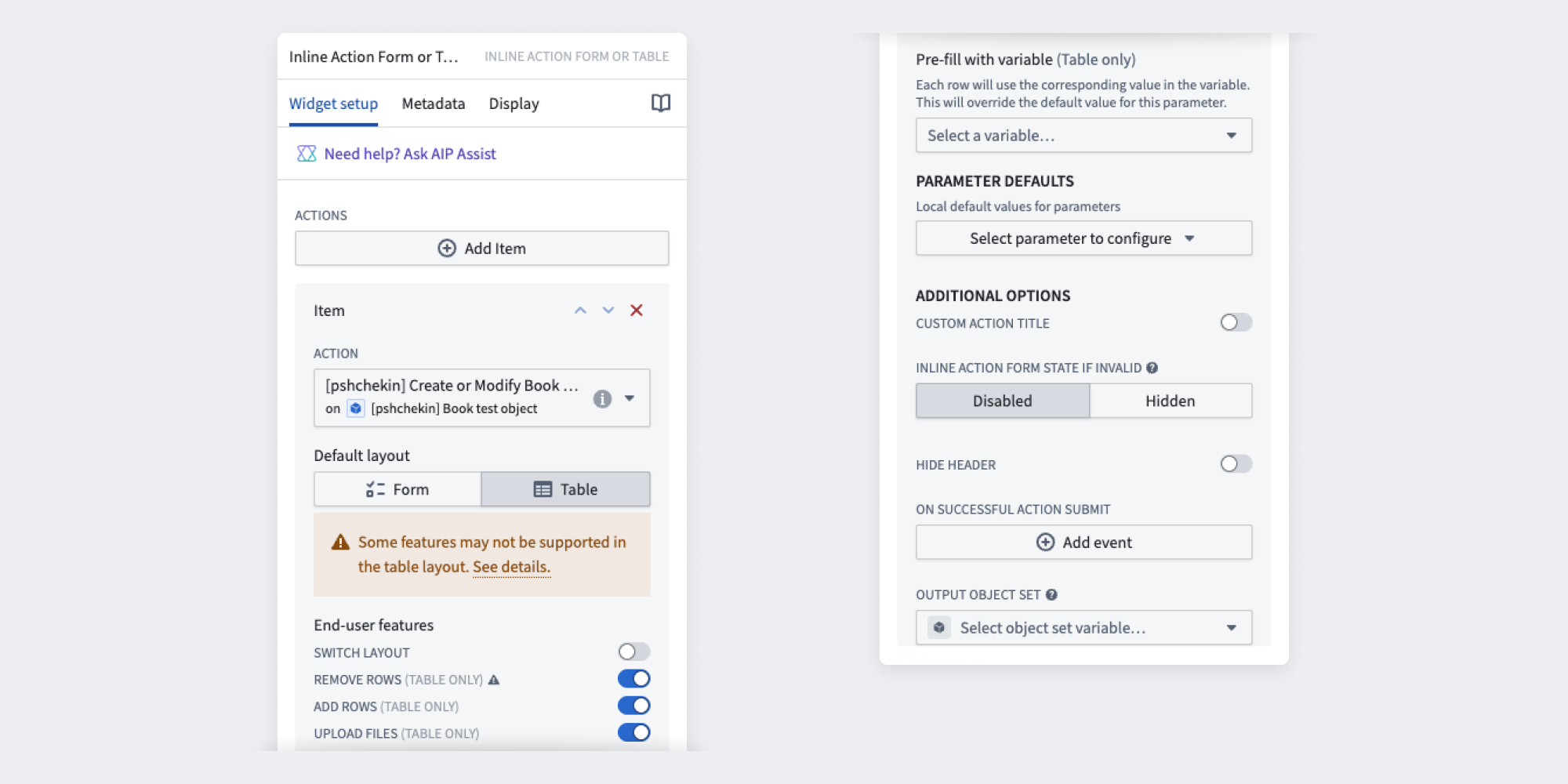
Primary features
- Select an Action: Select Add item to include multiple actions, each requiring individual configuration. When multiple actions are implemented in the same widget frame, users will see a selection menu upfront.
- Select default layout: Choose between Action Table and Action Form based on your use case.
- End-user features: Configure additional user interactions, including layout switching, row management, and file uploads. Note that table layout may have limited configuration options; see the action type configuration page for details. Also note that batch call limits apply to the table layout, as well as the requirement that edits do not conflict.
- Pre-fill with variable (table only): Pre-populate table rows by mapping an object set variable to an object reference action parameter. The variable's object type must match the action parameter's defined object type.
- Define parameter defaults (table and form): Set local default values for parameters in the Inline Action view. If unspecified, the action type parameter configurations from the Ontology will apply.
Additional features
- Set custom Action title: Customize the widget header by replacing the default title with your own text.
- Inline Action form state if invalid: Configure how the Action form appears when submission criteria are not met. Choose between
disabledorhiddento either disable or hide invalid Actions. - Hide header: Control the visibility of the Action header.
- Apply to Scenario: Applies the Action to a selected Scenario.
- On successful action submit: Configure a Workshop event to trigger after an Action is successfully submitted.
- Output object set: Specify the object set that will be created or modified when the Action is submitted.
中文翻译
内联操作(Inline Action)
内联操作(Inline Action) 组件使用户能够与本体论(Ontology)进行交互,以创建、修改或删除一个或多个对象或链接。该组件支持表单和表格两种界面,可在 Workshop 或本体管理器(Ontology Manager)应用中进行配置。两种界面均支持丰富的配置选项,包括默认值、约束条件以及带有自定义错误消息的实时验证,以简化问题排查。要配置该组件,用户必须在本体论(Ontology)中拥有已定义参数、逻辑和安全性的现有操作类型。单个内联操作(Inline Action)组件可同时显示多个操作。以下是应使用内联操作(Inline Action)的关键场景:
- 使用户能够直接从您的应用中执行业务操作或工作流。
- 收集用户的结构化信息。
- 标准化并控制对对象执行操作的方式,确保数据完整性和可审计性。
操作表单(Action form)
操作表单(Action form)每次触发一个操作,适用于需要引导式表单交互的小规模数据集。它通常用于对少量对象执行操作,或运行可通过少量参数计算更复杂编辑集的函数。常见示例包括输入个人信息、将多个任务标记为已完成,或运行大语言模型(LLM)从上传的媒体中提取信息并将结果保存到本体论(Ontology)。
操作表格(Action table)(操作网格)
操作表格(Action table)(原称为操作网格(Action grid))适用于大规模数据集或数据来自 CSV 文件的情况。它支持在 Workshop 应用中进行实时编辑。常见示例包括管理仓库库存和执行批量更新。表格布局具有多项优势,包括键盘导航和 CSV 文件上传功能。
:::callout 某些操作可能尚无法在表格中使用,因为操作的某些功能仅在表单布局中受支持。随着时间的推移,这些功能差距将被消除。 :::
配置
主要功能
- 选择操作(Select an Action): 选择添加项目(Add item)以包含多个操作,每个操作需要单独配置。当在同一组件框架中实现多个操作时,用户将首先看到一个选择菜单。
- 选择默认布局(Select default layout): 根据您的用例选择操作表格(Action Table)或操作表单(Action Form)。
- 最终用户功能(End-user features): 配置额外的用户交互,包括布局切换、行管理和文件上传。请注意,表格布局的配置选项可能有限;详情请参阅操作类型配置页面。另请注意,表格布局适用批量调用限制,并且要求编辑操作不冲突。
- 使用变量预填充(仅限表格): 通过将对象集变量映射到对象引用操作参数来预填充表格行。变量的对象类型必须与操作参数定义的对象类型匹配。
- 定义参数默认值(表格和表单): 在内联操作视图中为参数设置本地默认值。如果未指定,则将应用本体论(Ontology)中的操作类型参数配置。
附加功能
- 设置自定义操作标题(Set custom Action title): 通过将默认标题替换为您自己的文本来自定义组件标题。
- 无效时的内联操作表单状态(Inline Action form state if invalid): 配置当提交条件未满足时操作表单的显示方式。选择
disabled或hidden以禁用或隐藏无效操作。 - 隐藏标题(Hide header): 控制操作标题的可见性。
- 应用于场景(Apply to Scenario): 将操作应用于选定的场景(Scenario)。
- 操作成功提交时(On successful action submit): 配置在操作成功提交后触发的 Workshop 事件。
- 输出对象集(Output object set): 指定在提交操作时将创建或修改的对象集。