Widget: Scenario Selector(组件:场景选择器(Scenario Selector))
The Scenario selector widget in Workshop allows a user to select a Scenario(s) from a list of Scenarios and output an active Scenario or Scenario array. Module builders configuring a Scenario Selector widget can enable user selection of separate single Scenarios or Scenario arrays either for comparison or to enable selection without giving users the ability to create Scenarios.
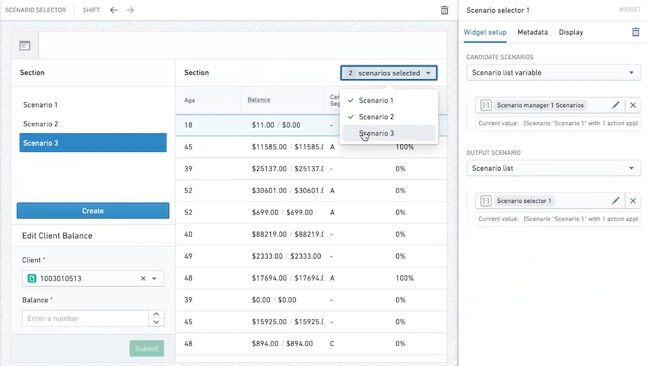
The screenshot below shows an example of a multi-select configuration of the Scenario selector. When placed in a section header, the widget becomes a dropdown instead of a panel.
Configuration Options
Here is a screenshot of the initial state of a newly added Scenario Selector widget alongside its initial configuration panel:
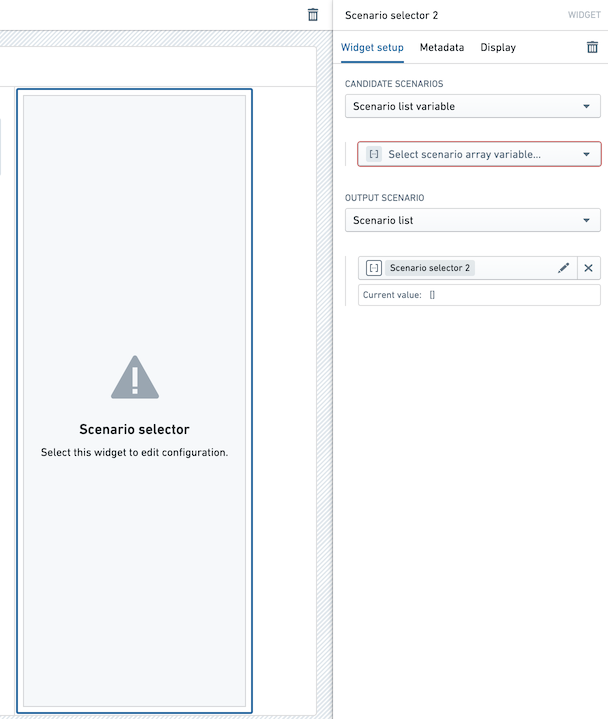
For the Scenario Selector widget, the core configuration options are the following:
- Input data
- Candidate Scenarios: Select the appropriate Scenario array variable or list of Scenario variables to pull Scenarios into your selector.
- Output Scenario: Choose between returning a Scenario array using multi-select or a single Scenario using single-select.
中文翻译
组件:场景选择器(Scenario Selector)
Workshop 中的场景选择器(Scenario Selector) 组件允许用户从场景列表中选取一个或多个场景,并输出一个活动场景或场景数组。配置场景选择器组件的模块构建者可以启用用户对单个场景或场景数组的选择,以便进行比较或实现选择功能,同时不授予用户创建场景的权限。
下方截图展示了场景选择器多选配置的示例。当该组件放置在章节标题中时,它将显示为下拉菜单而非面板。
配置选项
以下是新添加的场景选择器组件初始状态及其初始配置面板的截图:
场景选择器组件的核心配置选项如下:
- 输入数据(Input data)
- 候选场景(Candidate Scenarios): 选择适当的场景数组变量或场景变量列表,以将场景引入选择器。
- 输出场景(Output Scenario): 选择通过多选返回场景数组,或通过单选返回单个场景。