Widget: Scenario Summary(组件:场景摘要(Scenario Summary))
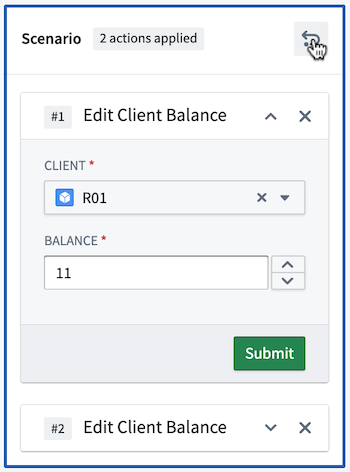
The Scenario Summary widget in Workshop displays the list of Actions associated with a selected Scenario. Module builders configuring a Scenario Summary widget can configure the Scenario to be summarized.
Users can remove specific actions using the X button as well as undo the previous changes to your list, including adding back previously removed actions.
Configuration Options
Here is a screenshot of the initial state of a newly added Scenario Summary widget alongside its initial configuration panel.
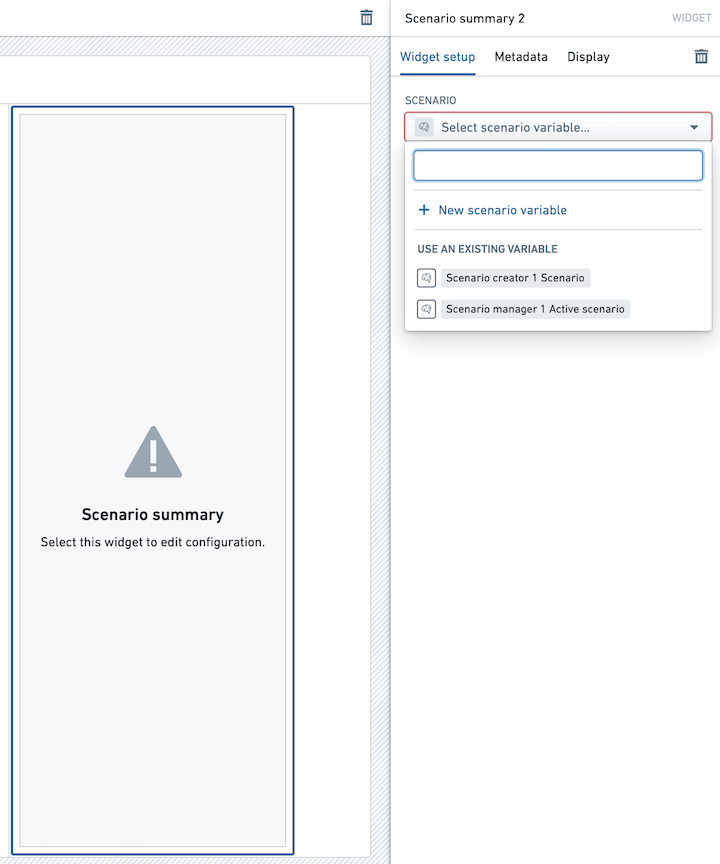
For the Scenario Summary widget, the core configuration options are the following:
- Input data
- Select Scenario variable: Select the Scenario for which to see the relevant actions.
中文翻译
组件:场景摘要(Scenario Summary)
Workshop 中的场景摘要(Scenario Summary) 组件会显示与所选场景(Scenario)关联的操作列表。模块构建者在配置场景摘要组件时,可以指定需要汇总的场景。
用户可以使用 X 按钮移除特定操作,也可以撤销对列表的先前更改,包括重新添加之前移除的操作。
配置选项
以下是新添加的场景摘要(Scenario Summary)组件的初始状态截图,以及其对应的初始配置面板。
对于场景摘要(Scenario Summary)组件,核心配置选项如下:
- 输入数据(Input data)
- 选择场景变量(Select Scenario variable): 选择要查看相关操作的场景(Scenario)。