Spreadsheet Display widget(电子表格展示组件(Spreadsheet Display widget))
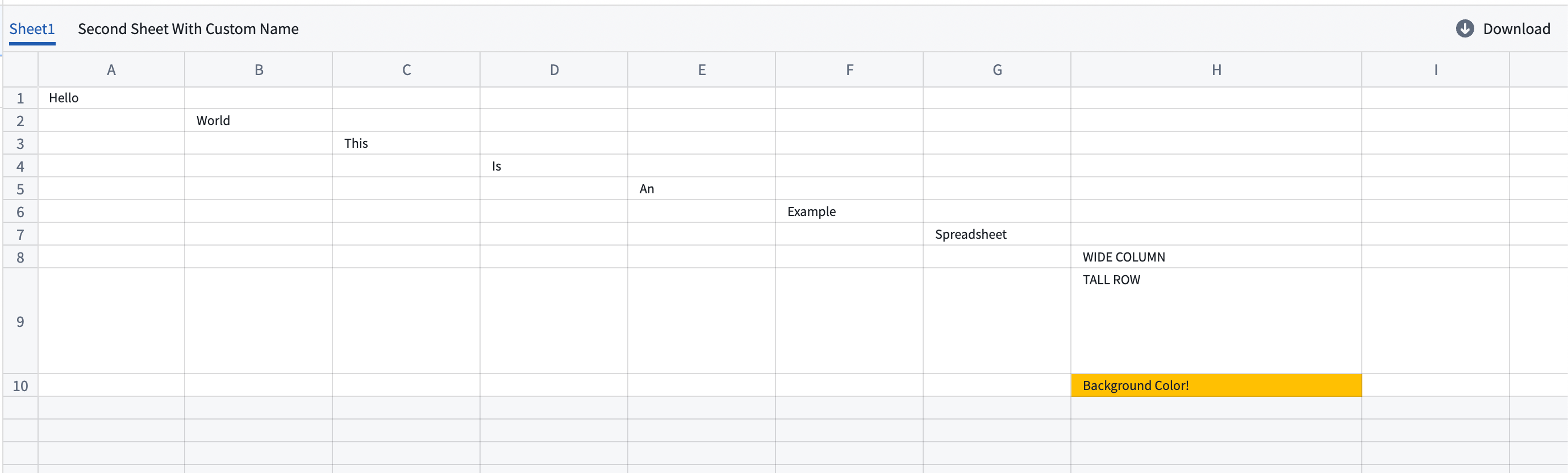
The Spreadsheet Display widget displays spreadsheet files from a media reference property on an object.
This widget provides a way to visualize spreadsheet data directly within your Workshop module, allowing users to view and interact with spreadsheet content, such as by creating annotations.
Configuration options
Spreadsheet display: Configure the object type and media reference and enable optional annotations.

- Object set with a single object: An object set containing a single object with a media reference property
- Spreadsheet media reference property: A media reference property that contains a spreadsheet media reference.
- Spreadsheet annotations: Enable this optional configuration to display annotations on top of the spreadsheet.
Spreadsheet annotation inputs: Configure one or more annotation layers.

- Annotation layer name: A custom name for the annotation layer.
- Object set: An object set containing annotation data.
- Sheet name property: A property containing the name of the sheet of the annotation.
- Cell range property: A property containing the cell range of the annotation. The property can be either a
stringor astruct: - A
stringin the JSON format following{"startRow": 0, "startCol": 0, "endRow": 0, "endCol": 0}. - A
structwith the fieldsstartRow (integer),endRow (integer),startCol (integer), andendCol (integer). - The range uses zero-indexing; cell A1 equals
(0,0), and a range from cell A1 to B2 equals{"startRow": 0, "startCol":0, "endRow": 1, "endCol": 1}.
Existing annotation interaction: An optional configuration to track selected annotations.
- Selected annotation: The existing annotation(s) to track.
- Select only one annotation at a time. When the selection changes, the preview seeks to the selected annotation.
- If the annotation cell range falls outside the sheet boundaries, the preview jumps to the sheet but not to the cell range.
- If the sheet name does not exist in the preview, no action occurs.
Annotation interactions: Configure one or more actions to surface in the widget.
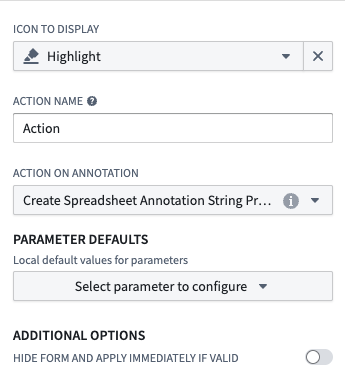
- Icon to display: A custom icon for the action.
- Name: A custom name for the action.
- Action on annotation: The action to execute on the annotation.
- Parameter defaults:
- Sheet name: The current sheet name (string).
- Cell range: The selected cell range (string).
- Additional options
- Hide form and apply immediately if valid: Enable to apply the action immediately instead of showing a form If the configured action has all the required information.
中文翻译
电子表格展示组件(Spreadsheet Display widget)
电子表格展示组件(Spreadsheet Display widget)用于显示对象上媒体引用(media reference)属性中的电子表格文件。
该组件提供了一种直接在 Workshop 模块中可视化电子表格数据的方式,使用户能够查看和交互电子表格内容,例如创建注释。
配置选项
电子表格展示(Spreadsheet display): 配置对象类型和媒体引用,并可选择启用注释功能。
- 包含单个对象的对象集(Object set with a single object): 包含一个具有媒体引用属性的单个对象的对象集
- 电子表格媒体引用属性(Spreadsheet media reference property): 包含电子表格媒体引用的媒体引用(media reference)属性。
- 电子表格注释(Spreadsheet annotations): 启用此可选配置以在电子表格上显示注释。
电子表格注释输入(Spreadsheet annotation inputs): 配置一个或多个注释层。
- 注释层名称(Annotation layer name): 注释层的自定义名称。
- 对象集(Object set): 包含注释数据的对象集。
- 工作表名称属性(Sheet name property): 包含注释所在工作表名称的属性。
- 单元格范围属性(Cell range property): 包含注释单元格范围的属性。该属性可以是
string或struct类型: - 遵循
{"startRow": 0, "startCol": 0, "endRow": 0, "endCol": 0}JSON 格式的string类型。 - 包含
startRow (integer)、endRow (integer)、startCol (integer)和endCol (integer)字段的struct类型。 - 范围使用从零开始的索引;单元格 A1 等于
(0,0),从单元格 A1 到 B2 的范围等于{"startRow": 0, "startCol":0, "endRow": 1, "endCol": 1}。
现有注释交互(Existing annotation interaction): 用于跟踪所选注释的可选配置。
- 所选注释(Selected annotation): 要跟踪的现有注释。
- 每次只能选择一个注释。当选择发生变化时,预览将跳转到所选注释。
- 如果注释单元格范围超出工作表边界,预览将跳转到工作表但不会跳转到单元格范围。
- 如果预览中不存在该工作表名称,则不执行任何操作。
注释交互(Annotation interactions): 配置一个或多个要在组件中显示的操作。
- 显示图标(Icon to display): 操作的自定义图标。
- 名称(Name): 操作的自定义名称。
- 注释操作(Action on annotation): 要在注释上执行的操作。
- 参数默认值(Parameter defaults):
- 工作表名称(Sheet name): 当前工作表名称(字符串类型)。
- 单元格范围(Cell range): 选定的单元格范围(字符串类型)。
- 其他选项(Additional options)
- 隐藏表单并在有效时立即应用(Hide form and apply immediately if valid): 启用后,如果配置的操作包含所有必需信息,则立即应用操作而不显示表单。