Attachments field(附件字段 (Attachments field))
:::callout{theme="warning"} Foundry Forms is no longer the recommended approach for data entry or writeback workflows on Foundry. Instead, build user input workflows with the Foundry Ontology, representing the relevant data structures as object types and configuring the writeback interaction with Actions. Learn more in the Forms overview documentation. :::
The Forms attachments field allows respondents to upload attachments with their entries.

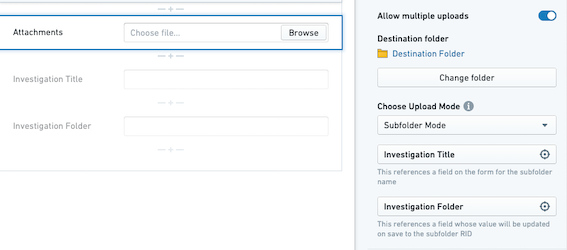
The attachments field supports the following configuration options:
-
Allow multiple uploads: If enabled, this option allows respondents to upload multiple attachments to the field rather than a single attachment.
-
Destination folder: This option specifies to which folder the attachments should be uploaded. All attachments to this field from all entries will be stored in this folder.
-
Upload mode: This field has two options:
-
Default mode: All attachments will be standalone files in the destination folder.
-
Subfolder mode: Upon successful submission of the form, a new folder will automatically be created inside the specified destination folder. All attachments will be standalone files in this subfolder. Configuring this mode requires two additional fields:
-
Subfolder name: The value of this field will be used as the name of the subfolder.
-
Subfolder RID: The value of this field will be auto-populated with the subfolder RID.
-
:::callout{theme="neutral"} When resubmitting an entry, attachments will get uploaded to this destination subfolder. If the subfolder RID is missing during resubmission, a new subfolder will be created. However, the new subfolder name and RID will not be automatically saved to this field. :::
:::callout{theme="neutral"} To use subfolder mode, you must create an additional text field within your form. It will be an empty field that will be selected as the subfolder RID above. To avoid respondent confusion, make this field read-only or hidden. :::
:::callout{theme="neutral"}
Destination folder and Upload mode cannot be affected by an update configuration transform.
:::
中文翻译
附件字段 (Attachments field)
:::callout{theme="warning"} Foundry Forms 已不再是 Foundry 平台上数据录入或回写工作流的推荐方案。请改用 Foundry Ontology 构建用户输入工作流,将相关数据结构表示为对象类型 (object types),并通过操作 (Actions) 配置回写交互。更多信息请参阅 Forms 概述 文档。 :::
Forms 的附件字段 (attachments field) 允许受访者随其条目上传附件。
附件字段支持以下配置选项:
-
允许多次上传 (Allow multiple uploads): 启用此选项后,受访者可向该字段上传多个附件,而非仅限单个附件。
-
目标文件夹 (Destination folder): 此选项指定附件应上传至哪个文件夹。所有条目中该字段的附件都将存储在此文件夹中。
-
上传模式 (Upload mode): 该字段包含两个选项:
-
默认模式 (Default mode): 所有附件将以独立文件形式存放在目标文件夹中。
-
子文件夹模式 (Subfolder mode): 表单成功提交后,系统将在指定目标文件夹内自动创建一个新文件夹。所有附件将以独立文件形式存放在此子文件夹中。配置此模式需要额外填写两个字段:
-
子文件夹名称 (Subfolder name): 该字段的值将用作子文件夹的名称。
-
子文件夹 RID (Subfolder RID): 该字段的值将自动填充为子文件夹的 RID。
-
:::callout{theme="neutral"} 重新提交条目时,附件将上传至该目标子文件夹。若重新提交时缺少子文件夹 RID,系统将创建一个新的子文件夹。但新的子文件夹名称和 RID 不会自动保存到此字段中。 :::
:::callout{theme="neutral"} 要使用子文件夹模式,您必须在表单中创建一个额外的文本字段。该字段将为空,并会被选作上述的子文件夹 RID。为避免受访者困惑,请将此字段设为只读或隐藏。 :::
:::callout{theme="neutral"}
目标文件夹 和 上传模式 不受更新配置转换影响。
:::