Code Editor(代码编辑器(Code Editor))
:::callout{theme="warning"} Foundry Forms is no longer the recommended approach for data entry or writeback workflows on Foundry. Instead, build user input workflows with the Foundry Ontology, representing the relevant data structures as object types and configuring the writeback interaction with Actions. Learn more in the Forms overview documentation. :::
The Code Editor allows users to view and edit the YAML representation of the form. While most configuration is possible with the Visual Editor, the Code Editor offers complete functionality, including the ability to add four code-only fields.
To view the Code Editor in action, open it by selecting the black \</> button in the bottom left of the form. Then, use the Visual Editor to add a field. Notice how the code automatically populates and updates as the field is configured.
:::callout{theme="neutral"} Select the book icon in the top right of the Code Editor to open examples and documentation directly within the Code Editor window. :::
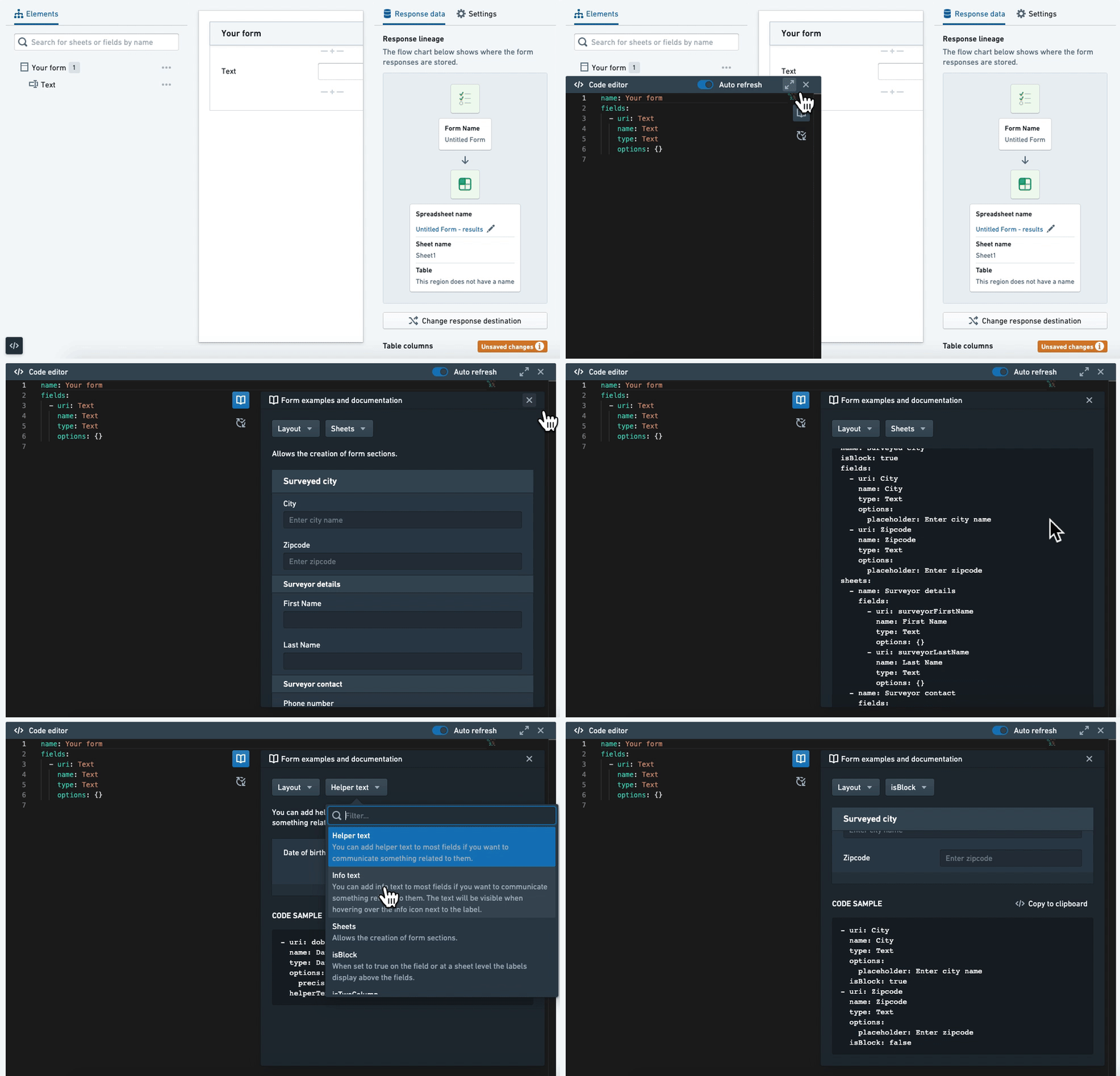
Code structure
The general structure of a form is as follows:
name: New form
fields:
  - uri: name
    name: Full name
    type: Text
    # and other generic options
    options:
      placeholder: 'Last, First'
      # and other specific options
sheets:
  - name: New sheet
    fields:
      - uri: date_of_birth
        name: Date of birth
        type: DatePicker
        options:
          precision: day
      - uri: weight_kg
        name: Weight
        type: Numeric
        options:
          unit: kg
At the top level, there is the name (the title of the form), fields (a list of fields), and sheets (a list of sheets). Then, each sheet itself has these same options. Fields have generic options, such as uri, name, and type, and specific options (underneath options), such as placeholder, precision, and unit.
Generic options
The following options can be configured for every field:
    uri: string
    type: string
    name: string
    urlParam: string
    tag: string
    helperText: string
    infoText: string
    columnSpan: integer
    disabled: Boolean
    hidden: Boolean
    isBlock: Boolean
    noLabel: Boolean
    validators: list<Validators>
    transforms: list<Transforms>
- uri: A unique identifier for the field. If the field is being written back to Fusion or the Ontology, it needs to match the column name or property ID respectively. If the field is not being written back, it needs to start with the prefix
display.. - type: The type of the field (for example,
Text,Numeric,DatePicker). - name: The label for the field.
- urlParam: The URL parameter associated with the field. This allows users to prefill the value when the form is embedded in an iframe.
- tag: Another unique identifier for the field, but without restrictions. This is the identifier used when one field references another (for example,
Calculation,Template), with the exception of attachments. - helperText: The caption below the field.
- infoText: The content of the informational tooltip displayed next to the label of the field.
- columnSpan: The number of columns occupied by the field.
- disabled: Allows the user to make the field read-only.
- hidden: Allows the user to hide the field but record the value.
- isBlock: Allows the user to display the label above the field instead of to the left.
- noLabel: Allows the user to hide the label of the field. This is only available via the Code Editor.
- validators: Validators on the field.
- transforms: Transforms on the field.
Code-only fields
Four fields are available only through the Code Editor:
Hidden
The hidden field allows users to record a value without showing a field. It is configured as follows:
- uri: Hidden
  name: Hidden
  type: Hidden
  options:
    val: string
List
The List field allows users to store multiple values when a field does not innately support it. It is configured as follows:
- uri: names
  name: Full names
  type: List
  options:
    # allowZeroItems: true
    item:
      type: Text
      # and other supported generic options (helperText, infoText, validators)
      options:
        placeholder: 'Last, First'
        # and other specific options
:::callout{theme="neutral"}
allowZeroItems is optional and false by default.
:::
Composite
The composite field allows users to store the values of multiple fields as one stringified JSON. It is configured as follows:
- uri: info
  name: Composite
  type: Composite
  options:
    fields:
      - uri: date_of_birth
        name: Date of birth
        type: DatePicker
        # and other supported generic options (helperText, infoText, disabled, isBlock, noLabel, validators)
        options:
          precision: day
          # and other specific options
      - uri: weight_kg
        name: Weight
        type: Numeric
        options:
          unit: kg
:::callout{theme="neutral"} Hidden fields and those that allow multiple values are not allowed within a composite field. :::
List aggregate
The list aggregate field is similar to calculation and template fields but works on fields that store multiple values. It is configured as follows:
- uri: single_value
  tag: single_value
  name: Single Value
  type: RadioButtons
  options:
    options:
      - value: '10'
      - value: '20'
      - value: '30'
- uri: multi_values
  name: Multiple Values
  tag: multi_values
  type: Checkboxes
  options:
    options:
      - value: '40'
      - value: '50'
      - value: '60'
- uri: avg_value
  name: Average Value
  type: ListAggregate
  options:
    listOperation:
      operation: mean
      listTag: [single_value, multi_values]
    # errorValue: No values selected
Or, when used with a composite field:
- uri: grades
  tag: grades
  name: Grades
  type: List
  options:
    item:
      type: Composite
      options:
        fields:
          - uri: name
            name: Name
            type: Text
            options:
              placeholder: 'Last, First'
          - uri: grade
            name: Grade
            type: Numeric
            options:
              unit: '%'
- uri: all_grades
  name: All grades
  type: ListAggregate
  options:
    listOperation:
      operation: concatenate
      joinWith: ', '
      listTag: grades
      displayItem: grade
    # errorValue: No grades added
When configuring options fields:
errorTextis optional and an empty string by default.- Within
listOperation: operationcan beconcatenate,sum,min,max,mean, orcount.listTagis the tag (or array of tags) of the field(s) being aggregated.joinWithis only required when the operation isconcatenate.displayItemis only required when the aggregated field is a composite field and is the URI of the nested field.
中文翻译
代码编辑器(Code Editor)
:::callout{theme="warning"} Foundry Forms 已不再是 Foundry 中数据录入或回写工作流的推荐方案。请改用 Foundry Ontology 构建用户输入工作流,将相关数据结构表示为对象类型(object types),并通过操作(Actions)配置回写交互。更多信息请参阅 Forms 概述 文档。 :::
代码编辑器(Code Editor) 允许用户查看和编辑表单的 YAML 表示形式。虽然大多数配置可通过可视化编辑器(Visual Editor)完成,但代码编辑器提供了完整功能,包括添加四种仅代码字段的能力。
要查看代码编辑器的实际效果,请点击表单左下角的黑色 \</> 按钮将其打开。然后使用可视化编辑器添加一个字段。请注意,代码会随着字段的配置自动填充和更新。
:::callout{theme="neutral"} 点击代码编辑器右上角的书籍图标,可直接在代码编辑器窗口中打开示例和文档。 :::
代码结构
表单的通用结构如下:
name: 新表单
fields:
  - uri: name
    name: 全名
    type: Text
    # 以及其他通用选项
    options:
      placeholder: '姓, 名'
      # 以及其他特定选项
sheets:
  - name: 新工作表
    fields:
      - uri: date_of_birth
        name: 出生日期
        type: DatePicker
        options:
          precision: day
      - uri: weight_kg
        name: 体重
        type: Numeric
        options:
          unit: kg
在顶层结构中,包含 name(表单标题)、fields(字段列表)和 sheets(工作表列表)。每个 sheet 本身也包含这些相同选项。字段包含通用选项(如 uri、name 和 type)以及特定选项(位于 options 下,如 placeholder、precision 和 unit)。
通用选项(Generic options)
每个字段均可配置以下选项:
    uri: string
    type: string
    name: string
    urlParam: string
    tag: string
    helperText: string
    infoText: string
    columnSpan: integer
    disabled: Boolean
    hidden: Boolean
    isBlock: Boolean
    noLabel: Boolean
    validators: list<Validators>
    transforms: list<Transforms>
- uri: 字段的唯一标识符。如果字段需要回写到 Fusion 或 Ontology,则必须分别匹配列名或属性 ID。如果字段不回写,则需以
display.前缀开头。 - type: 字段类型(例如
Text、Numeric、DatePicker)。 - name: 字段的标签。
- urlParam: 与字段关联的 URL 参数。当表单嵌入 iframe 时,允许用户预填该值。
- tag: 字段的另一个唯一标识符,但无限制条件。当一个字段引用另一个字段时(例如
Calculation、Template),使用此标识符,附件字段除外。 - helperText: 字段下方的说明文字。
- infoText: 显示在字段标签旁的信息提示内容。
- columnSpan: 字段占用的列数。
- disabled: 允许用户将字段设为只读。
- hidden: 允许用户隐藏字段但仍记录其值。
- isBlock: 允许用户将标签显示在字段上方而非左侧。
- noLabel: 允许用户隐藏字段标签。此选项仅通过代码编辑器可用。
- validators: 字段的验证器。
- transforms: 字段的转换器。
仅代码字段(Code-only fields)
以下四种字段仅可通过代码编辑器使用:
隐藏字段(Hidden)
隐藏字段允许用户记录值而不显示字段。配置如下:
- uri: Hidden
  name: 隐藏字段
  type: Hidden
  options:
    val: string
列表字段(List)
列表字段允许用户在字段本身不支持多值存储时存储多个值。配置如下:
- uri: names
  name: 全名
  type: List
  options:
    # allowZeroItems: true
    item:
      type: Text
      # 以及其他支持的通用选项(helperText、infoText、validators)
      options:
        placeholder: '姓, 名'
        # 以及其他特定选项
:::callout{theme="neutral"}
allowZeroItems 为可选参数,默认值为 false。
:::
复合字段(Composite)
复合字段允许用户将多个字段的值存储为字符串化的 JSON。配置如下:
- uri: info
  name: 复合字段
  type: Composite
  options:
    fields:
      - uri: date_of_birth
        name: 出生日期
        type: DatePicker
        # 以及其他支持的通用选项(helperText、infoText、disabled、isBlock、noLabel、validators)
        options:
          precision: day
          # 以及其他特定选项
      - uri: weight_kg
        name: 体重
        type: Numeric
        options:
          unit: kg
:::callout{theme="neutral"} 隐藏字段以及允许存储多个值的字段不允许包含在复合字段内。 :::
列表聚合字段(List aggregate)
列表聚合字段与计算字段和模板字段类似,但作用于存储多个值的字段。配置如下:
- uri: single_value
  tag: single_value
  name: 单值
  type: RadioButtons
  options:
    options:
      - value: '10'
      - value: '20'
      - value: '30'
- uri: multi_values
  name: 多值
  tag: multi_values
  type: Checkboxes
  options:
    options:
      - value: '40'
      - value: '50'
      - value: '60'
- uri: avg_value
  name: 平均值
  type: ListAggregate
  options:
    listOperation:
      operation: mean
      listTag: [single_value, multi_values]
    # errorValue: 未选择任何值
或者与复合字段配合使用:
- uri: grades
  tag: grades
  name: 成绩
  type: List
  options:
    item:
      type: Composite
      options:
        fields:
          - uri: name
            name: 姓名
            type: Text
            options:
              placeholder: '姓, 名'
          - uri: grade
            name: 分数
            type: Numeric
            options:
              unit: '%'
- uri: all_grades
  name: 所有成绩
  type: ListAggregate
  options:
    listOperation:
      operation: concatenate
      joinWith: ', '
      listTag: grades
      displayItem: grade
    # errorValue: 未添加成绩
配置 options 字段时:
errorText为可选参数,默认值为空字符串。- 在
listOperation中: operation可以是concatenate、sum、min、max、mean或count。listTag是被聚合字段的标签(或标签数组)。joinWith仅在操作为concatenate时必需。displayItem仅在聚合字段为复合字段时必需,且为嵌套字段的 URI。