Callouts in custom documentation(自定义文档中的标注框(Callouts))
The in-platform custom docs allow the use of HTML to create callouts. There are four available callouts that display information in gray, green, yellow, or red, respectively. Note that Markdown formatting is not available between the <div> and </div> in the callout; for example, to bold text within a callout you should use the HTML syntax <strong>This is bold text.</strong> rather than the Markdown syntax **This is bold text.**
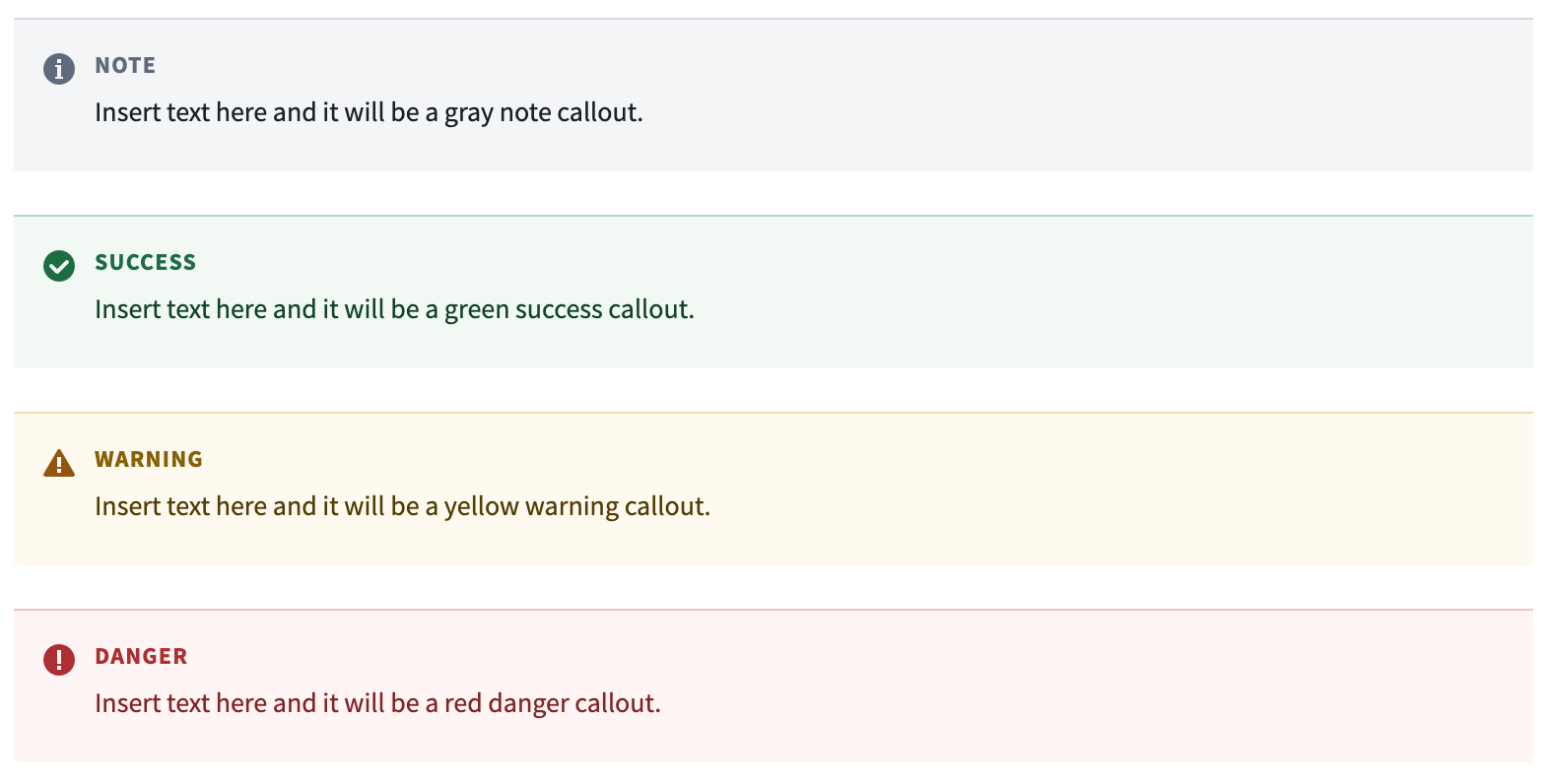
Gray note callout
This is the default callout style.
<div class="pt-callout">
    <h5 class="pt-callout-title">Note</h5>
    Insert text here and it will be a gray note callout.
</div>

Green success callout
This callout is used to give tips, recommendations, and other positive information to the reader.
<div class="pt-callout pt-intent-success">
    <h5 class="pt-callout-title">Success</h5>
    Insert text here and it will be a green success callout.
</div>

Yellow warning callout
This callout is used to draw the reader's attention to important information that could impact a workflow.
<div class="pt-callout pt-intent-warning">
    <h5 class="pt-callout-title">Warning</h5>
    Insert text here and it will be a yellow warning callout.
</div>

Red danger callout
This callout is used to indicate an irreversible action or a breaking behavior (such as an action that could lead to data loss or workflow failure).
<div class="pt-callout pt-intent-danger">
    <h5 class="pt-callout-title">Danger</h5>
    Insert text here and it will be a red danger callout.
</div>

中文翻译
自定义文档中的标注框(Callouts)
平台内的自定义文档支持使用 HTML 创建标注框。共有四种可用的标注框,分别以灰色、绿色、黄色和红色显示信息。请注意,在 <div> 和 </div> 标签之间不支持 Markdown 格式;例如,要在标注框内将文本加粗,应使用 HTML 语法 <strong>这是加粗文本。</strong>,而非 Markdown 语法 **这是加粗文本。**
灰色备注标注框(Gray note callout)
这是默认的标注框样式。
<div class="pt-callout">
    <h5 class="pt-callout-title">备注</h5>
    在此处插入文本,将显示为灰色备注标注框。
</div>
绿色成功标注框(Green success callout)
此标注框用于向读者提供提示、建议及其他正面信息。
<div class="pt-callout pt-intent-success">
    <h5 class="pt-callout-title">成功</h5>
    在此处插入文本,将显示为绿色成功标注框。
</div>
黄色警告标注框(Yellow warning callout)
此标注框用于提醒读者注意可能影响工作流的重要信息。
<div class="pt-callout pt-intent-warning">
    <h5 class="pt-callout-title">警告</h5>
    在此处插入文本,将显示为黄色警告标注框。
</div>
红色危险标注框(Red danger callout)
此标注框用于指示不可逆操作或破坏性行为(例如可能导致数据丢失或工作流失败的操作)。
<div class="pt-callout pt-intent-danger">
    <h5 class="pt-callout-title">危险</h5>
    在此处插入文本,将显示为红色危险标注框。
</div>