Add a new custom docs bundle(添加新的自定义文档包)
In-platform custom documentation is structured as "bundles", where a "bundle" is a grouped set of documentation pages that are published together and navigationally linked. Each bundle must have, at minimum, an overview page (overview.md) to serve as a landing page for users navigating to the bundle from the custom documentation home page, as well as an ordering file (ordering.md) that specifies the structure of pages in the bundle.
Create a new bundle
All documentation files should be stored in a custom docs repository's docs folder. If you do not yet have a custom docs repository, follow the instructions to create a new custom docs repository.
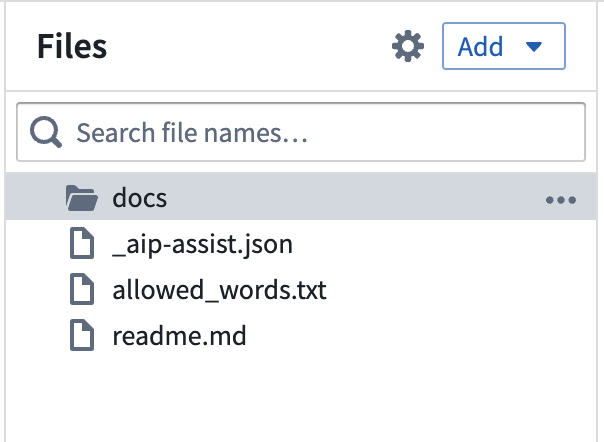
To add a new bundle to a custom docs repository, create a new folder in the docs folder with a name that is representative of your documentation bundle's intended contents (such as inventory-management-application). Note that folder file names must be unique and cannot contain spaces. The folder will be used as the product ID for the bundle.
Within the new folder for a bundle:
- Create a file called
overview.md. See the example below for more details. - In the
overview.md, declare a name for the product bundle using the@nameannotation. This will be displayed as the name of the documentation bundle in the user-facing in-platform custom docs. - In the
overview.md, provide a short description for the product using the@descriptionannotation. - Include some introductory text in the
overview.mdto orient the reader and provide context around the core purpose or workflows of the product. - Create a file called
ordering.mdand use this file to declare the structure of your content. Note that theoverview.mddoes not appear in theordering.mdsinceoverview.mdmust exist by default. See the documentation on structuring your docs bundle for more details.
:::callout{theme="neutral"}
The name and description specified with the @name and @description annotations will appear in the list of documentation bundles on the in-platform custom documentation homepage at <your-enrollment>/workspace/documentation.
:::
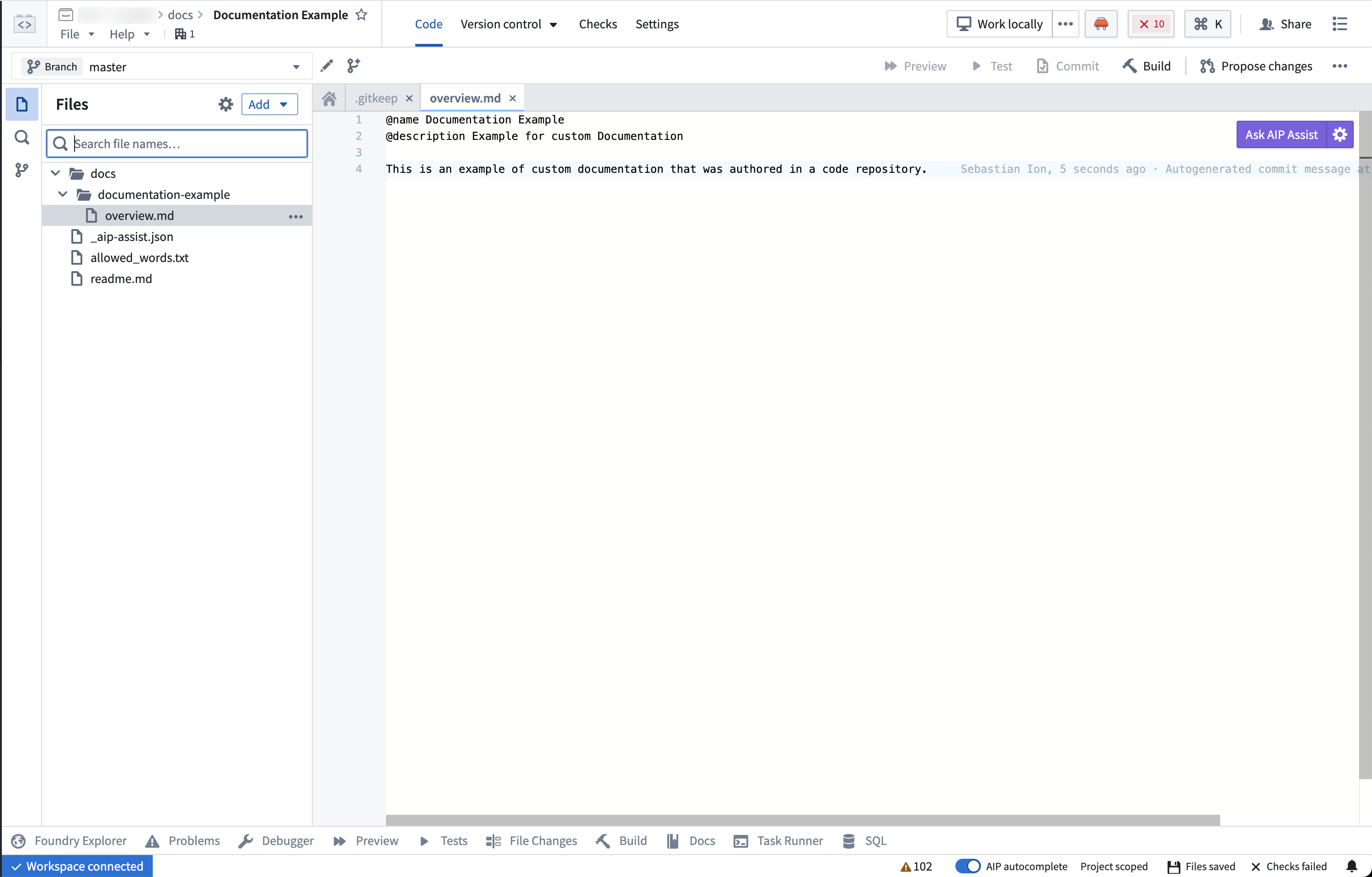
Example overview.md
Below is an example of an overview.md for Contour. Note that this example overview.md contains a @name, a short @description, and introductory text about the product.
@name Contour
@description Point-and-click data analysis at scale

Contour provides a point-and-click user interface to perform data analysis on tables at scale. These analyses can be used to create interactive [dashboards](@contour/dashboards-overview) that allow others to explore and investigate the data in a guided, structured way.

## Key features

Contour enables you to:

* Visualize, filter, and transform data without code.
* Organize complex analyses into analytical paths.
* Parameterize analyses to easily switch between different views of the data and results.
* Create interactive dashboards to share findings.
* Save analysis results as a new dataset for use in other Foundry tools.
* Leverage Contour's [expression language](@contour/expressions-overview) for more advanced transformations and aggregations.

## When to use Contour

Contour is a good fit for analytical use cases where:

* **Some or all of the data you want to use is not mapped in the Ontology.** In general, we recommend using the [Ontology layer](@ontology/overview) whenever possible, but there are some cases where this may not be appropriate (such as a one-time upload that will not be cleaned or reused).
* **You need to operate on a very large dataset.** For instance, performing joins on over 100,000 objects or aggregations on over 50,000 rows.
* **You want to share your analysis results as a new dataset for use in other Foundry tools.** [Learn more about saving results as a dataset.](@analytics/datasets-object-sets)
中文翻译
添加新的自定义文档包
平台内的自定义文档以"包(bundle)"的形式组织,每个包是一组相互关联的文档页面,它们一同发布并在导航上相互链接。每个包至少需要包含一个概览页面(overview.md),作为用户从自定义文档首页导航到该包时的着陆页,同时还需要一个排序文件(ordering.md),用于指定包内页面的结构。
创建新包
所有文档文件应存储在自定义文档仓库的 docs 文件夹中。如果您还没有自定义文档仓库,请按照说明创建新的自定义文档仓库。
要向自定义文档仓库添加新包,请在 docs 文件夹中创建一个新文件夹,其名称应能代表文档包的内容(例如 inventory-management-application)。请注意,文件夹文件名必须唯一且不能包含空格。该文件夹将用作包的"产品ID(product ID)"。
在包的文件夹内:
- 创建一个名为
overview.md的文件。详情请参见下面的示例。 - 在
overview.md中,使用@name注解声明产品包的名称。该名称将作为文档包的名称显示在面向用户的平台内自定义文档中。 - 在
overview.md中,使用@description注解提供产品的简短描述。 - 在
overview.md中包含一些介绍性文字,帮助读者了解产品的核心用途或工作流程。 - 创建一个名为
ordering.md的文件,并使用该文件声明内容的结构。请注意,overview.md不会出现在ordering.md中,因为overview.md默认必须存在。更多详情请参阅结构化文档包的文档。
:::callout{theme="neutral"}
使用 @name 和 @description 注解指定的名称和描述将显示在平台内自定义文档首页的文档包列表中,地址为 <your-enrollment>/workspace/documentation。
:::
示例 overview.md
以下是 Contour 的 overview.md 示例。请注意,此示例 overview.md 包含 @name、简短的 @description 以及关于产品的介绍性文字。
@name Contour
@description 大规模数据的点击式分析

Contour 提供点击式用户界面,用于对大规模表格数据进行数据分析。这些分析可用于创建交互式[仪表板](@contour/dashboards-overview),让其他人能够以引导式、结构化的方式探索和调查数据。

## 主要功能

Contour 使您能够:

* 无需编写代码即可可视化、筛选和转换数据。
* 将复杂分析组织成分析路径。
* 参数化分析,以便轻松切换数据和结果的不同视图。
* 创建交互式仪表板以分享发现。
* 将分析结果保存为新数据集,供其他 Foundry 工具使用。
* 利用 Contour 的[表达式语言](@contour/expressions-overview)进行更高级的转换和聚合。

## 何时使用 Contour

Contour 适用于以下分析场景:

* **您要使用的部分或全部数据未映射到本体论(Ontology)中。** 通常,我们建议尽可能使用[本体论层(Ontology layer)](@ontology/overview),但在某些情况下这可能不适用(例如一次性上传且不会清理或重复使用的数据)。
* **您需要对非常大的数据集进行操作。** 例如,对超过 100,000 个对象执行连接操作,或对超过 50,000 行执行聚合操作。
* **您希望将分析结果作为新数据集分享,供其他 Foundry 工具使用。** [了解有关将结果保存为数据集的更多信息。](@analytics/datasets-object-sets)