Define and run Slate functions(定义并运行 Slate 函数)
:::callout{theme="neutral"} Slate Functions are only available in Slate and are distinct from Foundry Functions; Foundry Functions are accessible platform-wide. You can access Foundry Functions in Slate using the Slate Platform Editor. Refer to the Functions documentation for more information. :::
The Functions Editor lets you define and run JavaScript functions on Handlebars-accessible items such as query results, global variables, and widget properties.
Functions don’t have access to the DOM or the Slate space and no state is saved. They can be used for data transformation only.
Functions are typically used for lightweight data-processing tasks like string parsing. Functions support asynchronous syntax (including async, await keywords, and promise).
:::callout{theme="warning"} Functions run sequentially, not in parallel. Slate executes functions one at a time from a queue, so each function must finish before the next one begins. This applies even when functions use asynchronous calls: a function that awaits a long-running operation will block the queue until it completes, delaying any functions that follow. Avoid relying on functions running concurrently. :::
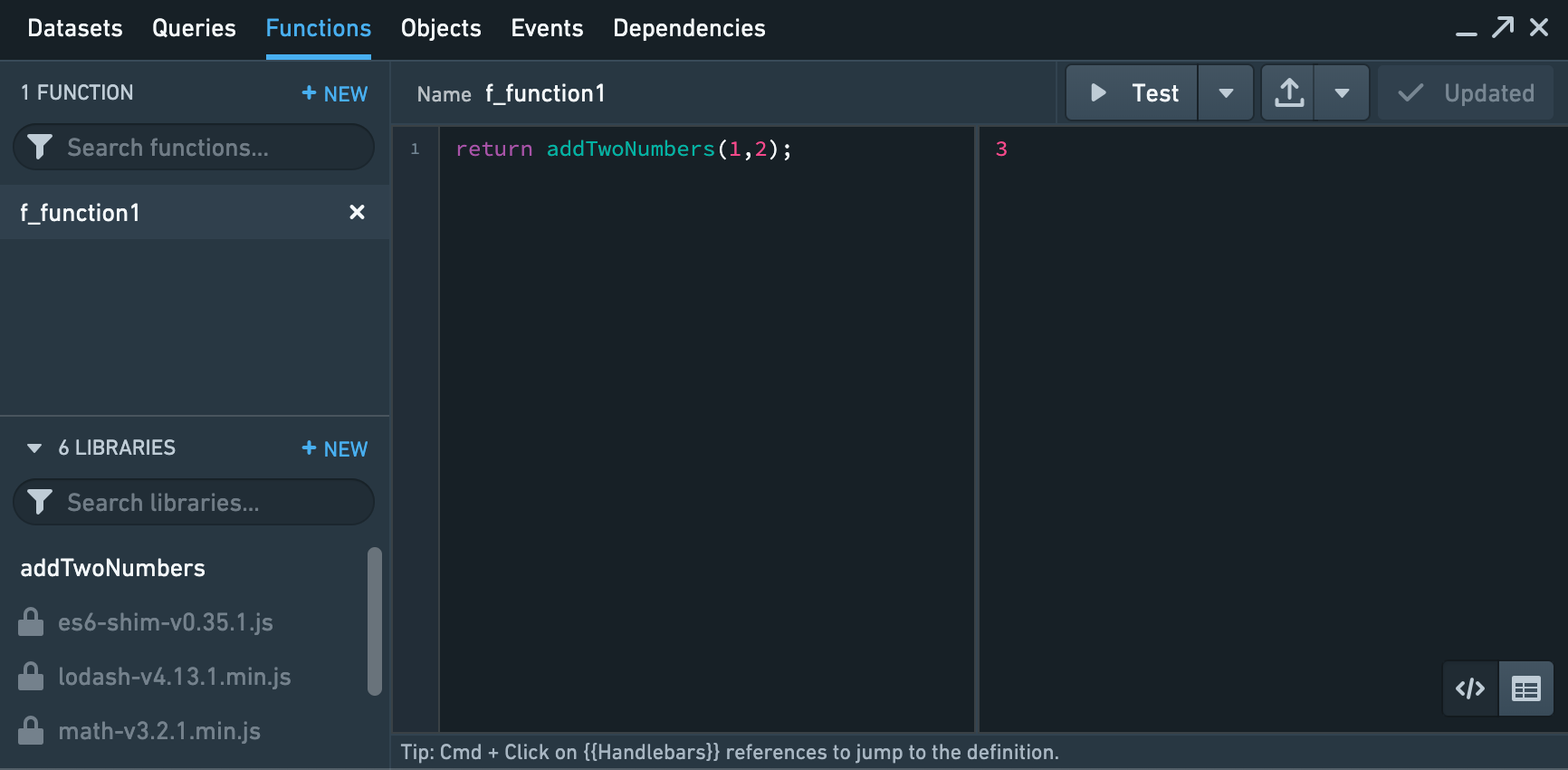
Per-Document level function libraries
Users are able to write reusable JavaScript functions with parameters. This will assist in the refactoring of code and reducing the copying and pasting of code in functions. You can also re-run and update all the functions dependent on a function library using the Re-run All Function button.
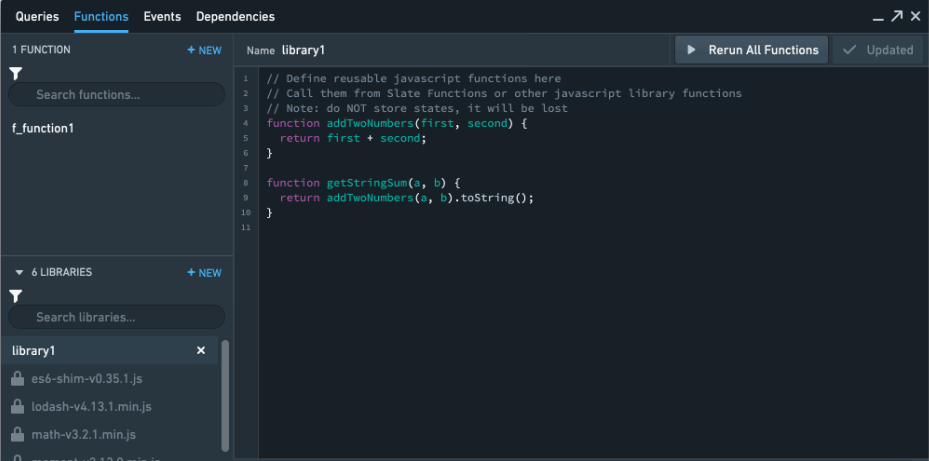
Default JavaScript libraries available
For enhanced use of functions, Slate ships by default with the following external JavaScript libraries: Lodash ↗, Math.js ↗, Moment ↗, Numeral ↗, and es6-shim ↗. Feel free to use these libraries when writing your functions.
Do not use ES6 syntax features unless all users are mandated to use a browser supporting these features.
Examples
Example 1: add two widget properties
This function adds the value of two dropdown widgets and displays the result in a text widget.

Open the Functions editor and add a function called addNumbers. Add the following JavaScript:
return {{lhs.selectedValue}} + {{rhs.selectedValue}};
Then, in the text widget, display the return value by referencing the function’s name in Handlebars {{addNumbers}}.
:::callout{theme="neutral"} The Functions editor does not accept Helpers of any kind. :::
Example 2: parse query results
This function parses each element in a query result. Assume there is a query named asteroids and it returns the following JSON:
{"id": [6, 7, 8],"name": ["Hebe", "Iris", "Flora"],"diameter": [185.18, 199.83, 135.89]}
The following function returns a result that combines the name and id, and also adds a new circumference property.
var asteroids = {{asteroids}};
var formattedNames = [];
var circumference = [];

for (var i = 0; i < asteroids.name.length; i++) {
  formattedNames.push(formatName(
    asteroids.name[i], asteroids.designation[i]));
  circumference.push(asteroids.diameter[i] * 3.14);
}

return {
  name: formattedNames,
  diameter: asteroids.diameter,
  circumference: circumference
};

function formatName(name, designation) {
  return name + " (" + designation + ")";
}
The resulting JSON looks like this:
{
  "name": ["Hebe (6)", "Iris (7)", "Flora (8)"],
  "diameter": [185.18, 199.83, 135.89],
  "circumference": [581.4652,627.4662,426.6946]
}
Example 3: Create pause using set timeout and promises
This function creates a setTimeout with a five second interval to pause the Slate function for five seconds before executing.
return new Promise(resolve => {
  setTimeout(() => {
    resolve();
  }, 5000);
});
This function returns undefined after five seconds of pause.
中文翻译
定义并运行 Slate 函数
:::callout{theme="neutral"} Slate 函数(Slate Functions)仅在 Slate 中可用,与 Foundry 函数(Foundry Functions)不同;Foundry 函数可在整个平台范围内访问。您可以通过 Slate 平台编辑器(Slate Platform Editor)在 Slate 中访问 Foundry 函数。更多信息请参阅函数文档。 :::
函数编辑器(Functions Editor) 允许您在 Handlebars 可访问的项目(如查询结果、全局变量和小部件属性)上定义并运行 JavaScript 函数。
函数无法访问 DOM 或 Slate 空间,也不会保存任何状态。它们仅用于数据转换。
函数通常用于轻量级数据处理任务,例如字符串解析。函数支持异步语法(包括 async、await 关键字和 Promise)。
:::callout{theme="warning"} 函数按顺序执行,而非并行执行。Slate 从队列中逐一执行函数,因此每个函数必须完成后下一个函数才能开始。即使函数使用异步调用也是如此:等待长时间运行操作的函数会阻塞队列,直到操作完成,从而延迟后续所有函数。请避免依赖函数并发运行。 :::
按文档级别的函数库
用户可以编写带有参数的可重用 JavaScript 函数。这有助于重构代码,减少函数中代码的复制粘贴。您还可以使用重新运行所有函数按钮,重新运行并更新所有依赖于某个函数库的函数。
可用的默认 JavaScript 库
为增强函数功能,Slate 默认附带以下外部 JavaScript 库:Lodash ↗、Math.js ↗、Moment ↗、Numeral ↗ 和 es6-shim ↗。编写函数时请随意使用这些库。
除非所有用户都强制使用支持 ES6 特性的浏览器,否则请勿使用 ES6 语法特性。
示例
示例 1:相加两个小部件属性
此函数将两个下拉小部件的值相加,并在文本小部件中显示结果。
打开函数编辑器,添加一个名为 addNumbers 的函数。添加以下 JavaScript 代码:
return {{lhs.selectedValue}} + {{rhs.selectedValue}};
然后,在文本小部件中,通过在 Handlebars 中引用函数名称 {{addNumbers}} 来显示返回值。
:::callout{theme="neutral"} 函数编辑器不接受任何类型的辅助函数(Helpers)。 :::
示例 2:解析查询结果
此函数解析查询结果中的每个元素。假设有一个名为 asteroids 的查询,返回以下 JSON:
{"id": [6, 7, 8],"name": ["Hebe", "Iris", "Flora"],"diameter": [185.18, 199.83, 135.89]}
以下函数返回一个结果,该结果组合了名称和 ID,并添加了一个新的周长属性。
var asteroids = {{asteroids}};
var formattedNames = [];
var circumference = [];

for (var i = 0; i < asteroids.name.length; i++) {
  formattedNames.push(formatName(
    asteroids.name[i], asteroids.designation[i]));
  circumference.push(asteroids.diameter[i] * 3.14);
}

return {
  name: formattedNames,
  diameter: asteroids.diameter,
  circumference: circumference
};

function formatName(name, designation) {
  return name + " (" + designation + ")";
}
生成的 JSON 如下所示:
{
  "name": ["Hebe (6)", "Iris (7)", "Flora (8)"],
  "diameter": [185.18, 199.83, 135.89],
  "circumference": [581.4652,627.4662,426.6946]
}
示例 3:使用 setTimeout 和 Promise 创建暂停
此函数创建一个间隔为五秒的 setTimeout,使 Slate 函数暂停五秒后再执行。
return new Promise(resolve => {
  setTimeout(() => {
    resolve();
  }, 5000);
});
此函数在暂停五秒后返回 undefined。