Retrieve individual objects(检索单个对象)
The Object Context panel lets you:
- Access the properties of an object directly using
{{o_object_context1.property1}}notation, instead of manipulating JSON. - Create a Slate application that will be dependent on a single object, which is a common pattern when using Slate to build a tab or custom widget to embed in an Object View.
Constructing an Object Context
To construct an Object Context o_object_context1, you need to enter a single object RID by:
- Referencing a function or object query that returns a single RID (like
{{return_single_object}}), or by - Directly entering a static object RID, like
ri.phonograph2-objects.main.object.09d2e0e9-dd3c-49b2-8b96-0cb1bf005c1d.
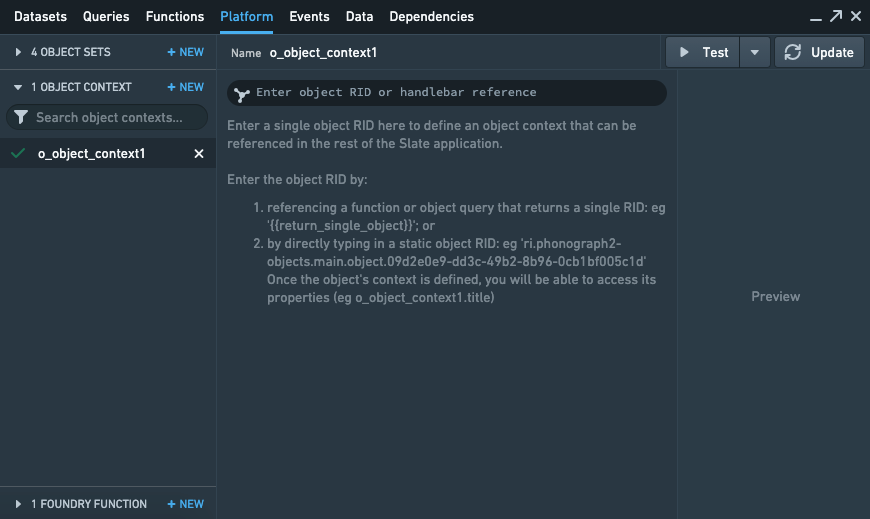
Once the Object Context is defined, you will be able to:
- Access its properties (for example,
o_object_context1.title or o_object_context1.property1) and - Use this output in the rest of Slate’s functions, variables, events, or widget properties.
中文翻译
检索单个对象
对象上下文面板(Object Context panel)允许您:
- 使用
{{o_object_context1.property1}}符号直接访问对象的属性,而无需操作 JSON。 - 创建依赖于单个对象的 Slate 应用程序,这是在使用 Slate 构建标签页或自定义小部件以嵌入对象视图(Object View)时的常见模式。
构建对象上下文
要构建对象上下文 o_object_context1,您需要通过以下方式输入单个对象 RID:
- 引用返回单个 RID 的函数或对象查询(如
{{return_single_object}}),或者 - 直接输入静态对象 RID,例如
ri.phonograph2-objects.main.object.09d2e0e9-dd3c-49b2-8b96-0cb1bf005c1d。
一旦定义了对象上下文,您将能够:
- 访问其属性(例如
o_object_context1.title或o_object_context1.property1),以及 - 在 Slate 的其他函数、变量、事件或小部件属性中使用此输出。