Create or retrieve object sets(创建或检索对象集)
The Object Set panel under the platform tab lets you:
- Create an object set, with or without filters, without any extra service configuration.
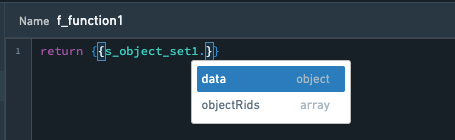
- Access objects of the object set directly by using the template dot notation (such as
{{s_object_set1.data.property1}}). - Access object RIDs using
{{s_object_set1.objectRids}}.
There are two modes:
Buildermode, which allows you to construct an object set using a GUI (graphical user interface), andRIDmode, which allows you to construct an object set by referencing theobject set RIDor theversioned object set RID.
Object set filter builder mode
To create an object set s_object_set1, select the base object type and then optionally add filters with AND/OR logic. The filter’s fields will account for the object’s property data type. For example, numeric properties will take a number range as the filter. You can further nest individual AND/OR filters in each filter level to limit the objects to specific results.
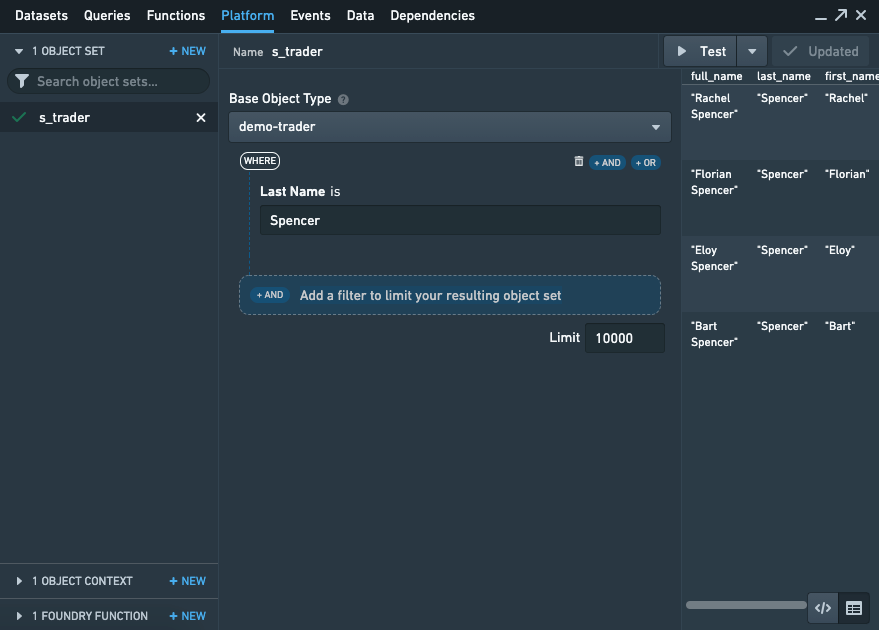
You can also use Slate’s handlebars in the filter fields so that you can parameterize an object set based on a dynamically changing input.
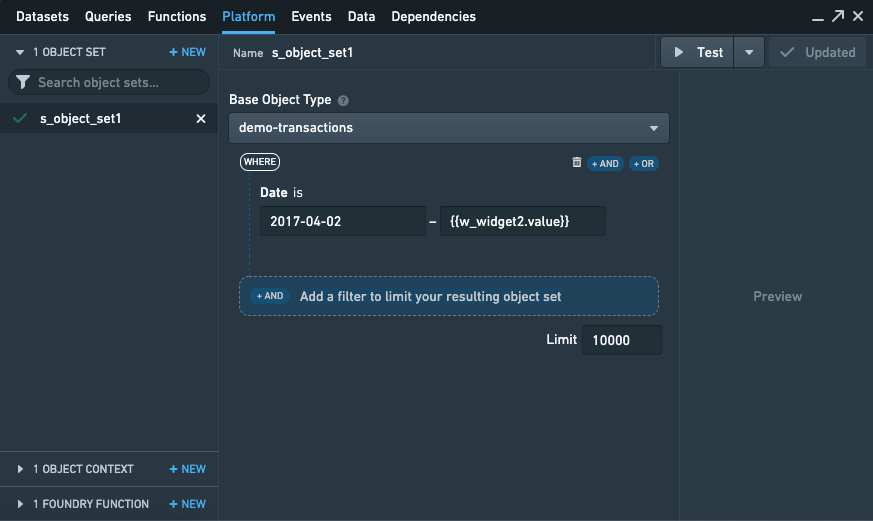
The filter fields also support templatizing using multi-term filters and wildcard filters:
- To templatize using the multi-term filter, you can pass in the multiple terms directly (for example,
["value1", "value2"]). - Alternatively, you can pass in a Handlebars template with direct reference to a function that outputs multiple terms.
- For example, if
{{f_my_filters}}returns["value1", "value2"], you can use{{f_my_filters}}directly in the object set editor.
Object set results are returned in a tabular format under field data and also includes all object RIDs in field objectRids.
Object set limit results
The Object Set filter also lets you set an upper limit on the number of objects returned. This is conceptually similar to SQL's LIMIT clause and enables quicker testing and iteration.
If the limit is smaller than the total number of results, the getNextPage and getPreviousPage events can be used to page through the results. This can boost performance when returning a large number of results.
Aggregations
Simple aggregations on object sets can be calculated using the object set editor in the Platform tab. To create an aggregate, toggle on Aggregation under Output options and select Add aggregation. The aggregation is based on the resulting object set defined above.
Aggregations can use one of the following aggregation types: count, average, sum, max, min, or cardinality. When calculating an aggregation other than count, a numeric property has to be selected.
You can calculate multiple aggregations based on one object set by selecting Add aggregation. When using aggregations, the preview will only show the results of the aggregation. The granular objects, however, are still available when referencing the object set via handlebars in Functions, Widgets, and other parts of Slate.
Multi-dimensional aggregation
To aggregate object set data over multiple dimensions (such as including a "group by" or segment), it is necessary to write a Function to group and segment the data before calculating a metric for the resulting buckets.
These Functions return aggregation types that Slate will parse into the parallel list data structure used for configuring charts and other Slate widgets.
The documentation on how to call Foundry Functions has further details on these interactions from Slate.
Object set sort
The resulting object set can be sorted by any parameter in either ascending or descending order. Multiple properties can be configured for the sorting, and sorting properties are applied from top to bottom. The limit set will only take effect after the sorting.
Object set RID mode
In the object set RID mode, Slate's object set panel is able to take in the object set RID as well as a versioned object set RID and resolve it back into Slate's data array format.
This means that you will have the flexibility of passing around RIDs in addition to using Slate's parameterized object set builder.
中文翻译
创建或检索对象集
平台选项卡下的对象集面板允许您:
- 创建带或不带筛选条件的对象集,无需额外服务配置。
- 使用模板点符号(如
{{s_object_set1.data.property1}})直接访问对象集中的对象。 - 使用
{{s_object_set1.objectRids}}访问对象 RID。
有两种模式:
Builder(构建器)模式,允许您通过图形用户界面构建对象集;RID模式,允许您通过引用object set RID(对象集 RID)或versioned object set RID(版本化对象集 RID)来构建对象集。
对象集筛选器构建器模式
要创建对象集 s_object_set1,请选择基础对象类型,然后可选地添加带有 AND/OR 逻辑的筛选条件。筛选条件的字段将根据对象的属性数据类型进行调整。例如,数值属性将采用数值范围作为筛选条件。您还可以在每个筛选层级中进一步嵌套单独的 AND/OR 筛选条件,将对象限制为特定结果。
您还可以在筛选字段中使用 Slate 的 Handlebars 模板,从而根据动态变化的输入对对象集进行参数化。
筛选字段还支持使用多词筛选和通配符筛选进行模板化:
- 要使用多词筛选进行模板化,可以直接传入多个词条(例如
["value1", "value2"])。 - 或者,您可以传入一个 Handlebars 模板,直接引用输出多个词条的函数。
- 例如,如果
{{f_my_filters}}返回["value1", "value2"],您可以直接在对象集编辑器中使用{{f_my_filters}}。
对象集结果以表格形式返回在 data 字段下,同时所有对象 RID 包含在 objectRids 字段中。
对象集结果限制
对象集筛选器还允许您设置返回对象数量的上限。这在概念上类似于 SQL 的 LIMIT 子句,能够加快测试和迭代速度。
如果限制数量小于结果总数,可以使用 getNextPage 和 getPreviousPage 事件对结果进行分页。这在返回大量结果时可以提高性能。
聚合
可以使用平台选项卡中的对象集编辑器计算对象集的简单聚合。要创建聚合,请在输出选项下打开聚合开关,然后选择添加聚合。聚合基于上述定义的结果对象集。
聚合可以使用以下聚合类型之一:计数、平均值、总和、最大值、最小值或基数。在计算非计数的聚合时,必须选择一个数值属性。
您可以通过选择添加聚合,基于一个对象集计算多个聚合。使用聚合时,预览将仅显示聚合结果。然而,在 Functions、Widgets 和 Slate 的其他部分通过 Handlebars 引用对象集时,仍可访问细粒度对象。
多维聚合
要在多个维度上聚合对象集数据(例如包含"分组依据"或分段),需要编写一个 Function 来对数据进行分组和分段,然后计算结果桶的指标。
这些 Functions 返回 聚合类型,Slate 会将其解析为用于配置图表和其他 Slate 小部件的并行列表数据结构。
关于如何调用 Foundry Functions 的文档提供了从 Slate 进行这些交互的更多详细信息。
对象集排序
结果对象集可以按任意参数进行升序或降序排序。可以配置多个属性用于排序,排序属性从上到下依次应用。设置的限制仅在排序后生效。
对象集 RID 模式
在对象集 RID 模式下,Slate 的对象集面板能够接收 object set RID(对象集 RID)以及 versioned object set RID(版本化对象集 RID),并将其解析回 Slate 的数据数组格式。
这意味着除了使用 Slate 的参数化对象集构建器之外,您还可以灵活地传递 RID。