Use the Ontology SDK (OSDK) in Slate(在 Slate 中使用 Ontology SDK (OSDK))
The Ontology Software Development Kit (OSDK) allows builders to leverage the full power of the Ontology within Slate's code environment. The OSDK is accessible as a library within the Functions editor, providing type-safe access to object types, link types, actions, and functions from your Ontology.
:::callout{theme="neutral"} The OSDK in Slate uses the same underlying APIs as the TypeScript OSDK. Slate uses JavaScript but provides IntelliSense for code completion and type hints. :::
Overview
The OSDK panel in Slate enables you to:
- Select an Ontology to work with
- Configure data entities including object types, link types, action types, and functions
- Generate a custom OSDK library tailored to your selected entities
- View documentation and code snippets for each entity
- Track changes before committing them to your application
Getting started
Access the OSDK panel
- Open your Slate application in edit mode.
- In the left sidebar, select the OSDK icon to open the OSDK panel.
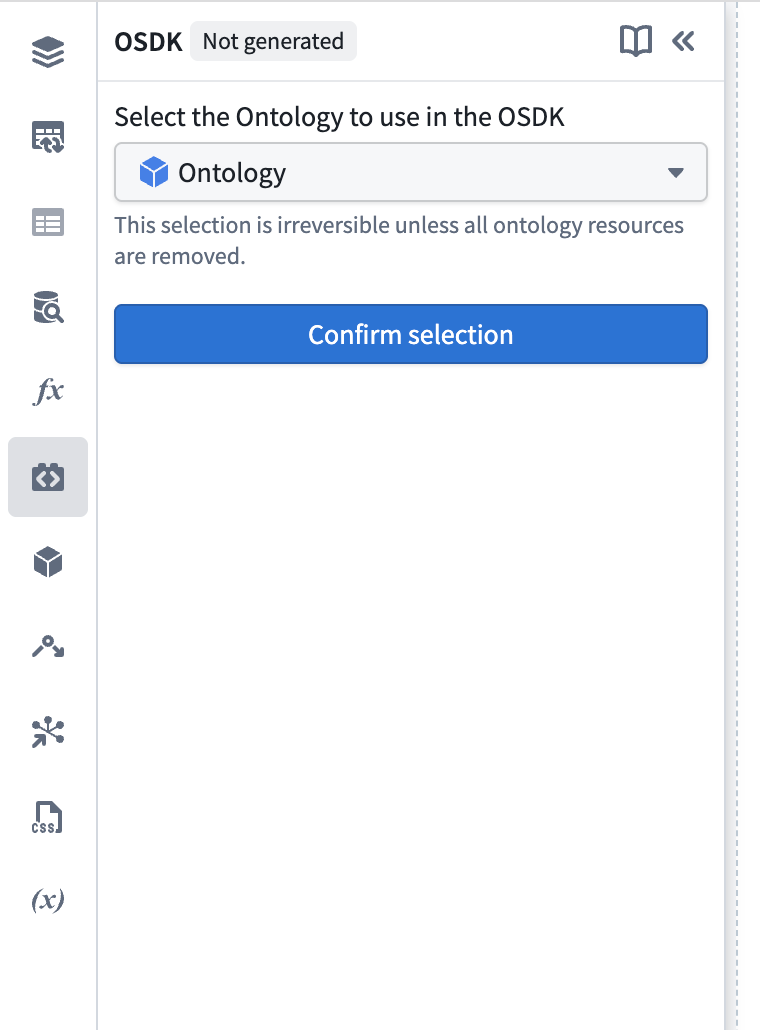
- If you have not yet configured an OSDK, you will see the Ontology selection screen.
Select your Ontology
- From the Select Ontology dropdown, choose the Ontology you want to access.
- Select Confirm selection to save your selection.
:::callout{theme="neutral"} The available Ontologies depend on your platform setup and permissions. You may only have access to one Ontology. You will have to delete and reconfigure the OSDK to switch to a different Ontology later. :::
Add data entities
Once you have selected an Ontology, you can add four types of entities to your OSDK configuration:
Object types and link types
Object types represent the core data entities in your Ontology. Link types define relationships between object types and appear nested under their parent object type.
- In the Object Types section, select the + button.
- Use the search dialog to find and select object types.
- When you select an object type, any associated link types are automatically available.
- Dependencies are resolved automatically, so if you add a link type, the required object types are included.
Action types
Action types allow you to execute operations that modify Ontology data.
- In the Action Types section, select the + button.
- Search for and select the action types you need.
- Object type dependencies required by the action are automatically added.
Functions
Functions let you call custom logic defined in your Ontology.
- In the Functions section, select the + button.
- Browse and select the functions you want to include.
:::callout{theme="neutral"} Functions without an API name or those that edit the Ontology cannot be selected. :::
Generate the OSDK
After configuring your entities:
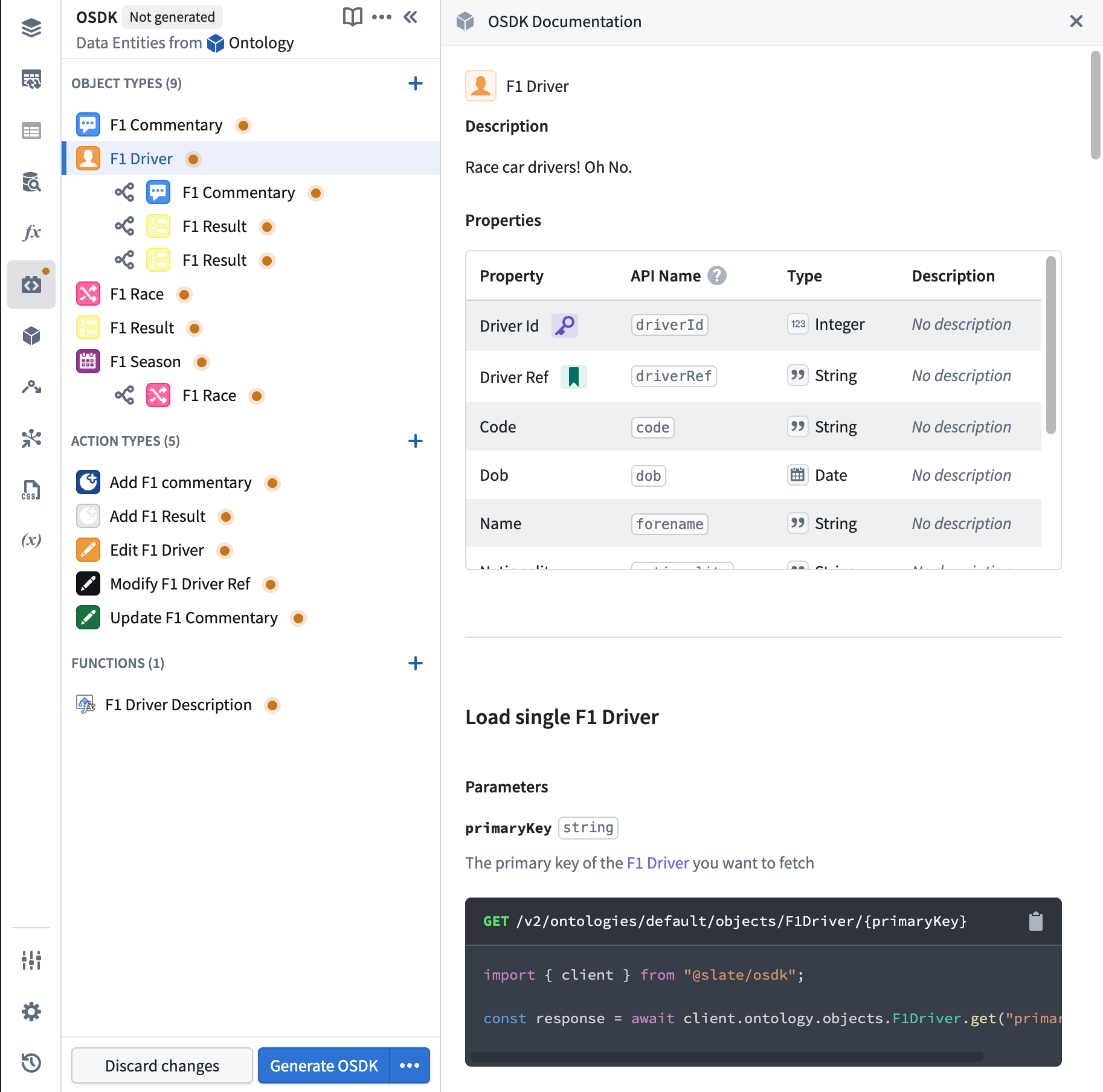
- Review your selections. Entities marked with an orange indicator have unsaved changes.
- Select Generate OSDK to create your custom OSDK library.
- Wait for the generation process to complete.
- Once generated, the OSDK is available for use in your Slate functions.
Using the OSDK in Slate functions
The Functions editor allows you to access and transform data fetched through the OSDK. To get started, select any entity in the OSDK panel to view its documentation and code snippets in the right panel. These snippets are tailored to your specific configuration and can be copied directly into your Slate functions.
For example, selecting an object type displays:
- A list of all properties with their API names and types.
- Code snippets for loading single objects, fetching pages, filtering, and more.
- The exact import statement and method calls for your generated OSDK.
For detailed syntax reference on filtering, aggregations, actions, and other operations, see the TypeScript OSDK guide. Note that Slate uses OSDK version 1 and is in JavaScript, so type annotations are omitted.
Managing your OSDK configuration
Viewing entity documentation
Select any entity in the OSDK panel to view detailed documentation in the right panel, including:
- Property definitions for object types
- Parameter specifications for actions and functions
- Code snippets customized for your selected entities
Tracking changes
The OSDK panel displays indicators for unsaved changes:
- Added entities show an orange indicator until generated
- Removed entities appear crossed out with an undo option
- Select Discard changes to revert to the last generated configuration
Regenerating the OSDK
If you need to regenerate the OSDK (for example, after Ontology changes):
- Select the dropdown arrow next to Generate OSDK.
- Select Regenerate last OSDK.
Viewing generation logs
To troubleshoot generation issues:
- Select the dropdown arrow next to Generate OSDK.
- Select View latest generation logs.
Deleting the OSDK
To remove the OSDK configuration entirely:
- Select the More menu (three dots) in the panel header.
- Select Delete OSDK.
- Confirm the deletion.
:::callout{theme="warning"} Deleting the OSDK removes all configuration and generated code. This action cannot be undone, and you will need to reconfigure the OSDK if needed later. :::
Best practices
- Start small: Add only the object types and actions you need. You can always add more later.
- Use error handling: Always check response types to handle errors gracefully.
- Paginate large datasets: Use
fetchPage()with appropriate page sizes instead of loading all objects at once. - Leverage the documentation panel: Select entities to see up-to-date code snippets for your specific configuration.
- Save your application: After generating the OSDK, save your Slate application to persist the configuration.
Related documentation
- Ontology SDK overview: Learn about the OSDK across all supported languages.
- TypeScript OSDK migration guide: Detailed syntax reference for TypeScript/JavaScript OSDK operations.
- Define and run Slate functions: Learn more about using JavaScript functions in Slate.
中文翻译
在 Slate 中使用 Ontology SDK (OSDK)
Ontology 软件开发工具包(OSDK,Ontology Software Development Kit)使构建者能够在 Slate 的代码环境中充分利用 Ontology 的全部功能。OSDK 在 Functions 编辑器中作为一个库提供,可实现对 Ontology 中对象类型、链接类型、操作和函数的类型安全访问。
:::callout{theme="neutral"} Slate 中的 OSDK 使用与 TypeScript OSDK 相同的底层 API。Slate 使用 JavaScript,但提供 IntelliSense 以实现代码补全和类型提示。 :::
概述
Slate 中的 OSDK 面板使您能够:
- 选择要使用的 Ontology
- 配置数据实体,包括对象类型、链接类型、操作类型和函数
- 生成针对所选实体定制的 OSDK 库
- 查看每个实体的文档和代码片段
- 在将更改提交到应用程序之前跟踪更改
入门指南
访问 OSDK 面板
- 在编辑模式下打开您的 Slate 应用程序。
- 在左侧边栏中,选择 OSDK 图标以打开 OSDK 面板。
- 如果您尚未配置 OSDK,将看到 Ontology 选择界面。
选择您的 Ontology
- 从 选择 Ontology 下拉菜单中,选择您要访问的 Ontology。
- 选择 确认选择 以保存您的选择。
:::callout{theme="neutral"} 可用的 Ontology 取决于您的平台设置和权限。您可能只能访问一个 Ontology。如需切换到其他 Ontology,您必须删除并重新配置 OSDK。 :::
添加数据实体
选择 Ontology 后,您可以向 OSDK 配置中添加四种类型的实体:
对象类型和链接类型
对象类型表示 Ontology 中的核心数据实体。链接类型定义对象类型之间的关系,并嵌套显示在其父对象类型下。
- 在 对象类型 部分,选择 + 按钮。
- 使用搜索对话框查找并选择对象类型。
- 选择对象类型后,任何关联的链接类型将自动可用。
- 依赖关系会自动解析,因此如果您添加链接类型,所需的对象类型也会被包含。
操作类型
操作类型允许您执行修改 Ontology 数据的操作。
- 在 操作类型 部分,选择 + 按钮。
- 搜索并选择您需要的操作类型。
- 操作所需的对象类型依赖关系会自动添加。
函数
函数允许您调用在 Ontology 中定义的自定义逻辑。
- 在 函数 部分,选择 + 按钮。
- 浏览并选择您要包含的函数。
:::callout{theme="neutral"} 没有 API 名称或编辑 Ontology 的函数无法被选择。 :::
生成 OSDK
配置实体后:
- 检查您的选择。带有橙色指示器的实体表示有未保存的更改。
- 选择 生成 OSDK 以创建您的自定义 OSDK 库。
- 等待生成过程完成。
- 生成后,OSDK 即可在您的 Slate 函数中使用。
在 Slate 函数中使用 OSDK
Functions 编辑器 允许您访问和转换通过 OSDK 获取的数据。要开始使用,请在 OSDK 面板中选择任意实体,以在右侧面板中查看其文档和代码片段。这些片段针对您的特定配置进行了定制,可以直接复制到您的 Slate 函数中。
例如,选择对象类型会显示:
- 所有属性及其 API 名称和类型的列表。
- 用于加载单个对象、获取分页数据、过滤等的代码片段。
- 针对您生成的 OSDK 的确切导入语句和方法调用。
有关过滤、聚合、操作和其他操作的详细语法参考,请参阅 TypeScript OSDK 指南。请注意,Slate 使用 OSDK 版本 1 且采用 JavaScript,因此类型注解被省略。
管理您的 OSDK 配置
查看实体文档
在 OSDK 面板中选择任意实体,以在右侧面板中查看详细文档,包括:
- 对象类型的属性定义
- 操作和函数的参数规范
- 针对您所选实体定制的代码片段
跟踪更改
OSDK 面板会显示未保存更改的指示器:
- 添加的实体在生成前会显示橙色指示器
- 移除的实体显示为带删除线,并带有撤销选项
- 选择 放弃更改 以恢复到上次生成的配置
重新生成 OSDK
如果您需要重新生成 OSDK(例如,在 Ontology 更改后):
- 选择 生成 OSDK 旁边的下拉箭头。
- 选择 重新生成上次的 OSDK。
查看生成日志
要排查生成问题:
- 选择 生成 OSDK 旁边的下拉箭头。
- 选择 查看最新的生成日志。
删除 OSDK
要完全移除 OSDK 配置:
- 选择面板标题中的 更多 菜单(三个点)。
- 选择 删除 OSDK。
- 确认删除。
:::callout{theme="warning"} 删除 OSDK 将移除所有配置和生成的代码。此操作无法撤销,如果以后需要,您将需要重新配置 OSDK。 :::
最佳实践
- 从小处着手: 只添加您需要的对象类型和操作。您可以随时添加更多。
- 使用错误处理: 始终检查响应类型以优雅地处理错误。
- 对大型数据集进行分页: 使用
fetchPage()并设置适当的页面大小,而不是一次性加载所有对象。 - 利用文档面板: 选择实体以查看针对您特定配置的最新代码片段。
- 保存您的应用程序: 生成 OSDK 后,保存您的 Slate 应用程序以持久化配置。
相关文档
- Ontology SDK 概述:了解所有支持语言中的 OSDK。
- TypeScript OSDK 迁移指南:TypeScript/JavaScript OSDK 操作的详细语法参考。
- 定义和运行 Slate 函数:了解有关在 Slate 中使用 JavaScript 函数的更多信息。