Read and write to data systems(读写数据系统)
The Queries panel lets you query your data sources. Depending on the type of data source, you can write different queries in the Queries panel. The below provides overviews and examples about how to write different types of queries, security considerations when using Handlebars in each type of query, and an introduction to query partials and conditional queries.
Query security overview
Foundry queries use the Foundry Synchronizer, which enforces read-only permissions on all synced tables; additionally, access to the individual tables respect the access granted at the dataset level in Foundry.
For datasources outside of Foundry, using Handlebars in queries raises security concerns because malicious users could perform injection attacks by replacing the contents of the template with harmful code. These queries therefore require additional security rules for Handlebars use - the rules are described in depth in the SQL queries and HTTP JSON queries sections below.
Additionally, any template that references user variables (e.g. {{user.firstName}}) gets its value from the server rather than accepting the value passed to the browser on login.
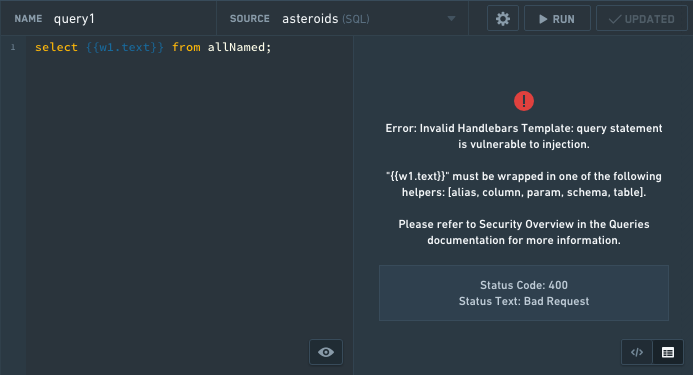
An example of a SQL security error:
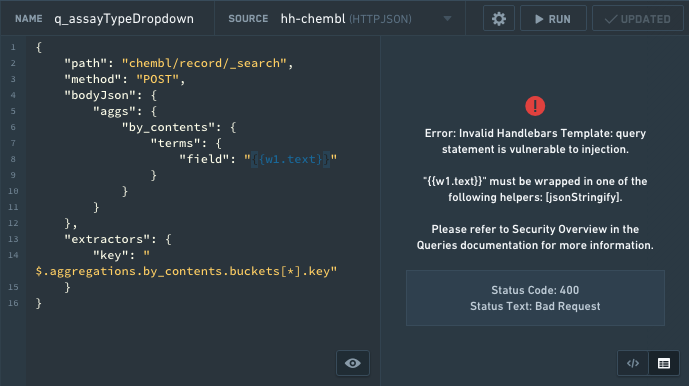
An example of a HTTP JSON security error:
API Gateway queries
The API Gateway data source can be used to interact with Foundry APIs. The documentation for each service and endpoint is displayed inline. Full documentation can be found in the API reference.
Specific examples for payload types can be found behind the Show details toggle next to the request input. These endpoints are secured differently than HTTP JSON datasource-type queries, so you do not need to jsonStringify handlebar inputs.
Foundry queries
The recommended method for querying Foundry data in Slate is to use the Ontology. Ontology objects can be used in Slate with the OSDK, the object set panel, or the object context panel. Alternatively, API gateway queries can be used.
The legacy method for querying data in Slate uses SQL queries to retrieve data from datasets synced to a Postgres instance in Foundry. This method is only available when dataset syncs have been enabled for your enrollment. Note that this feature is still supported, but no longer in development. We encourage querying data with the Ontology to benefit from new features and ensure future support.
Note that you do not need to use any SQL security helpers.
To create a dataset sync:
- Add a dataset in the Dataset sync panel and go to the Sync to Postgres section.
- Enter a table name.
- Select Apply and sync.
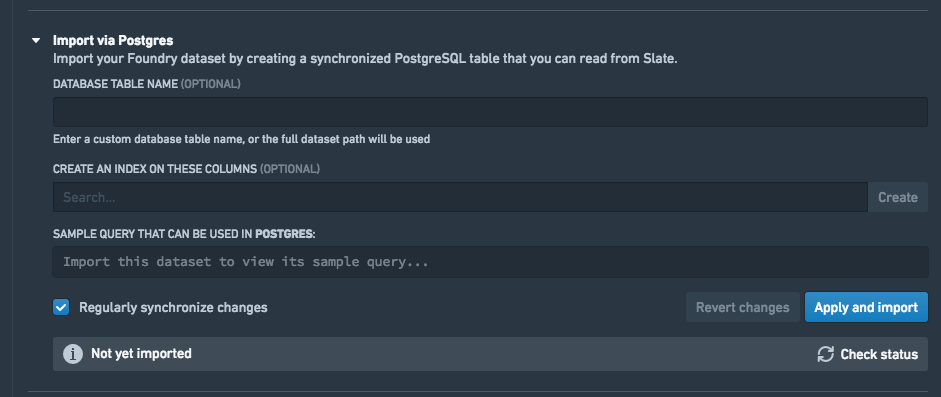
When the sync has completed, the Sync to Postgres section in the Dataset sync tab will contain a sample SQL query that can be pasted into the Queries tab.
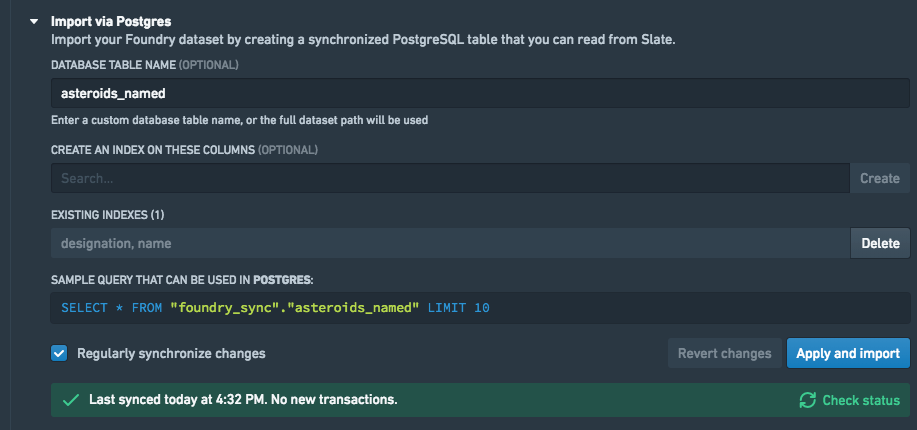
SQL queries
Security considerations
All handlebars templates in SQL queries (with the exception of those using Foundry datasources) must be enclosed by SQL security helpers or Handlebars Built-In Helpers ↗. You can find the full details for how and when to use each SQL security helper in SQL Helpers.
There are five helpers, which are schema, table, column, alias and param.
schema,table: Theschemaandtablehelpers work very similarly. Given a name and a list of allowed names, the helpers check to make sure the name exists in the list of allowed names and in the corresponding information schema table. For example, the table helper checks if the table name exists in the list of allowed names and ininformation_schema.tablesor the corresponding schema table in your database. Specifying the list of allowed names prevents the query from accessing any schema/table that it should not access. You cannot template the allowed names, because this would defeat the purpose of the validation.
SELECT column1 FROM {{schema someSchemaName 'allowedSchemaName1' 'allowedSchemaName2'}}.{{table someTableName 'allowedTableName1'}};
column: Thecolumnhelper checks to make sure the name exists ininformation_schema.columnsor the corresponding schema table in your database.
SELECT {{column someColumnName}} FROM table1;
alias: Thealiashelper is used when you want to template an aliased schema, table or column name. Because the aliased name is not in the information schema, you must register it with Slate using thealiashelper; otherwise, the name can’t be validated. You could only use thealiashelper with constant strings and not references, i.e.{{alias 'someConstantString'}}is allowed and{{alias someReference}}is not. Templating it defeats the purpose of validating it inschema,tableorcolumnbecause they could reference the same thing.
SELECT
column1 as {{alias 'aliasedColumnName'}}
FROM table1
ORDER BY {{column someColumnName}}

where someColumnName is 'aliasedColumnName' and 'aliasedColumnName' is not a valid column name in the database's schema.
param: Theparamhelper replaces the template with a ‘?’ such that the values can be set later using apreparedStatement. PreparedStatement is one of the safest way to protect against SQL injections. Notice that all values coming from the front end are numbers or strings, so to use a value with a type other than number or string in the query, you must cast the value to that type.
SELECT column1 FROM table1 WHERE column1 > {{param value1}} and dateColumn1 < {{param value2}}::date
When should I use which helper?
- When you want to template a schema/table/column name, you should use one of the corresponding
schema,tableorcolumnhelpers. - When you want to template an aliased table/column, you should register the alias with the
aliashelper. - When you want to template a parameter value, i.e. the value in a comparison in the where clause, you should use the
paramhelper.
Writing SQL queries
When querying a SQL data source, the editor accepts any SQL command. Typically, you run a SELECT statement. For example:
SELECT name,diameter,period FROM allNamed;
Slate parses the resulting rows into JSON, a key for each column, so that they are accessible via handlebars.
{
    "name": ["Undina", "Hekate"],
    "diameter": [126.42, 88.66],
    "period": [5.68801089633658, 5.42957878301233]
}
You can perform data transformations, such as basic string and math operations, by using SQL’s built-in functions ↗.
HTTP JSON queries
Security considerations
All HTTP JSON queries must conform to the following:
- All Handlebars templates must be wrapped in a jsonStringify helper. The
jsonStringifyhelper ensures that the value of the template could not escape its current scope. For example, it couldn’t close the block and add extra properties to the request.
An example to use it to template a property:
{
    "path": "path/to/api",
    "method": "POST",
    "bodyJson": {
        "filter": {{jsonStringify w1.text}}
    },
    "extractors": {
        "result": "$"
    },
    "headers": {
        "Custom_Header": "my custom header value"
    }
}
An example to use it to template as part of a property:
{
    "path": "path/to/api",
    "method": "POST",
    "bodyJson": {
        "filter": {{#jsonStringify}}some text plus {{w1.text}}{{/jsonStringify}}
    },
    "extractors": {
        "result": "$"
    },
    "headers": {
        "Custom_Header": "my custom header value"
    }
}
..is not allowed in the path. This ensures that the query path does not index to any parent scope and does not access information that shouldn’t be accessed.
Writing HTTP JSON queries
The query for a HTTP JSON data source is an object that contains the following properties: path, method, bodyJson, extractors.
path: the URL path to the data sourcequeryParams: (optional) the map of key-value pairs to append to the URL when building the request (ie. “query”: “something” would append ?query=something to thepath). Note that when this map is not empty, query params should not be specified in thepath.method: the HTTP method used to make the request. Supported methods are GET, POST, DELETE, and PUT.bodyJson: (optional) the JSON that’s sent as data to the API endpoint (e.g., how to format and aggregate the data). This field is not required if your data source endpoint doesn’t expect JSON.extractors: the results the query returns. Uses JSONPath ↗ to determine what to extract. For example, to see the whole result, use"result": "$". For help writing JSONPath, consult the following tester ↗. For more information on JSONPath, see JSONPath examples ↗.headers: (optional) A map of headers to set on the request. Authentication headers will be added on top of this list if present.
For example:
{
    "path": "astronomy/_comets",
    "queryParams": {
        "limit": 5,
        "text": "searchabc"
    },
    "method": "GET",
    "bodyJson": {
        "fields": ["name", "type", "date"],
        "query": {
            "type": "dust"
        }
    },
    "extractors": {
        "name": "$.results[*].fields.name"
    },
    "headers": {
        "Custom_Header": "my custom header value"
    }
}
Elasticsearch
The following is an example using Elasticsearch.
{
    "path": "geologist/_search",
    "method": "POST",
    "bodyJson": {
        "query": {
            "prefix": {
                "request": "/daily/api/permalinks/"
            }
        },
        "aggs": {
            "views": {
                "terms": {
                    "field": "auth",
                    "size": 0
                }
            }
        }
    },
    "extractors": {
        "Users": "$.aggregations.views.buckets[*].key",
        "Views": "$.aggregations.views.buckets[*].doc_count"
    }
}
For more information on Elasticsearch, see the Query DSL documentation ↗.
Query partials
Query partials allow you to write query code that can be reused in multiple queries in your document. To create a partial, click the + New Partial button in the Queries panel.
You can insert a partial into a query by writing {{>partialName}}. For example, say you have a partial named columnFilter with the contents WHERE column={{param w8.selectedValue}}. You can create another query with the code SELECT * from table {{>columnFilter}}. This renders to the query SELECT * from table WHERE column={{param w8.selectedValue}}.
You can also pass arguments to partials, with the syntax {{>partialName arg1=value1 arg2=value2 arg3=value3}}. The value of the arguments in the partial’s context will be replaced with the values you provide in a particular query. Values can be static values (such as strings or numbers), or Handlebars references (such as w8.selectedValue). In the example above, if you had two queries that were exactly the same, except were filtered by two different selected values, you could redefine columnFilter to be WHERE column={{param columnValue}}, and the query to be SELECT * from table {{>columnFilter columnValue=w8.selectedValue}}, which renders as SELECT * from table WHERE column={{param w8.selectedValue}}, as before.
You can also nest partials, allowing for code-reuse inside code-reuse.
Partials are a Handlebars concept and the Slate implementation uses the Handlebars syntax. See the Handlebars partials documentation ↗ to learn more.
Conditional queries
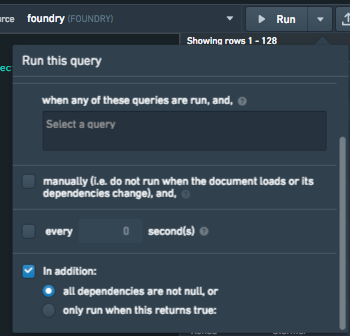
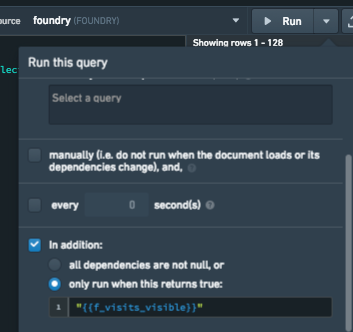
The Triggers & interactions tab will allow you to control the circumstances under which your query runs. There are two options for running the query conditionally, you can choose All dependencies are not null, which means that every single handlebars reference in the query must not be null in order for it to run, or you can choose The handlebar input returns true which will allow you to specify a handlebars condition. This condition can be a reference to a function, widget property, or anything you would like to control the logic for when your query should be able to run. The query will only run if this handlebars reference evaluates to true – if not, the query will not be run.

Example 1: all dependencies are not null
The following query requires at least one value from w_visits_bar.selection.data in order run.

If no values are present, the request to Postgres will fail with a syntax error.
Adding the condition to only run when all dependencies are not null will prevent known bad requests from being sent to Postgres, which otherwise consume connections and resources.
Example 2: only run when this returns true
The following query fetches data used to populate a widget in a tabbed container. Let’s assume that the widget is not visible on page load but has dependencies on a set of page level filters. In this particular case, you might consider adding a condition to the query to only run when the widget is visible. This can be done using the The handlebar input returns true option in the query settings.

Tutorial: Make data available for Slate
:::callout{theme="warning"} You should only load data using the Object Set Builder in the Platform tab of Slate where possible. The Object Set Builder allows you to easily query the Ontology and will return data in a tabular format similar to the example shown below. The Postgres workflow explained below is retained as a reference for legacy usage. :::
:::callout{title="warning"}
Before proceeding with the tutorial below, you must make the last-mile-flights and airports datasets you uploaded to Foundry available for use in Slate. Open the Datasets panel and select +Add to open the Foundry resource selector.
:::
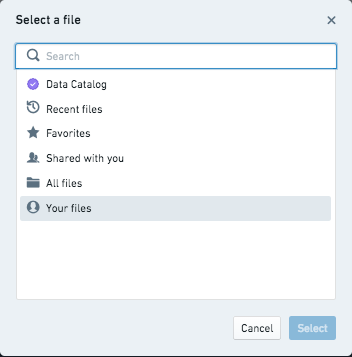
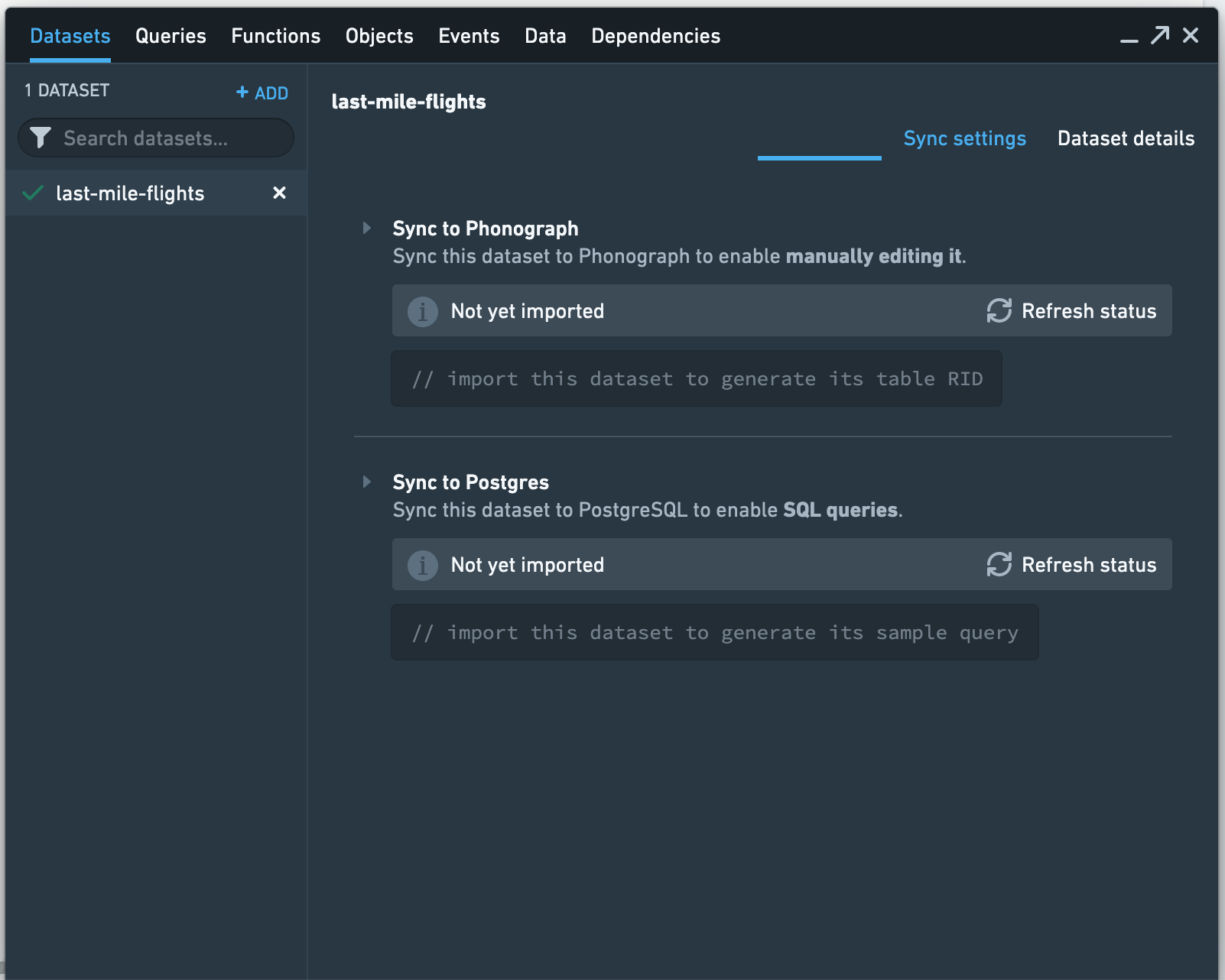
Navigate to the last-mile-flights dataset by selecting All Files > Getting started data, or use the search box in resource selector. Once you locate the dataset, choose the Select last-mile-flights option to begin import configuration.
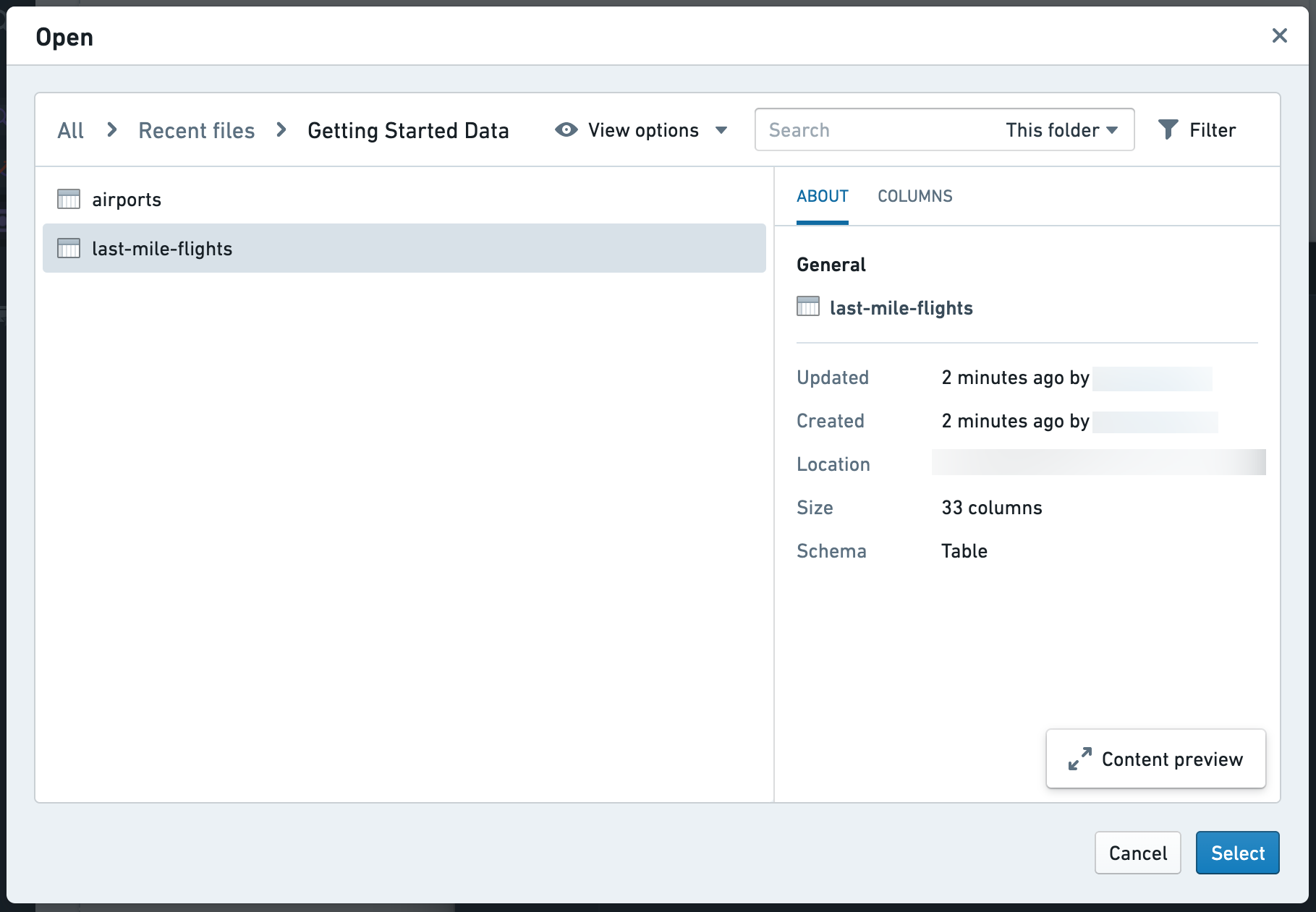
To view configuration options, select the arrow next to Sync to Postgres.
:::callout{theme="neutral"}
The default table name in Postgres will include the file path and mixed-case dataset name. To handle the special character /, uppercase letters, and spaces, Postgres will treat the table name as a quoted identifier. This means that whenever the table is referenced in a query, you must include double quotes or Postgres will throw a syntax error. We recommend the inclusion of a Postgresql table name in the setup that is snake case, lower case letters and _ to avoid the need for double quote usage.
:::
Since the data access patterns have not yet been defined and the last-mile-flights dataset is relatively small, we will not create any indexes on the table. You can always add these later. Select Apply and sync to start the sync. You can use the Check Status button to monitor the sync.
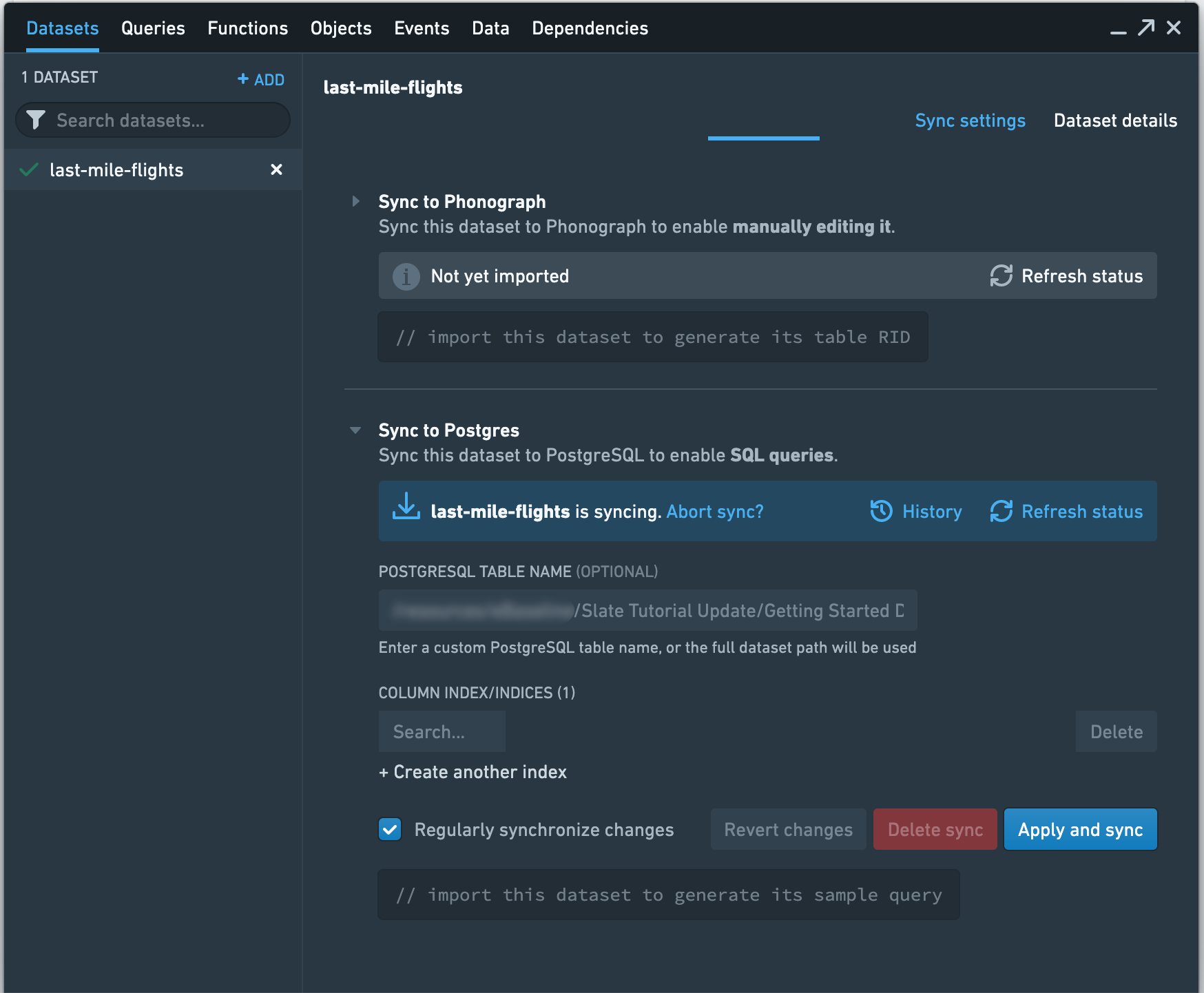
Once the sync is complete, you should see a sample query to use in Slate that looks similar to the following, though the number appended to your dataset name will be different:
SELECT * FROM "foundry_sync"."Getting Started Data/last-mile-flights-master-9406" LIMIT 10
Copy the query for later use as you build the application. Now, sync the airports dataset to Slate.
Create a query
First, create an SQL query to pull the required data from our synced dataset.
Select Queries to open the panel.
You should see a Queries list, a Partials list, and an editor. The lists will be empty as no queries have been created yet. Select + New query. The editor should now display a toolbar, a text editor, and a preview panel for query results.
In the Name textbox, enter q_allFlights as the query name. Select the datasource that has the FOUNDRY type as the data source from the Source dropdown to point Slate to our database. Note that this datasource may be called foundry-sync, foundry-postgate, foundry, or a similar name, but will always have the FOUNDRY type displayed to the right of the datasource name.
:::callout{theme="neutral"}
We recommend naming your queries to start with a query identifier like q_, to make them easily identifiable. This best practice can be especially useful when building out larger, complex applications.
:::
For this query, we want to pull in a few rows of data from the last-mile-flights table in our database. To do this, we can use the sample query we copied earlier in the editor:
SELECT * FROM "foundry_sync"."Getting Started Data/last-mile-flights-master-9406" LIMIT 10
:::callout{theme="warning"}
The queries we use as examples below will use "variable" as a stand-in for the specific table name. For example, rather than "foundry_sync"."Getting started data/last-mile-flights-master-9406", you will see "foundry_sync"."{{v_flightTable}}".
:::
We can test whether the query works by selecting Test, or by using Ctrl+Enter on Windows or Cmd+Enter on macOS. This populates the Preview panel with the results of the query.
If you get an error, make sure that you made last-mile-flights available in Slate and that you are using the correct path.
Select Update Query to save the query.
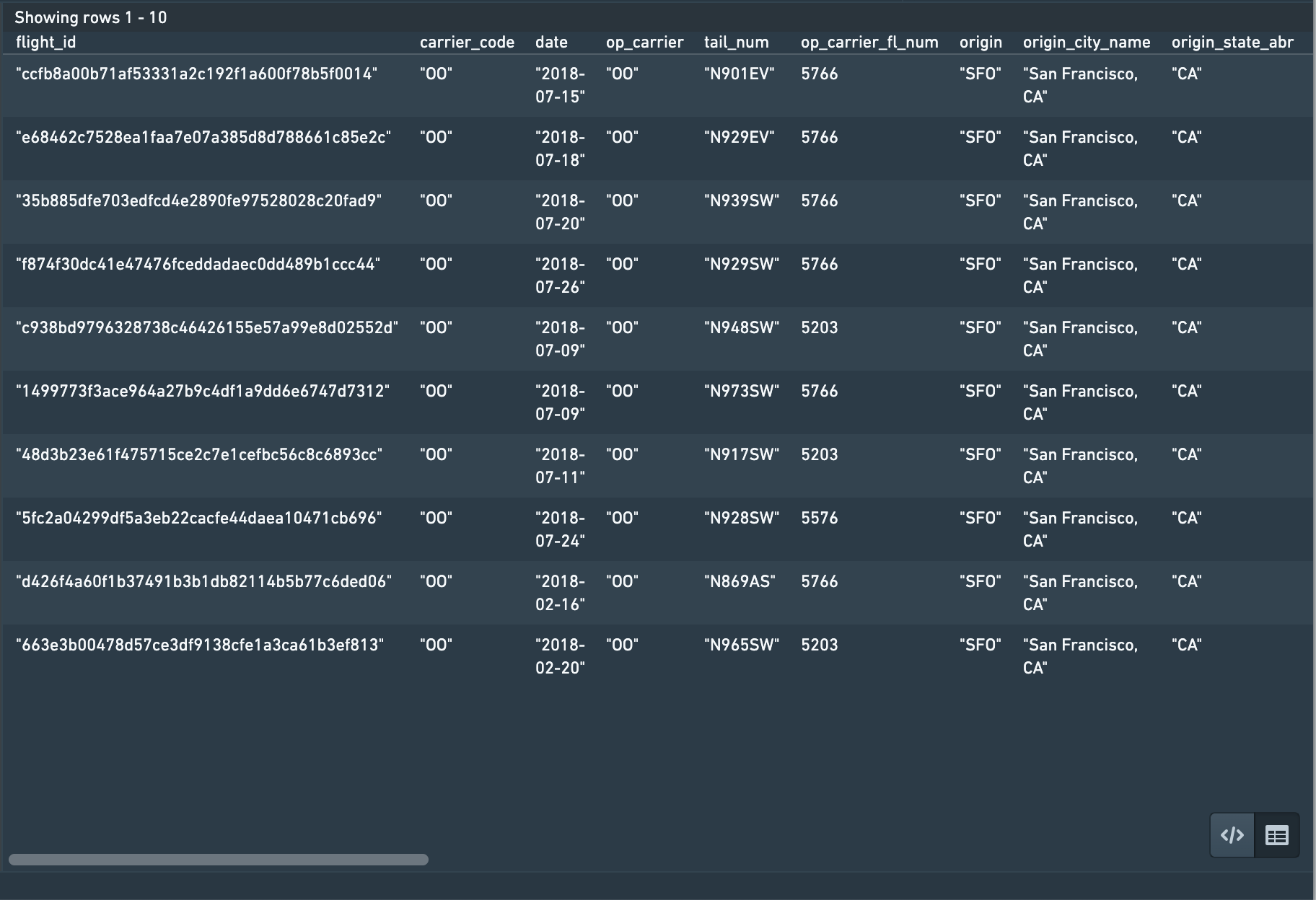
:::callout{theme="neutral"} You can view the results in the raw JSON response structure by selecting < / >. :::
Since our dataset has a lot of columns, refine the query to only pull in a few columns of interest:
SELECT
    flight_id,
    carrier_code,
    tail_num,
    origin,
    dest,
    dep_ts_utc,
    arr_ts_utc,
    distance,
    actual_elapsed_time
FROM "foundry_sync"."{{v_flightTable}}"
LIMIT 10
中文翻译
读写数据系统
查询面板允许您查询数据源。根据数据源类型的不同,您可以在查询面板中编写不同的查询。下文概述并举例说明如何编写不同类型的查询、每种查询中使用 Handlebars 时的安全注意事项,以及查询片段和条件查询的介绍。
查询安全概述
Foundry 查询使用 Foundry 同步器,该同步器对所有同步表强制执行只读权限;此外,对单个表的访问遵循 Foundry 中数据集级别授予的访问权限。
对于 Foundry 外部的数据源,在查询中使用 Handlebars 会引发安全问题,因为恶意用户可能通过用有害代码替换模板内容来执行注入攻击。因此,此类查询需要额外的 Handlebars 使用安全规则——这些规则在 SQL 查询和 HTTP JSON 查询部分中有详细说明。
此外,任何引用用户变量(例如 {{user.firstName}})的模板都会从服务器获取其值,而不是接受登录时传递给浏览器的值。
SQL 安全错误示例:
HTTP JSON 安全错误示例:
API 网关查询
API 网关数据源可用于与 Foundry API 交互。每个服务和端点的文档都会内联显示。完整文档可在 API 参考 中找到。
有效载荷类型的具体示例可在请求输入旁边的 显示详情 切换按钮下找到。这些端点的安全保护方式与 HTTP JSON 数据源类型的查询不同,因此您无需对 handlebar 输入进行 jsonStringify 处理。
Foundry 查询
在 Slate 中查询 Foundry 数据的推荐方法是使用本体论。本体对象可以在 Slate 中通过 OSDK、对象集面板 或 对象上下文面板 使用。或者,也可以使用 API 网关查询。
在 Slate 中查询数据的旧版方法是使用 SQL 查询从同步到 Foundry 中 Postgres 实例的数据集中检索数据。此方法仅在您的注册启用了数据集同步时才可用。请注意,此功能仍受支持,但不再开发。我们鼓励使用本体论查询数据,以受益于新功能并确保未来的支持。
请注意,您无需使用任何 SQL 安全辅助函数。
要创建数据集同步:
- 在 数据集同步 面板中添加一个数据集,然后转到 同步到 Postgres 部分。
- 输入一个表名。
- 选择 应用并同步。
同步完成后,数据集同步 选项卡中的 同步到 Postgres 部分将包含一个示例 SQL 查询,可以将其粘贴到 查询 选项卡中。
SQL 查询
安全注意事项
SQL 查询中的所有 Handlebars 模板(使用 Foundry 数据源的模板除外)都必须用 SQL 安全辅助函数或 Handlebars 内置辅助函数 ↗ 括起来。您可以在 SQL 辅助函数 中找到关于如何以及何时使用每个 SQL 安全辅助函数的完整详细信息。
共有五个辅助函数,分别是 schema、table、column、alias 和 param。
schema、table:schema和table辅助函数的工作方式非常相似。给定一个名称和一个允许的名称列表,这些辅助函数会检查该名称是否存在于允许的名称列表以及相应的信息模式表中。例如,table 辅助函数会检查表名是否存在于允许的名称列表以及information_schema.tables或数据库中相应的模式表中。指定允许的名称列表可防止查询访问任何不应访问的模式/表。您不能对允许的名称进行模板化,因为这会破坏验证的目的。
SELECT column1 FROM {{schema someSchemaName 'allowedSchemaName1' 'allowedSchemaName2'}}.{{table someTableName 'allowedTableName1'}};
column:column辅助函数会检查该名称是否存在于information_schema.columns或数据库中相应的模式表中。
SELECT {{column someColumnName}} FROM table1;
alias:当您想要对别名化的模式、表或列名进行模板化时,使用alias辅助函数。由于别名化的名称不在信息模式中,您必须使用alias辅助函数在 Slate 中注册它;否则,该名称无法被验证。您只能将alias辅助函数与常量字符串一起使用,而不能与引用一起使用,即允许{{alias 'someConstantString'}},而不允许{{alias someReference}}。对其进行模板化会破坏在schema、table或column中验证它的目的,因为它们可能引用同一事物。
SELECT
column1 as {{alias 'aliasedColumnName'}}
FROM table1
ORDER BY {{column someColumnName}}

其中 someColumnName 是 'aliasedColumnName',而 'aliasedColumnName' 在数据库模式中不是有效的列名。
param:param辅助函数将模板替换为 '?',以便稍后可以使用preparedStatement设置值。PreparedStatement 是防止 SQL 注入最安全的方法之一。请注意,所有来自前端的值都是数字或字符串,因此要在查询中使用数字或字符串以外的类型的值,您必须将该值强制转换为该类型。
SELECT column1 FROM table1 WHERE column1 > {{param value1}} and dateColumn1 < {{param value2}}::date
何时使用哪个辅助函数?
- 当您想要对模式/表/列名进行模板化时,应使用相应的
schema、table或column辅助函数。 - 当您想要对别名化的表/列进行模板化时,应使用
alias辅助函数注册别名。 - 当您想要对参数值进行模板化时,即 where 子句中比较的值,应使用
param辅助函数。
编写 SQL 查询
查询 SQL 数据源时,编辑器接受任何 SQL 命令。通常,您会运行一个 SELECT 语句。例如:
SELECT name,diameter,period FROM allNamed;
Slate 将结果行解析为 JSON,每列一个键,以便通过 Handlebars 访问。
{
    "name": ["Undina", "Hekate"],
    "diameter": [126.42, 88.66],
    "period": [5.68801089633658, 5.42957878301233]
}
您可以通过使用 SQL 的内置函数 ↗ 来执行数据转换,例如基本的字符串和数学运算。
HTTP JSON 查询
安全注意事项
所有 HTTP JSON 查询必须符合以下要求:
- 所有 Handlebars 模板必须包裹在 jsonStringify 辅助函数中。
jsonStringify辅助函数确保模板的值无法逃逸其当前作用域。例如,它无法关闭块并为请求添加额外属性。
使用它来模板化属性的示例:
{
    "path": "path/to/api",
    "method": "POST",
    "bodyJson": {
        "filter": {{jsonStringify w1.text}}
    },
    "extractors": {
        "result": "$"
    },
    "headers": {
        "Custom_Header": "my custom header value"
    }
}
使用它来模板化属性的一部分的示例:
{
    "path": "path/to/api",
    "method": "POST",
    "bodyJson": {
        "filter": {{#jsonStringify}}some text plus {{w1.text}}{{/jsonStringify}}
    },
    "extractors": {
        "result": "$"
    },
    "headers": {
        "Custom_Header": "my custom header value"
    }
}
- 路径中不允许使用
..。这确保了查询路径不会索引到任何父作用域,并且不会访问不应访问的信息。
编写 HTTP JSON 查询
HTTP JSON 数据源的查询是一个包含以下属性的对象:path、method、bodyJson、extractors。
path:数据源的 URL 路径queryParams:(可选)构建请求时附加到 URL 的键值对映射(例如,"query": "something" 会将 ?query=something 附加到path)。请注意,当此映射不为空时,不应在path中指定查询参数。method:用于发出请求的 HTTP 方法。支持的方法有 GET、POST、DELETE 和 PUT。bodyJson:(可选)作为数据发送到 API 端点的 JSON(例如,如何格式化和聚合数据)。如果您的数据源端点不期望 JSON,则此字段不是必需的。extractors:查询返回的结果。使用 JSONPath ↗ 来确定要提取的内容。例如,要查看整个结果,请使用"result": "$"。有关编写 JSONPath 的帮助,请查阅此测试工具 ↗。有关 JSONPath 的更多信息,请参阅 JSONPath 示例 ↗。headers:(可选)要在请求上设置的标头映射。如果存在身份验证标头,它们将添加到此列表之上。
例如:
{
    "path": "astronomy/_comets",
    "queryParams": {
        "limit": 5,
        "text": "searchabc"
    },
    "method": "GET",
    "bodyJson": {
        "fields": ["name", "type", "date"],
        "query": {
            "type": "dust"
        }
    },
    "extractors": {
        "name": "$.results[*].fields.name"
    },
    "headers": {
        "Custom_Header": "my custom header value"
    }
}
Elasticsearch
以下是一个使用 Elasticsearch 的示例。
{
    "path": "geologist/_search",
    "method": "POST",
    "bodyJson": {
        "query": {
            "prefix": {
                "request": "/daily/api/permalinks/"
            }
        },
        "aggs": {
            "views": {
                "terms": {
                    "field": "auth",
                    "size": 0
                }
            }
        }
    },
    "extractors": {
        "Users": "$.aggregations.views.buckets[*].key",
        "Views": "$.aggregations.views.buckets[*].doc_count"
    }
}
有关 Elasticsearch 的更多信息,请参阅 Query DSL 文档 ↗。
查询片段
查询片段允许您编写可在文档中的多个查询中重复使用的查询代码。要创建片段,请单击查询面板中的 + 新建片段 按钮。
您可以通过编写 {{>partialName}} 将片段插入到查询中。例如,假设您有一个名为 columnFilter 的片段,其内容为 WHERE column={{param w8.selectedValue}}。您可以创建另一个查询,其代码为 SELECT * from table {{>columnFilter}}。这将呈现为查询 SELECT * from table WHERE column={{param w8.selectedValue}}。
您还可以向片段传递参数,语法为 {{>partialName arg1=value1 arg2=value2 arg3=value3}}。片段上下文中参数的值将被您在特定查询中提供的值替换。值可以是静态值(如字符串或数字),也可以是 Handlebars 引用(如 w8.selectedValue)。在上面的示例中,如果您有两个完全相同的查询,只是按两个不同的选定值进行过滤,您可以将 columnFilter 重新定义为 WHERE column={{param columnValue}},并将查询重新定义为 SELECT * from table {{>columnFilter columnValue=w8.selectedValue}},这将像以前一样呈现为 SELECT * from table WHERE column={{param w8.selectedValue}}。
您还可以嵌套片段,从而在代码复用中实现代码复用。
片段是 Handlebars 的一个概念,Slate 的实现使用了 Handlebars 语法。请参阅 Handlebars 片段文档 ↗ 了解更多信息。
条件查询
触发器和交互 选项卡允许您控制查询运行的条件。有两个选项可以有条件地运行查询,您可以选择 所有依赖项均不为 null,这意味着查询中的每一个 Handlebars 引用都必须不为 null 才能运行;或者您可以选择 Handlebar 输入返回 true,这将允许您指定一个 Handlebars 条件。此条件可以是对函数、小部件属性或任何您想要控制查询运行逻辑的内容的引用。仅当此 Handlebars 引用评估为 true 时,查询才会运行——否则,查询将不会运行。
示例 1:所有依赖项均不为 null
以下查询需要 w_visits_bar.selection.data 中至少有一个值才能运行。
如果没有值存在,对 Postgres 的请求将因语法错误而失败。
添加仅在所有依赖项均不为 null 时才运行的条件,将防止向 Postgres 发送已知的错误请求,否则这些请求会消耗连接和资源。
示例 2:仅当此条件返回 true 时才运行
以下查询获取用于填充选项卡式容器中小部件的数据。假设该小部件在页面加载时不可见,但依赖于一组页面级过滤器。在这种特定情况下,您可以考虑向查询添加一个条件,使其仅在小部件可见时运行。这可以通过查询设置中的 Handlebar 输入返回 true 选项来实现。
教程:使数据可用于 Slate
:::callout{theme="warning"} 您应尽可能使用 Slate 平台选项卡中的对象集构建器加载数据。对象集构建器允许您轻松查询本体论,并将以类似于下面示例的表格格式返回数据。下面解释的 Postgres 工作流程保留作为旧版使用的参考。 :::
:::callout{title="警告"}
在继续下面的教程之前,您必须使上传到 Foundry 的 last-mile-flights 和 airports 数据集可用于 Slate。打开 数据集 面板并选择 + 添加 以打开 Foundry 资源选择器。
:::
通过选择 所有文件 > 入门数据 导航到 last-mile-flights 数据集,或使用资源选择器中的搜索框。找到数据集后,选择 选择 last-mile-flights 选项以开始导入配置。
要查看配置选项,请选择 同步到 Postgres 旁边的箭头。
:::callout{theme="neutral"}
Postgres 中的默认表名将包含文件路径和混合大小写的数据集名称。为了处理特殊字符 /、大写字母和空格,Postgres 会将表名视为带引号的标识符。这意味着每当在查询中引用该表时,您必须包含双引号,否则 Postgres 会抛出语法错误。我们建议在设置中包含一个使用蛇形命名法、小写字母和 _ 的 Postgresql 表名,以避免使用双引号。
:::
由于数据访问模式尚未定义,并且 last-mile-flights 数据集相对较小,我们不会在表上创建任何索引。您随时可以稍后添加它们。选择 应用并同步 以开始同步。您可以使用 检查状态 按钮来监控同步。
同步完成后,您应该会看到一个在 Slate 中使用的示例查询,类似于以下内容,尽管附加到数据集名称的数字会有所不同:
SELECT * FROM "foundry_sync"."Getting Started Data/last-mile-flights-master-9406" LIMIT 10
复制该查询以备在构建应用程序时使用。现在,将 airports 数据集同步到 Slate。
创建查询
首先,创建一个 SQL 查询以从同步的数据集中提取所需数据。
选择 查询 以打开面板。
您应该会看到一个 查询 列表、一个 片段 列表和一个编辑器。这些列表将是空的,因为尚未创建任何查询。 选择 + 新建查询。编辑器现在应显示一个工具栏、一个文本编辑器和一个用于查询结果的预览面板。
在 名称 文本框中,输入 q_allFlights 作为查询名称。从 源 下拉菜单中选择具有 FOUNDRY 类型的数据源作为数据源,以将 Slate 指向我们的数据库。请注意,此数据源可能被称为 foundry-sync、foundry-postgate、foundry 或类似名称,但始终会在数据源名称右侧显示 FOUNDRY 类型。
:::callout{theme="neutral"}
我们建议将查询命名为以查询标识符开头,例如 q_,以便于识别。在构建更大、更复杂的应用程序时,此最佳实践尤其有用。
:::
对于此查询,我们想从数据库的 last-mile-flights 表中提取几行数据。为此,我们可以在编辑器中使用之前复制的示例查询:
SELECT * FROM "foundry_sync"."Getting Started Data/last-mile-flights-master-9406" LIMIT 10
:::callout{theme="warning"}
我们在下面用作示例的查询将使用 "variable" 作为特定表名的占位符。例如,您将看到 "foundry_sync"."{{v_flightTable}}",而不是 "foundry_sync"."Getting started data/last-mile-flights-master-9406"。
:::
我们可以通过选择 测试,或在 Windows 上使用 Ctrl+Enter 或在 macOS 上使用 Cmd+Enter 来测试查询是否有效。这将使用查询结果填充 预览 面板。
如果出现错误,请确保您已使 last-mile-flights 在 Slate 中可用,并且您正在使用正确的路径。
选择 更新查询 以保存查询。
:::callout{theme="neutral"} 您可以通过选择 < / > 以原始 JSON 响应结构查看结果。 :::
由于我们的数据集有很多列,请优化查询以仅提取几个感兴趣的列:
SELECT
    flight_id,
    carrier_code,
    tail_num,
    origin,
    dest,
    dep_ts_utc,
    arr_ts_utc,
    distance,
    actual_elapsed_time
FROM "foundry_sync"."{{v_flightTable}}"
LIMIT 10