Add Slate application to a Marketplace product(将 Slate 应用添加到 Marketplace 产品中)
Use Foundry DevOps to include your Slate applications in Marketplace products for other users to install and reuse. Marketplace supports single-page and multipage Slate applications, including static applications with no data loading. All pages, routes, and page structure are preserved during packaging and installation. Learn how to create your first product.
Add Slate applications to products
To add a Slate application to a product, first create a product, then add outputs. Choose the Add files option to navigate to the Slate application from within the Compass filesystem and add it to your product.
Package Slate applications with Marketplace parameter variables
You can mark local variables as Marketplace parameters, allowing users to customize their values during product installation. This is useful for configuring per-installation settings and default values without modifying the Slate application code after installation.
To mark a variable as a Marketplace parameter:
- Open the Variables panel in your Slate application.
- Select the local variable that you want to make configurable.
- Select the menu for the variable and enable the Marketplace parameter option and choose a type (string or boolean).
Variables marked as Marketplace parameters will display a visual indicator in the Variables panel. When users install the product, they can provide custom values for these parameters during the installation process.
:::callout{theme="neutral"} Only local variables on the home document page can be marked as Marketplace parameters. Shared variables and variables on other pages in a multipage application are not currently supported as Marketplace parameters. :::
Package Slate applications that use the Code Sandbox widget
Slate applications which have dependencies on external libraries for the Code Sandbox widget can be packaged with Marketplace.
If you want to generate copies of the library files upon installation, ensure that you include the files for the libraries in the Files tab under the Content tab when creating your product. When a user installs the product, they will get a copy of those files in their project. The Code Sandbox widget will then reference their copy of the library files.
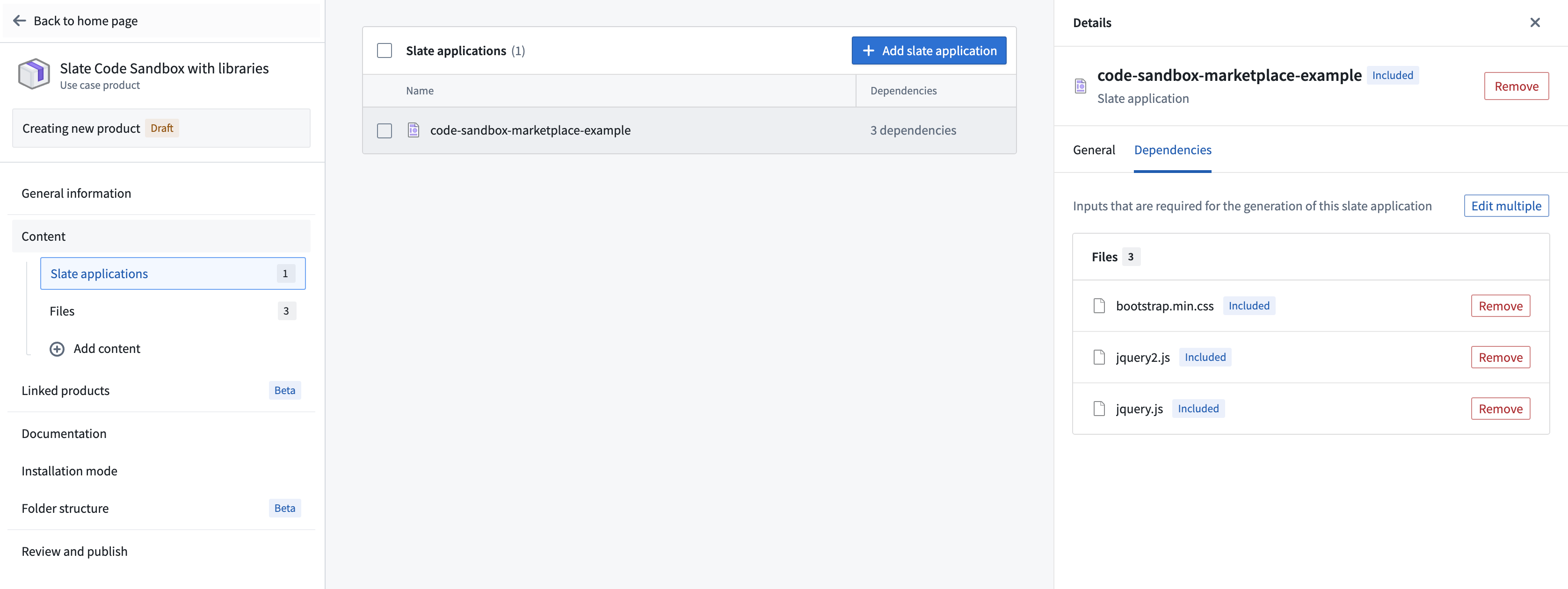
Slate also supports providing libraries via a CDN link (for example, https://unpkg.com/browse/chart.js@2.7.1/). The CDN links are untouched, so the installed Slate application will have the same CDN links. This may mean that the user will need to have configured their CSP to allow the CDN links.
For more information about using libraries with the Code Sandbox widget, see the Code Sandbox widget documentation.
Package Slate applications that use the Ontology SDK
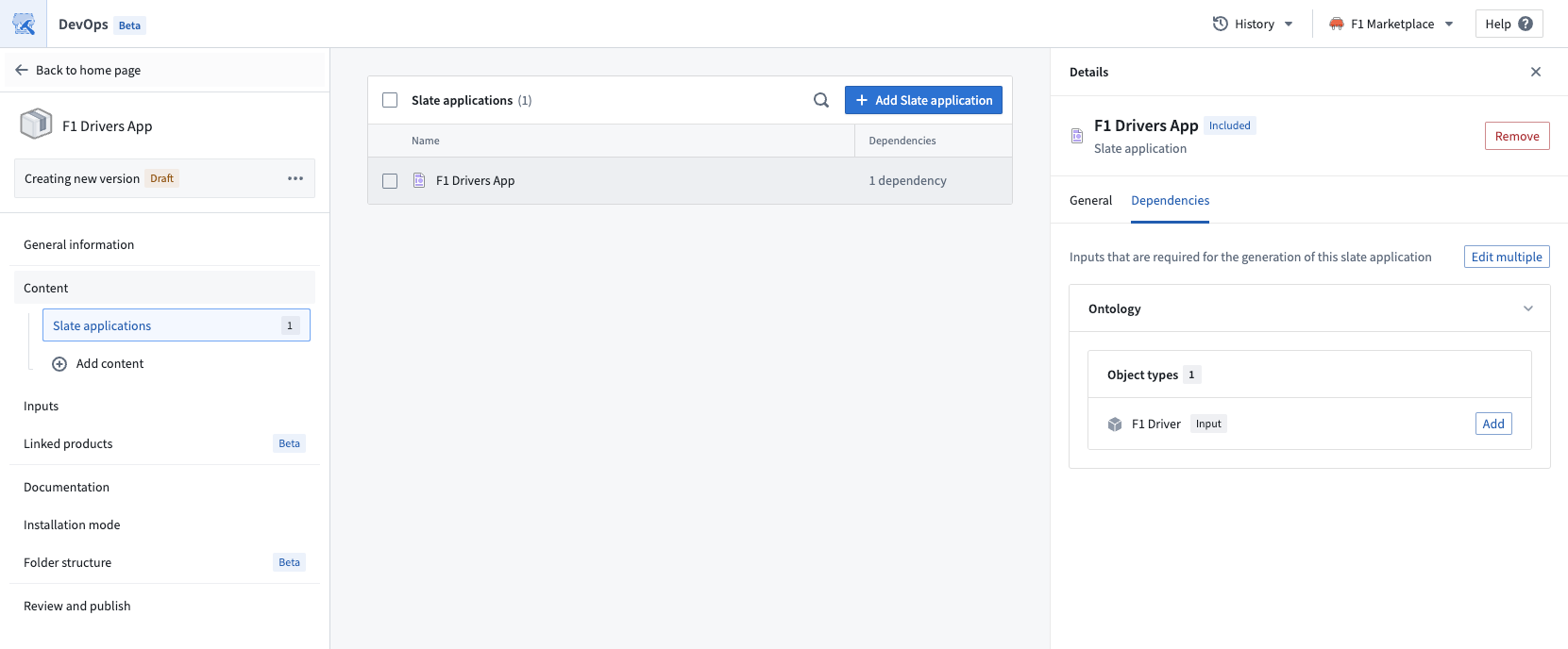
Slate applications that use the Ontology SDK (OSDK) can be packaged with Marketplace. Foundry DevOps automatically handles OSDK Ontology dependencies during packaging, so no manual dependency configuration is required.
How OSDK packaging works
When you publish a Slate application that uses the OSDK, the pre-built OSDK bundle is automatically included in the Marketplace package. This means that during installation, the bundle is copied directly rather than regenerated from scratch, which significantly reduces installation time.
Repackage existing applications for faster installation
Slate applications packaged before the pre-built bundle optimization was available will still regenerate the OSDK bundle during installation. To take advantage of faster installation times, publish a new version of your existing Marketplace product. The new version will automatically include the pre-built OSDK bundle.
To repackage your application:
- Open the product in Foundry DevOps.
- Create a new version of your product.
- Publish the new version.
No changes to the Slate application itself are required. The pre-built bundle is included automatically during publishing.
OSDK requirements
All Ontology resources must use the same API names as the source application. You can achieve this by installing without prefixes or by mapping inputs to existing Ontology resources with matching API names.
If API names do not match, the Slate function code will be mismatched with the Ontology entities in the target environment. Mismatches can be resolved manually by updating the Slate function code after installation.
API name conflicts can occur during installation in the following situations:
- When the target environment has Ontology entities with identical API names. For example, if both environments have an object type named
flights. - When an object's API name does not match its display name. For example, if an object type with the display name
flightshas an API name offlightsXYZ, it will be given the default API name offlightson installation. In this case, Slate function code will no longer match the API name, and a naming conflict could occur if an object type with the API nameflightsalready exists.
This applies to all Ontology entities, including object types, link types, action types, and Functions.
To prevent API name conflicts:
- Use descriptive display names so that the generated API names are unlikely to conflict with existing names.
- Check existing object types in target environments.
- Be prepared to update Slate function code if API names change during installation.
Only the latest version of a Function is supported. Versioned Functions are not supported when using the OSDK with Marketplace. If your application references an older version of a Function, update it to the latest version and repackage your application.
Unsupported features
The following features are not supported when packaging Slate applications with Marketplace:
- Custom data sources (including Postgres queries) are not supported.
API Gatewayis the only supported data source. For more information, see API Gateway queries. - Global stylesheets are not supported.
Foundry FormandTime Serieswidgets are not supported.
中文翻译
将 Slate 应用添加到 Marketplace 产品中
使用 Foundry DevOps 将您的 Slate 应用包含在 Marketplace 产品中,供其他用户安装和复用。Marketplace 支持单页和多页 Slate 应用,包括无数据加载的静态应用。在打包和安装过程中,所有页面、路由和页面结构都将被保留。了解如何创建您的第一个产品。
将 Slate 应用添加到产品中
要将 Slate 应用添加到产品中,首先创建一个产品,然后添加输出。选择 添加文件 选项,从 Compass 文件系统中导航到 Slate 应用,并将其添加到您的产品中。
使用 Marketplace 参数变量打包 Slate 应用
您可以将局部变量标记为 Marketplace 参数,允许用户在安装产品时自定义其值。这对于配置每个安装的设置和默认值非常有用,而无需在安装后修改 Slate 应用代码。
要将变量标记为 Marketplace 参数:
- 打开 Slate 应用中的 变量 面板。
- 选择您希望使其可配置的局部变量。
- 选择该变量的菜单,启用 Marketplace 参数 选项,并选择类型(字符串或布尔值)。
标记为 Marketplace 参数的变量将在 变量 面板中显示一个视觉指示器。当用户安装产品时,他们可以在安装过程中为这些参数提供自定义值。
:::callout{theme="neutral"} 只有主页文档上的局部变量可以标记为 Marketplace 参数。多页应用中其他页面上的共享变量和变量目前不支持作为 Marketplace 参数。 :::
打包使用 Code Sandbox 小部件的 Slate 应用
对 Code Sandbox 小部件有外部库依赖的 Slate 应用可以与 Marketplace 一起打包。
如果您希望在安装时生成库文件的副本,请确保在创建产品时,在 内容 选项卡下的 文件 选项卡中包含这些库的文件。当用户安装产品时,他们将在其项目中获得这些文件的副本。然后,Code Sandbox 小部件将引用他们自己的库文件副本。
Slate 还支持通过 CDN 链接提供库(例如,https://unpkg.com/browse/chart.js@2.7.1/)。CDN 链接保持不变,因此安装后的 Slate 应用将具有相同的 CDN 链接。这可能意味着用户需要配置其 CSP 以允许这些 CDN 链接。
有关使用 Code Sandbox 小部件使用库的更多信息,请参阅 Code Sandbox 小部件文档。
打包使用 Ontology SDK 的 Slate 应用
使用 Ontology SDK(OSDK)的 Slate 应用可以与 Marketplace 一起打包。Foundry DevOps 在打包过程中会自动处理 OSDK Ontology 依赖项,因此无需手动配置依赖项。
OSDK 打包的工作原理
当您发布使用 OSDK 的 Slate 应用时,预构建的 OSDK 包会自动包含在 Marketplace 包中。这意味着在安装过程中,该包会被直接复制而不是从头重新生成,从而显著减少安装时间。
重新打包现有应用以实现更快的安装
在预构建包优化可用之前打包的 Slate 应用在安装时仍会重新生成 OSDK 包。为了利用更快的安装时间,请发布现有 Marketplace 产品的新版本。新版本将自动包含预构建的 OSDK 包。
要重新打包您的应用:
- 在 Foundry DevOps 中打开产品。
- 创建产品的新版本。
- 发布新版本。
无需对 Slate 应用本身进行任何更改。预构建的包会在发布过程中自动包含。
OSDK 要求
所有 Ontology 资源必须使用与源应用相同的 API 名称。您可以通过无前缀安装或将输入映射到具有匹配 API 名称的现有 Ontology 资源来实现这一点。
如果 API 名称不匹配,Slate 函数代码将与目标环境中的 Ontology 实体不匹配。可以通过在安装后手动更新 Slate 函数代码来解决不匹配问题。
在安装过程中,以下情况可能会发生 API 名称冲突:
- 当目标环境具有相同 API 名称的 Ontology 实体时。例如,如果两个环境都有一个名为
flights的对象类型。 - 当对象的 API 名称与其显示名称不匹配时。例如,如果显示名称为
flights的对象类型的 API 名称为flightsXYZ,则在安装时它将被赋予默认 API 名称flights。在这种情况下,Slate 函数代码将不再与 API 名称匹配,并且如果已存在 API 名称为flights的对象类型,则可能发生命名冲突。
这适用于所有 Ontology 实体,包括对象类型、链接类型、操作类型和函数。
为防止 API 名称冲突:
- 使用描述性显示名称,以便生成的 API 名称不太可能与现有名称冲突。
- 检查目标环境中的现有对象类型。
- 准备好如果在安装过程中 API 名称发生变化,则更新 Slate 函数代码。
仅支持最新版本的函数。在将 OSDK 与 Marketplace 一起使用时,不支持版本化函数。如果您的应用引用了旧版本的函数,请将其更新到最新版本并重新打包您的应用。
不支持的功能
在使用 Marketplace 打包 Slate 应用时,不支持以下功能:
- 不支持自定义数据源(包括 Postgres 查询)。
API Gateway是唯一支持的数据源。有关更多信息,请参阅 API Gateway 查询。 - 不支持全局样式表。
- 不支持
Foundry Form和Time Series小部件。