Drag and drop between Foundry and Gotham(在 Foundry 与 Gotham 之间拖放)
In certain cases, you may have both a Foundry and Gotham representation of the same real-world object, rendering these object representations synonyms of one another. Synonyms are different resources that accurately represent the same object in the real world. These synonyms can be mapped to each other with type mapping, establishing them as synonymous representations.
To increase compatibility between Foundry and Gotham you can identify existing synonyms by implementing data enrichment. Drag-and-drop data enrichment transforms workflows by discovering mapped synonymous representations across Foundry and Gotham, increasing interoperability between your application and the Palantir platform.
:::callout{theme="neutral"} To access data enrichment, your enrollment must have both Gotham and Foundry, with type mapping enabled. If your application performs drag-and-drop operations with only Gotham or only Foundry, you do not need to implement data enrichment. :::
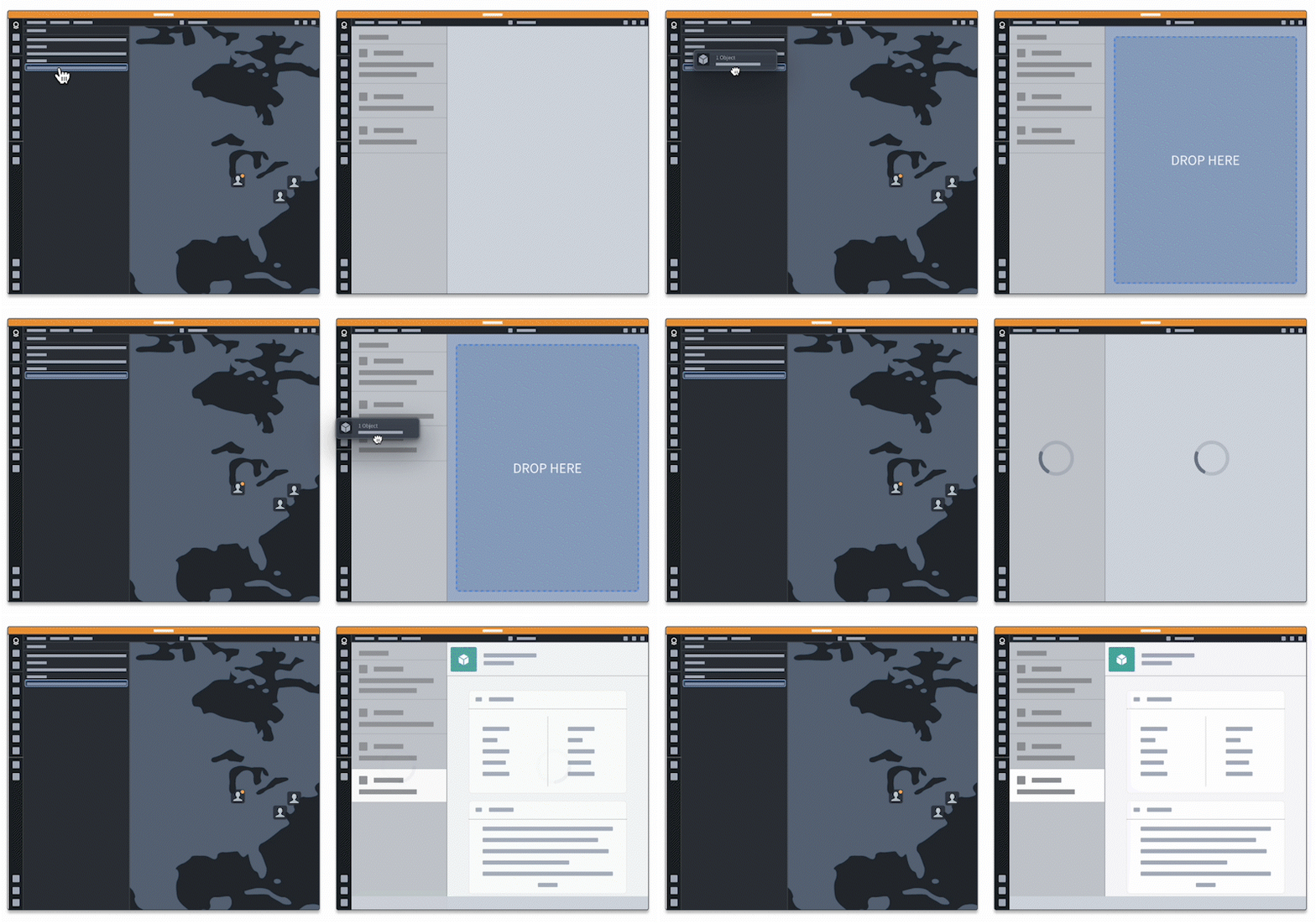
Before proceeding with the tutorial below, ensure that you have reviewed the overview and tutorial on creating drag-and-drop integration points for a basic understanding of drag-and-drop concepts and implementation.
Increase cross-application interactivity with data enrichment
As a sample use case, let's say your application recognizes Gotham object IDs, and you would like to create a workflow for dragging Gotham object ID data from your application to a Foundry application. You might first try to write the Gotham object IDs to the DataTransfer using the dragstart handler below. Note the custom Palantir media type application/x-vnd.palantir.rid.gotham.object:
function handleDragStart(event) {
    event.dataTransfer.setData(
        "application/x-vnd.palantir.rid.gotham.object",
        JSON.stringify(["ri.gotham.XXXXXXXX", "ri.gotham.YYYYYYYY"...])
    );
    event.dataTransfer.effectAllowed = "move";
}
You might notice that the Foundry drop zones do not "light up" when you try to drag this data on them, indicating that this is not a valid media type for those drop zones. Foundry drop zones will likely not accept this data because the DataTransfer contains a Gotham-specific media type. You can remedy this by implementing data enrichment, so that Foundry synonyms for Gotham objects are identified and added to the DataTransfer. This allows Foundry to accept your dropped data, since a synonymous representation with an accepted media type will now be included in the DataTransfer. Note that this only works if you have type mapping enabled on your enrollment and for the objects you plan to enrich. Refer to the type mapping documentation to learn more.
Context and guidelines
The following sections provide context on how various aspects of data enrichment work. This includes an overview of the service that makes data enrichment possible and when and where to implement enrichment.
Where to add data enrichment
Data enrichment can be added to drag zones or drop zones. It is not necessary to add enrichment on both drag and drop zones in a drag-and-drop workflow. Identify the flow of data between applications to determine where data will be coming from and where it will be going to.
If your application contains drop zones that you want users to drag Gotham and Foundry data to, we recommend enriching data in the drop zone after the drag payload is dropped. This way, your application will not need to recognize both Gotham and Foundry concepts. Instead, your application can accept Gotham or Foundry media types and use synonymous data from data enrichment if the original drag payload was not of an accepted media type.
Alternatively, if you have drag zones in your application that you want users to be able to drag to both Foundry and Gotham drop zones, we recommend enriching your data before adding it to the DataTransfer. This way, your drag payload will be enriched with both Foundry and Gotham media types, allowing Foundry and Gotham drop zones to accept the drag payload.
Requesting enriched data
When implementing data enrichment, you must make a request to Data Bank Service to obtain synonymous data. The Data Bank Service identifies and returns synonymous object identifiers across Foundry and Gotham, enabling cross-platform drag and drop.
:::callout{theme="neutral"} Making requests to Data Bank Service incurs slight performance costs, since an additional call is required. We recommend being aware of how many enriched drag or drop zones are added to your application and the associated increase in performance costs. Contact your Palantir representative for more information on this service. :::
If your workflow involves dragging and dropping data between Gotham and Foundry, follow the enrichment tutorial to harness the power of Palantir media types.
中文翻译
在 Foundry 与 Gotham 之间拖放
在某些情况下,同一现实世界对象可能同时存在 Foundry 和 Gotham 两种表示形式,这使得这些对象表示成为彼此的同义词(synonyms)。同义词是指能够准确表示同一现实世界中对象的不同资源。这些同义词可以通过类型映射(type mapping)相互关联,从而建立同义表示关系。
为了增强 Foundry 与 Gotham 之间的兼容性,您可以通过实施数据丰富(data enrichment)来识别现有同义词。拖放数据丰富功能通过发现 Foundry 和 Gotham 之间已映射的同义表示来转换工作流程,从而提升您的应用程序与 Palantir 平台之间的互操作性。
:::callout{theme="neutral"} 要使用数据丰富功能,您的注册环境必须同时包含 Gotham 和 Foundry,并启用类型映射。如果您的应用程序仅与 Gotham 或仅与 Foundry 进行拖放操作,则无需实施数据丰富。 :::
在继续以下教程之前,请确保您已阅读概述和创建拖放集成点的教程,以基本了解拖放概念和实现方法。
通过数据丰富增强跨应用交互性
以一个示例用例来说,假设您的应用程序能够识别 Gotham 对象 ID,并且您希望创建一个工作流程,将 Gotham 对象 ID 数据从您的应用程序拖放到 Foundry 应用程序中。您可能会首先尝试使用以下 dragstart 处理程序将 Gotham 对象 ID 写入 DataTransfer。请注意自定义的 Palantir 媒体类型 application/x-vnd.palantir.rid.gotham.object:
function handleDragStart(event) {
    event.dataTransfer.setData(
        "application/x-vnd.palantir.rid.gotham.object",
        JSON.stringify(["ri.gotham.XXXXXXXX", "ri.gotham.YYYYYYYY"...])
    );
    event.dataTransfer.effectAllowed = "move";
}
您可能会注意到,当您尝试将这些数据拖放到 Foundry 放置区时,这些区域并未"亮起",这表明该媒体类型对这些放置区无效。Foundry 放置区很可能不会接受这些数据,因为 DataTransfer 包含的是 Gotham 特定的媒体类型。您可以通过实施数据丰富来解决此问题,这样 Gotham 对象的 Foundry 同义词就会被识别并添加到 DataTransfer 中。这使得 Foundry 能够接受您拖放的数据,因为现在 DataTransfer 中会包含一个具有可接受媒体类型的同义表示。请注意,这仅在您的注册环境已启用类型映射,并且您计划丰富的对象也支持类型映射时才有效。请参阅类型映射文档了解更多信息。
背景与指南
以下部分提供了数据丰富各工作方面的背景信息,包括实现数据丰富所依赖的服务概述,以及何时何地实施丰富。
在何处添加数据丰富
数据丰富可以添加到拖拽区(drag zones)或放置区(drop zones)。在拖放工作流程中,无需同时在拖拽区和放置区添加丰富功能。请识别应用程序之间的数据流向,以确定数据来自何处以及去向何处。
如果您的应用程序包含放置区,并且您希望用户将 Gotham 和 Foundry 数据拖放到这些区域,我们建议在拖放负载被放置后,在放置区中丰富数据。这样,您的应用程序无需同时识别 Gotham 和 Foundry 的概念。相反,您的应用程序可以接受 Gotham 或 Foundry 的媒体类型,并在原始拖放负载不是可接受的媒体类型时,使用来自数据丰富的同义数据。
或者,如果您的应用程序包含拖拽区,并且您希望用户能够将数据拖放到 Foundry 和 Gotham 的放置区,我们建议在将数据添加到 DataTransfer 之前进行丰富。这样,您的拖放负载将同时包含 Foundry 和 Gotham 的媒体类型,从而使 Foundry 和 Gotham 的放置区都能接受该负载。
请求丰富数据
在实施数据丰富时,您必须向数据银行服务(Data Bank Service)发送请求以获取同义数据。数据银行服务会识别并返回 Foundry 和 Gotham 之间的同义对象标识符,从而实现跨平台拖放。
:::callout{theme="neutral"} 向数据银行服务发送请求会带来轻微的性能开销,因为需要额外的调用。我们建议您注意应用程序中添加了多少个丰富的拖拽区或放置区,以及随之而来的性能开销增加。有关此服务的更多信息,请联系您的 Palantir 代表。 :::
如果您的工作流程涉及在 Gotham 和 Foundry 之间拖放数据,请按照丰富教程来利用 Palantir 媒体类型的强大功能。