Cross-application interactivity(跨应用交互)
Cross-application interactivity is the ability to share data across distinct applications on the Palantir platform. Data in the platform can be shared through specific interaction points, such as through drag-and-drop actions, or by pairing applications so they share state in real time. Applications that implement cross-application interactivity create an ecosystem in which users can seamlessly build workflows that span multiple applications across and between Gotham and Foundry. This ecosystem enables users to connect applications in novel ways, since each interaction point in an application creates a potential connection to every other application with an interaction point.
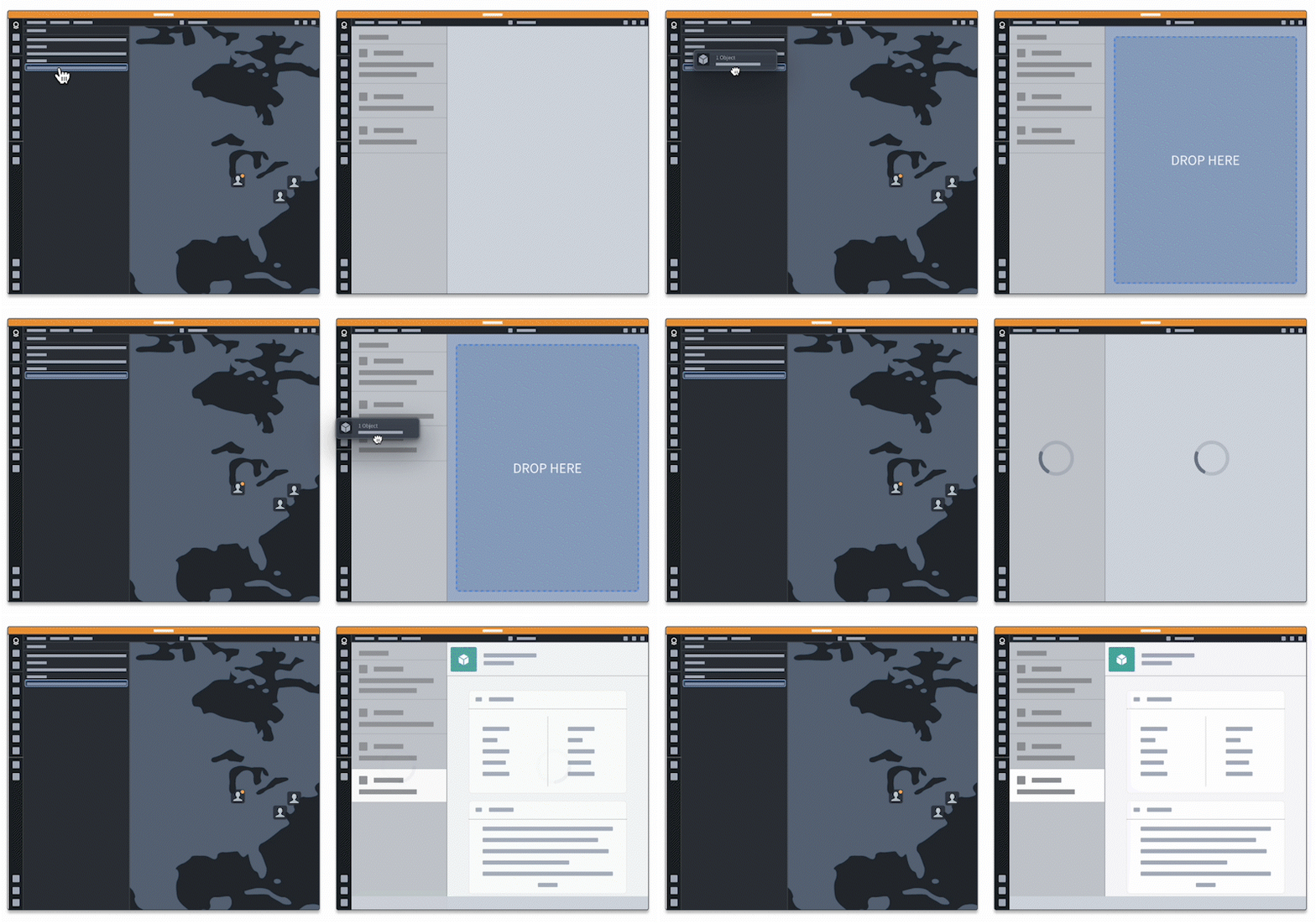
As an example, drag-and-drop functionality can enable users to drag data from Gaia into a Workshop application, while ensuring data compatibility through data enrichment. Additionally, users can configure Workshop's App Pairing widget to connect supported Palantir platform applications (such as Gotham's Gaia and Graph) to their Workshop modules, allowing commands to automatically target the paired platform application on execution.
Cross-application interactivity also acts as a plug-in point for third-party developers to extend existing functionality by sharing context between applications. As workflows change and business logic evolves, cross-application interactivity unlocks new and diverse ways to generate value with the Palantir platform.
Support
Currently, all Gotham applications and many Foundry applications implement some form of cross-application interactivity. Applications built in Workshop and Slate, or with the assistance of OSDK, can also implement cross-application interactivity.
Common interactions
When coupled with drag-and-drop functionality, App Pairing and Commands enable users to perform the following:
- Execute a workflow that spans multiple applications simultaneously.
- Move data between applications within a single workflow.
- Execute a workflow in one application that requires the use of capabilities native in a second or third.
- Connect their application to other ontology-backed applications.
- Configure AIP Chatbots (formerly known as AIP Agents) which can execute operations in an application on behalf of a user.
The sections below outline common interactions supported by the functionality of cross-application interactivity.
Transition workflows and data between applications
When a user completes a task, often the next step is to transition their workflow to another application to continue its execution. Use commands within the Button Group or App Pairing widgets to pass data between applications.
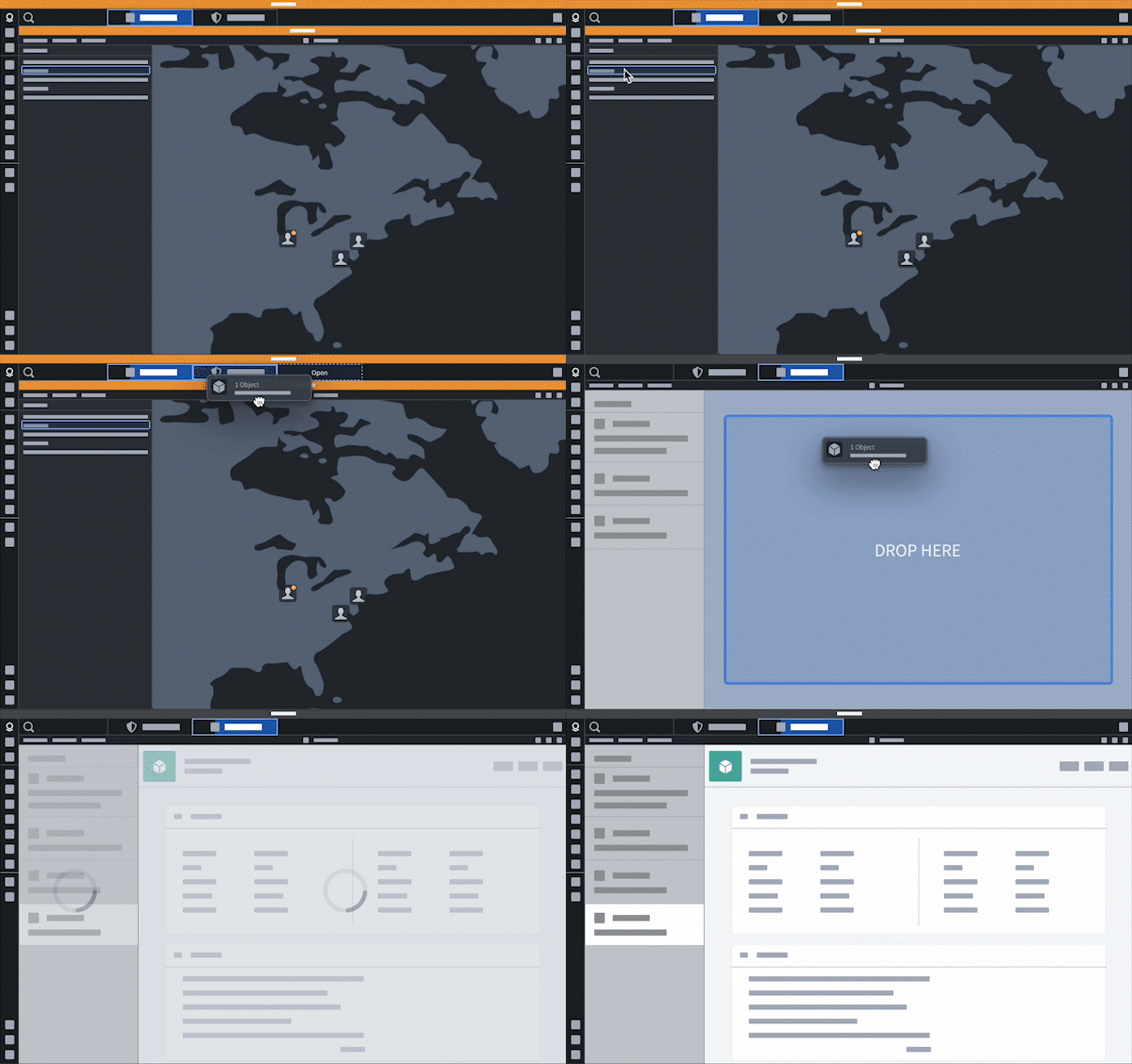
Users can drag and drop data, such an object or object set, between applications when their workflow revolves around entity identification and triage.
Sync selection state across applications
Configure the App Pairing widget or set commands to sync selection state when completing tasks that use multiple applications simultaneously. This enables users to view the same data using two complementary views and transition between the applications without losing state.
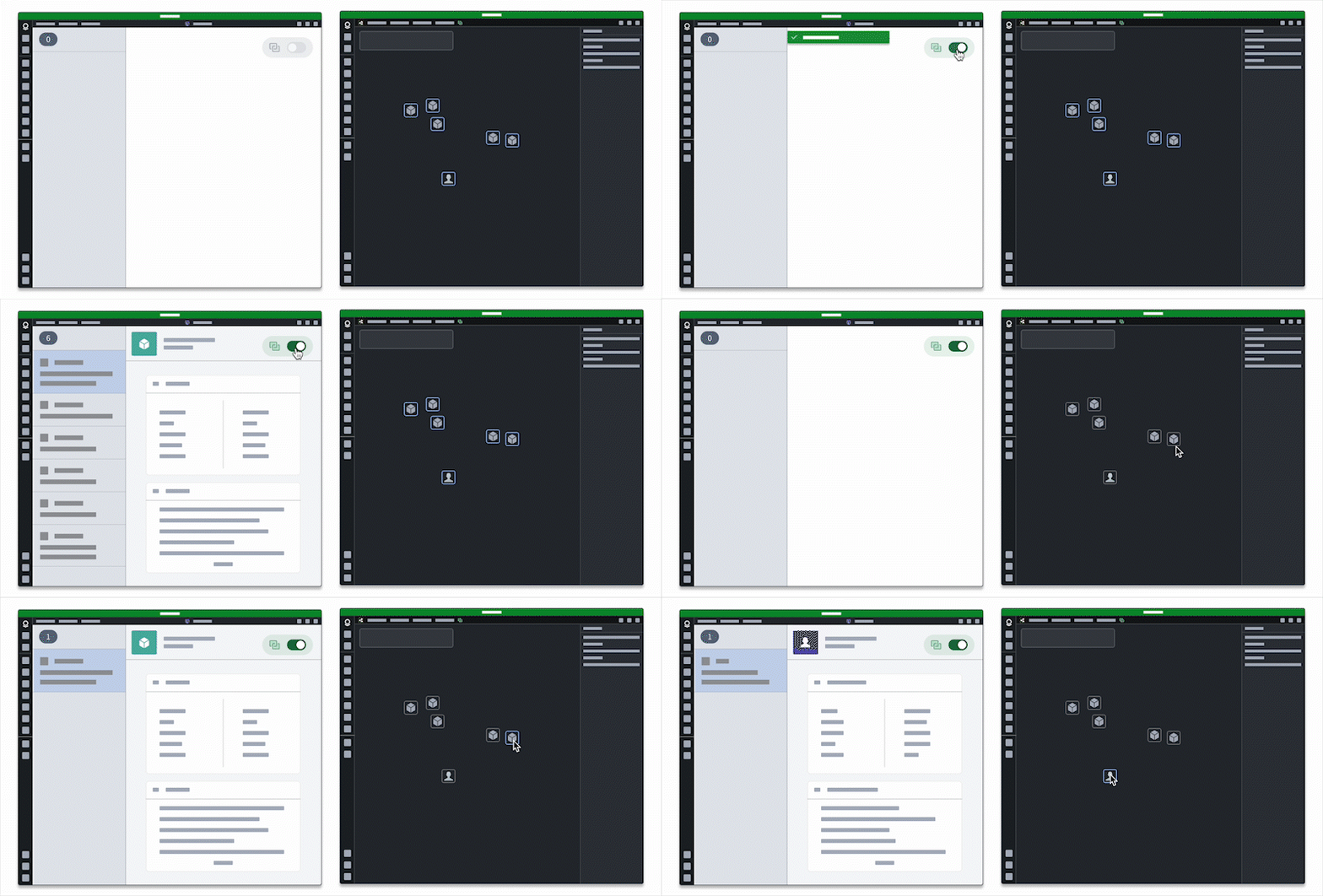
Additionally, users can embed one application within another to leverage existing views they integrate using the App Pairing widget.
:::callout{theme="neutral"} Users should embed only the applications they need into an existing application, as embedding multiple may impact performance. :::
Provide context to AIP
The App Pairing and Commands widgets can read application state from the current viewport or selection and provide that context to AIP Logic.
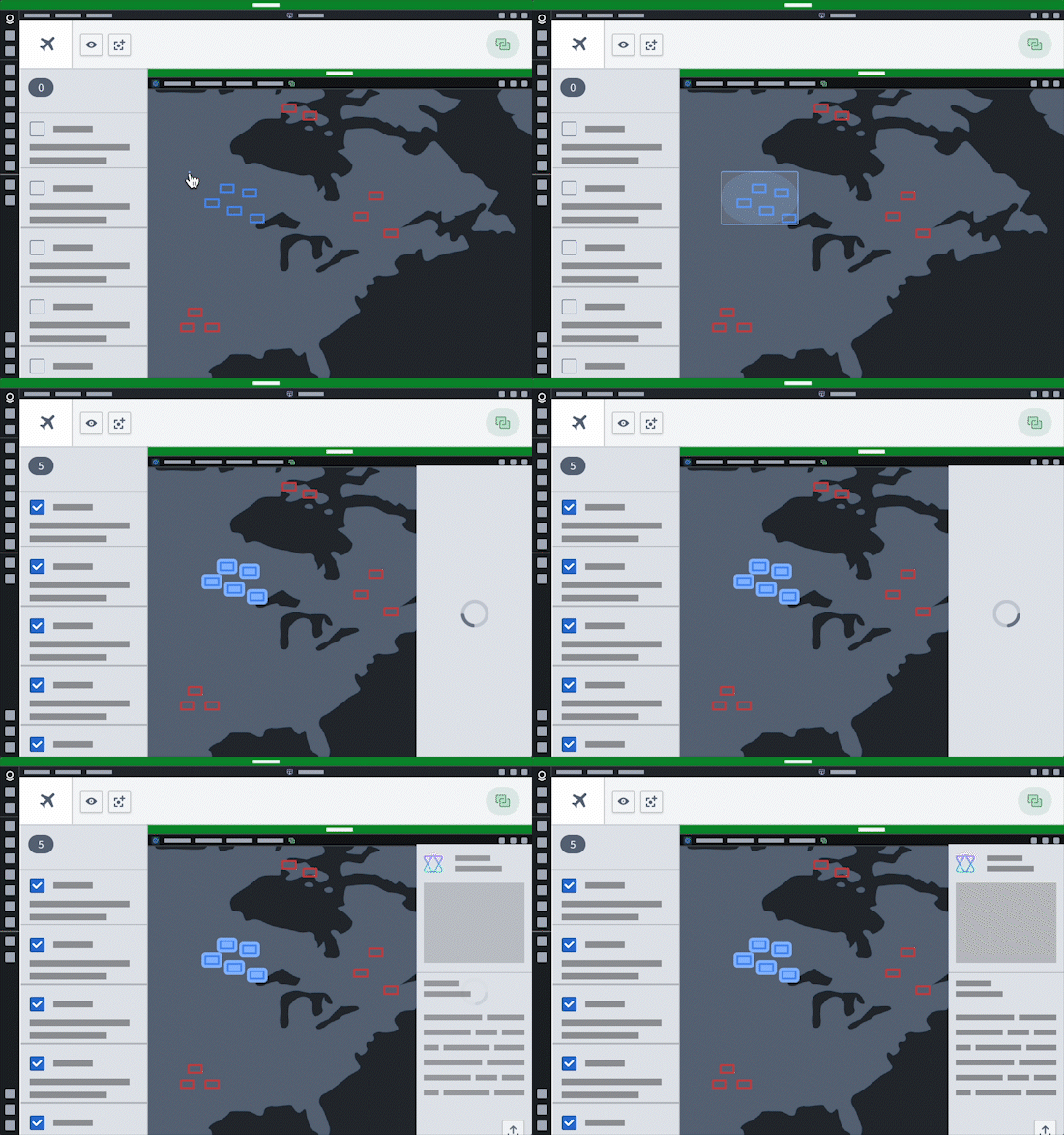
Additionally, users can configure chatbots in AIP Chatbot Studio that leverage commands as tools to read from and write to any application that can interoperate with commands, such as Gaia.
Connect to the broader ecosystem
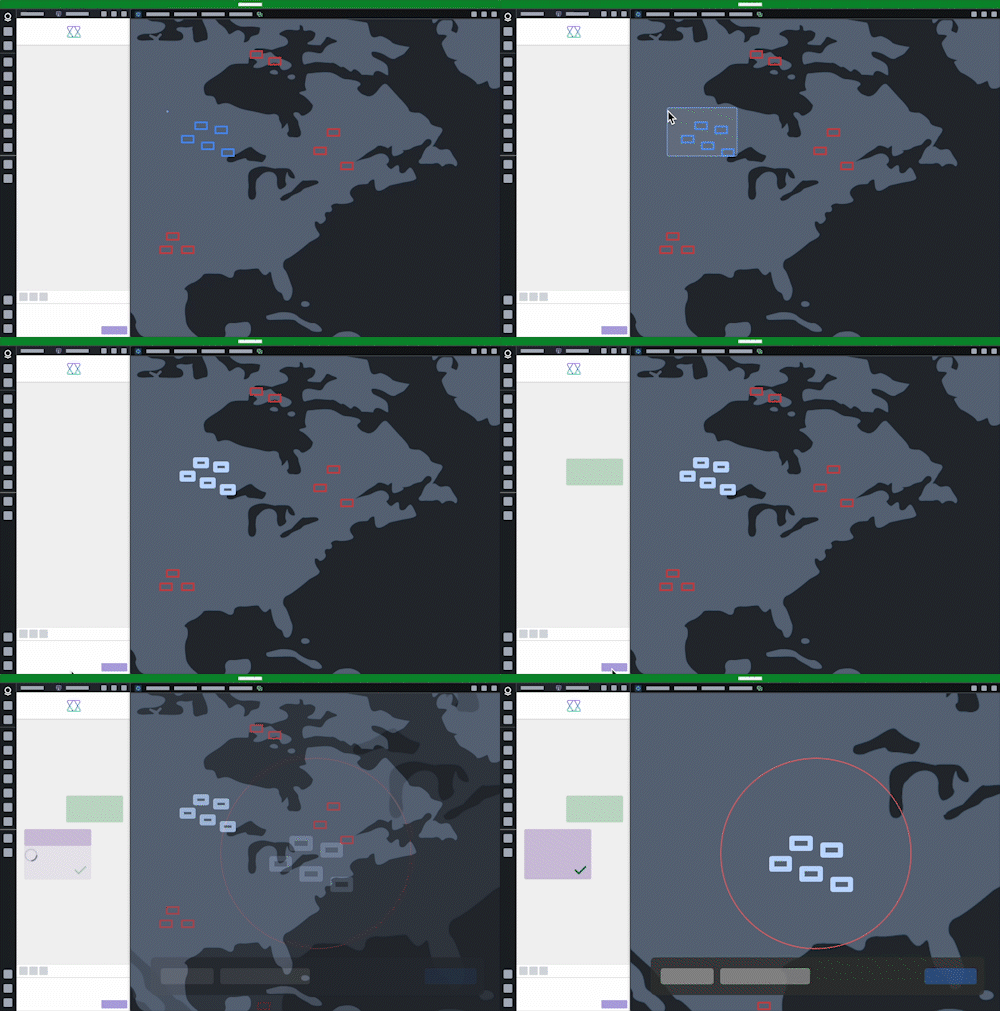
Users can create drag-and-drop integration points to harness the power of their ontology and connect their application to others with similar integrations now and in the future.
中文翻译
跨应用交互
跨应用交互是指在 Palantir 平台上不同应用之间共享数据的能力。平台中的数据可以通过特定的交互点进行共享,例如通过拖放操作,或通过配对应用使其实时共享状态。实现跨应用交互的应用能够创建一个生态系统,用户可以在其中无缝构建跨越 Gotham 和 Foundry 多个应用的工作流。由于应用中的每个交互点都可能与拥有交互点的其他应用建立连接,该生态系统使用户能够以新颖的方式连接应用。
例如,拖放功能允许用户将数据从 Gaia 拖入 Workshop 应用,同时通过数据富化确保数据兼容性。此外,用户可以配置 Workshop 的应用配对微件,将支持的 Palantir 平台应用(如 Gotham 的 Gaia 和 Graph)连接到其 Workshop 模块,从而使命令在执行时自动以配对的平台应用为目标。
跨应用交互还作为第三方开发者的插件点,通过应用之间共享上下文来扩展现有功能。随着工作流的变化和业务逻辑的演进,跨应用交互为利用 Palantir 平台创造价值解锁了新颖多样的方式。
支持范围
目前,所有 Gotham 应用和许多 Foundry 应用都实现了某种形式的跨应用交互。在 Workshop 和 Slate 中构建的应用,或借助 OSDK 构建的应用,也可以实现跨应用交互。
常见交互
结合拖放功能时,应用配对和命令使用户能够执行以下操作:
- 同时执行跨多个应用的工作流。
- 在单个工作流内在应用之间移动数据。
- 在一个应用中执行需要利用第二个或第三个应用原生功能的工作流。
- 将其应用连接到其他基于 Ontology 的应用。
- 配置 AIP 聊天机器人(原名 AIP 代理),使其能够代表用户在应用中执行操作。
以下部分概述了跨应用交互功能支持的常见交互。
在应用之间转移工作流和数据
当用户完成任务时,下一步通常是将工作流转移到另一个应用以继续执行。使用按钮组或应用配对微件中的命令在应用之间传递数据。
当工作流围绕实体识别和分类时,用户可以在应用之间拖放数据,例如对象或对象集。
跨应用同步选择状态
在同时使用多个应用完成任务时,配置应用配对微件或设置命令以同步选择状态。这使用户能够通过两种互补视图查看相同数据,并在应用之间切换而不会丢失状态。
此外,用户可以将一个应用嵌入到另一个应用中,以利用通过应用配对微件集成的现有视图。
:::callout{theme="neutral"} 用户应仅将所需的应用嵌入到现有应用中,因为嵌入多个应用可能会影响性能。 :::
为 AIP 提供上下文
应用配对和命令微件可以从当前视口或选择中读取应用状态,并将该上下文提供给 AIP Logic。
此外,用户可以在 AIP Chatbot Studio 中配置聊天机器人,利用命令作为工具,从任何可与命令互操作的应用(如 Gaia)中读取数据或向其写入数据。
连接更广泛的生态系统
用户可以创建拖放集成点,以利用其 Ontology 的强大功能,并将自己的应用与当前及未来拥有类似集成的其他应用连接起来。