AIP features in Notepad(Notepad 中的 AIP 功能)
Foundry Notepad features a collection of AIP features designed to help you share Ontological insights faster and more efficiently. You can use AIP in Notepad to automatically spellcheck, shorten, modify, or translate your text - while preserving its existing formatting. You can also use Functions to modify Notepad contents with custom behavior configured in AIP Logic or other published functions.
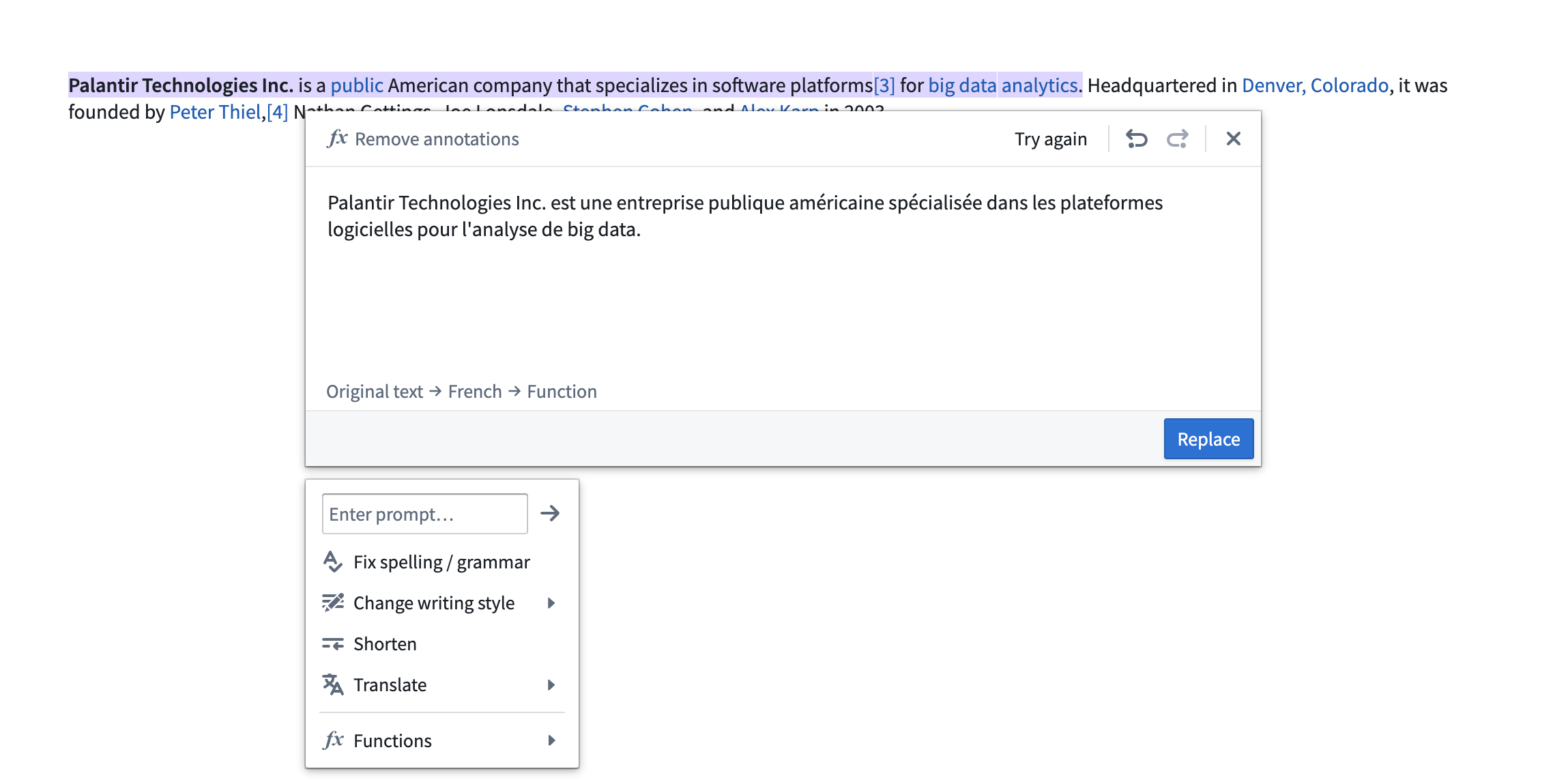
Notepad's AIP features include:
- Custom prompt: Enter your own instructions in the Enter prompt... field to apply custom transformations to your text.
- Fix spelling and grammar: Support for English, French, German, Japanese, Korean, Spanish, and Ukrainian.
- Change writing style: Select between “Professional” (suitable for reports) or “Confident” (suitable for announcements) styles.
- Shorten: Makes text blocks more concise.
- Translate: Translates the text from one supported language to another.
- Preview multiple commands: Preview the result of multiple AIP operations on the same text block, such as correcting spelling, then making text concise, then translating to French, before replacing your original text.
- Functions: Use in-platform functions that accept a string input to replace text in your document or template. These can be used in conjunction with other AIP operations. If AIP is not enabled, you will still be able to edit Notepad content with functions. Refer to custom functions for more details.
Activate AIP features
To use AIP in Notepad, select the Edit with AIP button in the toolbar.

Note: AIP feature availability is subject to change and may differ between customers.
中文翻译
Notepad 中的 AIP 功能
Foundry Notepad 提供了一系列 AIP 功能,旨在帮助您更快速、更高效地分享本体洞察(Ontological insights)。您可以在 Notepad 中使用 AIP 自动检查拼写、缩短、修改或翻译文本,同时保留其现有格式。您还可以使用函数,通过 AIP Logic 或其他已发布函数中配置的自定义行为来修改 Notepad 内容。
Notepad 的 AIP 功能包括:
- 自定义提示(Custom prompt): 在 输入提示... 字段中输入您自己的指令,对文本应用自定义转换。
- 修复拼写和语法(Fix spelling and grammar): 支持英语、法语、德语、日语、韩语、西班牙语和乌克兰语。
- 更改写作风格(Change writing style): 在“专业”(适用于报告)或“自信”(适用于公告)风格之间选择。
- 缩短(Shorten): 使文本块更加简洁。
- 翻译(Translate): 将文本从一种支持的语言翻译成另一种语言。
- 预览多个命令(Preview multiple commands): 预览对同一文本块执行多个 AIP 操作的结果,例如先纠正拼写,再使文本简洁,然后翻译成法语,最后替换原始文本。
- 函数(Functions): 使用平台内函数,这些函数接受字符串输入来替换文档或模板中的文本。它们可以与其他 AIP 操作结合使用。如果未启用 AIP,您仍然可以使用函数编辑 Notepad 内容。更多详情请参阅自定义函数。
激活 AIP 功能
要在 Notepad 中使用 AIP,请选择工具栏中的 使用 AIP 编辑 按钮。
注意:AIP 功能的可用性可能会发生变化,并且可能因客户而异。