Document outline(文档大纲)
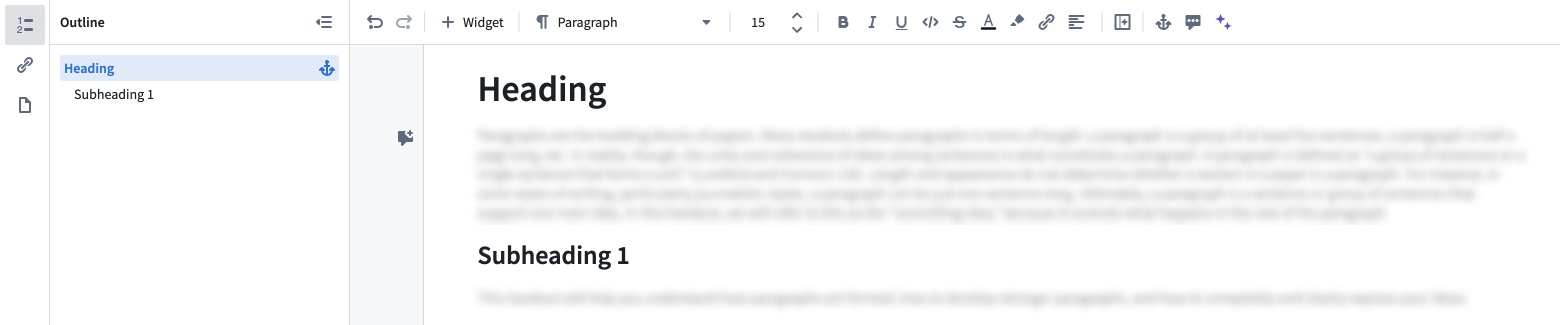
You can view your document's outline in the left panel. The outline is automatically generated from your document's headings, and selecting an outline item will take you to the respective section. You can also copy an anchor link to a heading by selecting the anchor option in the outline.
Embedded outline
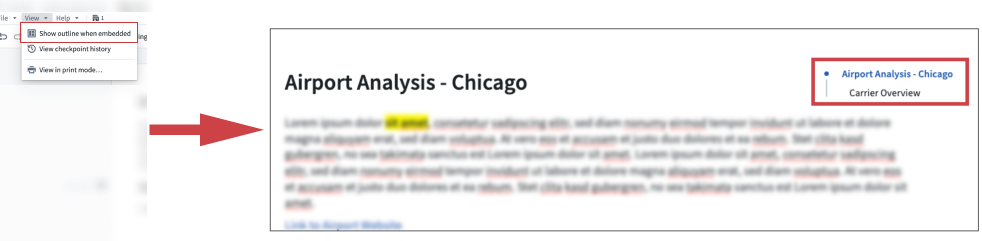
To view your document's outline in other applications, such as in Workshop, you need to toggle the Show outline when embedded option from the view menu.
中文翻译
文档大纲
您可以在左侧面板中查看文档的大纲。大纲会根据文档中的标题自动生成,选择大纲中的某个条目即可跳转到对应的章节。您还可以通过大纲中的锚点选项(anchor option)复制标题的锚点链接。
嵌入大纲
若要在其他应用(如 Workshop)中查看文档的大纲,您需要从视图菜单中启用嵌入时显示大纲(Show outline when embedded)选项。