Embed widgets(嵌入组件)
Widgets in Notepad allow you to add content such as images, charts, tables, styling elements, links, and connections to other Foundry applications to your Notepad document.
Supported integrations
Notepad supports embedding widgets such as charts or tables from several other Foundry applications. The following integrations are supported:
- Code Workbook chart
- Command
- Contour chart
- Functions
- Map
- Object card
- Object media preview
- Object property Markdown editor
- Quiver chart
- Quiver dashboard
- Solution Designer diagram
- Vertex graph
Additionally, Notepad has as a number of native widgets:
- Anchor link
- Current date
- Horizontal rule
- Image
- LaTeX
- Page break
- Resource link
- Table
- User mention
- Value embed
The widget references provide a detailed description of the configuration options and capabilities. Notepad does not currently support embedding widgets with views from Workshop modules or Slate applications.
Add a widget
You can add widgets within a document or directly from the source application.
From a document
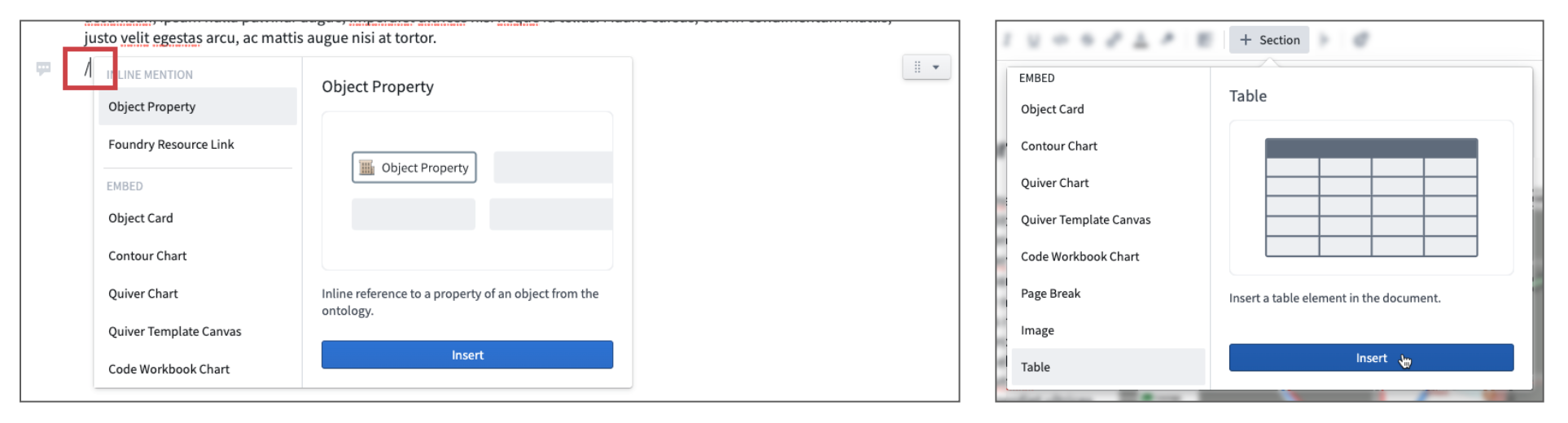
- Use the / keyboard shortcut in a paragraph or click + Widget to open the insertion menu.
- Select the embed type.
- Click Insert to add the new widget.
Integrations from other Foundry applications may need additional configuration to show data or visualizations. Use the Widget Properties panel located on the right to configure.
From a resource
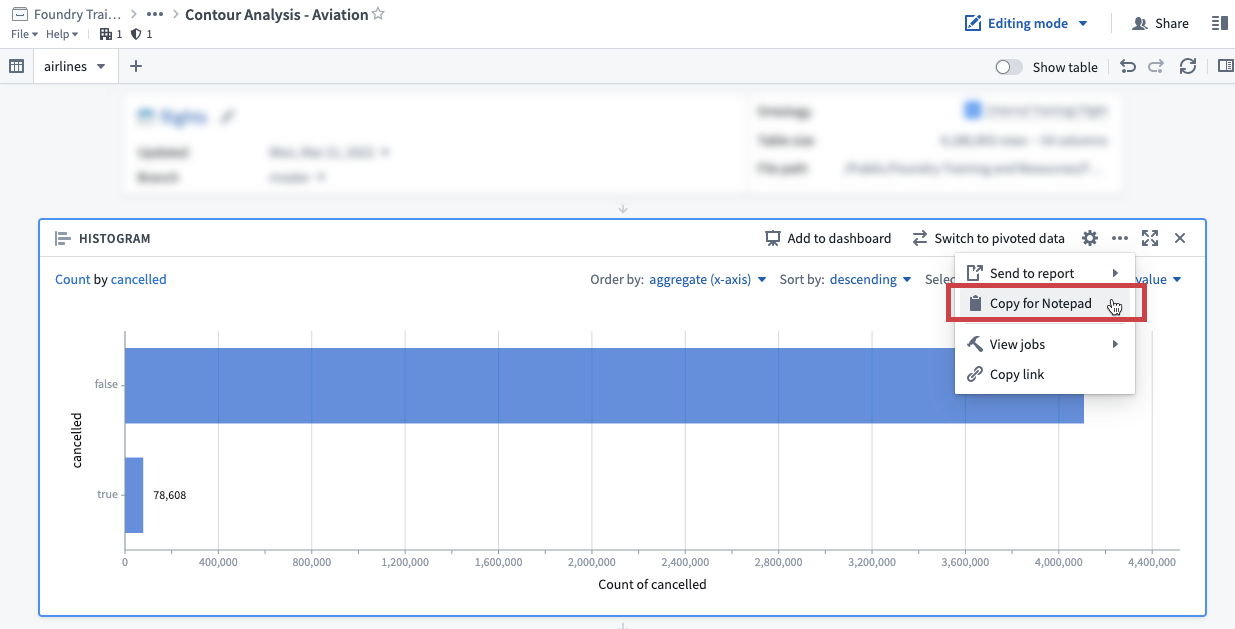
The Copy for Notepad button is available in all embeddable Foundry applications. Clicking this will copy content to your clipboard, which you can then paste into a document.
Widget links
All objects, object sets, and Foundry resources that are referenced in a document are automatically linked to the document. Use the View document links button in the top right Actions menu to view document links.
Links to objects are used in Workshop's Notepad: Linked Documents widget to display all documents that reference a particular object. See Show documents linked to objects for more details.
中文翻译
嵌入组件
Notepad 中的组件(widget)允许您向文档中添加内容,例如图片、图表、表格、样式元素、链接以及与其他 Foundry 应用程序的连接。
支持的集成
Notepad 支持嵌入来自其他多个 Foundry 应用程序的组件,例如图表或表格。支持以下集成:
- Code Workbook 图表
- Command
- Contour 图表
- Functions
- 地图
- 对象卡片
- 对象媒体预览
- 对象属性 Markdown 编辑器
- Quiver 图表
- Quiver 仪表盘
- Solution Designer 图表
- Vertex 图
此外,Notepad 还拥有多个原生组件:
组件参考文档提供了配置选项和功能的详细说明。Notepad 目前不支持嵌入来自 Workshop 模块或 Slate 应用程序的视图组件。
添加组件
您可以在文档内或直接从源应用程序中添加组件。
从文档中添加
- 在段落中使用 / 键盘快捷键,或点击 + Widget 打开插入菜单。
- 选择嵌入类型。
- 点击 Insert 添加新组件。
来自其他 Foundry 应用程序的集成可能需要额外配置才能显示数据或可视化内容。使用右侧的 Widget Properties 面板进行配置。
从资源中添加
所有可嵌入的 Foundry 应用程序中都提供了 Copy for Notepad 按钮。点击该按钮会将内容复制到剪贴板,然后您可以将其粘贴到文档中。
组件链接
文档中引用的所有对象、对象集和 Foundry 资源都会自动链接到该文档。使用右上角 Actions 菜单中的 View document links 按钮查看文档链接。
对象的链接用于 Workshop 的 Notepad: Linked Documents 组件,以显示引用特定对象的所有文档。更多详情请参阅显示链接到对象的文档。