Add documents and templates to a Marketplace product(向 Marketplace 产品添加文档和模板)
Use Foundry DevOps to include your Notepad documents and Notepad templates in Marketplace products for other users to install and reuse. Learn how to create your first product.
Supported features
Marketplace products currently support Notepad documents and templates with the following widget types:
- List
- Hyperlink
- Anchor link
- Resource link
- Table
- Image
- LaTeX
- User mention
- Current date
- Page break
- Quiver dashboard
- Value embed
- Conditional section
- Functions on objects
- Object card
- Object media preview
- Object property
- Row generator table
- Section generator
Support for additional Palantir-created default Notepad widgets is coming soon.
Add Notepad documents and templates to products
To add a Notepad resource to a product, first create a product, then add outputs. Choose the Add files option to navigate to the Notepad document or template from within the Compass filesystem and add it to your product.
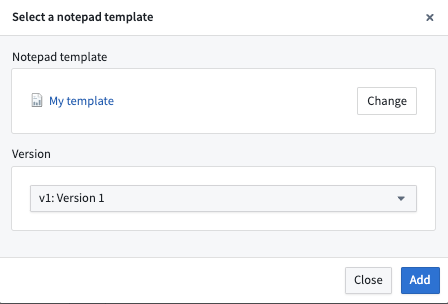
When adding a Notepad template, you will be prompted to select a template version.
Add embedded resources to products
Your document or template must be packaged alongside any referenced Foundry resources, such as Quiver dashboards and functions. Widgets referencing the same resource must refer to the same version.
中文翻译
向 Marketplace 产品添加文档和模板
使用 Foundry DevOps 将您的 Notepad 文档和 Notepad 模板 纳入 Marketplace 产品 中,供其他用户安装和重复使用。了解如何创建您的第一个产品。
支持的功能
Marketplace 产品目前支持包含以下小部件(widget)类型的 Notepad 文档和模板:
- 列表(List)
- 超链接(Hyperlink)
- 锚点链接(Anchor link)
- 资源链接(Resource link)
- 表格(Table)
- 图片(Image)
- LaTeX
- 用户提及(User mention)
- 当前日期(Current date)
- 分页符(Page break)
- Quiver 仪表板(Quiver dashboard)
- 值嵌入(Value embed)
- 条件区域(Conditional section)
- 对象函数(Functions on objects)
- 对象卡片(Object card)
- 对象媒体预览(Object media preview)
- 对象属性(Object property)
- 行生成器表格(Row generator table)
- 区域生成器(Section generator)
对其他 Palantir 创建的默认 Notepad 小部件的支持即将推出。
向产品添加 Notepad 文档和模板
要将 Notepad 资源添加到产品中,首先创建一个产品,然后添加输出(outputs)。选择 添加文件(Add files) 选项,从 Compass 文件系统中导航到 Notepad 文档或模板,并将其添加到您的产品中。
添加 Notepad 模板时,系统会提示您选择一个模板版本。
向产品添加嵌入资源
您的文档或模板必须与所有引用的 Foundry 资源(例如 Quiver 仪表板和函数)一起打包。引用同一资源的小部件必须指向相同的版本。