Add template inputs(添加模板输入(template inputs))
Document templates accept input parameters which are used to drive the widget content in new documents created from the template.
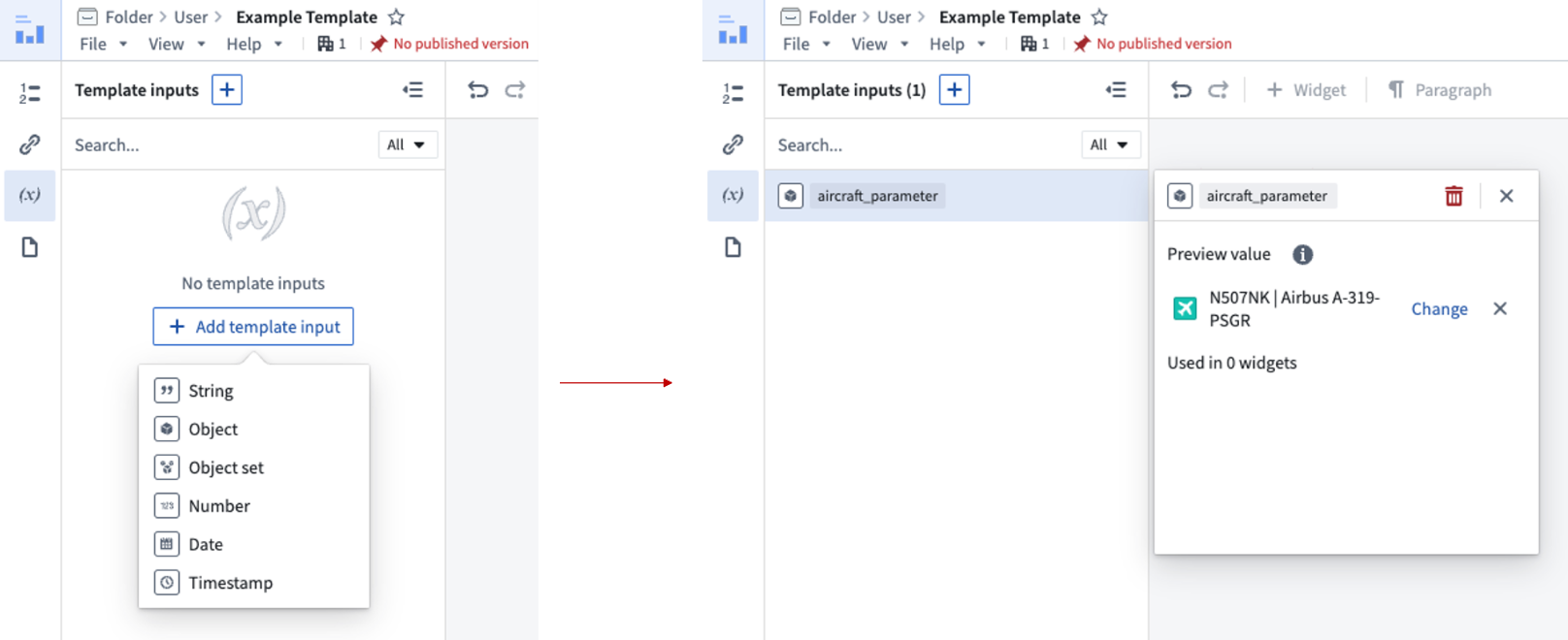
To add a parameter to a document template, open the template and select the template inputs panel in the left panel of the application. Use the + Add template input option to add a string, number, date, timestamp, object, or object set input. The widget type dictates what input type can be consumed.
For each template input, you can set a preview value. A preview value allows you to link a template input to a specified value while configuring the template. Note that a preview value is not a default value and has no relevance for the generation step. Preview values are only used for ensuring that input parameters and widgets are correctly set up.
Afterward, you can use the template inputs to drive the configuration of your templatizable widgets.
Existing input parameters can be renamed and assigned a new preview value. You can also delete input parameters if they are not in use by any widget.
中文翻译
添加模板输入(template inputs)
文档模板可接受输入参数,这些参数用于驱动基于模板创建的新文档中的微件内容。
若要向文档模板添加参数,请打开模板并选择应用程序左侧面板中的模板输入面板。使用 + 添加模板输入 选项可添加字符串(string)、数字(number)、日期(date)、时间戳(timestamp)、对象(object)或对象集(object set)输入。微件类型决定了可接受的输入类型。
对于每个模板输入,您可以设置一个预览值(preview value)。预览值允许您在配置模板时将模板输入链接到指定值。请注意,预览值并非默认值,且与生成步骤无关。预览值仅用于确保输入参数和微件正确设置。
之后,您可以使用模板输入来驱动配置可模板化的微件。
现有的输入参数可以重命名并分配新的预览值。如果某些输入参数未被任何微件使用,您也可以将其删除。