Functions(函数)
:::callout{theme="neutral"} This widget is only available for document templates. :::
The Functions on Objects widget allows you to use a TypeScript function to compute values which will be inserted when the document is generated from the template.
You can connect the function with input parameters which are passed at generation time. Functions on Objects sections can also be nested in generator sections like the Section generator or Table row generator; this enables you to compute separate values for each object in an object set. We recommend configuring batched functions inside generators.
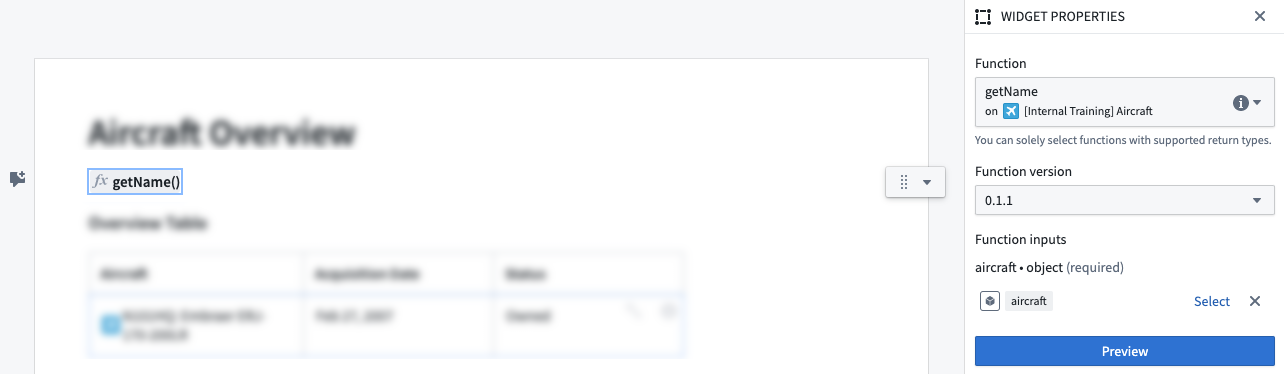
Batched functions
Batched functions are functions that accept an object set as an argument and return results for each object in the object set. Users can configure batched functions for Functions on Objects sections that are nested inside generator sections.
Here is an example of a Functions on Objects section configured with a batched function:
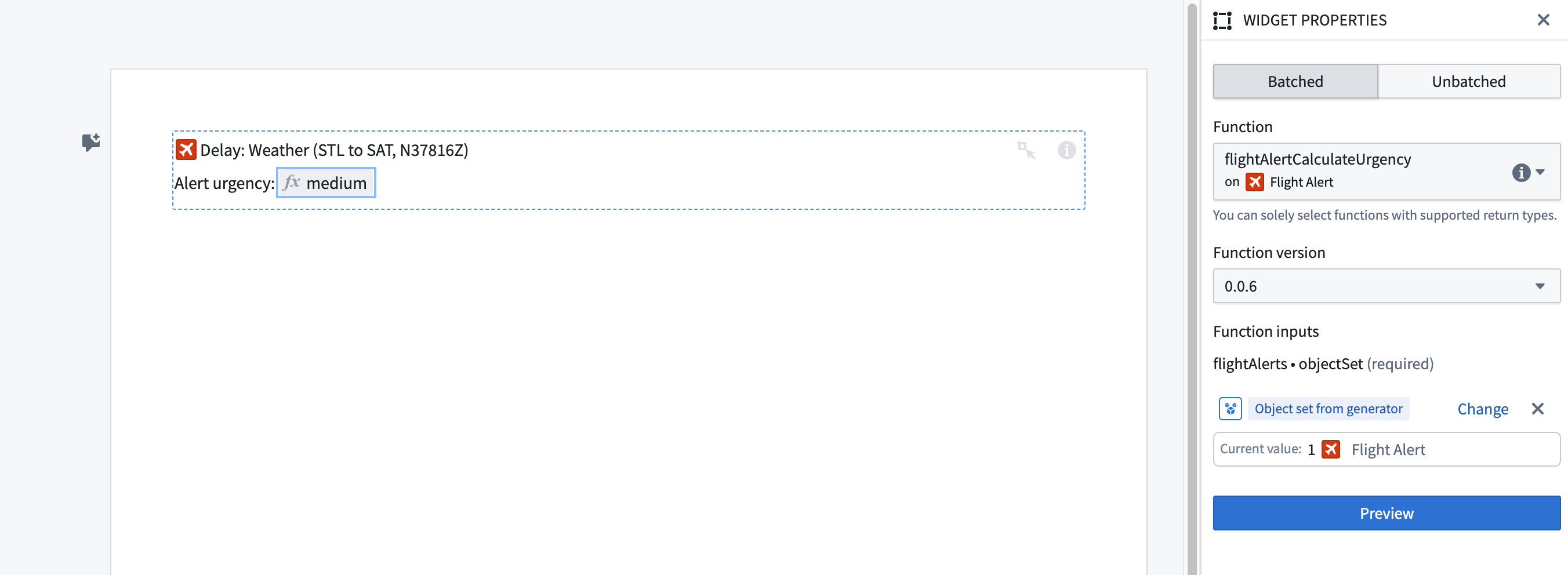
Using batched functions significantly reduces the time taken to generate a document from a template. This is because of the overhead cost for executing functions: unbatched functions must execute once for each object in an object set, whereas a batched function executes only once for the entire object set.
When configuring a Functions on Objects section with a batched function, object sets taken as input can be an Object set from generator. An Object set from generator refers to the object set that is generated over by the surrounding generator section. Note that batched functions can have more than one input. In the case that a batch function is contained in a nested generator, the object set taken as input can be generated by at most one generator; the nested generator, or the top-level generator, but not both. If a batch function has multiple object set function inputs, all object sets that are configured to an Object set from generator should be from the same surrounding generator section.
:::callout{theme="neutral"} Batched functions may have arguments in addition to the object set argument. :::
:::callout{theme="neutral"} Experienced Foundry users may be familiar with function-backed properties. Batched functions are similar to function-backed properties. :::
Writing batched functions
A batched function takes an object set as an argument and returns a FunctionsMap that maps each object in the object set to the corresponding result. For more details, see the section on accepted function inputs and outputs.
For example, consider an unbatched function that takes in a Flight Alert object and calculates the urgency of the alert based on its delay:
@Function()
public getAlertUrgency(flightAlert: FlightAlertWorkshopTutorial): string {
    const hoursDelayed = flightAlert.timeOfDelayHours
    if (hoursDelayed! > 4) {
        return "High";
    }
    else if (hoursDelayed! > 2) {
        return "Medium";
    }
    else {
        return "Low";
    }
}
A batched version of this function takes in an object set of FlightAlertWorkshopTutorial objects and returns a FunctionsMap<FlightAlertWorkshopTutorial, string>. The returned FunctionsMap contains a mapping of FlightAlertWorkshopTutorial objects to their urgency.
@Function()
public flightAlertCalculateUrgency(flightAlerts: ObjectSet<FlightAlertWorkshopTutorial>):
    FunctionsMap<FlightAlertWorkshopTutorial, string> {
    const map = new FunctionsMap<FlightAlertWorkshopTutorial, string>();
    flightAlerts.all().forEach(flightAlert => {
        const hoursDelayed = flightAlert.timeOfDelayHours
        if (hoursDelayed! > 4) {
            map.set(flightAlert, "High")
        }
        else if (hoursDelayed! > 2) {
            map.set(flightAlert, "Medium")
        }
        else {
            map.set(flightAlert, "Low")
        }
    });
    return map;
}
Batch function generator object set limits
Section generator and table row generator object sets are capped during template generation. During template generation, batch functions are executed using intermediate object sets that are the result of limiting the size of the provided input object sets.
Accepted function inputs and outputs
Required outputs for unbatched functions
Unbatched functions must return one of the following types in order to be used in Notepad templates:
- Boolean
- Date
- Double
- Float
- Integer
- Long
- String
Required inputs and outputs for batched functions
Valid batched functions must have at least one argument of type ObjectSet<K>, and must have a return value of type FunctionsMap<K, V>. The type V must be one of the accepted types listed below:
- Boolean
- Date
- Double
- Float
- Integer
- Long
- String
:::callout{theme="neutral"} Functions with sets or lists as arguments currently do not qualify as valid batched functions. :::
Widget properties
- Batched/Unbatched: Allows the user to select whether they would like to configure a batched or unbatched function. Only displayed if the function widget is nested inside a generator section.
- Function: The function to run. If the batched option is selected above, only batched functions will be available.
- Function version: The version of the function to run.
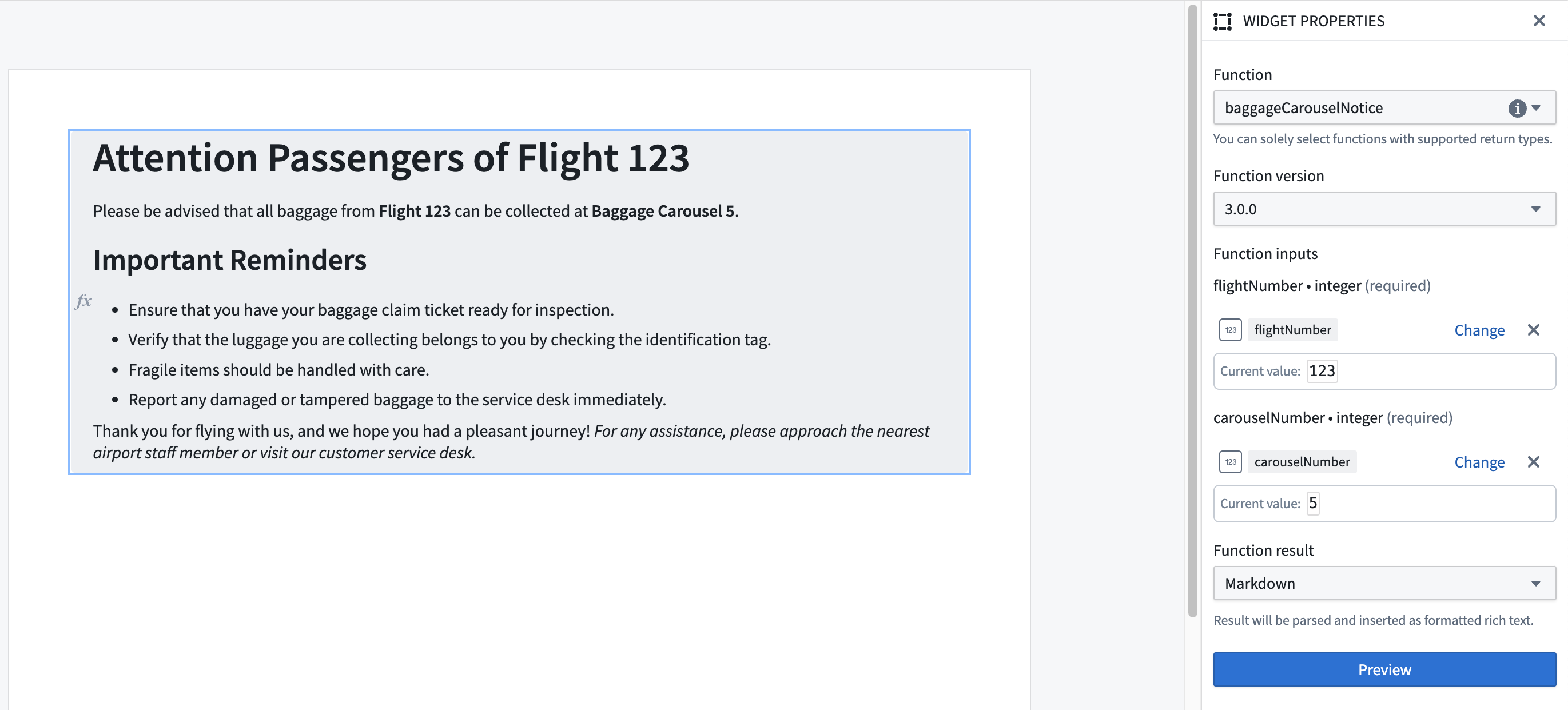
- Function inputs: Values to pass into the function. The available parameters are defined by the selected function.
- Function result: The output generated by the function after execution. The results can be parsed in various formats such as plain text or Markdown. Markdown parsing is currently only supported for unbatched functions.
Template configuration
- Function inputs: Depending on the selected function, the different expected input values can be templatized via parameters.
An embedded Functions on Objects section can also be connected to a generator section in this way.
中文翻译
函数
:::callout{theme="neutral"} 此小组件仅适用于文档模板。 :::
对象函数(Functions on Objects)小组件允许您使用 TypeScript 函数计算值,这些值将在从模板生成文档时插入。
您可以将函数与输入参数连接,这些参数在生成时传递。对象函数部分也可以嵌套在生成器部分中,例如部分生成器或表格行生成器;这使您能够为对象集中的每个对象计算单独的值。我们建议在生成器内部配置批处理函数。
批处理函数
批处理函数(batched functions)是接受对象集作为参数并为对象集中每个对象返回结果的函数。用户可以为嵌套在生成器部分内部的对象函数部分配置批处理函数。
以下是一个配置了批处理函数的对象函数部分示例:
使用批处理函数可以显著减少从模板生成文档所需的时间。这是因为执行函数存在开销成本:非批处理函数必须为对象集中的每个对象执行一次,而批处理函数仅为整个对象集执行一次。
当使用批处理函数配置对象函数部分时,作为输入的对象集可以是"来自生成器的对象集"(Object set from generator)。"来自生成器的对象集"指的是由周围生成器部分生成的对象集。请注意,批处理函数可以有多个输入。如果批处理函数包含在嵌套生成器中,则作为输入的对象集最多只能由一个生成器生成;可以是嵌套生成器,也可以是顶层生成器,但不能同时由两者生成。如果批处理函数有多个对象集函数输入,所有配置为"来自生成器的对象集"的对象集都应来自同一个周围生成器部分。
:::callout{theme="neutral"} 批处理函数除了对象集参数外,还可以有其他参数。 :::
:::callout{theme="neutral"} 有经验的 Foundry 用户可能熟悉函数支持的属性。批处理函数与函数支持的属性类似。 :::
编写批处理函数
批处理函数接受一个对象集作为参数,并返回一个 FunctionsMap,该映射将对象集中的每个对象映射到相应的结果。更多详情,请参阅批处理函数所需的输入和输出部分。
例如,考虑一个非批处理函数,它接收一个航班警报对象并根据其延误时间计算警报的紧急程度:
@Function()
public getAlertUrgency(flightAlert: FlightAlertWorkshopTutorial): string {
    const hoursDelayed = flightAlert.timeOfDelayHours
    if (hoursDelayed! > 4) {
        return "High";
    }
    else if (hoursDelayed! > 2) {
        return "Medium";
    }
    else {
        return "Low";
    }
}
该函数的批处理版本接收一个 FlightAlertWorkshopTutorial 对象的对象集,并返回一个 FunctionsMap<FlightAlertWorkshopTutorial, string>。返回的 FunctionsMap 包含 FlightAlertWorkshopTutorial 对象到其紧急程度的映射。
@Function()
public flightAlertCalculateUrgency(flightAlerts: ObjectSet<FlightAlertWorkshopTutorial>):
    FunctionsMap<FlightAlertWorkshopTutorial, string> {
    const map = new FunctionsMap<FlightAlertWorkshopTutorial, string>();
    flightAlerts.all().forEach(flightAlert => {
        const hoursDelayed = flightAlert.timeOfDelayHours
        if (hoursDelayed! > 4) {
            map.set(flightAlert, "High")
        }
        else if (hoursDelayed! > 2) {
            map.set(flightAlert, "Medium")
        }
        else {
            map.set(flightAlert, "Low")
        }
    });
    return map;
}
批处理函数生成器对象集限制
部分生成器和表格行生成器的对象集在模板生成期间有上限。在模板生成期间,批处理函数使用中间对象集执行,这些中间对象集是对提供的输入对象集进行大小限制后的结果。
接受的函数输入和输出
非批处理函数所需的输出
非批处理函数必须返回以下类型之一才能在 Notepad 模板中使用:
- 布尔值(Boolean)
- 日期(Date)
- 双精度浮点数(Double)
- 浮点数(Float)
- 整数(Integer)
- 长整数(Long)
- 字符串(String)
批处理函数所需的输入和输出
有效的批处理函数必须至少有一个 ObjectSet<K> 类型的参数,并且返回值类型必须为 FunctionsMap<K, V>。类型 V 必须是以下接受的类型之一:
- 布尔值(Boolean)
- 日期(Date)
- 双精度浮点数(Double)
- 浮点数(Float)
- 整数(Integer)
- 长整数(Long)
- 字符串(String)
:::callout{theme="neutral"} 参数为集合或列表的函数目前不符合有效批处理函数的条件。 :::
小组件属性
- 批处理/非批处理: 允许用户选择是否配置批处理或非批处理函数。仅当函数小组件嵌套在生成器部分内部时显示。
- 函数: 要运行的函数。如果上面选择了批处理选项,则仅显示批处理函数。
- 函数版本: 要运行的函数版本。
- 函数输入: 传递给函数的值。可用参数由所选函数定义。
- 函数结果: 函数执行后生成的输出。结果可以以多种格式解析,例如纯文本或 Markdown。Markdown 解析目前仅支持非批处理函数。
模板配置
- 函数输入: 根据所选函数,不同的预期输入值可以通过参数进行模板化。
嵌入的对象函数部分也可以通过这种方式连接到生成器部分。