Object card(对象卡片(Object card))
The Object card allows you to display multiple object properties with a link to the object. You can add it by clicking + Add Widget or typing / in a paragraph field to open up the widget insertion menu. By default, prominent properties will be shown. You can adjust the displayed properties and property order from Visible properties in the widget configuration panel on the right.
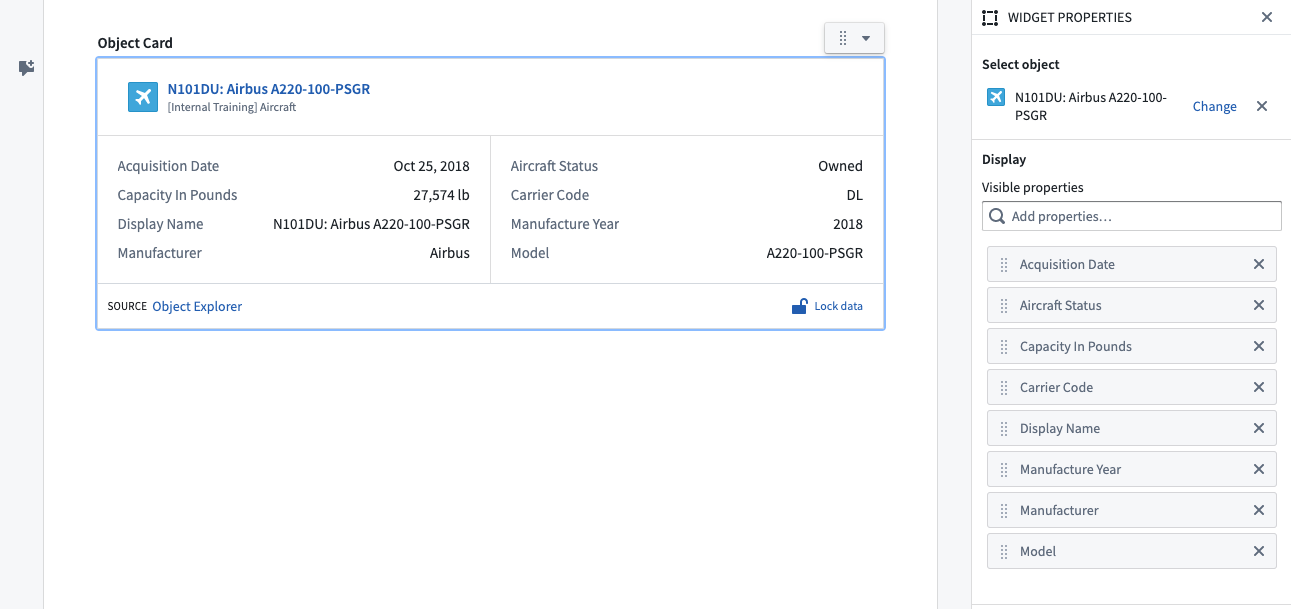
Widget properties
- Object selection: Object to display.
- Visible properties: Define which properties should be displayed and their order.
Template configuration
- Object selection: Object to display.
Ontology Actions
Hover over a widget to display an Actions menu in the top-right corner that enables submitting Actions on the displayed object. Hover over properties with configured inline edits to display the edit option.
中文翻译
对象卡片(Object card)
对象卡片允许您显示多个对象属性,并提供指向该对象的链接。您可以通过点击"+ 添加组件"(+ Add Widget)或在段落字段中输入"/"来打开组件插入菜单进行添加。默认情况下,将显示主要属性。您可以在右侧的组件配置面板中,通过"可见属性"(Visible properties)调整显示的属性及其顺序。
组件属性(Widget properties)
- 对象选择(Object selection): 要显示的对象。
- 可见属性(Visible properties): 定义要显示的属性及其顺序。
模板配置(Template configuration)
- 对象选择(Object selection): 要显示的对象。
本体操作(Ontology Actions)
将鼠标悬停在组件上,右上角会显示操作菜单(Actions menu),支持对显示的对象提交操作。将鼠标悬停在已配置内联编辑(inline edits)的属性上,可显示编辑选项。