Object property(对象属性(Object property))
The Object property section allows you to reference object properties inline. Add an object property widget by clicking + Add Widget or typing / in a paragraph field to open up the widget insertion menu. This will open a search bar where you can find a specific object and select it to add.
By default, the title property of the object is shown, but you can change the displayed property in the widget property menu.
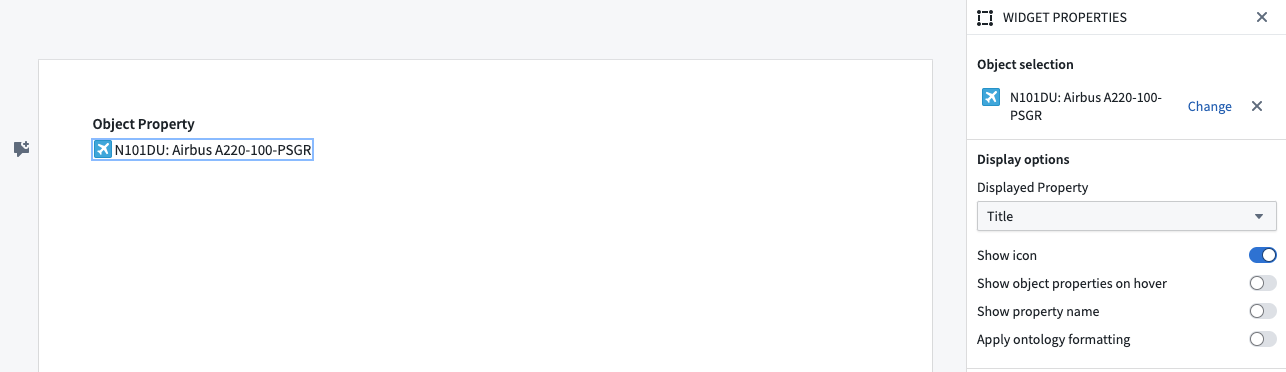
Widget properties
- Object selection: The object to display.
- Property: The property to display.
- Show icon: Shows an object icon with the content of the property.
- Show object properties on hover: Opens an object information popover when hovering over the object property. The popover contains prominent object properties and a link to the object view.
- Show property name: Shows the property name with the content of the property.
- Apply ontology formatting: Applies conditional formatting as defined in the Ontology Manager.
- Disable link: If toggled, removes link to Object Explorer from the object property.
- Show custom value for empty values: If toggled, allows you to specify a custom value to show when an ontology property is empty.
Template configuration
- Object selection: The object to display.
Ontology Actions
Hover over properties to display a menu that enables editing text properties that have configured inline edits, modifying the object with Actions, and opening the object in Object Explorer.
中文翻译
对象属性(Object property)
对象属性部分允许您内联引用对象属性。要添加对象属性小组件,请点击"+ 添加小组件"或在段落字段中输入"/"以打开小组件插入菜单。这将打开一个搜索栏,您可以在其中查找特定对象并选择它以进行添加。
默认情况下,会显示对象的title属性,但您可以在小组件属性菜单中更改显示的属性。
小组件属性(Widget properties)
- 对象选择(Object selection): 要显示的对象。
- 属性(Property): 要显示的属性。
- 显示图标(Show icon): 显示带有属性内容的对象图标。
- 悬停时显示对象属性(Show object properties on hover): 当悬停在对象属性上时,会打开一个对象信息弹出窗口。该弹出窗口包含主要对象属性以及指向对象视图的链接。
- 显示属性名称(Show property name): 显示属性名称及其内容。
- 应用本体格式化(Apply ontology formatting): 应用在本体管理器(Ontology Manager)中定义的条件格式。
- 禁用链接(Disable link): 如果启用,将移除对象属性中指向对象浏览器(Object Explorer)的链接。
- 为空值显示自定义值(Show custom value for empty values): 如果启用,允许您指定在本体属性为空时显示的自定义值。
模板配置(Template configuration)
- 对象选择(Object selection): 要显示的对象。
本体操作(Ontology Actions)
将鼠标悬停在属性上可显示一个菜单,该菜单支持编辑已配置内联编辑的文本属性、通过操作(Actions)修改对象,以及在对象浏览器(Object Explorer)中打开对象。