Quiver chart(箭袋图 (Quiver chart))
:::callout{theme="neutral"} To templatize a Quiver chart in a Notepad template, first create a Quiver dashboard. Then, you can use Notepad's Quiver dashboard canvas widget to embed a chart from it. :::
You can integrate charts or tables from a Quiver analysis using the Quiver chart section. You can add Quiver charts either via the insertion menu or directly via the Copy for Notepad button available in Quiver.
The two options differ slightly:
- When embedded via Copy for Notepad, the chart and its filter state are captured. This means that all filters applied in the Quiver analysis are retained, and you won't be able to adjust the analysis and specific chart in the Widget properties configuration after adding to Notepad.
:::callout{theme="neutral"} Note that when copy-pasting functions and other charts that are set to auto-update their version, the pasted chart will be pinned to the latest available version at the time of copying. :::
- When embedded via the insertion menu, filter states are not captured. There is an option to adjust the Quiver analysis and the chart in the Widget properties configuration.
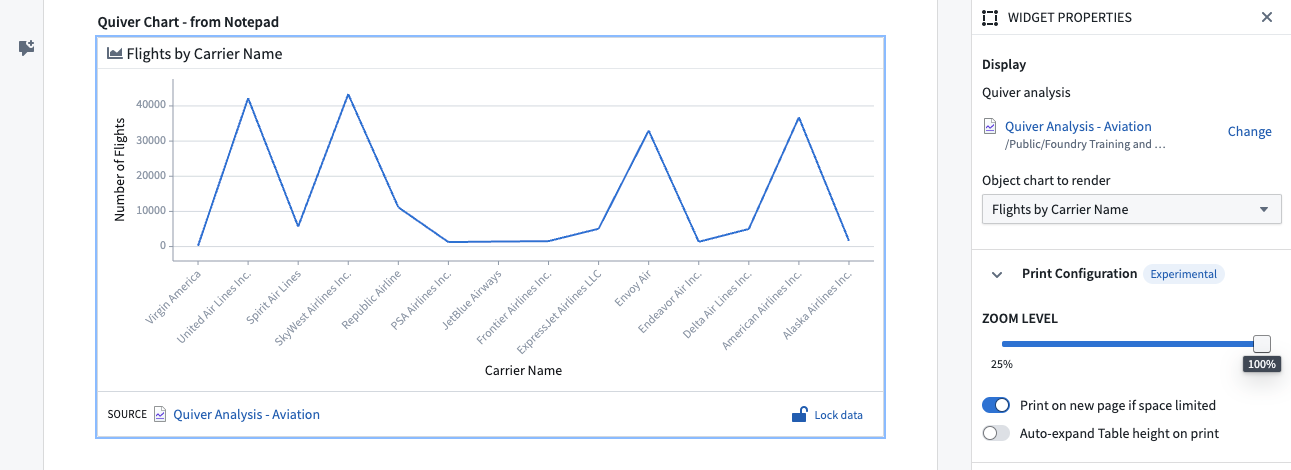
Widget properties
- Quiver analysis: The selected analysis.
- Object chart to render: The chart in the selected analysis to render.
中文翻译
箭袋图 (Quiver chart)
:::callout{theme="neutral"} 若要在记事本模板中将箭袋图模板化,请先创建一个箭袋仪表盘。然后,您可以使用记事本的箭袋仪表盘画布组件嵌入其中的图表。 :::
您可以通过箭袋图 (Quiver chart) 部分集成来自箭袋分析 (Quiver analysis) 的图表或表格。您既可以通过插入菜单添加箭袋图,也可以直接通过箭袋中提供的复制到记事本 (Copy for Notepad) 按钮进行操作。
这两种方式略有不同:
- 通过复制到记事本嵌入时,图表及其筛选状态会被一并捕获。这意味着箭袋分析中应用的所有筛选条件都将保留,并且在添加到记事本后,您将无法在组件属性配置中调整分析内容及特定图表。
:::callout{theme="neutral"} 请注意,当复制粘贴设置为自动更新 (auto-update) 版本的函数及其他图表时,粘贴的图表将固定为复制时的最新可用版本。 :::
- 通过插入菜单嵌入时,筛选状态不会被捕获。您可以在组件属性配置中调整箭袋分析及图表。
组件属性 (Widget properties)
- 箭袋分析 (Quiver analysis): 所选的分析内容。
- 要渲染的对象图表 (Object chart to render): 所选分析中要渲染的图表。