Table row generator(表格行生成器(Table row generator))
:::callout{theme="neutral"} This widget is only available for document templates. :::
The Table row generator enables dynamically generating a row for each object in an object set that is passed to a Notepad document template. The Table row generator is very similar to the Section generator, but instead of generic sections, the Table row generator returns rows and can only be used in Notepad tables.
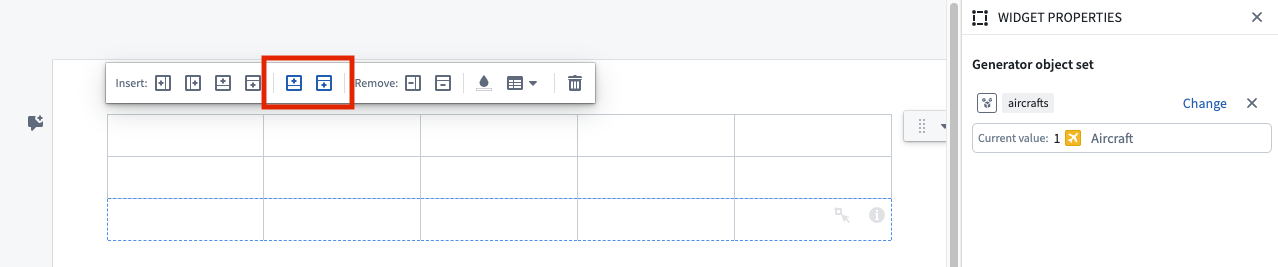
The row generator can be inserted into a regular Notepad table via the table right-click menu or table Insert operations located in the toolbar. Alternatively, select + Add Widget or type / in a paragraph field to open the widget insertion menu, from which you can insert a Table row generator that is prefilled with one regular row and one generator row.
Connect embedded widgets with the Table row generator
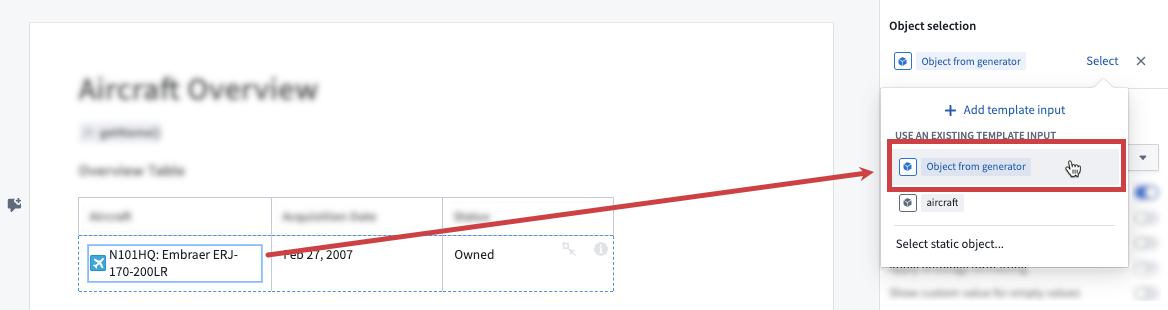
To connect an embedded widget's input parameter with its surrounding Table row generator, set the input to Object from generator. The Object from generator input item will be automatically selectable for widgets inside generators that accept object template inputs.
The figure below shows an example for an object property.
Sort objects with the Table row generator
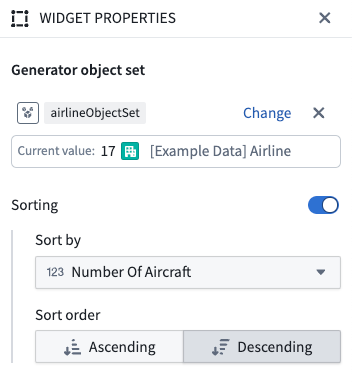
To sort the objects that are returned from a generator, use the Sorting controls. Select an object property to sort by from the Sort by dropdown. Note that the number of objects that can be sorted is capped at 2000.
The figure below shows an example of sorting Airline objects by the Number of Aircraft property.
Template configuration
- Generator object set RID: An object set to pass to the Table row generator. The Table row generator will generate a table row for each object in this set. Note that the amount of objects that can be passed is currently capped at 100 objects.
Nested table row generators
Table row generators can be nested within a top-level section generator. Nested table row generators can be configured to generate over an object set template input, or over first-degree linked objects of the top-level generator object.
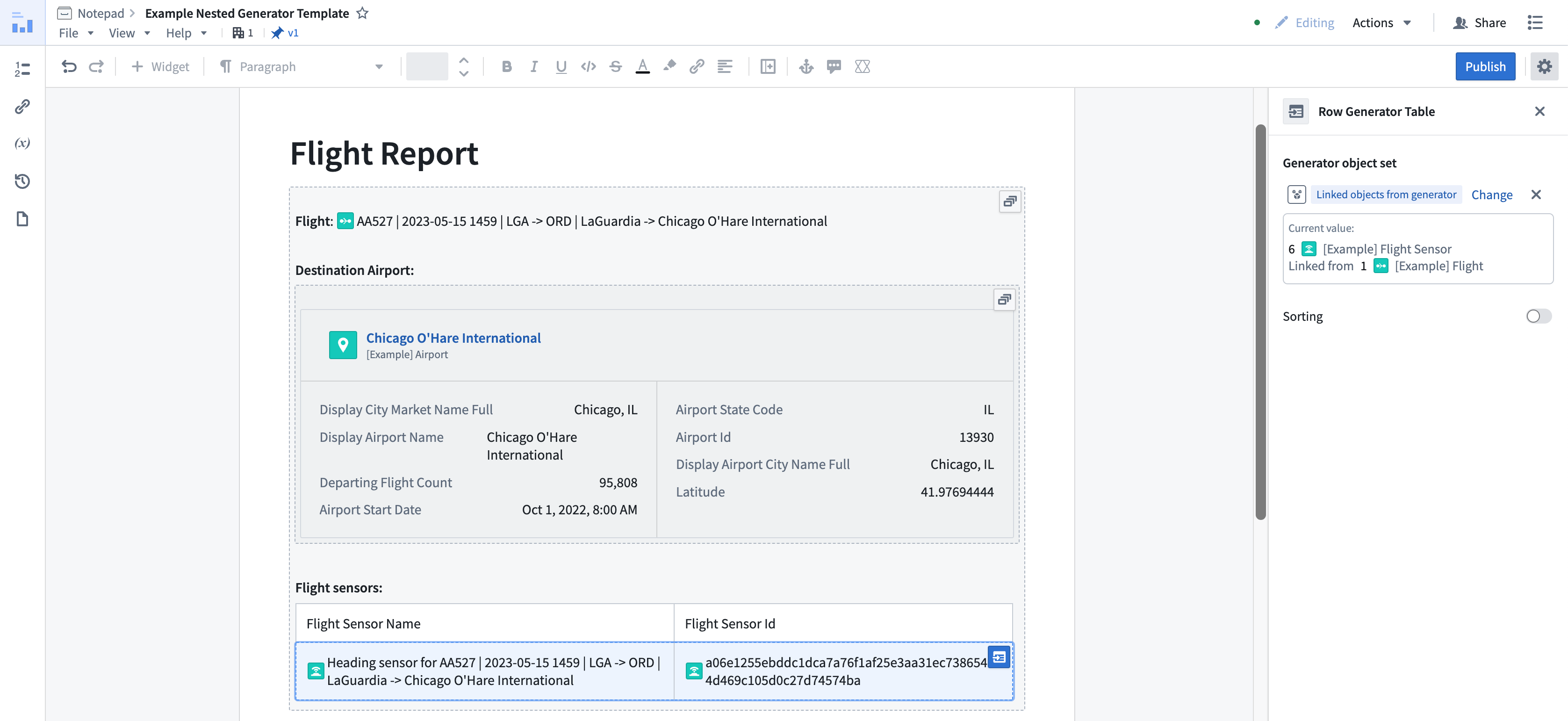
Table row generator object limits
By default, the generation limit for top-level table row generators is set to a maximum of 100 objects. For table row generators nested within a section generator, the limit is set to a maximum of 100 objects. Note that generating rows from a large set of objects can negatively impact template generation performance and document loading performance for the generated document.
中文翻译
表格行生成器(Table row generator)
:::callout{theme="neutral"} 此组件仅适用于文档模板。 :::
表格行生成器(Table row generator)能够为传递给 Notepad 文档模板的对象集中的每个对象动态生成一行。表格行生成器与章节生成器非常相似,但不同之处在于,表格行生成器返回的是行,且仅能在 Notepad 表格中使用。
行生成器可通过表格右键菜单或工具栏中的表格插入操作插入到常规 Notepad 表格中。或者,在段落字段中选择 + 添加组件或输入 / 以打开组件插入菜单,从中可插入一个预填了常规行和生成器行的表格行生成器。
将嵌入式组件与表格行生成器连接
要将嵌入式组件的输入参数与其周围的表格行生成器连接,请将输入设置为 来自生成器的对象(Object from generator)。对于生成器内接受对象模板输入的组件,来自生成器的对象输入项将自动可选。
下图展示了对象属性的示例。
使用表格行生成器对对象排序
要对生成器返回的对象进行排序,请使用排序控件。从 排序依据(Sort by)下拉菜单中选择要排序的对象属性。请注意,可排序的对象数量上限为 2000。
下图展示了按 飞机数量(Number of Aircraft)属性对航空公司(Airline)对象排序的示例。
模板配置
- 生成器对象集 RID(Generator object set RID): 传递给表格行生成器的对象集。表格行生成器将为此集合中的每个对象生成一个表格行。请注意,当前可传递的对象数量上限为 100。
嵌套表格行生成器
表格行生成器可以嵌套在顶层章节生成器内。嵌套的表格行生成器可配置为基于对象集模板输入生成,或基于顶层生成器对象的一级关联对象生成。
表格行生成器对象限制
默认情况下,顶层表格行生成器的生成限制设置为最多 100 个对象。对于嵌套在章节生成器内的表格行生成器,限制同样设置为最多 100 个对象。请注意,从大量对象生成行可能会对模板生成性能以及生成文档的文档加载性能产生负面影响。