Embed a document(嵌入文档 (Embed a document))
You may want to allow users to read or edit a document without opening the Notepad application. To enable this, use the Notepad: Embedded Document widget in Workshop.
Notepad: Embedded document widget
This widget renders a document in embed mode. To configure, you need to provide the resource identifier (rid) of the document. This rid should look something like ri.notepad.main.notepad.aaaaaaaa-1234-bbb-5678-cccccccccccc and needs to be passed as a Workshop variable.
By default, the document will be displayed as read-only. Toggle the Allow Editing option to allow users to edit it.
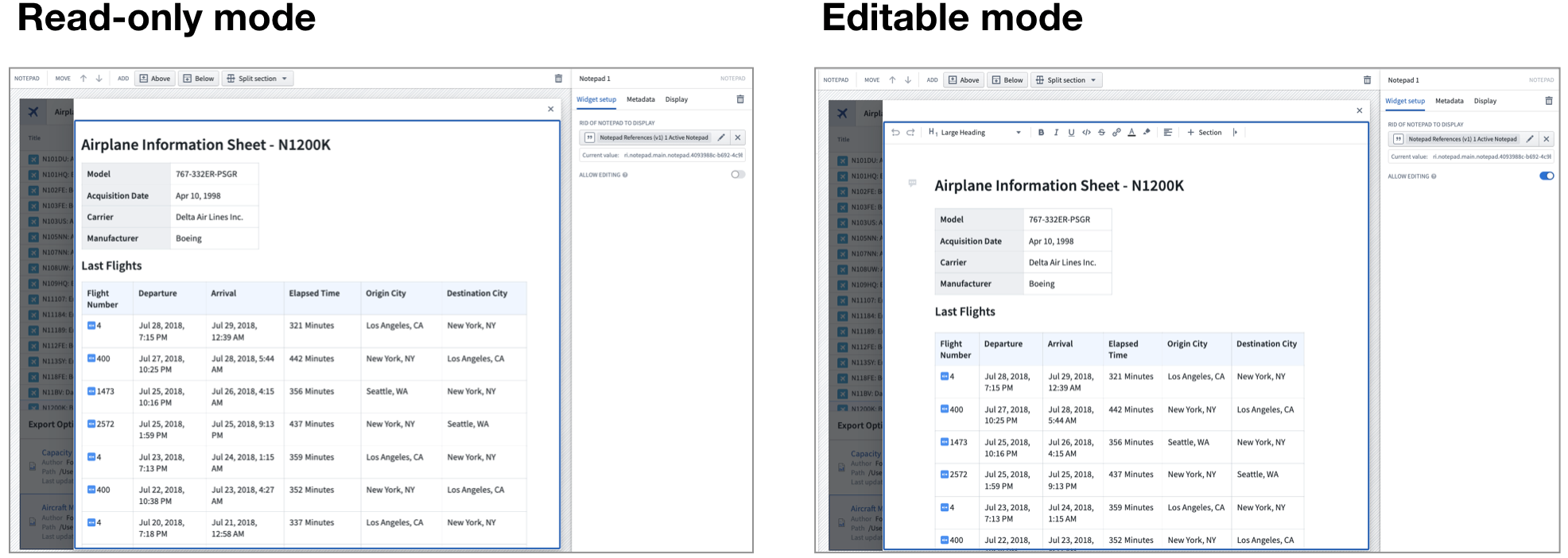
:::callout{theme="neutral"} The edit mode of an embedded document exposes a reduced version of the Notepad application and does not offer all available edit functionality. Use the Notepad application for access to all operations. :::
To export an embedded document from within Workshop, use the Notepad: Export Button.
中文翻译
嵌入文档 (Embed a document)
您可能希望允许用户在不打开记事本 (Notepad) 应用程序的情况下阅读或编辑文档。为此,请在 Workshop 中使用 记事本:嵌入文档 (Notepad: Embedded Document) 组件。
记事本:嵌入文档组件 (Notepad: Embedded document widget)
该组件以嵌入模式 (embed mode) 渲染文档。配置时,您需要提供文档的资源标识符 (rid)。此 rid 的格式应类似于 ri.notepad.main.notepad.aaaaaaaa-1234-bbb-5678-cccccccccccc,并且需要作为 Workshop 变量传递。
默认情况下,文档将以只读 (read-only) 模式显示。切换 允许编辑 (Allow Editing) 选项可允许用户对其进行编辑。
:::callout{theme="neutral"} 嵌入文档的编辑模式仅提供记事本应用程序的简化版本,并不包含所有可用的编辑功能。如需访问所有操作,请使用记事本应用程序。 :::
若要从 Workshop 中导出嵌入文档,请使用 记事本:导出按钮 (Notepad: Export Button)。